1. Overview
The Sony XE300 is a portable Bluetooth speaker designed for high-quality audio in various environments. It features a unique Line-Shape Diffuser for wide sound distribution, X-Balanced Speakers for clear audio, and a robust IP67 rating for water and dust resistance. Enjoy extended playback with its long battery life and convenient connectivity options.
Key Features:
- Line-Shape Diffuser: Creates a line source to distribute sound evenly across a wide area.
- IP67 Rating: Waterproof and dustproof design allows for use in various outdoor and indoor settings.
- Long Battery Life: Up to 24 hours of playback on a single charge, with quick charging capabilities.
- X-Balanced Speakers: Engineered to deliver powerful, clear, and distortion-free sound.
- App Control: Personalize sound settings via the Sony | Music Center app and enhance ambiance with the Fiestable app.
- Bluetooth Connectivity: Seamlessly connect and stream music from compatible devices.
- Hands-Free Calling: Built-in microphone with echo canceling for clear communication.
- Party Connect: Link up to 100 compatible wireless speakers for synchronized audio.
2. Setup
2.1 Charging the Speaker
Before initial use, fully charge the speaker. The XE300 supports USB-C quick charging.
- Open the protective cap on the back of the speaker to reveal the USB-C port.
- Connect the supplied USB-C cable to the speaker's charging port and to a USB power adapter (not included).
- The CHARGE indicator will light up during charging and turn off when charging is complete.
A 10-minute quick charge provides approximately 70 minutes of playback.
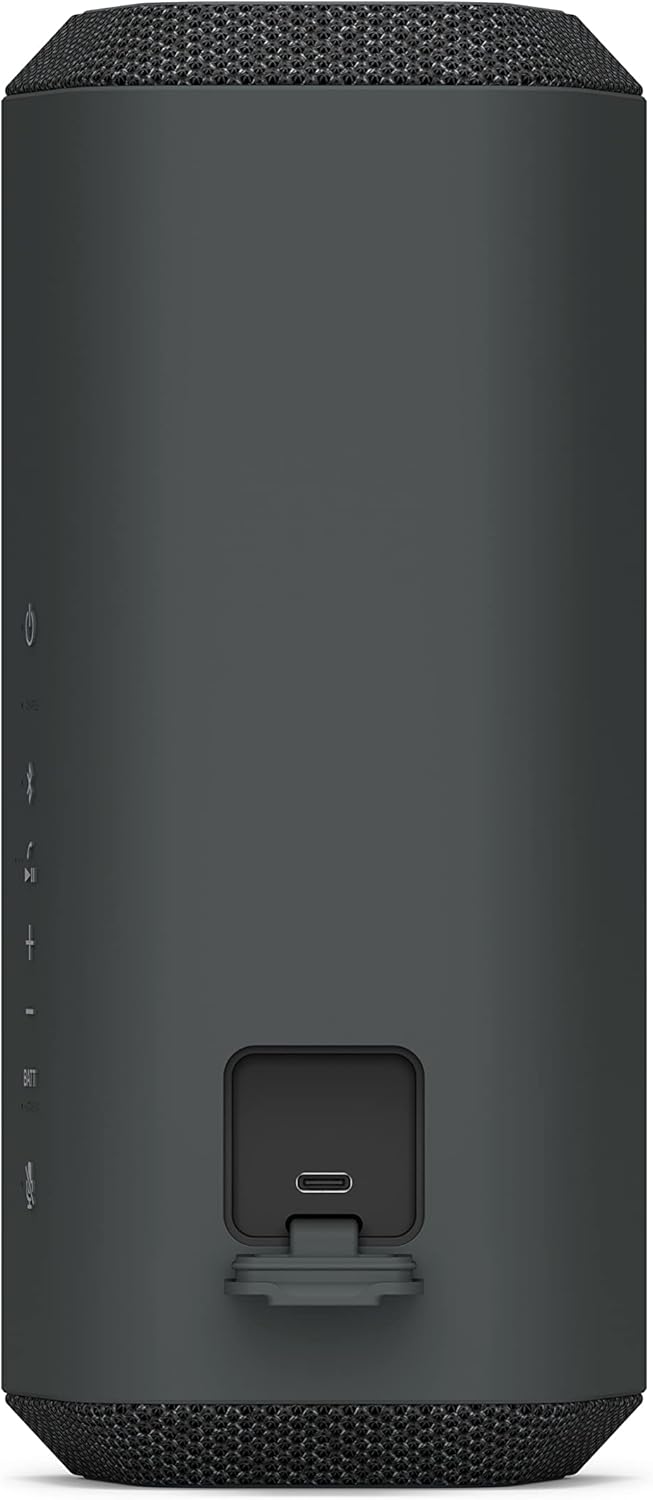
Figure 2.1: USB-C charging port located on the back of the speaker.
2.2 Powering On/Off
- To power on, press the Power button located on the control panel. The power indicator will light up.
- To power off, press and hold the Power button until the power indicator turns off.

Figure 2.2: Speaker control panel with power button.
2.3 Bluetooth Pairing
To connect your device to the speaker via Bluetooth:
- Turn on the speaker. The Bluetooth indicator will flash slowly.
- Press the Bluetooth button on the speaker. The Bluetooth indicator will start flashing rapidly, indicating pairing mode.
- On your smartphone or audio device, enable Bluetooth and search for available devices.
- Select "SRS-XE300" from the list of devices.
- Once connected, the Bluetooth indicator on the speaker will stop flashing and remain lit.
3. Operation
3.1 Basic Controls
The speaker features intuitive controls on its top panel:
- Power Button: Turns the speaker on/off.
- Bluetooth Button: Initiates Bluetooth pairing.
- Volume Buttons (+/-): Adjusts the playback volume.
- Play/Pause Button: Controls music playback.
- Battery Button (BATT): Checks battery level.
- Microphone Button: Mutes/unmutes the microphone during calls.

Figure 3.1: Speaker in use, highlighting the accessible control panel.
3.2 Line-Shape Diffuser Technology
The XE300 incorporates Sony's unique Line-Shape Diffuser, which creates a line source for sound. This design helps distribute audio more evenly and widely across a space, ensuring a consistent listening experience for everyone.

Figure 3.2: The Line-Shape Diffuser spreads sound widely for group enjoyment.
3.3 App Control
Enhance your speaker experience by downloading the dedicated apps:
- Sony | Music Center app: Customize sound settings, manage music playback, and access other smart features.
- Fiestable app: Add fun effects and control party features to elevate your listening environment.
3.4 Hands-Free Calling
The built-in microphone with echo canceling technology allows for clear hands-free calls directly through the speaker. Press the microphone button to mute or unmute during a call.
3.5 Party Connect
For a more immersive audio experience, you can connect up to 100 compatible Sony wireless speakers using the Party Connect feature. Refer to the Sony | Music Center app for detailed instructions on setting up Party Connect.
4. Maintenance
4.1 Waterproof and Dustproof Care (IP67)
The XE300 has an IP67 rating, meaning it is protected against dust ingress and can withstand immersion in water up to 1 meter for 30 minutes. To maintain its waterproof and dustproof performance:
- Always ensure all ports and covers, especially the USB-C charging port, are securely closed before exposing the speaker to water or dust.
- Do not use the speaker in saltwater or chlorinated water.
- After exposure to water, wipe the speaker dry with a soft, clean cloth. Do not charge the speaker if it is wet.
- Avoid dropping the speaker or subjecting it to strong impacts, as this may compromise its water and dust resistance.

Figure 4.1: The speaker's IP67 rating ensures protection against water and dust.
5. Troubleshooting
If you encounter issues with your Sony XE300 speaker, try the following basic troubleshooting steps:
- No Power: Ensure the speaker is charged. Connect it to a power source using the USB-C cable.
- No Sound: Check the volume level on both the speaker and your connected device. Ensure the device is properly paired via Bluetooth.
- Bluetooth Disconnection: Try re-pairing the speaker with your device. Ensure the speaker is within the Bluetooth range (up to 10 meters) of your device.
- Poor Sound Quality: Move the speaker closer to your device to reduce interference. Adjust equalizer settings via the Sony | Music Center app.
- Speaker Not Responding: Press and hold the power button for an extended period (e.g., 10 seconds) to perform a soft reset.
For more detailed troubleshooting or persistent issues, please refer to the official Sony support website or contact customer service.
6. Specifications
| Feature | Detail |
|---|---|
| Model Name | Sony XE300 |
| Mounting Type | Tabletop Mount |
| Material | Plastic |
| Speaker Type | Multimedia |
| Special Feature | Up to 24-hour battery life with quick charging, X-Balanced Speaker Unit |
| Recommended Uses | Music |
| Compatible Devices | Smartphone, Tablet, MP3 Player, Desktop, Laptop |
| Surround Sound Channel Configuration | 1.0 |
| Color | Black |
| Included Components | Speaker |
| Product Dimensions | 4.69"D x 4.13"W x 9.37"H |
| Item Weight | 1.5 Pounds |
| Impedance | 4 Ohms |
| Is Waterproof | TRUE (IP67) |
| Warranty Type | Limited |
| Maximum Range | 10 Meters (Bluetooth) |
| Control Method | Remote (via app) |
| Wireless Communication Technology | Bluetooth |
| Power Source | Battery Powered |
| Number of Batteries | 1 Lithium Ion (included) |
| Audio Driver Type | Balanced Armature Driver |
| Charging Time | Approx. 24 hours for full charge (from empty) |
| Speaker Maximum Output Power | 10 Watts |
| Frequency Response | 2.4 GHz (Bluetooth) |
| Audio Output Mode | Stereo |
7. Warranty and Support
The Sony XE300 Portable Bluetooth Speaker comes with a limited warranty. For specific warranty terms, registration, and support, please visit the official Sony support website or contact their customer service. Keep your proof of purchase for warranty claims.


