
Welcome to Your JCLOUD P300 Smart Scent Air Machine
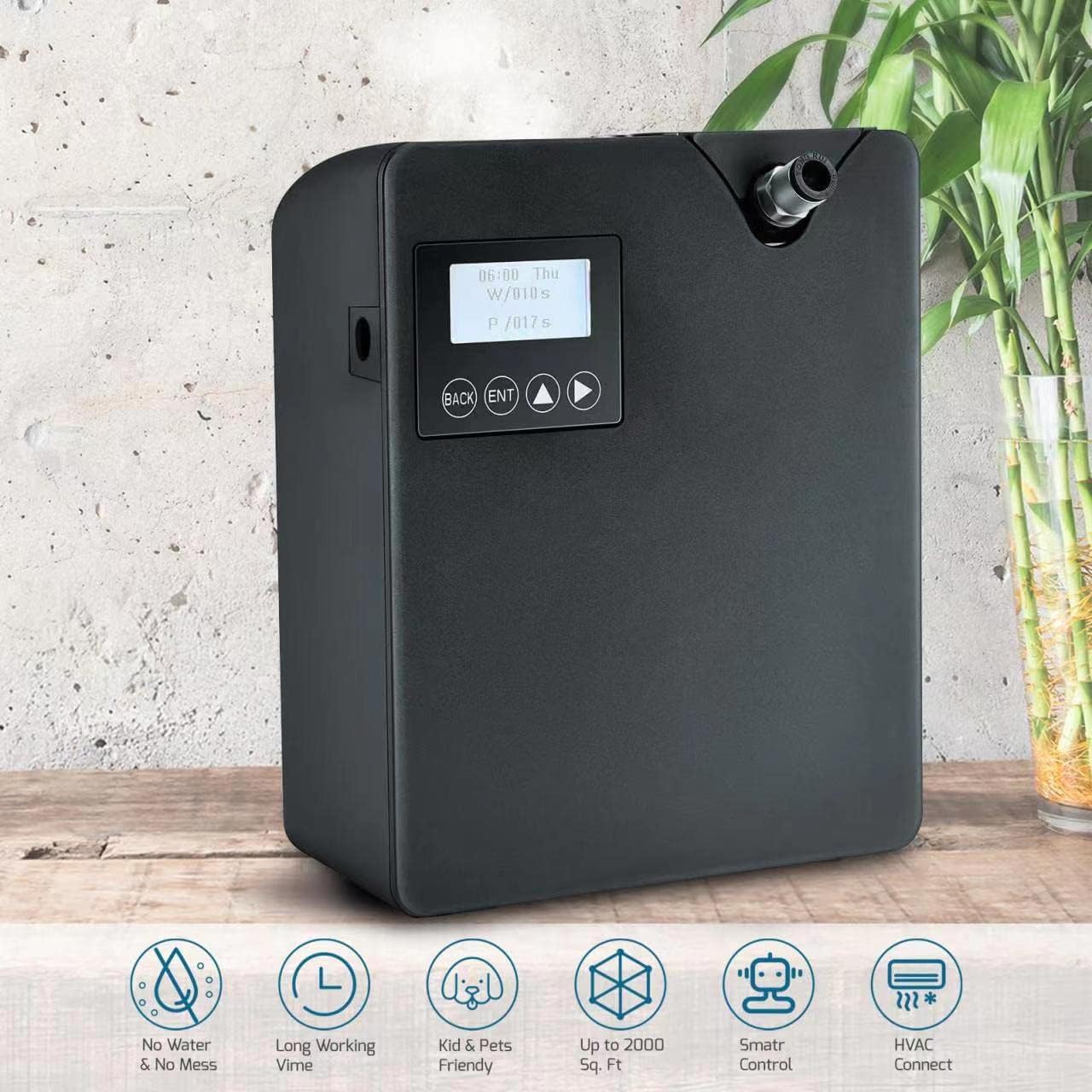
The JCLOUD P300 Smart Scent Air Machine utilizes advanced Cold-Air Diffusion Technology to disperse high-quality fragrance oil micro-droplets throughout your space without heat or water. Designed for efficiency, it consumes less than 0.5ml/h at its highest setting, making it an economical choice for improving air quality and creating a pleasant ambiance. This waterless diffuser is suitable for large rooms, offices, spas, and homes, covering up to 2000 square feet.
Important Safety Information
- Use with caution around children and pets. Avoid direct skin contact with undiluted essential oils.
- Ensure the device is placed on a stable, flat surface.
- Do not block the air outlet or inlet during operation.
- Only use pure essential oils or fragrance oils specifically designed for cold-air diffusers. Do not dilute with water or other substances.
- Keep the device away from direct sunlight, heat sources, and open flames.
- Unplug the device before cleaning or when not in use for extended periods.
Package Contents
Please check the box for the following items:
- JCLOUD P300 Smart Scent Air Machine Unit
- Power Adapter
- 300ml Essential Oil Bottle (empty)
- Keys for secure access
- HVAC Connection Hose (for optional HVAC integration)
- User Manual

Setup
1. Filling the Essential Oil Bottle
- Unlock the device using the provided key.
- Remove the empty essential oil bottle from the device.
- Carefully unscrew the cap from the essential oil bottle.
- Fill the bottle with your preferred waterless essential oil (up to 300ml capacity). Do not overfill.
- Securely screw the cap back onto the essential oil bottle.
2. Installing the Oil Bottle
- Insert the filled essential oil bottle back into its compartment within the device.
- Ensure the bottle is seated correctly and the top mechanism is securely in place.
- Lock the device using the key to secure the bottle compartment.
3. Power Connection
Connect the power adapter to the device's power port and then plug it into a standard electrical outlet.
Operating Instructions
Manual Control
If you choose not to use the app, the machine will operate on a default cycle: work for 10 seconds, then pause for 110 seconds, and repeat. Use the physical buttons (BACK, ENT, Up/Down arrows) on the device to adjust basic settings like time and scent grade directly.
- Power On/Off: Hold down the ENT button.
- Factory Reset: Press the 1st and 4th buttons (BACK and Right Arrow) simultaneously, then select 'yes' to reset to factory mode. The APP default password is 1234.
- Set Time: Tap the Up Arrow and Right Arrow buttons simultaneously.
- Toggle Fan: Hold down the BACK button.
App Control (Aroma-Link)
For advanced control and customization, download the 'Scent Marketing' app (or 'Aroma-Link' as mentioned in some reviews) from Google Play (Android) or the APP Store (iOS).
- Download & Install: Search for 'Scent Marketing' in your device's app store and install it.
- Connect Device: Open the app, ensure Bluetooth is enabled on your phone, and follow the on-screen prompts to add your JCLOUD P300 device. The default password for the app is 1234.
- Set Working Schedule: Within the app, you can define specific working times (Power On/Off), days of the week, and scent concentration levels (Work Time in seconds, Suspend Time in seconds).
- Adjust Concentration: Customize the scent intensity by setting the 'Work' and 'Suspend' times. For example, 5 seconds work and 180 seconds pause for a lighter scent.
- Fan Control: The app allows you to toggle the booster fan, which helps disperse fragrance more forcefully.
HVAC Connection (Optional)
The JCLOUD P300 can be integrated with your HVAC system to distribute scent throughout your entire home or commercial space more effectively.
- Locate HVAC Duct: Identify an appropriate location on your HVAC system's outflow ductwork.
- Drill Hole: Carefully drill a small hole (e.g., 5/16 inch) into the duct.
- Connect Hose: Insert one end of the provided HVAC connection hose into the diffuser's designated port and the other end into the drilled hole in the HVAC duct. Ensure a secure seal (e.g., using plumber's putty).
- Optimal Placement: For best results, connect the hose to the outflow side of your furnace to prevent the filter from catching the fine mist.

Maintenance
Refilling Essential Oil
When the essential oil level is low, the device may indicate this on its display or via the app. Follow the steps in the 'Filling the Essential Oil Bottle' section to refill and reinsert the bottle.
Cleaning
Periodically clean the exterior of the device with a soft, dry cloth. Do not use harsh chemicals or abrasive materials. Ensure no liquid enters the internal components.
Troubleshooting Guide
| Issue | Possible Cause | Solution |
|---|---|---|
| No scent emitted | Oil bottle empty or incorrectly installed; nozzle clogged; device not powered on. | Check oil level and refill; ensure bottle is correctly seated; verify power connection; clean nozzle if necessary. |
| Device beeps 5 times | Lost Wi-Fi connection or server issue. | Check Wi-Fi connection; if using Bluetooth only, ignore beeps or ensure stable connection. Device will beep once upon reconnection. |
| Condensation in HVAC tube | Tube running downward from device. | Adjust tube placement so it runs upward from the device, allowing condensation to drain back into the bottle. |
| Scent too strong/weak | Incorrect concentration settings. | Adjust 'Work' and 'Suspend' times in the app to achieve desired intensity. |
| Device not responding | Device frozen or app connectivity issue. | Try factory reset (press 1st and 4th buttons simultaneously); restart app and device. |
Product Specifications
| Feature | Detail |
|---|---|
| Brand | JCLOUD |
| Model Name | P300 |
| Color | Black |
| Capacity | 300 Milliliters |
| Coverage Area | Up to 2000 Square Feet |
| Power Source | Corded Electric |
| Wattage | 12 watts |
| Special Features | Waterless, Cold-Air Diffusion, Smart Bluetooth Control, HVAC Compatible, Kids & Pets Friendly |
| Material | Plastic |
| Auto Shutoff | Yes |
| Item Weight | 2.88 pounds |
| Package Dimensions | 12.28 x 10.2 x 4.96 inches |
Warranty and Customer Support
Your satisfaction is our top priority. We are committed to providing exceptional customer service. If you encounter any issues or have questions regarding installation, operation, or maintenance of your JCLOUD P300 Smart Scent Air Machine, please contact us.
- Contact: Refer to the service card included in your package or contact us via Amazon mail.
- Warranty: Information regarding product warranty and return policy is available through your purchase platform.

