
B-Qtech KF609
B-Qtech KF609 Drone with 2K HD Dual Camera User Manual
Model: KF609
1. Introduction
This manual provides essential information for operating your B-Qtech KF609 Drone. Please read it thoroughly before your first flight to ensure safe operation and optimal performance. Retain this manual for future reference.
2. Safety Guidelines
Adherence to these safety guidelines is crucial to prevent injury, damage, or legal issues.
- Flight Environment: Fly in open areas, away from people, animals, buildings, and power lines. Avoid flying in strong winds or adverse weather conditions.
- Line of Sight: Always maintain visual line of sight with the drone during flight.
- Battery Safety: Use only approved batteries and chargers. Do not overcharge or puncture batteries. Discontinue use if batteries are damaged or swollen.
- Propeller Safety: Keep fingers, hair, and loose clothing away from rotating propellers. Ensure propellers are securely attached before flight.
- Age Recommendation: This drone is recommended for adults.
- Legal Compliance: Be aware of and comply with local drone regulations and privacy laws.
3. Package Contents
Verify that all items are present in your package:
- B-Qtech KF609 Drone
- Remote Control
- 3.7V 1100mAh Modular Batteries (2 included)
- USB Charging Cable
- Spare Propellers
- Screwdriver
- User Manual

Image: B-Qtech KF609 Drone with remote control, two batteries, and spare propellers.
4. Product Overview
The B-Qtech KF609 is a foldable RC quadcopter featuring dual cameras, a six-axis gyroscope, and various intelligent flight modes. Its engineering plastic construction ensures durability.
4.1. Drone Components
- Foldable Arms: For compact storage and transport.
- Dual Cameras: Front 2.7K 120° wide-angle camera and a bottom optical flow camera. The front camera is 90° manually adjustable.
- Propellers: Four main propellers for lift and thrust.
- Modular Battery Compartment: Houses the 3.7V 1100mAh battery.
- Optical Flow Sensor: Located on the bottom for stable hovering.

Image: Drone showing optical flow fixed height feature and durable construction.
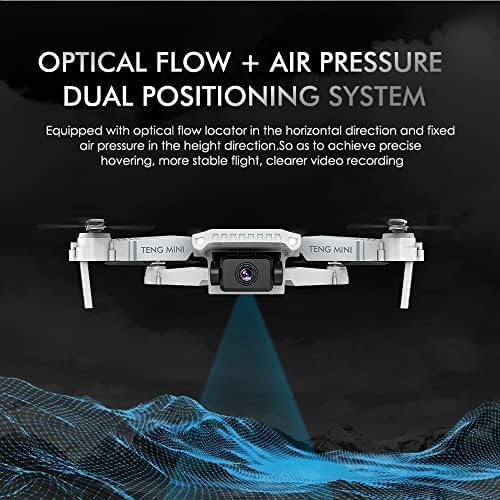
Image: Optical Flow + Air Pressure Dual Positioning System.
5. Getting Started (Setup)
5.1. Charging Batteries
The drone comes with two 3.7V 1100mAh modular batteries. Use the provided USB charging cable to charge them. Connect the cable to a USB power source (e.g., computer, USB wall adapter). The indicator light on the battery will show charging status (e.g., red for charging, off for fully charged).
- Charging time: Approximately 60-90 minutes per battery.
- Flight time: 8-10 minutes per battery.
5.2. Installing Batteries
- Ensure the drone is powered off.
- Locate the battery compartment on the drone.
- Insert a fully charged modular battery into the compartment until it clicks into place.
- Close the battery compartment cover securely.
5.3. Propeller Installation
If propellers are not pre-installed or need replacement, ensure they are correctly oriented. Each propeller is marked (A or B) and must match the corresponding motor arm. Use the provided screwdriver to secure them.
5.4. Controller Overview
The remote control features joysticks for flight control and buttons for various functions like one-key take-off/landing, headless mode, and speed adjustment (via app). It also has a phone holder for FPV viewing.
5.5. App Installation & Connection
- Scan the QR code in the quick start guide or search for the recommended app (e.g., HFunPro) in your device's app store.
- Install the app on your smartphone.
- Power on the drone.
- Go to your phone's Wi-Fi settings and connect to the drone's Wi-Fi network (usually named 'WIFI_XXXXXX').
- Open the app. The drone's camera feed should appear, indicating a successful connection.
6. Flight Operation
6.1. Pre-Flight Checklist
- Ensure drone and remote control batteries are fully charged.
- Check propellers for damage and ensure they are securely attached.
- Select a safe, open flying area.
- Connect your smartphone to the drone's Wi-Fi and open the app.
6.2. Taking Off and Landing
- One-Key Take-off: Press the one-key take-off button on the remote or in the app. The drone will automatically ascend to a stable hovering height.
- Manual Take-off: Push both joysticks down and outwards to arm the motors, then slowly push the left joystick up to ascend.
- One-Key Landing: Press the one-key landing button. The drone will automatically descend and land.
- Manual Landing: Slowly pull the left joystick down to descend.
6.3. Basic Flight Controls
- Left Joystick (Throttle/Yaw): Up/Down for altitude, Left/Right for rotation (yaw).
- Right Joystick (Pitch/Roll): Up/Down for forward/backward movement (pitch), Left/Right for left/right movement (roll).
6.4. Headless Mode
In Headless Mode, the drone's orientation is irrelevant. It will move relative to the pilot's position. Press the Headless Mode button to activate/deactivate.
6.5. Altitude Hold Mode
The drone automatically maintains a stable altitude, allowing you to focus on directional control. This feature is enabled by the optical flow and air pressure dual positioning system.
6.6. Gesture Control
Perform specific hand gestures in front of the drone's camera to trigger photo or video recording. Refer to the app for specific gesture commands.
6.7. Trajectory Flight
Using the app, draw a flight path on your smartphone screen. The drone will automatically follow this trajectory. This feature is ideal for capturing specific aerial routes.

Image: Trajectory Flight via mobile app control.
6.8. Smart Follow (Portrait Following)
Activate Smart Follow mode in the app. The drone will identify and follow a designated target, keeping it centered in the frame. This is useful for hands-free video recording.

Image: Portrait Following feature in action.
6.9. 3D Flip Function
Press the 3D Flip button on the remote control (or activate via app) and then move the right joystick in any direction to perform an aerial flip.
7. Camera and Video Features
7.1. Dual Camera Functionality
The KF609 drone is equipped with a front 2.7K HD camera and a bottom optical flow camera. You can switch between these cameras via the app to capture different perspectives.

Image: Dual Cameras Switch Shooting.
7.2. FPV Live Video
The drone transmits live video footage to your connected smartphone via Wi-Fi, providing a First Person View (FPV) experience. This allows for real-time monitoring of your flight and captures.
7.3. Adjusting Camera Angle
The front camera's angle can be manually adjusted up to 90 degrees before flight to achieve your desired shooting perspective.

Image: Front camera with 90° manual adjustment.
8. Maintenance and Care
- Cleaning: Use a soft, dry cloth to clean the drone and remote control. Avoid water or solvents.
- Propeller Replacement: If propellers are damaged, replace them with spare parts. Ensure correct A/B orientation.
- Battery Care: Store batteries in a cool, dry place. Do not fully discharge batteries for extended periods. Charge them periodically if not in use.
- Storage: Fold the drone arms for compact storage when not in use.
9. Troubleshooting
| Problem | Possible Cause | Solution |
|---|---|---|
| Drone does not respond to remote. | Low battery on drone or remote; not paired; out of range. | Charge batteries; re-pair drone and remote; fly within operational range. |
| Drone drifts during flight. | Calibration needed; strong wind; uneven propeller wear. | Perform gyroscope calibration; fly in calm conditions; check/replace propellers. |
| No FPV video feed. | Wi-Fi not connected; app not open; drone too far. | Ensure phone is connected to drone's Wi-Fi; open app; fly closer to drone. |
| Short flight time. | Battery not fully charged; old battery; aggressive flying. | Fully charge battery; consider replacing old batteries; fly more conservatively. |
10. Specifications
| Feature | Detail |
|---|---|
| Brand | B-Qtech |
| Model Name | KF609 |
| Special Feature | Dual Camera, Foldable Design, Gesture Operation, Smart Follow, Altitude Hold, Headless Mode |
| Age Range (Description) | Adult |
| Color | White |
| Video Capture Resolution | 2K (2.7K front camera) |
| Connectivity Technology | USB (for charging), Wi-Fi (for FPV and app control) |
| Skill Level | Beginner |
| Battery Capacity | 3.7V 1100mAh (Lithium Polymer) |
| Flight Time | 8-10 minutes per battery |
| Control Range | Up to 80-100m |
| Material | Engineering Plastic |
| Item Weight | 1.06 pounds |
| Product Dimensions | 7.87 x 5.91 x 3.94 inches |
11. Warranty and Support Information
For warranty claims or technical support, please refer to the contact information provided at the point of purchase or visit the official B-Qtech website. Keep your purchase receipt as proof of purchase.
Ask a question about this manual
Ask about setup, troubleshooting, compatibility, parts, safety, or missing instructions. Manuals+ will review the question and use this page’s manual context to help answer it.