Introduction
This manual provides detailed instructions for the proper installation, operation, and maintenance of your LUXRILIX F112 Replacement Odor Trapping Filters. Adhering to these guidelines will ensure optimal performance and extend the lifespan of your filters and vacuum cleaner. These filters are designed to be compatible with various Dirt Devil Endura vacuum models, offering advanced filtration and odor trapping capabilities.

Figure 1: Four LUXRILIX F112 replacement filters and four foam filter cottons included in the package.
Setup and Installation
Before installing the new filter, ensure your vacuum cleaner is unplugged from the power outlet to prevent accidental startup. The F112 filter system consists of two main components: the pleated filter and the foam filter cotton.
- Disassembly: Carefully remove the dust cup from your Dirt Devil Endura vacuum cleaner. Locate the existing filter assembly. Twist or pull to remove the old filter and foam cotton.
- Assembly of New Filter: The foam filter cotton is designed to fit around the pleated F112 filter. Gently slide the foam cotton over the pleated filter until it is fully seated, as shown in Figure 2.
- Installation into Vacuum: Insert the assembled filter unit back into the dust cup of your vacuum cleaner. Ensure it is securely in place. Reattach the dust cup to the vacuum cleaner.
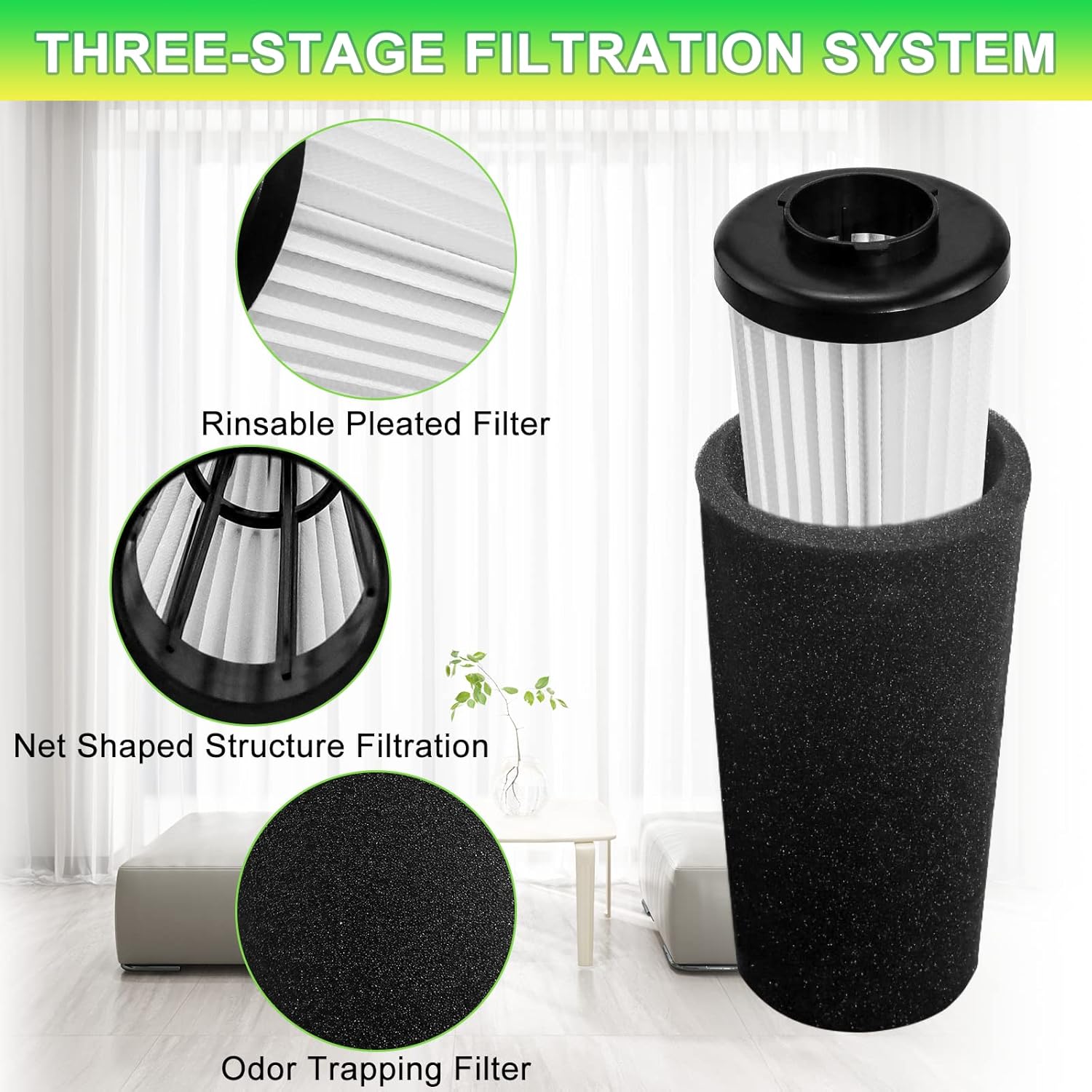
Figure 2: The F112 filter features a three-stage filtration system, including a pleated filter and an odor-trapping foam layer.

Figure 3: Proper installation ensures long-lasting suction and effective cleaning performance.
Video 1: This video demonstrates the process of assembling the F112 filter with its foam cotton and installing it into a compatible vacuum cleaner.
Operating Principles
The LUXRILIX F112 filter is engineered with a three-layer filtration design to capture a wide range of airborne particles and odors. The pleated filter efficiently traps fine dust, dirt, and allergens, while the activated carbon sponge layer is specifically designed to trap unpleasant odors, including pet odors. This combined action ensures cleaner exhaust air and a fresher home environment.
These filters are specifically designed for Dirt Devil F112 Vacuum Cleaner Endura models, including UD701350, UD20120BDI, UD20120TDI, UD20126CDI Endura Reach, UD70188, UD20120NC, UD70161, UD70167, UD70181, UD70187, UD70171, UD70174, UD70174B, UD70164, UD70185, UD70182, UD70186, UD70355B, UD70350B, UD20117, UD20127, UD70162, UD70184, UD20124, D76710, and UD78710.

Figure 4: The F112 filter is compatible with a wide range of Dirt Devil Endura vacuum models.
Maintenance and Care
Regular cleaning and timely replacement of your F112 filters are crucial for maintaining optimal vacuum performance and air quality. The filters are washable and reusable.
Cleaning Instructions:
- Remove the filter assembly from the vacuum cleaner as described in the Setup section.
- Separate the pleated filter from the foam filter cotton.
- Rinse both the pleated filter and the foam filter cotton under running water until the water runs clear.
- Allow both components to air dry completely for at least 24 hours before reassembling and reinstalling them into the vacuum. Ensure they are thoroughly dry to prevent mold or mildew growth and to maintain filtration efficiency.
Replacement Frequency:
For best performance and to maintain strong suction, it is recommended to replace the F112 filter every 3 to 6 months, depending on usage and household conditions (e.g., presence of pets, frequency of vacuuming).

Figure 5: Regular cleaning and timely replacement are essential for filter longevity and vacuum performance.
Video 2: This video illustrates the process of disassembling the filter for cleaning and reassembling it.
Troubleshooting
| Problem | Possible Cause | Solution |
|---|---|---|
| Reduced Suction Power | Clogged or dirty filter. | Clean the filter as per the Maintenance section. Ensure it is completely dry before reinstallation. If suction does not improve, replace the filter. |
| Unpleasant Odors from Vacuum | Odor-trapping filter is saturated or dirty. | Clean the filter thoroughly. If odors persist after cleaning, replace the filter. |
| Filter Does Not Fit Properly | Incorrect filter model or improper assembly. | Verify that you have the correct F112 filter for your specific Dirt Devil Endura model. Refer to the Setup section for correct assembly of the pleated filter and foam cotton. |
Specifications
| Feature | Detail |
|---|---|
| Brand | LUXRILIX |
| Model Info | F112 AD47936 |
| Item Weight | 10.2 ounces |
| Product Dimensions | 2.8 x 2.8 x 6.6 inches |
| Part Number | F112 Filter-4 |
| Special Features | 4 PACK F112 HEPA Particle filter and Activated carbon sponge odor filter, Washable & Reusable |
| Color | White&Black |
| Compatible Device | for Dirt Devil F112 UD20120NC UD70161 UD70167 UD70181 UD70187 UD70171 UD70174 UD70174B UD70164 UD70185 UD70182 UD70186 UD70355B |
| Material Type | Fiberglass, PP |
| Included Components | 4 pack F112 Filter Replacement for Dirt Devil, Activated carbon sponge odor filter, Compatible with Dirt Devil F112 UD20120NC UD70161, Compatible with Dirt Devil UD70167 UD70181 UD70187 UD70171, Compatible with Dirt Devil UD70174 UD70174B UD70164 |
| Reusability | Reusable |

Figure 6: Detailed dimensions of the F112 filter and its foam cotton.
Warranty and Support
LUXRILIX is committed to providing high-quality products and excellent customer service. If you encounter any issues or have questions regarding your F112 Replacement Filters, please do not hesitate to contact our customer support team. We aim for simplicity and excellence in the quality of our services and are glad to provide you with appropriate assistance.
For further assistance, please visit the official LUXRILIX Store: LUXRILIX Store on Amazon.