
Important Safety Instructions
Please read all instructions carefully before using your Ultenic U10 Pro vacuum cleaner. Keep this manual for future reference.
- Read all instructions before use.
- Do not use outdoors or on wet surfaces. This appliance is designed for dry indoor use only.
- Do not allow to be used as a toy. Close attention is necessary when used by or near children.
- Use only as described in this manual. Use only manufacturer's recommended attachments.
- Do not use with a damaged cord or plug. If the appliance is not working as it should, has been dropped, damaged, left outdoors, or dropped into water, return it to an authorized service center.
- Do not pull or carry by the cord, use the cord as a handle, close a door on the cord, or pull the cord around sharp edges or corners. Keep the cord away from heated surfaces.
- Do not unplug by pulling on the cord. To unplug, grasp the plug, not the cord.
- Do not handle the plug or appliance with wet hands.
- Do not put any object into openings. Do not use with any opening blocked; keep free of dust, lint, hair, and anything that may reduce air flow.
- Keep hair, loose clothing, fingers, and all parts of the body away from openings and moving parts.
- Do not pick up anything that is burning or smoking, such as cigarettes, matches, or hot ashes.
- Do not use without the dust cup and/or filters in place.
- Turn off all controls before unplugging.
- Use extra care when cleaning on stairs.
- Do not use to pick up flammable or combustible liquids, such as gasoline, or use in areas where they may be present.
- Store the appliance indoors. Put it away after use to prevent accidents.
- This appliance is for household use only.
Product Overview
The Ultenic U10 Pro is a powerful and lightweight cordless stick vacuum cleaner designed for efficient cleaning of various surfaces. It features a 400W motor providing 30,000 Pa suction power, a 5-layer filtration system, and a removable battery for convenient charging.
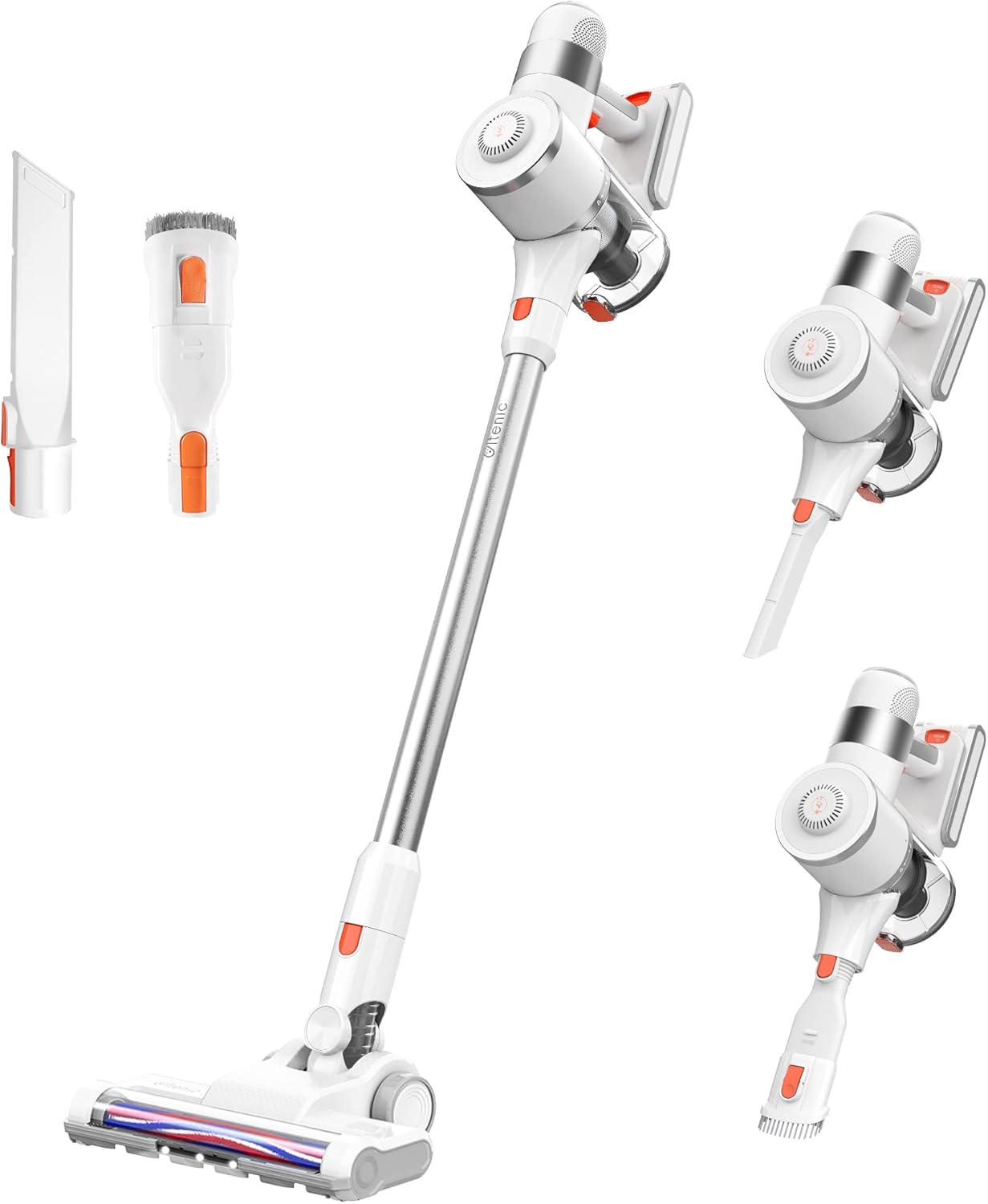
Image: The Ultenic U10 Pro vacuum cleaner shown with its main body, extension tube, floor brush, and various attachments like the crevice tool and combination tool.
Key Features
- Powerful Suction: A 400 Watt motor delivers up to 30,000 Pa suction for effective cleaning of dust, crumbs, and pet hair from floors and carpets. Two modes allow switching between different cleaning requirements.
- Lightweight Design: Weighs only 2.68 kg, making it easy to handle for all users, including children and the elderly.
- Adjustable Length: Equipped with a telescopic tube to adjust the vacuum's length according to your height and cleaning area for a better user experience.
- Versatile Cleaning: Includes a main roller brush, crevice tool, and upholstery tool for seamless cleaning of floors, furniture, cars, crevices, and beds.
- LED Headlight: The main brush features an integrated LED light to illuminate dark areas, ensuring no dust is missed.
- Advanced Filtration: A 5-layer filter system captures 99.99% of dust, ultra-fine particles, and hair, preventing secondary pollution and making it suitable for allergy sufferers.
- Removable Battery: The built-in 2200 mAh battery provides up to 35 minutes of runtime and can be removed for separate charging. An optional spare battery can double the cleaning time.
Package Contents
Please check the package contents upon unboxing to ensure all parts are present and in good condition. If any items are missing or damaged, please contact customer support.

Image: A visual representation of the Ultenic U10 Pro package contents, including the motor head, power adapters, filters, various brushes, wall mount, and user manual.
| Item | Description |
|---|---|
| Motor Head and Dust Cup | The main unit containing the motor and dust collection bin. |
| Power Adapters | For charging the vacuum's battery. |
| Pre-HEPA Filter | Filters fine dust before the main HEPA filter. |
| Combination Tool | Versatile tool for various surfaces and corners, often with a brush and wide nozzle. |
| Wall Mount Dock | For convenient storage and charging of the vacuum. |
| Main Brush Head | Motorized brush for floor cleaning, equipped with LED lights. |
| Post-HEPA Filter | The final filter for capturing ultra-fine particles and ensuring clean air output. |
| User Manual | This instruction guide for product usage and maintenance. |
| Roller Brush | The main rotating brush located inside the brush head. |
| Crevice Tool | Designed for cleaning narrow gaps, corners, and hard-to-reach areas. |
| Cleaning Tool | A small tool provided for cleaning the dust cup and filters. |
| Extension Tube | Connects the main unit to the brush head for floor cleaning, adjustable in length. |
Setup
Assembly
Follow these steps to assemble your Ultenic U10 Pro vacuum cleaner:
- Attach the Extension Tube: Insert the extension tube into the main motor head until it clicks securely into place.
- Attach the Main Brush Head: Connect the main brush head to the other end of the extension tube, ensuring it clicks securely.
- Install the Battery: Slide the battery pack into the designated slot on the main motor head until it locks.
Charging the Battery
Before first use, fully charge the battery. The battery can be charged while attached to the vacuum or separately.

Image: The Ultenic U10 Pro battery can be charged while attached to the vacuum on its wall mount, or removed and charged independently using the power adapter.
- Connect the power adapter to a power outlet.
- Connect the other end of the adapter to the charging port on the battery (either on the vacuum or removed).
- The battery indicator lights will show the charging status. A full charge typically takes approximately 4-5 hours.
Operating Instructions
Power On/Off and Suction Modes
The Ultenic U10 Pro offers two suction modes to suit different cleaning needs.
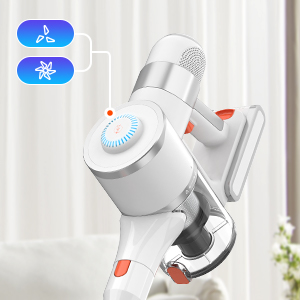
Image: A close-up of the vacuum's control panel, highlighting the power button and mode selection button for switching between standard and max suction.
- To Power On: Press the power button once. The vacuum will start in standard suction mode.
- To Change Suction Mode: Press the mode button to switch between standard and max suction modes.
- To Power Off: Press the power button again.
Using Different Attachments
The vacuum comes with various attachments for versatile cleaning across different surfaces and areas.

Image: The Ultenic U10 Pro in action, demonstrating its use on hard floors, as a handheld vacuum for car interiors and upholstery, and with the crevice tool for curtains.
- Main Brush Head: Ideal for both hard floors and carpets. The integrated LED lights illuminate dust in dark areas, ensuring thorough cleaning.
- Crevice Tool: Use this tool for narrow gaps, corners, and edges, such as between sofa cushions, along baseboards, or in car interiors.
- Combination Tool: This versatile tool features both a brush and a wide nozzle, making it suitable for upholstery, car interiors, and delicate surfaces that require gentle cleaning.

Image: A detailed view of the main brush head of the Ultenic U10 Pro, showing its LED lights illuminating dust particles on a hard floor surface, highlighting its ability to detect hidden dirt.
Maintenance
Regular maintenance ensures optimal performance and extends the lifespan of your Ultenic U10 Pro vacuum cleaner. Always turn off the vacuum before performing any maintenance.
Emptying the Dust Cup
Empty the dust cup regularly, especially when the MAX line is reached, to maintain strong suction.

Image: A user demonstrating how to easily empty the 800ml dust cup of the Ultenic U10 Pro directly into a trash bin by pressing a release button.
- Hold the vacuum over a trash bin.
- Press the dust cup release button to open the bottom flap and empty the contents.
- Close the flap securely after emptying.
Cleaning the Filters
The 5-layer filtration system requires regular cleaning to maintain suction power and air quality. It is recommended to clean filters monthly or as needed.

Image: An exploded diagram illustrating the Ultenic U10 Pro's 5-stage filtration system, including the main cyclone, metal mesh filter, front HEPA filter, sponge, and rear HEPA filter, with descriptions of each component's function.
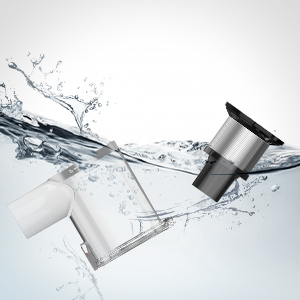
Image: The washable components of the Ultenic U10 Pro's filtration system, including the metal mesh filter and dust cup, being rinsed under running water.
- Remove Filters: Twist and pull to remove the pre-HEPA filter, metal mesh filter, and post-HEPA filter from the dust cup assembly.
- Wash Filters: Rinse the metal mesh filter and pre-HEPA filter under running water until clean. Do not wash the main motor unit or the post-HEPA filter unless specified by the manufacturer.
- Dry Filters: Allow all washed parts to air dry completely for at least 24 hours before reassembling. Ensure they are completely dry to prevent mold or damage, which can affect performance.
- Reassemble: Once dry, reinsert the filters and dust cup assembly into the main unit in the correct order.
Cleaning the Roller Brush
Regularly clean the roller brush to prevent hair and debris from tangling and affecting performance.
- Turn off the vacuum and detach the main brush head from the extension tube.
- Locate the release tab or lock on the side of the brush head and open it to remove the roller brush.
- Use the provided cleaning tool or scissors to carefully remove any tangled hair, threads, or debris from the roller brush.
- Reinsert the clean roller brush into the brush head and close the release tab securely.
Troubleshooting
If you encounter issues with your Ultenic U10 Pro, refer to the following common problems and solutions. If the problem persists, please contact customer support.
| Problem | Possible Cause | Solution |
|---|---|---|
| Vacuum does not turn on. | Battery is not charged or not properly installed. | Ensure the battery is fully charged. Reinsert the battery securely until it clicks into place. |
| Low suction power. | Dust cup is full; Filters are clogged; Blockage in the nozzle, tube, or brush head. | Empty the dust cup. Clean or replace the filters as per maintenance instructions. Check for and remove any blockages in the air path. |
| Battery life is short. | Using max suction mode frequently; Battery not fully charged; Battery degradation over time. | Use standard mode for longer runtime. Ensure the battery is fully charged before each use. Consider purchasing a replacement battery if significant degradation is observed. |
| Brush roll not spinning. | Brush roll is tangled with hair or debris; Brush head is blocked; Connection issue. | Clean the brush roll by removing tangled hair and debris. Check the brush head for any obstructions. Ensure the brush head is properly connected to the extension tube. |
| Unusual noise during operation. | Blockage in the air path; Damaged component; Loose parts. | Check for and remove any blockages in the dust cup, filters, tube, or brush head. Ensure all parts are securely assembled. If the noise persists, contact customer support. |
Specifications
Detailed technical specifications for the Ultenic U10 Pro Cordless Stick Vacuum Cleaner.
| Feature | Detail |
|---|---|
| Brand | Ultenic |
| Model Number | U10 Pro |
| Color | White |
| Product Dimensions | 66.5 x 22.5 x 113 cm |
| Item Weight | 2.68 Kilograms |
| Dust Cup Capacity | 800 Milliliters |
| Power/Wattage | 400 watts |
| Voltage | 25.9 Volts |
| Number of Speeds | 2 |
| Noise Level | 65 dB |
| Runtime | Up to 35 minutes |
| Special Features | Cordless |
| Filter Type | HEPA Filter (5-layer system) |
| Recommended Surface | Hard floor, carpet |
| Power Source | Battery Powered |
Warranty and Support
The Ultenic U10 Pro comes with a 2-year warranty provided by Amazon.com.tr, ensuring peace of mind for your purchase.
For technical support, warranty claims, or further assistance with your Ultenic U10 Pro, please contact Ultenic customer service or refer to the official Ultenic website.
- Warranty Period: 2 years (provided by Amazon.com.tr)
- Manufacturer: Ultenic
- Official Website/Store: Ultenic Store on Amazon.com.tr