Introduction
This manual provides comprehensive instructions for the installation, operation, and maintenance of your AWOW Smart Home Thermostat. This device is designed for water heating and suspended boiler systems, offering intelligent temperature control and weekly programming capabilities. It features a large LCD display for enhanced user experience and is compatible with smart home ecosystems like Amazon Alexa and Google Assistant.
Please read this manual thoroughly before installation and use to ensure proper function and safety.
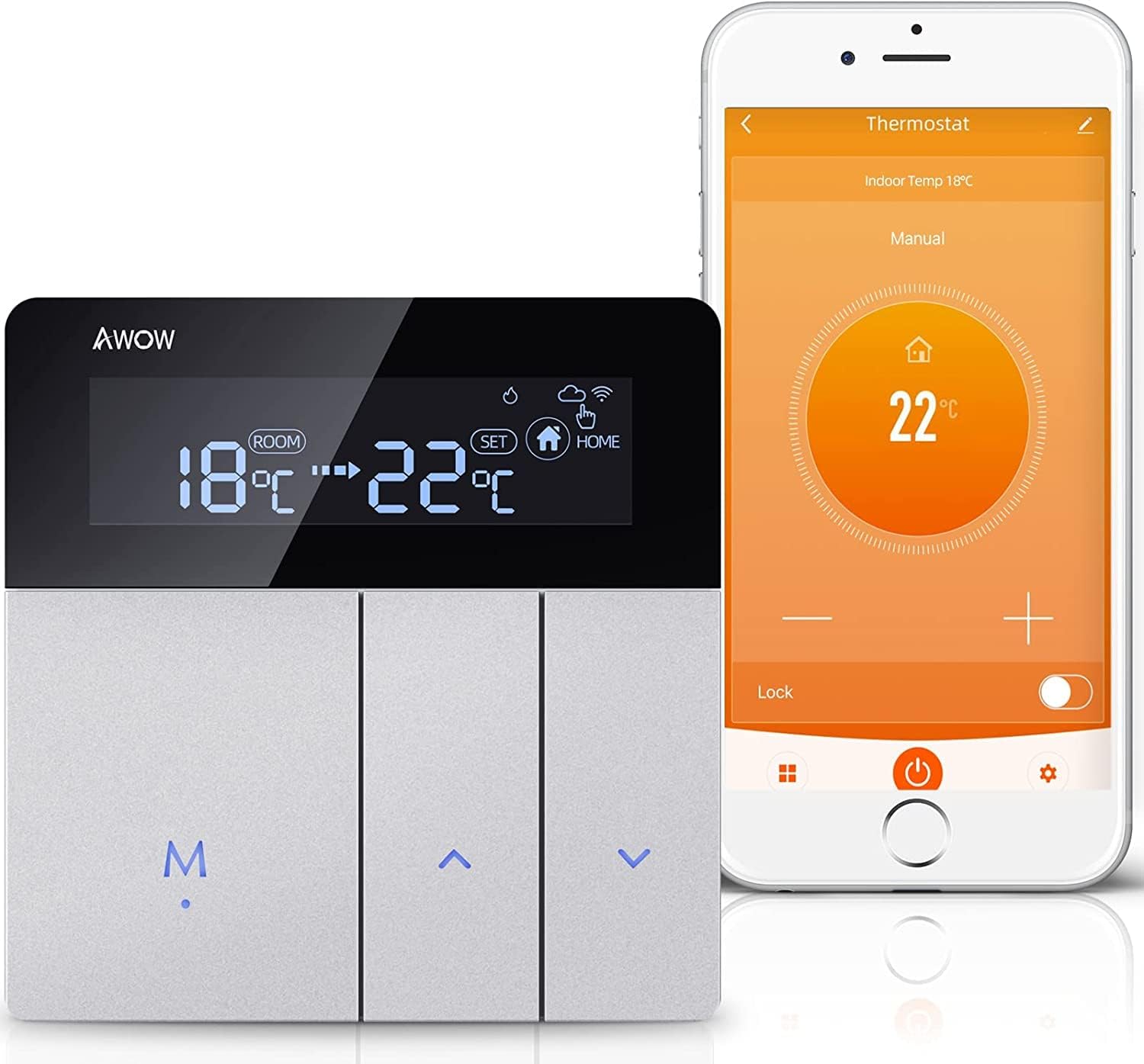
Image: The AWOW Smart Home Thermostat displaying 18°C room temperature and a set temperature of 22°C, alongside a smartphone showing the Smart Life app interface for thermostat control.
Safety Information
WARNING:
- This thermostat is not applicable to heat pump systems.
- Electrical shock hazard: Improper installation can cause electric shock or damage to the device. Always disconnect power before installation or maintenance.
- Installation should be performed by a qualified professional.
Setup and Installation
1. Physical Installation
The AWOW Smart Home Thermostat is designed for flush mounting. Ensure you have a standard UK 86mm patress box for installation.

Image: Detailed dimensions of the AWOW Smart Home Thermostat, showing its front panel measuring 8.6cm x 8.7cm and its recessed back unit measuring 6cm x 3.2cm x 6cm, indicating compatibility with a standard UK 86mm patress box.
2. Wiring Instructions
Before proceeding, ensure the main power supply is disconnected to prevent electrical hazards. This thermostat is suitable for water heating systems, water valves, and water floor heating systems. It is not compatible with heat pump systems.
Refer to the wiring diagrams below for correct connection to your boiler or electric actuator. The installation process is typically quick, often completed in 5 minutes or less for experienced installers.

Image: A diagram illustrating the connection of the AWOW thermostat to a boiler and an electric actuator for underfloor heating. The diagram shows the thermostat connected to the boiler via dry contact and to the electric actuator which controls the water mixing center and underfloor heating loops.
Image: Two detailed wiring diagrams. The top diagram shows connections for a boiler system, including NTC sensor, Volt-free contacts, and AC220V power supply. The bottom diagram shows connections for water underfloor heating, including NTC sensor, normally open/closed actuator connections, and AC220V power supply.
3. Smart Life App Integration
To unlock the full smart features of your thermostat, download the Smart Life app from the App Store (iOS) or Google Play Store (Android). A 2.4 GHz Wi-Fi network connection is required for app functionality.
- Download and install the "Smart Life" app on your smartphone.
- Register an account or log in if you already have one.
- Follow the in-app instructions to add your AWOW thermostat. Ensure your phone is connected to a 2.4 GHz Wi-Fi network during the pairing process.
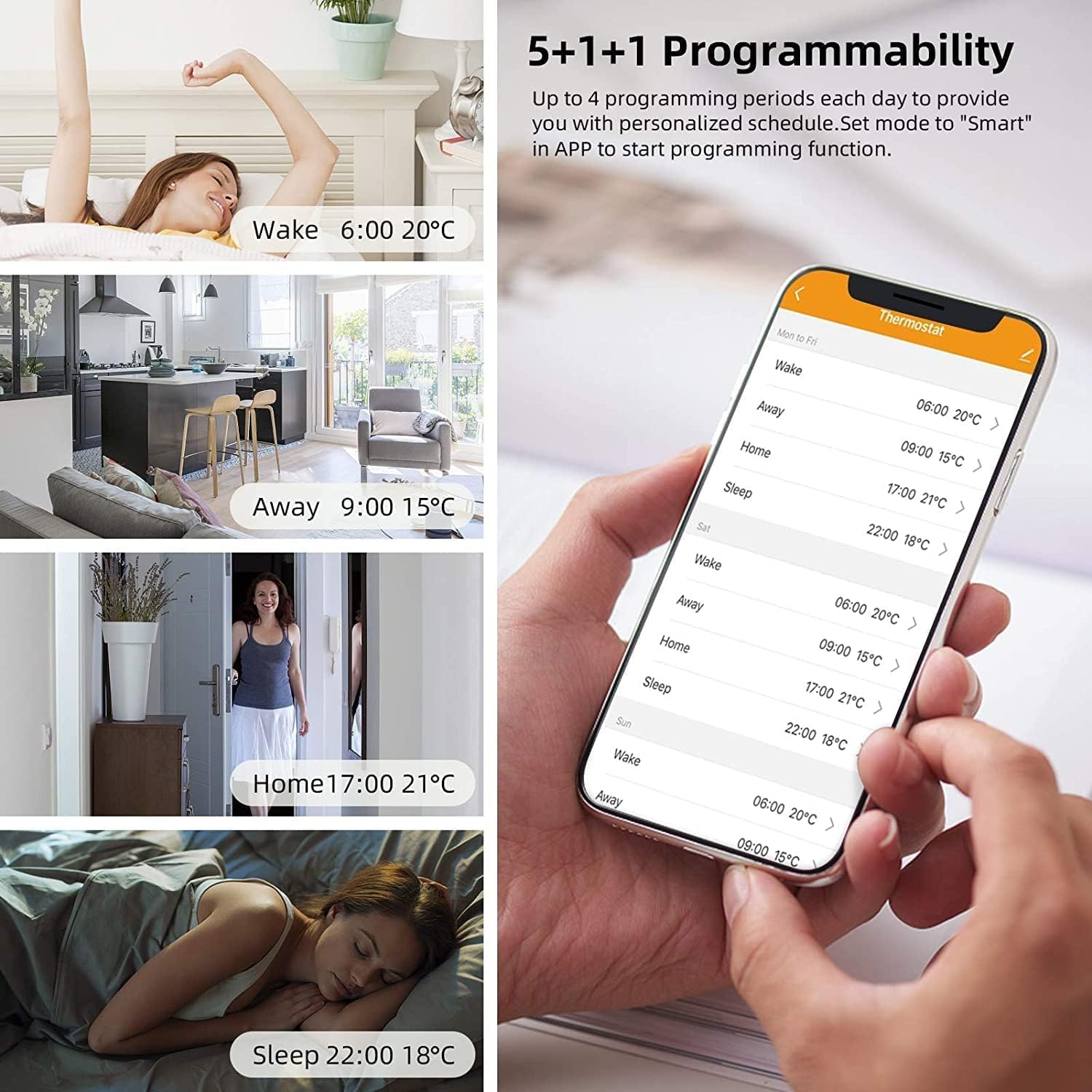
Image: A family in a living room, with a smartphone displaying the Smart Life app interface for thermostat control. The image also shows icons for downloading the app from the App Store and Google Play.
Operating Instructions
The thermostat offers both manual control and smart control via the Smart Life app, Amazon Alexa, and Google Assistant.
1. Manual Control
Use the physical buttons on the thermostat to adjust settings directly. The large LCD screen displays the current room temperature and the set temperature, along with other operational indicators.
- Temperature Adjustment: Use the up and down arrow buttons to increase or decrease the target temperature.
- Mode Selection: The 'M' button typically cycles through different operating modes (e.g., manual, automatic).
- Set Button: The 'SET' button is used to confirm selections or enter programming modes.
2. Programmable Modes (5+1+1)
The thermostat supports weekly programming with a 5+1+1 schedule, allowing up to 4 programming periods per day. This feature helps optimize energy consumption by adjusting heating based on your daily routine.
- Access the programming settings through the Smart Life app or directly on the thermostat using the 'SET' button.
- Set desired temperatures for different periods (e.g., Wake, Away, Home, Sleep) for weekdays (5 days), Saturday (1 day), and Sunday (1 day).
- The thermostat will automatically follow this schedule, adjusting heating to maintain comfort and save energy.

Image: An illustration demonstrating the 5+1+1 programmability feature, showing different daily routines (Wake, Away, Home, Sleep) with corresponding set temperatures and times, as displayed on a smartphone app interface.
3. Smart Control via App
Control your thermostat remotely using the Smart Life app on your smartphone. This allows you to adjust settings, create heating plans, and monitor your home's temperature from anywhere.

Image: A person in a car using a smartphone to adjust the thermostat via the Smart Life app, demonstrating remote control capabilities.
4. Voice Control (Alexa & Google Assistant)
Integrate your AWOW thermostat with Amazon Alexa or Google Assistant for convenient voice control. Ensure your thermostat is connected to the Smart Life app and linked to your Alexa or Google Home account.
Example voice commands:
- "Alexa, set the living room to 22 degrees."
- "Hey Google, what's the temperature in the bedroom?"
- "Alexa, turn on the heating."

Image: An AWOW thermostat displayed in a room setting, with text overlay "Alexa, Set the thermostat to 22 degrees" and logos indicating compatibility with Amazon Alexa and Google Assistant.
Maintenance
The AWOW Smart Home Thermostat requires minimal maintenance. Follow these guidelines to ensure optimal performance:
- Cleaning: Wipe the thermostat's screen and casing with a soft, dry cloth. Avoid using abrasive cleaners, solvents, or chemical sprays, as these can damage the surface.
- Power Cycle: If the thermostat becomes unresponsive, try turning off the main power supply to the unit for a few minutes, then restore power.
- Software Updates: Ensure your Smart Life app is always updated to the latest version to benefit from new features and bug fixes. The thermostat's firmware may also receive updates via the app.
Troubleshooting
| Problem | Possible Cause | Solution |
|---|---|---|
| Thermostat not powering on. | No power supply or incorrect wiring. | Check the main power supply. Verify wiring connections according to the installation diagrams. Consult a qualified electrician if unsure. |
| Cannot connect to Wi-Fi. | Incorrect Wi-Fi password, 5 GHz network, or weak signal. | Ensure you are connecting to a 2.4 GHz Wi-Fi network. Double-check the Wi-Fi password. Move the thermostat closer to the router or consider a Wi-Fi extender. |
| Heating not turning on/off as scheduled. | Incorrect programming, manual override, or system fault. | Verify your programming schedule in the Smart Life app. Check if the thermostat is in manual mode. Ensure the heating system (boiler/actuator) is functioning correctly. |
| Voice control not working. | Thermostat not linked to Alexa/Google Assistant, or incorrect commands. | Ensure the Smart Life skill/service is enabled and linked in your Alexa or Google Home app. Use precise voice commands as specified in the operating instructions. |
| Inaccurate temperature readings. | Sensor interference or calibration needed. | Ensure the thermostat is not exposed to direct sunlight, drafts, or heat sources. The thermostat has a temperature calibration function accessible via the app or advanced settings. |
Specifications
| Feature | Detail |
|---|---|
| Model Number | TH213-WS010-3AB |
| Power Supply | 100-240 VAC, 50/60 Hz |
| Electrical Load | 3 A (for water heating) |
| Sensor | NTC3950, 10 K |
| Accuracy | 0.5 °C or 1 °F |
| Settable Temperature Range | 0-35 °C |
| Display Temperature Range | 5-99 °C |
| Ambient Temperature | 0-45 °C |
| Ambient Humidity | 5-95% RH (non-condensing) |
| Storage Temperature | -5 to 45 °C |
| Power Consumption | 1.5 W |
| Timer Error | 1% |
| Shell Material | PC + ABS (flame retardant) |
| Connectivity | Wi-Fi (2.4 GHz only) |
| Dimensions (L x W x H) | 8.6 x 4.6 x 8.7 cm |
| Weight | 230 grams |
| Display Type | LCD with white backlight |
| Compatibility | Amazon Alexa, Google Assistant, Smart Life App |
Warranty Information
Specific warranty details for AWOW products are typically provided at the point of purchase or within the product packaging. Please retain your proof of purchase for warranty claims. For detailed warranty terms and conditions, refer to the documentation included with your thermostat or contact AWOW customer support.
Customer Support
If you encounter any issues or have questions not covered in this manual, please contact AWOW customer support. You can typically find contact information on the official AWOW website or through the retailer where you purchased the product.
When contacting support, please have your product model number (TH213-WS010-3AB) and a description of the issue ready.