
Kooduu Synergy 50
Kooduu Synergy 50 User Manual
Model: Synergy 50 | Brand: Kooduu
Introduction
The Kooduu Synergy 50 is a versatile product designed to enhance your indoor and outdoor experiences. It combines a portable Bluetooth speaker, a dimmable LED lamp, and an integrated ice bucket, offering a unique blend of music, light, and cooling functionality. This manual provides essential information for the safe and effective use of your Synergy 50.
Safety Information
- Read all instructions carefully before use.
- Do not immerse the entire unit in water. The ice bucket is designed for liquids, but the electronic components are not fully submersible.
- Keep away from extreme temperatures, direct sunlight, and open flames.
- Use only the provided charging cable.
- Do not attempt to disassemble or repair the unit yourself. Refer all servicing to qualified personnel.
- Ensure the charging port is dry before connecting the charging cable.
- Keep out of reach of children.
Package Contents
Verify that all items are present in the package:
- Kooduu Synergy 50 Unit
- USB Charging Cable
- User Manual (this document)
Product Overview
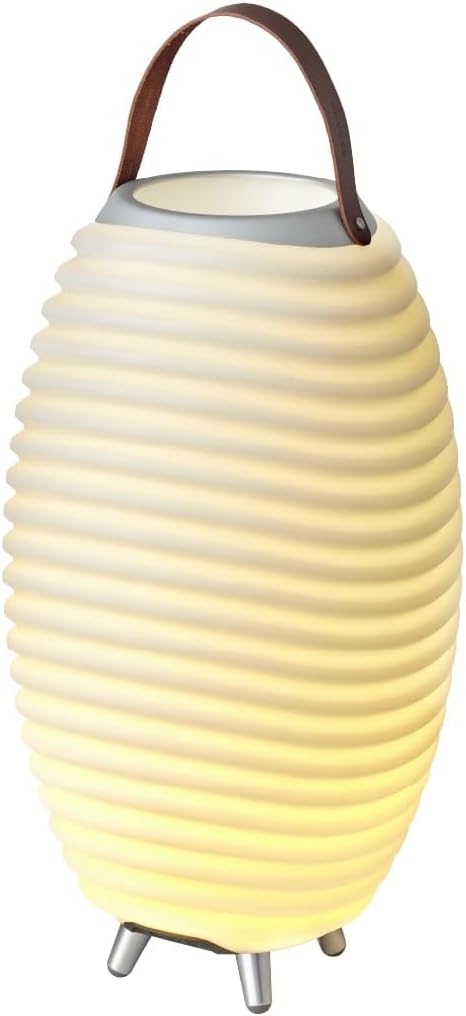
Figure 1: The Kooduu Synergy 50 unit, illuminated and ready for use. This image highlights the product's elegant design and its primary function as a lamp.

Figure 2: Top view of the Synergy 50, illustrating the opening for the ice bucket and the sturdy leather handle for portability.

Figure 3: Bottom view of the Synergy 50, revealing the control buttons for power and light, as well as the charging port and speaker grille.

Figure 4: Feature diagram of the Kooduu Synergy 50, highlighting its key functionalities including Bluetooth connectivity, bottle holder, stereo pairing option, dimmable LED light, True Wireless Stereo (TWS) capability, and 10W speaker output.
The Synergy 50 features a durable construction with brushed aluminum, PE white plastic, and genuine leather. It is designed for both indoor and outdoor environments.
Setup
Charging the Unit
- Locate the charging port on the bottom of the Synergy 50 unit (refer to Figure 3).
- Connect the provided USB charging cable to the unit and a compatible USB power adapter (not included).
- The charging indicator light will illuminate, typically red, during charging.
- A full charge takes approximately 3.5 hours. The indicator light will change color (e.g., green or off) when fully charged.
- A fully charged battery provides up to 10 hours of playback time.
Initial Power On
After charging, press and hold the power button on the bottom of the unit for a few seconds until the light illuminates and you hear an audible confirmation.
Operating Instructions
Power On/Off
- To power on, press and hold the power button (⑁) on the bottom of the unit until the light turns on.
- To power off, press and hold the power button again until the light turns off.
Bluetooth Pairing
- Ensure the Synergy 50 is powered on. It will automatically enter Bluetooth pairing mode, indicated by a blinking blue light (if applicable).
- On your smartphone, tablet, or other Bluetooth-enabled device, go to the Bluetooth settings.
- Search for "Kooduu Synergy 50" in the list of available devices and select it to pair.
- Once paired, the unit will emit a confirmation sound, and the Bluetooth indicator light will become solid.
True Wireless Stereo (TWS) Pairing (Optional)
You can pair two Kooduu Synergy units together for a stereo sound experience.
- Ensure both Synergy units are powered on and not connected to any other Bluetooth device.
- On one unit (this will be the master unit), double-press the Bluetooth button. It will search for another Synergy unit.
- Once connected, both units will emit a confirmation sound, and their Bluetooth indicator lights will synchronize.
- Now, connect your device to the master Synergy unit via Bluetooth as described above. Audio will play through both units in stereo.
Light Control
- Press the light button (☀) on the bottom of the unit to turn the LED lamp on or off.
- To adjust the brightness, press and hold the light button. The light will cycle through different intensity levels. Release the button at your desired brightness.
Using the Ice Bucket
- The top section of the Synergy 50 is designed to hold ice and beverages.
- Carefully place ice and your desired drinks into the top compartment.
- After use, empty any melted ice and clean the compartment thoroughly.
Maintenance
- Cleaning: Wipe the exterior of the unit with a soft, damp cloth. For the ice bucket compartment, clean with mild soap and water, then rinse thoroughly. Ensure the electronic components and charging port remain dry.
- Storage: Store the Synergy 50 in a cool, dry place when not in use. If storing for extended periods, charge the battery every 3-6 months to maintain battery health.
- Battery Care: Avoid fully discharging the battery frequently. Charge the unit when the low battery indicator appears.
Troubleshooting
| Problem | Possible Cause | Solution |
|---|---|---|
| Unit does not power on. | Battery is depleted. | Charge the unit for at least 30 minutes. |
| No sound from speaker. | Volume is too low or device not paired. | Increase volume on both the Synergy 50 and your connected device. Re-pair Bluetooth if necessary. |
| Light does not turn on. | Light function is off or battery low. | Press the light button. Charge the unit if the battery is low. |
| Cannot pair via Bluetooth. | Unit is already paired or too far from device. | Ensure no other device is connected. Move your device closer to the Synergy 50. Restart both devices. |
Specifications
| Feature | Detail |
|---|---|
| Model Number | Synergy 50 (KS0050WS) |
| Dimensions (L x W x H) | 32.4 x 32.4 x 54.5 cm |
| Weight | 2.65 kg |
| Battery Life | Up to 10 hours |
| Charging Time | Approx. 3.5 hours |
| Bluetooth Version | 5 |
| Speaker Output Power | 10 Watts |
| LED Power | 0.5 Watts |
| Material | Aluminum, Leather, PE Plastic, Silicon rubber |
| Water Resistance | Yes (for ice bucket, not submersible) |
Warranty and Support
The Kooduu Synergy 50 comes with a 2-year availability for spare parts. For warranty claims, technical support, or further assistance, please contact your retailer or visit the official Kooduu website. Please retain your proof of purchase for warranty purposes.
Related documentsSynergy 50


Ask a question about this manual
Ask about setup, troubleshooting, compatibility, parts, safety, or missing instructions. Manuals+ will review the question and use this page’s manual context to help answer it.