Introduction
This manual provides detailed instructions for the installation, setup, and operation of your LoraTap Wi-Fi Connected Roller Shutter Switch. This smart switch allows you to control your roller shutters, curtains, or blinds conveniently via touch, voice commands (Alexa, Google Home, Siri), or through the Smart Life/Tuya mobile application.
Key Features
- Adjustable Motor Working Time: Customize the motor's operation time from 0s to 120s via the Smart Life app, enabling precise partial opening and closing of your blinds.
- Voice Control: Seamlessly compatible with Amazon Alexa, Google Home, and Apple Siri for convenient hands-free operation of your roller shutters.
- Programmable LED Backlight: Control the LED backlight status (on/off) and schedule its operation directly from the app.
- Time Scheduling & Remote Control: Set daily or weekly schedules for automatic opening and closing. Control your curtains from anywhere using the free Smart Life & Tuya app.
- Group Control & Device Sharing: Manage up to 20 switches in groups and easily share control with family members through the Smart Life app.

This image highlights the main features of the LoraTap smart switch, including adjustable timing for curtain movement, voice control compatibility, scheduled operations, customizable backlight, and remote control via a mobile application.
Safety Information
- Power Disconnection: Always ensure the main power supply to the circuit is OFF at the circuit breaker before attempting any installation or maintenance.
- Professional Installation: If you are unsure about electrical wiring, it is highly recommended to consult a qualified electrician for installation.
- Motor Compatibility: This product is only compatible with 4-wire motors (typically consisting of 2 output wires for up/down, 1 neutral wire, and 1 earth wire).
- Current Rating: Do not exceed the maximum current rating of 2 Amperes to prevent damage to the switch or connected motor.
- Child Safety: Keep the device and its components out of reach of children.
- Environmental Conditions: Do not expose the switch to water, excessive humidity, or extreme temperatures.
Installation Guide
Wiring Diagram
Before beginning, ensure the main power supply to the circuit is turned off at the circuit breaker. The LoraTap Wi-Fi Roller Shutter Switch requires a 4-wire motor connection. Please refer to the diagram below for correct wiring.

This image provides the physical dimensions of the LoraTap smart switch (86mm x 86mm x 25mm) and a detailed wiring diagram. It illustrates connections for Live (L), Neutral (N), Up (motor up), Down (motor down), and Earth (GND) wires, emphasizing the need for a 4-wire motor.
Physical Installation
- Connect the wires according to the wiring diagram provided. Ensure all connections are secure.
- Carefully mount the switch into a standard wall box.
- Secure the switch firmly with screws.
- Once installation is complete, restore power to the circuit at the breaker.
Initial Setup and App Connection
Download the App
Download the "Smart Life" or "Tuya Smart" app from your smartphone's app store (available on iOS and Android).
Pairing the Switch
- Ensure the switch is powered on and the indicator light is flashing (or put it into pairing mode by pressing and holding a button as per app instructions).
- Open the Smart Life/Tuya app and register or log in to your account.
- Tap "+" (Add Device) in the top right corner of the app.
- Select "Curtain Switch" or "Shutter Switch" from the device list under "Electrical" or "Lighting".
- Follow the in-app instructions to confirm the indicator light status.
- Enter your Wi-Fi network details (ensure it's a 2.4GHz Wi-Fi network, 5GHz is not supported).
- Wait for the device to connect. Once connected, you can rename the switch for easy identification.

This image displays the Smart Life app interface, demonstrating how users can set the operational time for the roller shutter motor. It shows examples of setting the duration to 10 seconds for partial opening and 70 seconds for full closure, allowing precise control over curtain position.
Operation
Manual Control
The switch features touch-sensitive buttons on its glass panel for direct manual control:
- Touch the "Up" arrow to open the curtain/shutter.
- Touch the "Down" arrow to close the curtain/shutter.
- Touch the "Pause" button (middle icon) to stop the curtain/shutter at any desired position.

This image shows the sleek black glass panel of the LoraTap smart switch, featuring three illuminated touch icons: an 'up' arrow, a 'pause' symbol, and a 'down' arrow, indicating its manual control capabilities.
App Control
Once connected to the Smart Life/Tuya app, you can control your switch from anywhere with an internet connection:
- Open the Smart Life/Tuya app and select your roller shutter switch.
- Use the virtual buttons within the app to open, close, or pause the curtain/shutter.

This image illustrates the remote control capability of the LoraTap switch via the Smart Life app. A user is shown operating a roller blind from their smartphone, demonstrating the convenience of controlling curtains from anywhere.
Voice Control
The LoraTap switch is fully compatible with popular voice assistants. Link your Smart Life/Tuya account to your Amazon Alexa, Google Home, or Apple HomeKit (for Siri) app to enable voice commands:
- "Alexa, open the [device name] curtain."
- "Hey Google, close the [device name] blinds."
- "Siri, turn on the [device name] shutter."
This image demonstrates the voice control feature, showing a user interacting with smart speakers. It highlights the LoraTap switch's compatibility with Amazon Alexa and Google Assistant, allowing for convenient voice commands to operate connected curtains or blinds.
Timing Function
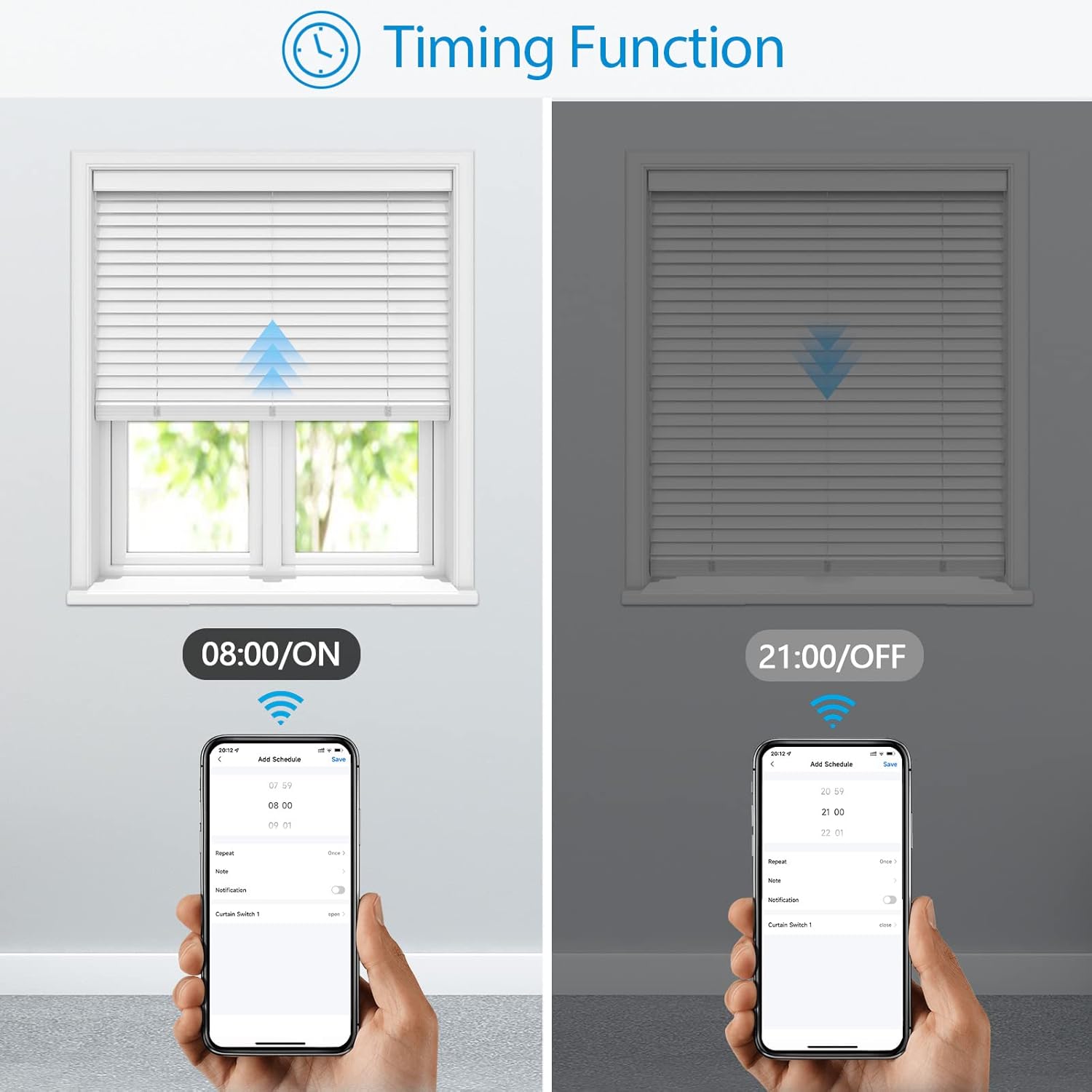
Utilize the timing function in the Smart Life/Tuya app to automate your curtains or shutters. Set specific schedules for them to open or close at desired times, enhancing your daily routine.

This image illustrates the timing function within the Smart Life app, where users can program specific times for their curtains to open (e.g., 08:00 AM) and close (e.g., 09:00 PM) automatically, enhancing home automation.
Backlight Function
The LED backlight on the switch can be programmed to be on or off, or you can set a specific schedule for its operation, directly from the Smart Life/Tuya app. This feature is useful for bedrooms or areas where light sensitivity is a concern.

This image shows the programmable backlight feature of the LoraTap switch. It depicts the switch with its LED backlight both 'ON' (green) and 'OFF' (dark), demonstrating how users can control the illumination, which can be useful for bedrooms.
Maintenance
- Cleaning: Clean the surface of the switch with a soft, dry cloth. Do not use abrasive cleaners, solvents, or harsh chemicals, as these may damage the finish.
- Moisture: Ensure the switch is kept dry and away from direct moisture or excessive humidity to prevent electrical hazards and damage.
Troubleshooting
Switch not responding:
- Check if the main power supply to the switch is on at the circuit breaker.
- Ensure all wiring connections are correct and secure as per the installation guide.
- Try restarting the switch by turning off and then on the power at the circuit breaker.
Cannot connect to Wi-Fi:
- Ensure your Wi-Fi network is 2.4GHz. This device does not support 5GHz Wi-Fi networks.
- Verify that you are entering the correct Wi-Fi password.
- Move the switch closer to your Wi-Fi router to improve signal strength.
- Reset the switch to pairing mode (refer to app instructions) and attempt to connect again.
Voice control not working:
- Ensure your Smart Life/Tuya account is correctly linked to your voice assistant application (Amazon Alexa, Google Home, Apple HomeKit).
- Check your internet connection and ensure your smart speaker is online.
- Verify that the device name in the Smart Life/Tuya app matches the name you are using in your voice commands.
Motor not moving fully:
- Adjust the motor working time in the Smart Life/Tuya app (from 0s to 120s) to precisely match the full travel time of your curtain or shutter.
Specifications
| Feature | Detail |
|---|---|
| Model Number | SC400W-EU-V6-BLK-SLT |
| Brand | LoraTap |
| Control Mode | ON-OFF |
| Current Rating | 2 Ampere |
| Contact Type | Normally Open |
| Switch Type | Roller Shutter |
| Terminal | Button |
| Material | Plastic |
| Actuator Type | Touch |
| Control Method | Remote |
| Package Dimensions | 10.5 x 10.3 x 4.4 cm |
| Item Weight | 180 g |
| First Available Date | August 21, 2022 |
| Manufacturer | Smart LT |
| Number of Units | 1.0 |
Warranty Information
LoraTap products typically come with a standard manufacturer's warranty. For specific warranty terms, conditions, and duration, please refer to the product packaging or visit the official LoraTap website. It is advisable to retain your purchase receipt as proof of purchase for any warranty claims.
Customer Support
If you encounter any issues, have questions not covered in this manual, or require further assistance, please contact LoraTap customer support.
For the most up-to-date contact information, including email, phone, or online support channels, please visit the official LoraTap website or the retailer's support page where you purchased the product.


