Introduction
The Two Notes ReVolt Bass is an all-analog bass amp simulator pedal designed to provide a wide range of bass tones for various applications, from live performance to studio recording. It features a 12AX7 preamp tube operating at 200V, ensuring a rich and dynamic sound. The pedal offers three distinct channels: Classic Clean, Vintage Dirt, and Modern Drive, allowing bassists to achieve everything from pristine clean tones to aggressive overdriven sounds. An integrated Dry/Wet blend control provides additional tone-shaping capabilities, and an analog speaker simulation ensures a polished, miked-cab sound. The ReVolt Bass is equipped with versatile connectivity options, including a 4-cable mode, an FX loop, and MIDI I/O, making it easy to integrate into any bass rig.
Setup
This section details the various ways to connect your ReVolt Bass pedal to your amplifier, audio interface, or other effects units.
Rear Panel Connections

Image: Rear panel of the ReVolt Bass pedal. This view displays all the input and output connections, including IN, SEND, RETURN, OUT, MIDI IN, MIDI OUT, BALANCED OUT, and the 12V DC power input.
- IN: Connect your bass guitar here.
- SEND/RETURN: These jacks form the effects loop. Connect your external effects pedals here. The SEND jack outputs the signal to your effects, and the RETURN jack receives the processed signal back into the ReVolt Bass.
- OUT: This is the main output to your amplifier's input or another pedal.
- MIDI IN/OUT: Use these ports to connect the ReVolt Bass to MIDI controllers or other MIDI-compatible devices for remote control and preset management.
- BALANCED OUT: An XLR output for direct connection to a mixing console or audio interface, providing a balanced signal for studio or live sound applications. Includes a GND LIFT switch to eliminate ground hum.
- 12V DC 600mA: Connect the included 12V DC power supply here. Ensure to use only the specified power adapter.
Front Panel Connections and Switches

Image: Front panel of the ReVolt Bass pedal. This view highlights the 4-Cable Method switch, Cab Sim switch, Aux In jack, and Headphone Out jack.
- 4-CABLE METHOD Switch: This switch enables or disables the 4-cable method, allowing you to integrate the ReVolt Bass into your amplifier's effects loop while still utilizing its preamp section.
- CAB SIM Switch: Toggles the analog cabinet simulation on or off for the main output. When engaged, it provides a miked-cab sound, useful for direct recording or connecting to a PA system.
- AUX IN: A 3.5mm stereo input for connecting external audio sources like an MP3 player or smartphone, allowing you to play along with backing tracks.
- Headphone Out: A 3.5mm stereo output for silent practice with headphones.
Operating Instructions
The ReVolt Bass features three distinct channels, each with its own set of controls, providing a wide palette of bass tones.
Top Panel Controls and Footswitches
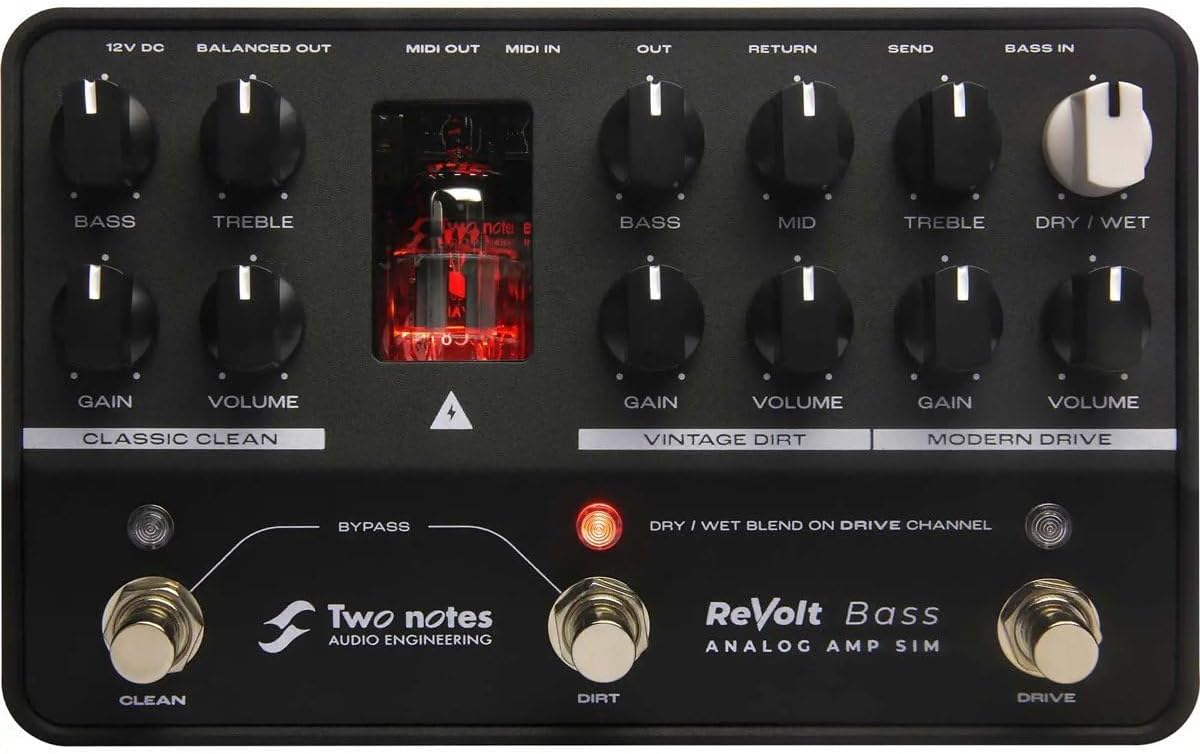
Image: Top panel of the ReVolt Bass pedal. This detailed view shows the layout of all control knobs (Gain, Volume, Bass, Mid, Treble, Dry/Wet) and footswitches (Clean, Dirt, Drive, Bypass). The 12AX7 preamp tube is also visible.
Channels and Controls:
- CLASSIC CLEAN Channel:
- GAIN: Adjusts the input gain for the clean channel, controlling the amount of signal sent to the preamp tube.
- VOLUME: Sets the output volume for the clean channel.
- BASS: Controls the low-frequency response of the clean channel.
- TREBLE: Controls the high-frequency response of the clean channel.
- VINTAGE DIRT Channel:
- GAIN: Adjusts the amount of overdrive/distortion for the vintage dirt channel.
- VOLUME: Sets the output volume for the vintage dirt channel.
- BASS: Controls the low-frequency response of the vintage dirt channel.
- MID: Controls the mid-frequency response of the vintage dirt channel.
- TREBLE: Controls the high-frequency response of the vintage dirt channel.
- MODERN DRIVE Channel:
- GAIN: Adjusts the amount of high-gain distortion for the modern drive channel.
- VOLUME: Sets the output volume for the modern drive channel.
- DRY / WET Blend on Drive Channel: Blends the dry (unprocessed) signal with the wet (driven) signal for the modern drive channel, allowing for greater clarity and low-end retention.
Footswitches:
- CLEAN Footswitch: Activates the Classic Clean channel.
- DIRT Footswitch: Activates the Vintage Dirt channel.
- DRIVE Footswitch: Activates the Modern Drive channel.
- BYPASS Footswitch: Engages or disengages the ReVolt Bass pedal, allowing the signal to pass through unprocessed when bypassed.
Maintenance
Proper maintenance ensures the longevity and optimal performance of your ReVolt Bass pedal.
Tube Replacement

Image: Bottom panel of the ReVolt Bass pedal. This view shows the product's serial number area and a crucial warning regarding tube replacement.
The ReVolt Bass utilizes a 12AX7 preamp tube, which may require replacement over time due to wear. When replacing the tube:
- UNPLUG THE PRODUCT: Always disconnect the power supply from the ReVolt Bass before attempting any maintenance, especially tube replacement.
- Allow the unit to cool down if it has been in operation.
- Refer to the official Two Notes website or the detailed online manual for specific instructions on how to safely access and replace the 12AX7 tube. Incorrect handling can damage the unit or cause injury.
For more detailed instructions on tube replacement, please visit the official Two Notes ReVolt product page: revolt.two-notes.com
General Cleaning
To clean the exterior of the pedal, use a soft, dry cloth. Avoid using abrasive cleaners, solvents, or excessive moisture, as these can damage the finish or internal components.
Troubleshooting
This section provides solutions to common issues you might encounter with your ReVolt Bass pedal.
- No Sound Output:
- Ensure the power supply is correctly connected and the pedal is receiving power.
- Check all audio cables (input, output, FX loop) for secure connections and proper functionality.
- Verify that the volume controls on the pedal, your bass, and your amplifier are turned up.
- If using the FX loop, ensure all pedals in the loop are powered and functioning correctly. Try bypassing the FX loop to isolate the issue.
- Distorted or Unwanted Noise:
- Check for proper grounding. Use the GND LIFT switch on the BALANCED OUT if experiencing hum.
- Ensure the correct power supply is used (12V DC, 600mA). Incorrect power can cause noise.
- Reduce the GAIN settings on the active channel if the distortion is unintentional.
- Test with different cables to rule out faulty cabling.
- MIDI Control Issues:
- Verify MIDI cable connections.
- Ensure the MIDI controller is sending the correct messages (Program Change, Control Change) on the appropriate MIDI channel.
- Consult the ReVolt Bass advanced manual (available online) for detailed MIDI implementation.
If you continue to experience issues, please refer to the comprehensive online resources provided by Two Notes or contact their customer support.
Specifications
| Feature | Detail |
|---|---|
| Model Number | TNREVOLTB |
| Item Weight | 1.86 pounds (845 Grams) |
| Product Dimensions | 8.8 x 8.4 x 3.2 inches |
| Color | Black |
| Signal Format | Analog |
| Output Wattage | 15 Watts (Max) |
| Power Source | Corded Electric |
| Voltage | 12 Volts |
| Wattage | 6 watts (Power Consumption) |
| Tube Type | 12AX7 Preamp Tube |
| Channels | 3 (Classic Clean, Vintage Dirt, Modern Drive) |
| Connectivity | MIDI I/O, FX Loop, Balanced XLR Out, Aux In, Headphone Out |
Warranty and Support
For information regarding product warranty, technical support, and additional resources, please visit the official Two Notes website.
Official Product Page: revolt.two-notes.com
General Support: www.two-notes.com/support
You can also find frequently asked questions, firmware updates, and detailed manuals on their support pages.


