
Introduction
This manual provides detailed instructions for the setup, operation, maintenance, and troubleshooting of your RUNMUS K1 Wired Over Ear Gaming Headphone. Please read this manual thoroughly before using the product to ensure optimal performance and longevity.
What's in the Box
- RUNMUS K1 Gaming Headphone
- User Manual
Product Features
The RUNMUS K1 Gaming Headphone is designed to enhance your gaming experience with its advanced audio and communication capabilities.
3D Surround Bass Sound
Equipped with advanced 50MM magnetic drivers, the headphones deliver immersive bass-boosted sound, allowing you to clearly hear in-game audio cues like footsteps and distant gunshots for a competitive edge.

Image: The RUNMUS K1 Gaming Headphone showcasing its 3D surround bass capabilities, with visual effects indicating sound direction and depth.

Image: An exploded view of the RUNMUS K1 headphone's ear cup, highlighting the internal 50mm magnetic driver responsible for delivering clear and accurate sound.
RGB Lighting & Adjustable Noise-Isolating Microphone
The headphones feature colorful RGB lighting for an enhanced aesthetic. The microphone is designed for noise isolation, offering 360° voice pick-up and 160° flexibility for precise positioning. It can be rotated 360° and adjusted 120° to effectively reduce ambient noise and ensure clear communication.

Image: A close-up of the RUNMUS K1 headphone's microphone, demonstrating its 160-degree flexibility and 360-degree voice pick-up capability, along with RGB lighting on the earcups.

Image: A detailed view of the RUNMUS K1 headphone's microphone, illustrating its 360-degree rotation and 120-degree adjustment range for optimal positioning and noise cancellation.
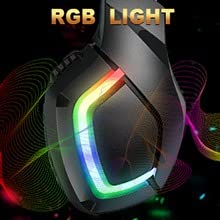
Image: A close-up of the RUNMUS K1 headphone's earcup, showcasing the vibrant RGB lighting effect.
Comfortable Design
The K1 headphones feature breathable protein over-ear pads and a double retractable head beam, ensuring comfort during extended use. The design accommodates various head shapes without causing discomfort.

Image: A visual breakdown of the RUNMUS K1 headphone's comfort features, including breathable mesh earmuffs, soft ear cushions, an adjustable headband, and a cozy headband design.
Durable Construction
Constructed with durable materials and an anti-winding braided USB cable, the headphones are built to withstand frequent use and resist wear and tear.

Image: A diagram illustrating the durable material construction of the RUNMUS K1 headphone, highlighting its robust layers designed for longevity.
Setup
- Connect Audio: Plug the 3.5mm audio jack into the corresponding port on your device (PC, PS4, PS5, Xbox, Laptop, Mobile, Tablet, etc.).
- Power RGB Lighting: Connect the USB cable to a USB port on your device or a power bank to activate the RGB lighting. Note that the RGB lighting requires USB power and will not illuminate if only the 3.5mm jack is connected to a mobile device without a separate USB power source.
- Xbox Compatibility: For older Xbox controllers, an additional Microsoft adapter (not included) may be required for full functionality.

Image: The RUNMUS K1 headphone demonstrating wide compatibility, shown connected to various gaming platforms and devices including Xbox, Nintendo Switch, PlayStation consoles, laptops, PCs, and mobile phones.

Image: A user wearing the RUNMUS K1 gaming headphones, highlighting the comfortable fit and the accessible in-line controls for volume and microphone.
Operating Instructions
Volume Control
Adjust the volume using the in-line volume control wheel located on the headphone cable.
Microphone Mute
Use the in-line switch to mute or unmute the microphone as needed.
Microphone Adjustment
The microphone is flexible and can be bent up to 160 degrees. It can also be rotated 360 degrees and adjusted 120 degrees to position it optimally for voice pick-up and noise reduction.
Compatibility
The RUNMUS K1 Gaming Headphone is compatible with a wide range of devices:
- PC
- PS4
- PS5
- Xbox (older controllers may require an adapter)
- Mac
- Laptop
- PSP
- Tablet
- iPad
- Mobile Phones (iOS, Android)
- All Wired Jack Devices
Maintenance
- Cleaning: Use a soft, dry cloth to clean the headphones. Do not use abrasive cleaners or solvents.
- Earpads: Periodically check the earpads for wear and tear. Replace if necessary to maintain comfort and sound isolation.
- Storage: Store the headphones in a cool, dry place away from direct sunlight and extreme temperatures. Avoid tangling the cable.
Troubleshooting
No Sound
- Ensure the 3.5mm audio jack is fully inserted into your device's audio port.
- Check the in-line volume control and ensure it is not set to minimum.
- Verify your device's audio output settings are configured to use the connected headphones.
- Test the headphones with another device to rule out a device-specific issue.
Microphone Not Working
- Ensure the microphone mute switch on the in-line control is in the 'unmute' position.
- Check your device's input settings to ensure the headphone microphone is selected as the default input device.
- For Xbox, confirm if a Microsoft adapter is needed and properly connected.
- Test the microphone with another application or device.
RGB Lights Not On
- Ensure the USB cable is securely connected to a powered USB port on your device or a power bank.
- The RGB lighting requires a separate USB power source and will not function solely through the 3.5mm audio jack.
Specifications
| Brand | RUNMUS GAMING |
| Model Name | K1 (RGB variant) |
| Connectivity Technology | Wired (3.5mm Jack + USB for RGB) |
| Ear Placement | Over Ear |
| Noise Control | Active Noise Cancellation (Microphone) |
| Control Type | Volume Control, Microphone Mute |
| Compatible Devices | Laptops, Mobile Phones, Tablets, PC, PS4, PS5, Xbox, iOS, Android |
| Microphone Features | Noise Cancelling, 360° Voice Pick-up, 160° Flexible, 120° Adjustable |
| Special Features | RGB Color LED, Lightweight, Comfortable Earpads, Durable Braided Cable |
| Item Weight | 410 Grams |
Warranty and Support
Warranty Information
The RUNMUS K1 Gaming Headphone comes with a 6-month warranty from the date of purchase. This warranty covers manufacturing defects. Please retain your proof of purchase for warranty claims.
Customer Support
For technical assistance, warranty claims, or any product-related inquiries, please contact RUNMUS GAMING customer support through the retailer where the product was purchased or visit the official RUNMUS GAMING website for contact information.