1. Introduction
This manual provides detailed instructions for the safe and efficient operation of your NANKADF 30V 10A DC Variable Bench Power Supply. Please read this manual thoroughly before use and retain it for future reference. This device is designed for laboratory, educational, and hobbyist applications requiring a stable and adjustable DC power source.
2. Product Overview
The NANKADF DC Variable Bench Power Supply is a high-precision instrument offering adjustable voltage and current output. It features a clear 4-digit LED display, an encoder adjustment knob for precise control, an output enable/disable button, overcurrent protection (OCP), and a convenient USB fast charging port.

Figure 1: NANKADF 30V 10A DC Variable Bench Power Supply
2.1 Front Panel Features
- 4-Digit LED Display: Shows real-time voltage (V), current (A), and wattage (W) with high accuracy. Includes indicators for Constant Voltage (C.V.), Constant Current (C.C.), Overcurrent Protection (OCP), and Output (OUT).
- Output Button: Enables or disables the power output to the terminals.
- USB Quick Charge Port: Provides 18W fast charging for compatible devices.
- Voltage Adjustment Knob: Encoder knob for precise voltage setting. Press to select digit, turn to adjust value.
- Current Adjustment Knob: Encoder knob for precise current setting. Press to select digit, turn to adjust value. Also used for OCP ON/OFF.
- Output Terminals: Red (+) for positive, Black (-) for negative, Green for ground.
2.2 Rear Panel Features
- Cooling Fan: Automatically activates to maintain optimal operating temperature.
- AC Power Input: Connects to the main power supply.
- Fuse Box: Contains the protective fuse for the unit.
- Voltage Selector Switch: Allows selection between 115V and 230V input voltage.

Figure 2: Front and Rear Panel Features with labeled components
3. Setup
- Unpacking: Carefully remove the power supply and all accessories from the packaging.
- Placement: Place the unit on a stable, level surface with adequate ventilation around the cooling fan.
- Input Voltage Selection: Before connecting the power cable, verify the voltage selector switch on the rear panel is set to the correct input voltage for your region (115V or 230V). Incorrect setting can damage the unit.

Figure 3: Rear panel showing the voltage selector switch
- Power Connection: Connect the provided power cable to the AC power input on the rear panel and then to a suitable power outlet.
- Output Cable Connection: Connect the provided output cables (red for positive, black for negative) to the corresponding output terminals on the front panel. Ensure connections are secure.
4. Operation
4.1 Power On/Off
Press the POWER button on the front panel to turn the unit on or off. The LED display will illuminate upon power-on.
4.2 Adjusting Voltage and Current (Encoder Knob)
The NANKADF power supply features high-precision encoder knobs for setting voltage and current. This allows for fine adjustments to individual digits.
- Select Digit: Press the VOLTAGE knob to cycle through the digits of the voltage display (e.g., tens, units, tenths, hundredths). The selected digit will blink.
- Adjust Value: Turn the VOLTAGE knob clockwise to increase the value of the selected digit, or counter-clockwise to decrease it.
- Repeat steps 1 and 2 for the CURRENT knob to set the desired amperage.

Figure 4: Using the encoder adjustment knob for precise settings
4.3 Output Enable/Disable
The OUTPUT button controls the power delivery to your connected load. It is recommended to set your desired voltage and current before enabling the output to prevent potential damage to sensitive components.
- Press the OUTPUT button once to enable the power output. The 'OUT' indicator on the display will light up.
- Press the OUTPUT button again to disable the power output. The 'OUT' indicator will turn off.

Figure 5: The Output button for controlling power delivery
4.4 Overcurrent Protection (OCP)
The OCP function protects both the power supply and the connected load from damage due to excessive current. When OCP is active and an overcurrent condition occurs, the power supply will automatically stop output and sound an alarm.
- Enable/Disable OCP: Press and hold the CURRENT knob for approximately 3 seconds to toggle the OCP function on or off. The 'OCP' indicator on the display will show its status.
- When OCP is triggered, the 'OCP' indicator will flash, and a buzzer will sound. To reset, disable the output, resolve the overcurrent condition, and then re-enable the output.

Figure 6: Overcurrent Protection (OCP) indicator and function
4.5 USB Fast Charging
The integrated 18W USB fast charging port allows you to charge compatible devices directly from the power supply.
- Connect your USB-compatible device to the USB Quick Charge port on the front panel.
- The power supply will automatically detect and provide fast charging to your device.

Figure 7: USB Quick Charge Port for device charging
4.6 Video Demonstration of Key Features
The following video demonstrates the encoder adjustment, output enable/disable, and overcurrent protection features of the NANKADF DC power supply.
Video 1: NANKADF DC Power Supply Features Overview
5. Maintenance
- Cleaning: Regularly clean the exterior of the unit with a soft, dry cloth. Do not use abrasive cleaners or solvents.
- Ventilation: Ensure the cooling fan and ventilation openings are free from dust and obstructions to prevent overheating.
- Fuse Replacement: If the unit does not power on, check the fuse located in the fuse box on the rear panel. Replace with a fuse of the same type and rating if necessary.
6. Troubleshooting
| Problem | Possible Cause | Solution |
|---|---|---|
| Unit does not power on | No power from outlet; Blown fuse; Incorrect voltage selector setting | Check power outlet; Replace fuse; Verify voltage selector switch is correct. |
| No output voltage/current | Output button is off; OCP triggered; Loose connections | Press Output button; Reset OCP; Check all cable connections. |
| OCP alarm sounds | Overcurrent condition detected | Disable output, reduce load current, then re-enable output. |
| Inaccurate readings | Calibration needed; Faulty connections | Contact NANKADF support for calibration; Ensure secure connections. |
7. Specifications
- Model: 30V 10A
- Output Voltage: 0-30V DC (Adjustable)
- Output Current: 0-10A DC (Adjustable)
- Output Wattage: 300 Watts
- Display: 4-digit LED (0.01V, 0.001A accuracy)
- Modes: Constant Voltage (C.V.), Constant Current (C.C.)
- Protection: Overcurrent Protection (OCP)
- USB Port: 18W Quick Charge
- Cooling: Intelligent Fan Control
- Dimensions: 7.51 x 3.56 x 5.81 inches (19.08 x 9.04 x 14.76 cm)
- Item Weight: 2.47 pounds (1.12 kg)
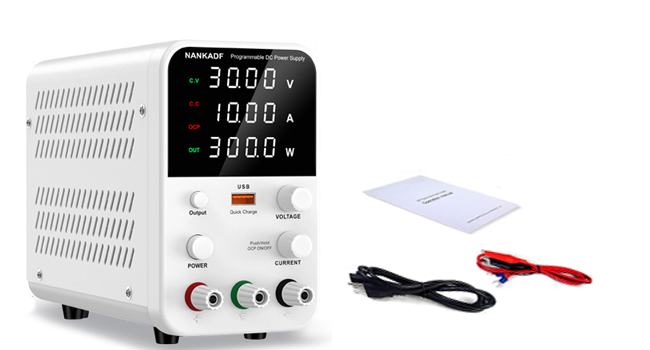
Figure 8: Product dimensions
8. What's in the Box
- 1 x NANKADF DC Power Supply
- 1 x Power Cable
- 1 x Output Cable (with alligator clips)
- 1 x User Manual
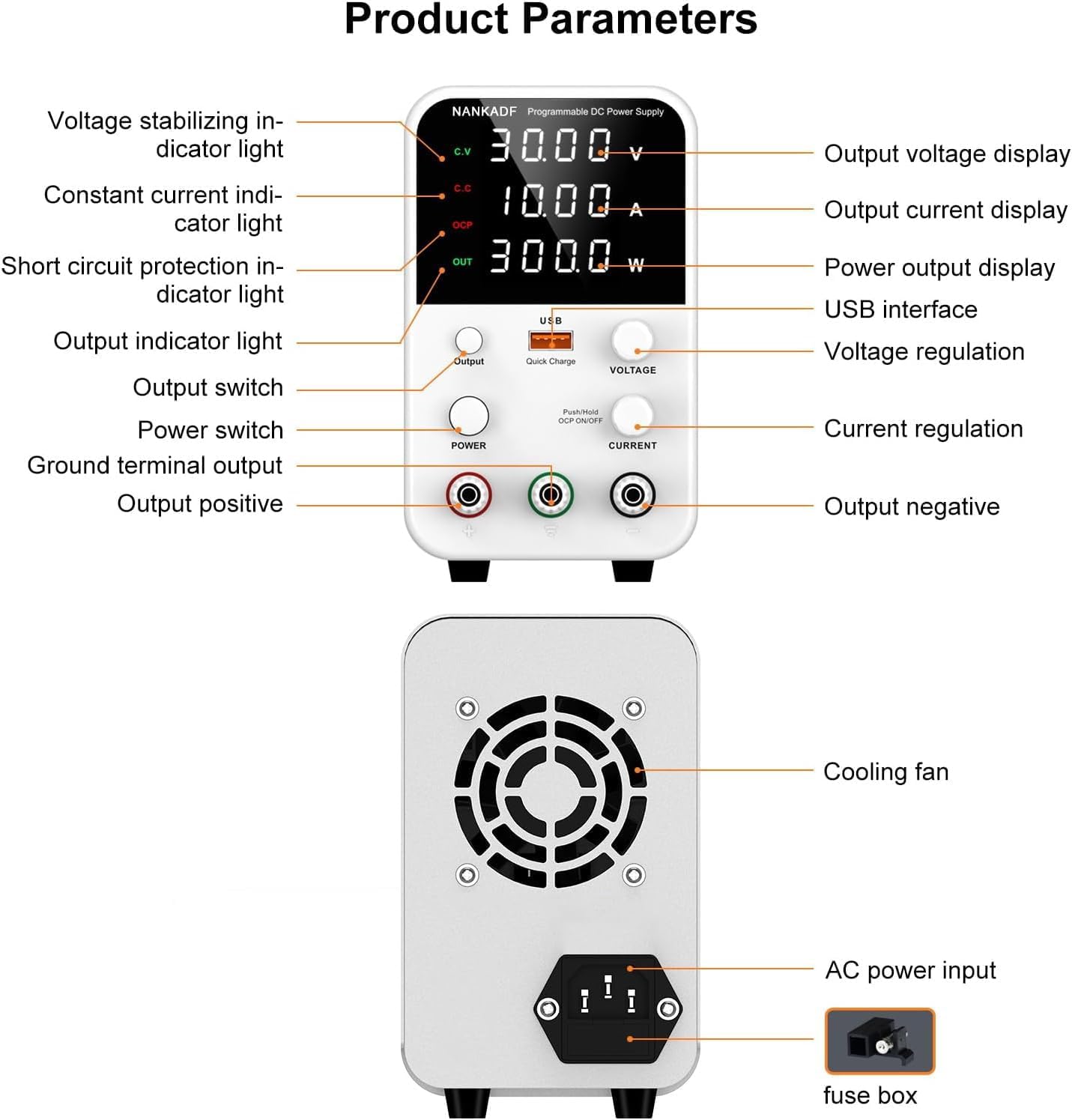
Figure 9: Contents included in the product package
9. Warranty and Support
For warranty information or technical support, please refer to the contact details provided with your purchase or visit the official NANKADF website. Keep your purchase receipt as proof of purchase for any warranty claims.


