
Introduction
This manual provides instructions for the ZdalaMit 219863500 replacement remote control, designed for use with various Epson projector models. This remote offers direct functionality without the need for programming, ensuring a straightforward user experience.
Please read this manual thoroughly to understand the remote's features and ensure proper operation.
Setup
1. Battery Installation
The remote control requires two (2) 1.5V AA Alkaline batteries (not included). Follow these steps to install them:
- Locate the battery compartment cover on the back of the remote control.
- Slide the cover downwards or press the latch to open it.
- Insert two AA batteries, ensuring the positive (+) and negative (-) terminals align correctly with the markings inside the compartment.
- Replace the battery compartment cover, sliding it back into place until it clicks securely.
Note: Ensure batteries are inserted with correct polarity to prevent damage to the remote control.
2. Initial Use
No programming is required for this replacement remote control. Once batteries are installed, it is ready for immediate use with compatible Epson projectors.

Image 1: Front view of the ZdalaMit 219863500 replacement remote control, showing all buttons and their labels. This image illustrates the overall layout and design of the remote.
Operating Instructions
This section details the functions of the buttons on your ZdalaMit 219863500 remote control.
| Button | Function |
|---|---|
| Power (⏻) | Turns the projector on or off. |
| HDMI, Computer, USB, LAN | Selects the corresponding input source for the projector. |
| Source Search | Initiates an automatic search for active input sources. |
| 1-9, Num, Auto 0/All, ID | Numeric input and specific functions depending on projector model (e.g., selecting channels, auto-adjustment, or projector ID). |
| Menu | Opens the projector's on-screen menu. |
| Navigation Arrows (▲, ▼, ◄, ►) | Navigates through menu options and adjusts settings. |
| Enter (↵) | Confirms selections in the menu. |
| Esc | Exits the current menu or cancels an operation. |
| User | Activates a user-defined function (if configured on the projector). |
| Default | Resets certain settings to their factory defaults. |
| Color Mode | Cycles through available color modes (e.g., Dynamic, Cinema, Presentation). |
| E-Zoom (+/-) | Digitally zooms in or out on the projected image. |
| Volume (+/-) | Adjusts the audio output volume. |
| Aspect | Changes the aspect ratio of the projected image. |
| A/V Mute | Temporarily mutes audio and blanks the video output. |
| Split | Activates the split-screen function (if supported by the projector). |
| Freeze | Pauses the current projected image. |
| Home (⌂) | Returns to the projector's home screen or main menu. |
| Projector | A dedicated button for projector-specific functions, often used to switch between multiple projectors or control specific projector settings. |

Image 2: Angled view of the ZdalaMit 219863500 remote control, highlighting the ergonomic design and button placement for ease of use.
Maintenance
Battery Replacement
Replace batteries when the remote's response becomes sluggish or stops working. Always replace both batteries simultaneously with new 1.5V AA Alkaline batteries. Do not mix old and new batteries, or different types of batteries.
Cleaning
To clean the remote control, gently wipe its surface with a soft, dry cloth. For stubborn dirt, slightly dampen the cloth with water. Avoid using harsh chemicals, abrasive cleaners, or solvents, as these can damage the remote's finish or internal components.
Troubleshooting
- Remote not responding:
- Ensure batteries are correctly installed with the proper polarity.
- Replace old batteries with new 1.5V AA Alkaline batteries.
- Check for any obstructions between the remote and the projector's IR receiver.
- Ensure you are within the effective operating range of the projector.
- Intermittent functionality:
- This may indicate low battery power. Replace batteries.
- Ensure a clear line of sight to the projector.
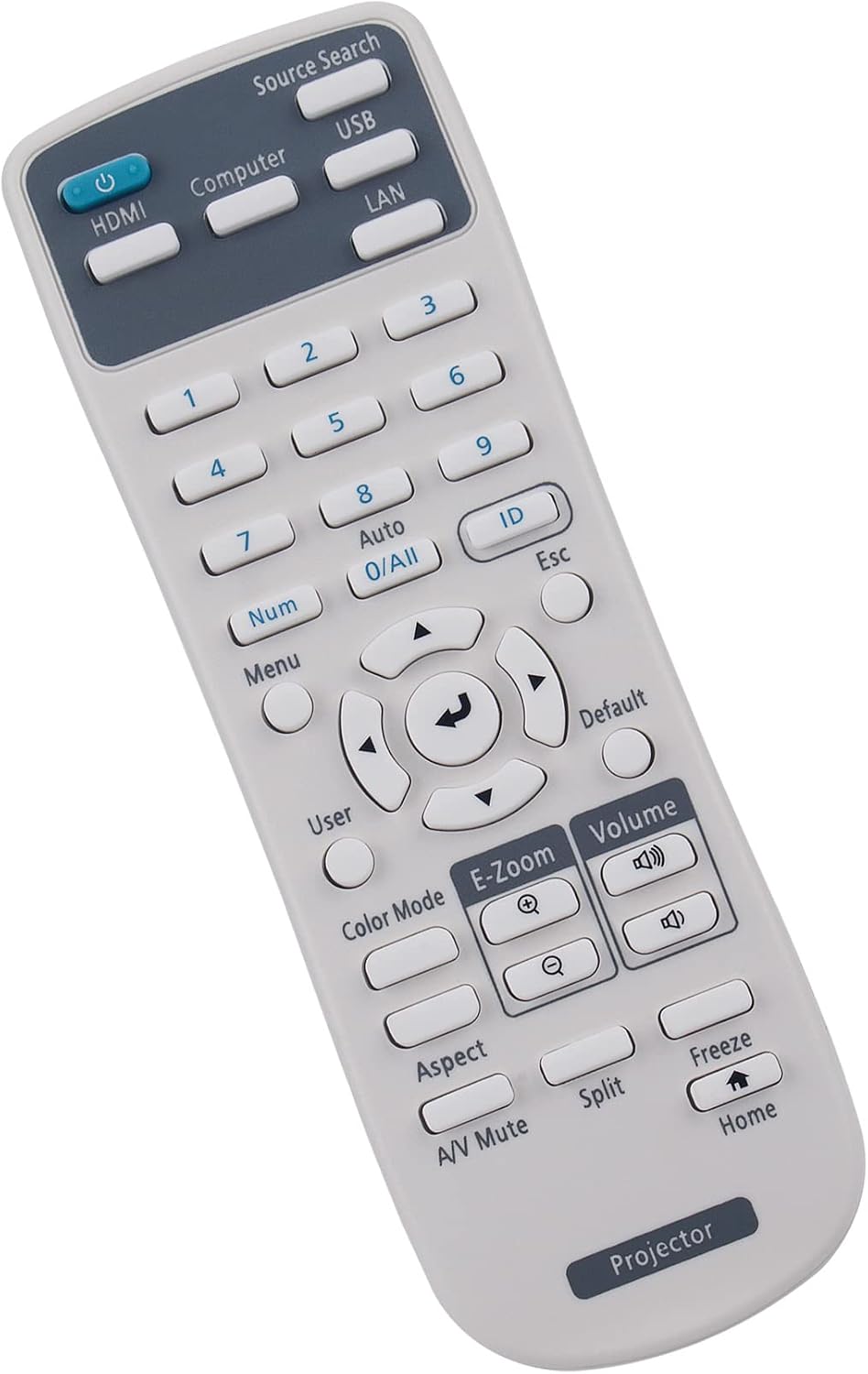
Image 3: Side view of the ZdalaMit 219863500 remote control, illustrating its slim profile and button depth.
Specifications
- Model: 219863500
- Brand: ZdalaMit
- Power Supply: 2 x 1.5V AA Alkaline Batteries
- Product Dimensions: 5.76 x 1.99 x 0.55 inches
- Item Weight: 2 ounces
- Compatible Devices: Various Epson Projector Models (e.g., EX3280, EX5280, EX9230, VS260, EB-992F, EB-982W, EB-972, EB-118, EB-W49, EB-X49, EB-E20, EB-FH52, EB-W52, EB-W51, EB-X51, EB-E10, EB-FH06, EB-W06, EB-X06, EB-E01, EB-X500, EB-E500, EB-1485Fi, EB-1480Fi, EB-1481Fi, EB-735Fi, EB-750F, EB-755F, EB-735F, EB-725Wi, EB-725W, EB-720, EB-L200F, EB-L200W, EB-L200X, V11H994020, EH-TW750, EH-TW740, EH-TW710, Pro EX7280, Pro EX9240, Powerlite EB-L200SW, Powerlite EB-L200SX)
Warranty and Support
For any queries or assistance regarding your ZdalaMit 219863500 replacement remote control, please contact the seller or manufacturer directly. Refer to your purchase documentation for specific warranty information and contact details.
We are committed to providing support for our products.