
1. Important Safety Instructions
Please read all instructions carefully before operating the appliance. Retain this manual for future reference.
- Ensure the ice maker is properly grounded.
- Do not operate the appliance with a damaged cord or plug.
- Keep ventilation openings clear of obstruction.
- Do not store explosive substances such as aerosol cans with a flammable propellant in this appliance.
- Only connect to a potable water supply.
- Unplug the appliance before cleaning or performing maintenance.
2. Product Overview
The COWSAR Commercial Ice Maker Machine is designed for efficient and quiet ice production, ideal for various commercial and home settings. It produces soft, crunchy nugget ice.

Figure 2.1: Front view of the COWSAR Commercial Ice Maker Machine, showcasing its stainless steel finish and compact design.
Key Features:
- Nugget Ice Production: Capable of producing up to 66 pounds of nugget ice per day.
- Rapid Ice Making: Produces ice cubes in just 10-15 minutes per cycle.
- Smart LCD Control Panel: Allows precise control over the ice-making process with a clear display.
- Self-Cleaning Function: One-touch self-cleaning for easy maintenance.
- Water Filtration: Equipped with a water filter in the inlet pipe for pure ice.
- Excellent Insulation: Integrated cyclopentane foam insulation and stainless steel casing keep ice frozen for 6-8 hours.
- Spacious Storage: Features double ice baskets for ample ice storage.

Figure 2.2: Internal view showing the two spacious ice baskets and the powerful compressor for rapid ice production.

Figure 2.3: Illustration highlighting the soft, crunchy, and good-tasting qualities of nugget ice produced by the machine.
3. Setup & Installation
Proper installation is crucial for optimal performance and longevity of your ice maker. The unit can be used freestanding or installed under a counter.
Unpacking:
- Carefully remove all packaging materials.
- Inspect the unit for any shipping damage.
- Ensure all accessories are present: ice scoop, ice basket, water inlet hose, water outer hose, and drain pump (if applicable).
Video 3.1: Overview of the Nugget Ice Commercial Ice Maker Machine, including its components and initial setup considerations.
Placement:
- Place the ice maker on a flat, stable surface.
- Allow adequate clearance around the unit for proper ventilation (especially at the back and sides).
- Avoid direct sunlight or heat sources.
- The unit can be installed as a freestanding appliance or built-in under a counter.

Figure 3.1: Examples of the ice maker installed as a freestanding unit and integrated under a kitchen counter.
Water Connection:
- Connect the water inlet hose to a potable water supply.
- Ensure all connections are secure to prevent leaks.
- Connect the drain hose to a suitable drainage point.

Figure 3.2: Diagram illustrating the water inlet port, water outlet, and drainage hole for proper installation.
4. Operation
Operating your COWSAR ice maker is straightforward thanks to its intuitive LCD control panel.
Control Panel:
The smart LCD panel provides access to various functions and displays important information.

Figure 4.1: Detailed view of the LCD control panel, showing buttons for Timer, Clean, On/Off, and temperature/status indicators.
Initial Startup:
- After connecting water and power, press the "ON/OFF" button to start the unit.
- The machine will begin its ice-making cycle, typically producing ice within 10-15 minutes.
Timer Function:
Utilize the 24-hour timer function to schedule ice production according to your needs.
- Press the "TIMER" button to set a delayed start or stop time.
- Adjust the time using the "+" and "-" buttons.

Figure 4.2: Visual representation of the 24-hour timer function, allowing users to schedule ice production for convenience.
Video 4.1: Demonstration of the COWSAR Commercial Nugget Ice Maker Machine's operation, including ice production and features.
5. Maintenance & Cleaning
Regular cleaning and maintenance ensure hygienic ice production and extend the lifespan of your appliance.
Self-Cleaning Function:
- The ice maker features a one-touch self-cleaning function.
- To activate, press and hold the "CLEAN" button on the control panel for 5 seconds.
- The machine will automatically run a cleaning cycle.
Water Filter:
The built-in water filter helps remove impurities. Regularly check and replace the filter as needed to ensure optimal water quality and ice purity.
Drainage:
Ensure the drainage system is clear and free of blockages. Periodically check the drain hose for kinks or debris.
6. Troubleshooting
If you encounter issues with your ice maker, refer to the following common troubleshooting steps:
| Problem | Possible Cause | Solution |
|---|---|---|
| No ice production | No water supply, clogged filter, power issue | Check water connection, replace filter, ensure power is connected |
| Ice tastes bad | Dirty water system, old water filter | Run self-cleaning cycle, replace water filter |
| Machine is noisy | Unit not level, internal component issue | Adjust leveling feet, contact customer support if noise persists |
| Ice melting quickly | Poor insulation, high ambient temperature | Ensure proper ventilation, avoid placing in hot environments |
For issues not listed here, please contact COWSAR customer support.
7. Specifications
| Specification | Value |
|---|---|
| Brand | COWSAR |
| Model Number | Z3912 |
| Ice Production Capacity | Up to 66 lbs / 24 hours |
| Ice Storage Capacity | 18 lbs |
| Ice Making Cycle Time | 10-15 minutes |
| Product Dimensions (D x W x H) | 18.62"D x 17.17"W x 35.83"H |
| Wattage | 183 watts |
| Country of Origin | China |
| Included Accessories | Ice Scoop, Ice Basket |
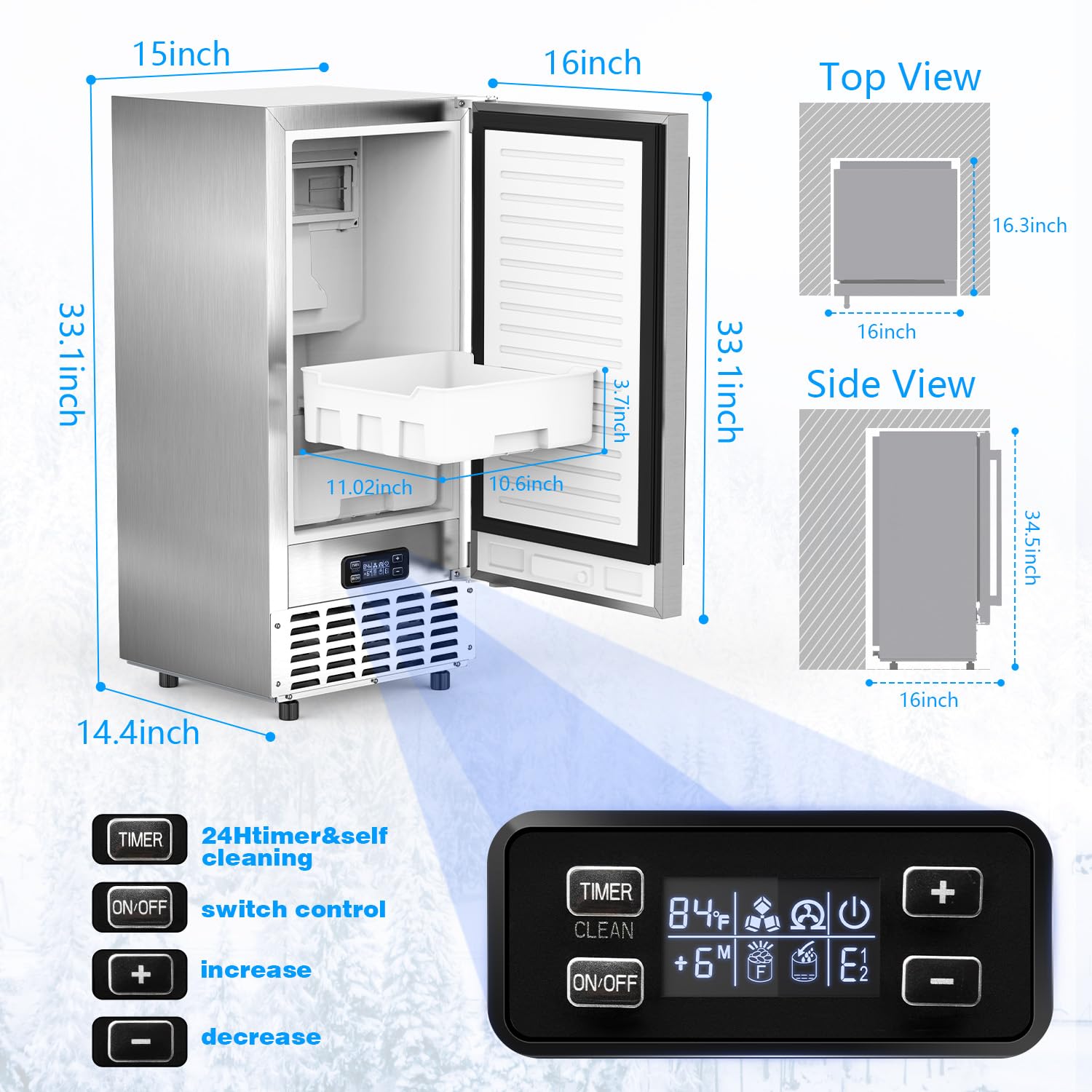
Figure 7.1: Detailed dimensions of the COWSAR Commercial Ice Maker Machine.
8. Warranty & Support
For warranty information and customer support, please refer to the documentation included with your product or visit the official COWSAR website. Keep your purchase receipt for warranty claims.
Contact Information:
- Manufacturer: COWSAR
- For support, please visit the COWSAR store on Amazon: COWSAR Store