
1. Introduction
This manual provides detailed instructions for the installation, operation, and maintenance of your ASUS TUF GT301 NEZUKO Mid-Tower Compact Case Demon Slayer Edition. Please read this manual thoroughly before beginning assembly or use to ensure proper functionality and safety. Keep this manual for future reference.
2. Product Features
- Stylish Design: Features a perforated honeycomb front panel for enhanced airflow and a tempered-glass side panel to showcase internal components.
- Efficient Cooling: Equipped with three 120mm Aura Sync addressable RGB-illuminated fans and one 120mm rear fan. Supports up to six fan-mounting points for optimized airflow.
- Radiator Support: Space reserved for 280/360mm water-cooling radiators in the front and a 120mm radiator in the rear.
- Integrated RGB Control: Includes a 6-port Aura Sync addressable-RGB controller hub and a dedicated front panel control button for customizable lighting effects.
- Extensive Storage Options: Provides mounting locations for up to 2 HDDs (trays included) and 6 SSDs (2 dedicated brackets included, one on the power supply shroud).
- Convenient Headphone Hook: Features a customized headphone hook that can be attached to either side of the case.
3. Setup and Installation
Follow these general steps for setting up your PC case. Refer to your component manuals for specific installation details.
- Unpacking: Carefully remove the case from its packaging. Inspect for any damage.
- Side Panel Removal: Remove the tempered glass side panel to access the interior.
- Motherboard Installation: Install your ATX motherboard onto the standoffs. Ensure all screws are securely fastened.
- Power Supply Installation: Mount your power supply unit (PSU) in the designated rear compartment.
- Storage Drive Installation: Install your SSDs and HDDs into their respective mounting locations.
- Graphics Card Installation: Insert your graphics card into the appropriate PCIe slot and secure it.
- Cooling System Setup: Install any additional fans or liquid cooling radiators as needed. The case supports 280/360mm radiators in the front and 120mm in the rear.
- Cable Management: Route all cables through the designated channels for a clean build and optimal airflow.
- Final Assembly: Reattach the side panel and connect all external peripherals.
4. Operating Instructions
Once your system is fully assembled and connected, you can power it on.
- Power On: Press the power button located on the top I/O panel.
- RGB Lighting Control: Use the dedicated RGB control button on the top panel to cycle through various lighting modes and colors for the pre-installed Aura Sync fans. For advanced customization, connect the RGB hub to a compatible motherboard and use ASUS Aura Sync software.
- Front Panel Ports: Utilize the front panel USB 3.2 ports and audio jacks for convenient connectivity.
5. Maintenance
Regular maintenance helps ensure optimal performance and longevity of your PC case.
- Dust Filter Cleaning: Periodically remove and clean the magnetic dust filters located on the top and front panels to maintain optimal airflow and prevent dust buildup.
- Interior Cleaning: Use compressed air to remove dust from internal components, especially fans and heatsinks. Ensure the system is powered off and unplugged before cleaning.
- Exterior Cleaning: Wipe the exterior surfaces with a soft, damp cloth. Avoid abrasive cleaners that may damage the finish or tempered glass.
6. Troubleshooting
If you encounter issues, refer to these common troubleshooting tips:
- No Power: Check all power connections, including the PSU, motherboard, and front panel power switch. Ensure the PSU is switched on.
- Fans Not Spinning/RGB Not Working: Verify that all fan and RGB cables are correctly connected to the motherboard or the integrated RGB controller hub. Check motherboard BIOS settings for fan control.
- Overheating: Ensure proper airflow by cleaning dust filters and verifying fan orientation. Check CPU and GPU temperatures using monitoring software.
- Loose Connections: Re-seat all components (RAM, GPU, power cables) to ensure they are properly connected.
7. Specifications
| Feature | Detail |
|---|---|
| Brand | ASUS |
| Series | GT301 TUF GAMING CASE/PINK/HANDLE |
| Item Model Number | GT301 TUF GAMING CASE/PINK/HANDLE |
| Item Weight | 19.21 pounds |
| Product Dimensions (LxWxH) | 16.77 x 8.42 x 18.97 inches |
| Color | PINK |
| Material | Tempered Glass |
| Motherboard Compatibility | Extended ATX |
| Case Type | Mid Tower |
| Power Supply Mounting Type | Rear Mount |
| Cooling Method | Water |
| Fan Size | 120 Millimeters |
| Number of USB 2.0 Ports | 2 |
| Number of USB 3.0 Ports | 2 |
8. Product Images


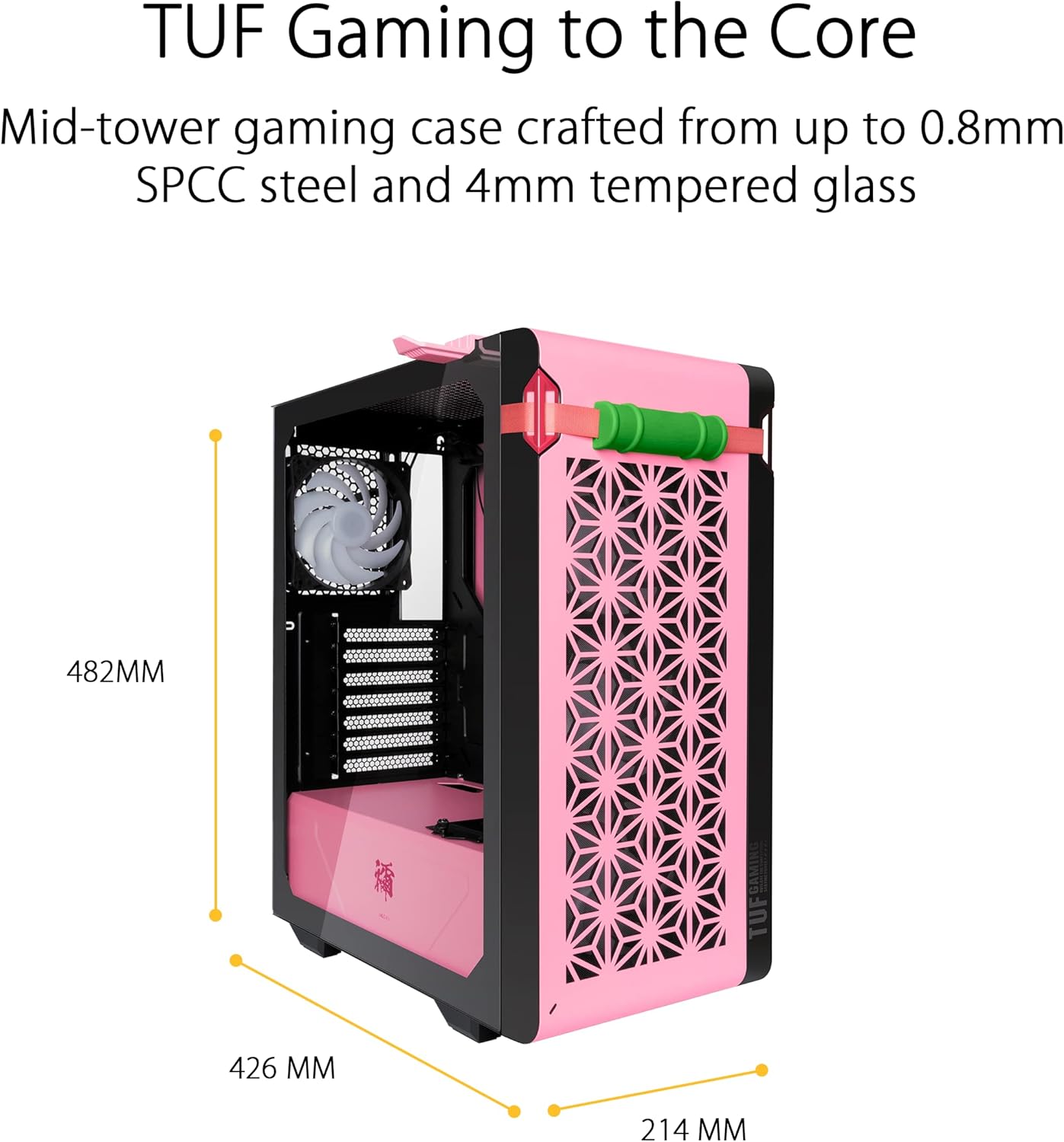


9. Official Product Videos
No official product videos from the seller were found for this specific model.
10. Warranty and Support
Your ASUS TUF GT301 NEZUKO Mid-Tower Compact Case is covered by a manufacturer's warranty. Please refer to the warranty card included with your product for specific terms and conditions. For technical support, driver downloads, or further assistance, visit the official ASUS support website or contact their customer service.
Online Support: www.asus.com/support/