
1. Introduction
The TACTACAM Reveal X PRO is an advanced cellular trail camera designed for remote scouting, security, and surveillance. This 2022 model features integrated GPS tracking, a built-in LCD screen for easy programming and photo viewing, and Hybrid Mode for optimized performance. It captures high-definition photos and videos, which can be delivered directly to your smartphone, tablet, or computer via the REVEAL by TACTACAM app.

Figure 1: TACTACAM Reveal X PRO Cellular Trail Camera
2. Package Contents
Verify that all items are present in your TACTACAM Reveal X PRO package:
- TACTACAM Reveal X PRO Cellular Trail Camera
- Verizon SIM Card
- AT&T SIM Card
- Mounting Strap
- Quick Start Guide (not included in this manual)
3. Setup
3.1. Battery Installation
The Reveal X PRO requires 12 AA batteries or a TACTACAM Lithium battery cartridge (sold separately). For optimal performance, TACTACAM recommends using their Lithium battery cartridge or high-quality alkaline AA batteries.
- Open the camera's front door to access the battery compartment.
- Locate the EJECT button at the bottom of the LCD screen. Press it to release the battery tray.
- Insert 12 AA batteries into the tray, ensuring correct polarity (+/-). If using the TACTACAM Lithium battery cartridge, insert it into the tray.
- Slide the battery tray back into the camera until it clicks securely into place.
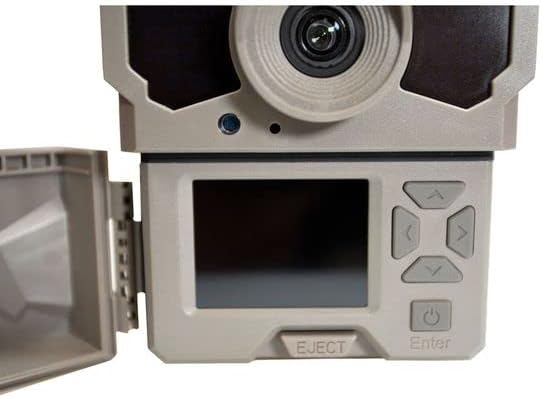
Figure 2: LCD Screen and Eject Button
3.2. SD Card Installation
A 32GB Class 10 U3 SD card is required for operation. TACTACAM brand SD cards are recommended for compatibility and performance.
- With the camera door open, locate the SD card slot on the side of the camera, next to the LCD screen.
- Insert the SD card into the slot with the label facing the front of the camera until it clicks into place.
- To remove, gently push the SD card in until it springs out.
3.3. SIM Card Selection and Installation
The camera is multi-carrier capable and includes both Verizon and AT&T SIM cards. Choose the SIM card that provides the best cellular service in your camera's deployment area.
- Locate the SIM card slot inside the camera, typically near the SD card slot.
- Insert the chosen SIM card into the designated slot until it is fully seated.
- Close the camera door securely.
3.4. App Installation and Activation
Download the REVEAL by TACTACAM app from your smartphone's app store (iOS or Android). Follow the in-app instructions to create an account and activate your camera. No contract is needed for activation; you can choose annual or month-to-month payment plans.

Figure 3: REVEAL by TACTACAM App Interface
4. Operating Instructions
4.1. Powering On/Off
To power on the camera, press and hold the power button located below the LCD screen until the screen illuminates. To power off, press and hold the power button until the screen shuts down.
4.2. Using the Built-in LCD Screen
The Reveal X PRO features a built-in LCD screen for easy setup and viewing. This allows you to:
- Preview the camera's field of view to ensure optimal placement.
- Adjust camera settings directly on the device.
- Review captured photos and videos on-site without removing the SD card.

Figure 4: Camera Mounted on Tree with LCD Screen Open
4.3. Hybrid Mode
Hybrid Mode optimizes the camera's performance by balancing faster picture and video delivery with superior battery life. This mode is automatically enabled and managed by the camera's internal software.
4.4. Requesting HD Photos and Videos
While the camera automatically sends standard definition photos to your app, you can request high-definition versions of specific photos and videos directly through the REVEAL by TACTACAM app. This feature allows for detailed analysis of captured content.
5. Key Features
5.1. No Glow IR Technology
The Reveal X PRO utilizes No Glow IR (Infrared) technology, making it ideal for discreet hunting, security, and surveillance applications. This technology ensures that the camera's flash is invisible to animals and humans, preventing disturbance or detection.

Figure 5: Camera Lens with No Glow IR Emitters
5.2. Integrated GPS Tracking
With built-in GPS tracking, you can always monitor the location of your camera. This feature provides an added layer of security and helps in recovery if the camera is moved or lost.
5.3. Multi-Carrier Capability
The camera supports both Verizon and AT&T networks, allowing you to select the carrier with the strongest signal in your area for reliable data transmission.
5.4. Fast Trigger Speed and Detection Range
The Reveal X PRO boasts a lightning-fast trigger speed and a 96-foot flash and detection range, ensuring that fast-moving subjects are captured clearly.
5.5. Features Comparison: X PRO vs. X Gen 2.0
For a detailed comparison of the Reveal X PRO and Reveal X Gen 2.0 models, refer to the video below. This video highlights the key differences, including the X PRO's built-in LCD screen, No Glow IR technology, and integrated GPS.
Video 1: Comparison of TACTACAM Reveal X PRO and X Gen 2.0 features, highlighting differences in LCD screen, IR technology, and GPS tracking.
6. Maintenance
6.1. Battery Management
Regularly check the battery level via the REVEAL app. Replace batteries promptly when low to ensure continuous operation. Consider using rechargeable lithium battery packs for long-term cost savings and convenience.
6.2. SD Card Management
Periodically format your SD card using the camera's menu or a computer to prevent data corruption and ensure optimal recording performance. Back up important photos and videos before formatting.
6.3. Cleaning and Weather Protection
The camera has an IP65 International Protection Rating, making it resistant to dust and water splashes. However, avoid submerging the camera. Clean the lens and IR sensors regularly with a soft, dry cloth to ensure clear image quality. Ensure the camera door is always securely latched to maintain its weather resistance.
7. Troubleshooting
If you encounter issues with your TACTACAM Reveal X PRO, try the following steps:
- No Power: Check battery installation and ensure batteries are fully charged or new.
- No Signal: Verify SIM card is correctly inserted. Check cellular coverage in your area. Try switching to the other provided SIM card (Verizon/AT&T) if available.
- No Photos/Videos: Ensure SD card is inserted, formatted, and has sufficient space. Check camera settings for proper trigger mode and sensitivity.
- Poor Image Quality: Clean the camera lens and IR sensors. Ensure adequate lighting conditions for night captures (if not using No Glow IR).
- App Connectivity Issues: Ensure your smartphone has a stable internet connection. Restart the app or reinstall it if problems persist.
For further assistance, contact TACTACAM customer service.
8. Specifications
| Feature | Detail |
|---|---|
| Model | Reveal X PRO |
| Effective Still Resolution | 16 MP |
| Video Capture Resolution | 720p |
| Flash Type | No Glow IR |
| Flash/Detection Range | 96 feet |
| Trigger Speed | Lightning fast |
| Connectivity | Cellular (Verizon & AT&T SIMs included), Wi-Fi (for app communication) |
| GPS Tracking | Integrated |
| Display | Built-in LCD Screen |
| Power Source | 12 AA batteries or TACTACAM Lithium battery cartridge |
| SD Card Support | 32GB Class 10 U3 (required) |
| International Protection Rating | IP65 |
| Dimensions (L x W x H) | 9 x 5 x 3 inches |
| Weight | 1.64 pounds |
9. Warranty and Support
For warranty information, product registration, and technical support, please visit the official TACTACAM website or contact their in-house customer service. TACTACAM is committed to providing support for their USA-developed and supported app and products.
Online Support: www.tactacam.com