
Introduction
This manual provides instructions for the setup, operation, and maintenance of your new Generic replacement remote control. This remote is designed to be fully compatible with Grandin TV models LD22LGB19 and UD65LGB201, offering precise 1:1 functionality.
Product Overview
The remote control is a direct replacement, providing all essential functions for your compatible Grandin television. It operates using infrared technology.
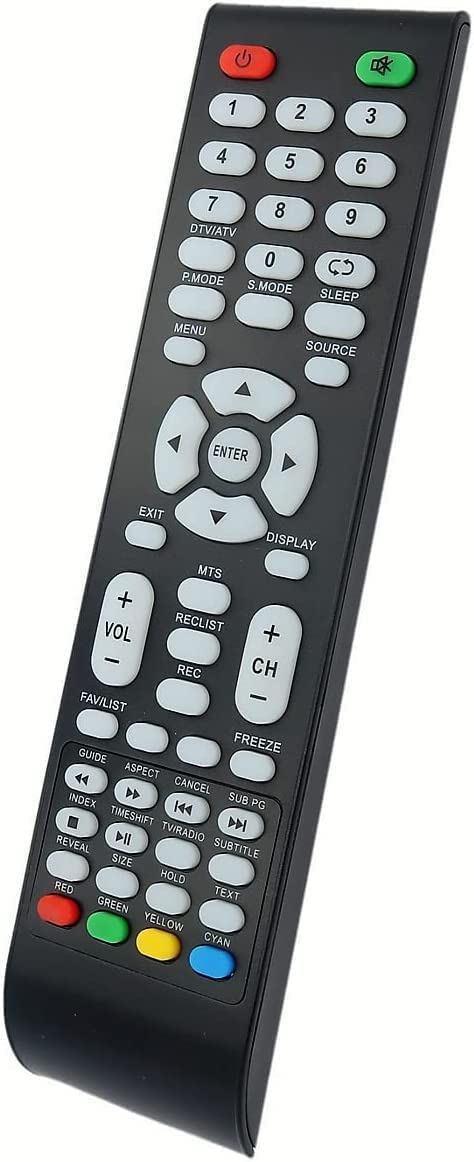
Image: Front view of the Generic remote control, showing its button layout. This remote is designed for Grandin TV models LD22LGB19 and UD65LGB201.
Setup
Battery Installation
- Locate the battery compartment on the back of the remote control.
- Slide the battery cover downwards or press the latch and lift to open.
- Insert two AAA alkaline batteries (not included), ensuring the correct polarity (+ and -) as indicated inside the compartment.
- Replace the battery cover, ensuring it clicks securely into place.
The remote control does not require any programming and should work immediately with compatible Grandin TV models once batteries are installed.
Operating Instructions
This remote control provides standard functions for your Grandin TV. Point the remote directly at the TV's infrared receiver for optimal performance.
Key Functions:
- Power Button: Turns the TV on or off.
- Number Buttons (0-9): Direct channel selection.
- Channel Up/Down: Navigates through channels sequentially.
- Volume Up/Down: Adjusts the audio volume.
- Mute: Silences the TV audio.
- Source/Input: Selects input sources (HDMI, AV, etc.).
- Menu: Accesses the TV's main menu.
- Navigation Buttons (Up, Down, Left, Right, OK): Used for menu navigation and selection.
- Exit/Back: Exits menus or returns to the previous screen.
- (Note: Specific button labels and functions may vary slightly based on your TV model, but core functions remain consistent.)
Troubleshooting
- Remote not responding:
- Ensure batteries are inserted correctly with the right polarity.
- Replace old batteries with new alkaline batteries.
- Check for any obstructions between the remote and the TV's infrared sensor.
- Ensure you are within the maximum operating range of 10 meters.
- Some buttons not working:
- This remote is a direct replacement. If specific advanced functions are not working, your TV model might not support them with this generic remote, or the button mapping might differ slightly. Refer to your TV's original manual.
- Clean the remote control buttons and surface if there is any residue.
- Intermittent response:
- Weak batteries may cause intermittent response. Replace them.
- Ensure no strong light sources (like direct sunlight or fluorescent lights) are interfering with the TV's IR sensor.
- Remote works with other TVs but not mine:
- Confirm your TV model is Grandin LD22LGB19 or UD65LGB201. This remote is specifically designed for these models.
Maintenance
- Cleaning: Use a soft, dry cloth to clean the remote control. Do not use liquid cleaners or abrasive materials.
- Storage: Store the remote in a cool, dry place away from direct sunlight and extreme temperatures.
- Battery Replacement: If the remote will not be used for an extended period, remove the batteries to prevent leakage.
- Avoid Drops: Protect the remote from physical impact to prevent damage.
Specifications
| Feature | Detail |
|---|---|
| Brand | Generic |
| Compatible Models | Grandin LD22LGB19, UD65LGB201 |
| Connectivity Technology | Infrared |
| Maximum Range | 10 Meters |
| Number of Buttons | 20 |
| Battery Type | AAA Alkaline (2 required) |
| Color | Black |
| Manufacturer | InfratexRC |
| Country of Origin | Poland |
Warranty and Support
This product is typically covered by a standard manufacturer's warranty against defects in materials and workmanship. Please refer to your purchase documentation or contact the seller for specific warranty details and support options.
For technical assistance or further inquiries, please contact the retailer or manufacturer directly. Keep your purchase receipt as proof of purchase.