
ASHATA Portable Digital Lossless Music MP3 Player
ASHATA MP3 Player User Manual
Model: Portable Digital Lossless Music MP3 Player
1. Introduction
Thank you for choosing the ASHATA Portable Digital Lossless Music MP3 Player. This compact and versatile device is designed to provide high-fidelity audio playback, making it ideal for music enthusiasts, students, and anyone on the go. Its simple operation and robust features ensure an enjoyable listening experience.
This manual provides essential information on setting up, operating, maintaining, and troubleshooting your MP3 player. Please read it carefully before use.
2. Package Contents
- ASHATA MP3 Player
- Earphones
- Lanyard
3. Product Overview

The ASHATA MP3 Player features a compact design with integrated control buttons and a direct USB connector for easy file transfer and charging.

Included accessories: the MP3 player, a lanyard for portability, and earphones for immediate use.

The player supports memory card expansion up to 64GB via a dedicated slot, allowing for extensive music libraries.

The included lanyard enhances portability, making it easy to carry the player around your neck or attach it to bags.
4. Setup
4.1 Charging the Device
The MP3 player has a built-in USB connector for direct charging. Simply plug the player into a standard USB port on a computer or a USB wall adapter.
- Connect the integrated USB plug of the MP3 player directly into a USB port.
- The device will begin charging automatically.
4.2 Inserting a Memory Card
The MP3 player supports memory card expansion up to 64GB (memory card not included).
- Locate the memory card slot on the side of the MP3 player.
- Gently insert a compatible microSD card into the slot until it clicks into place. Ensure the card is oriented correctly.
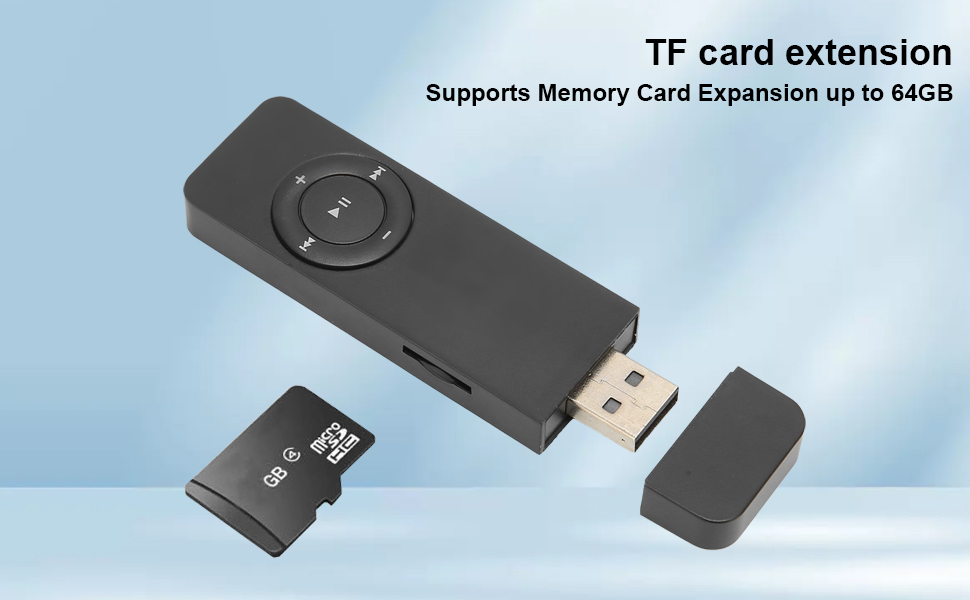
The MP3 player supports TF (microSD) card expansion for additional storage.
4.3 Connecting Earphones
Connect the included earphones or any standard 3.5mm audio jack earphones to the player's headphone port.
- Insert the 3.5mm jack of the earphones firmly into the headphone port located on the player.

Connect your earphones to the player's audio jack for private listening.
4.4 Transferring Music Files
To transfer music or audio files to your MP3 player, connect it to a computer.
- Plug the MP3 player's integrated USB connector into an available USB port on your computer.
- The computer should recognize the MP3 player as a removable disk.
- Open the player's drive (or the inserted memory card's drive) and drag-and-drop your audio files (e.g., MP3 format) into the desired folders.
- For specific playback order within folders, transfer songs one by one in the desired sequence, as the player dictates order by copy time, not alphabetical.
- Once files are transferred, safely eject the device from your computer before unplugging.
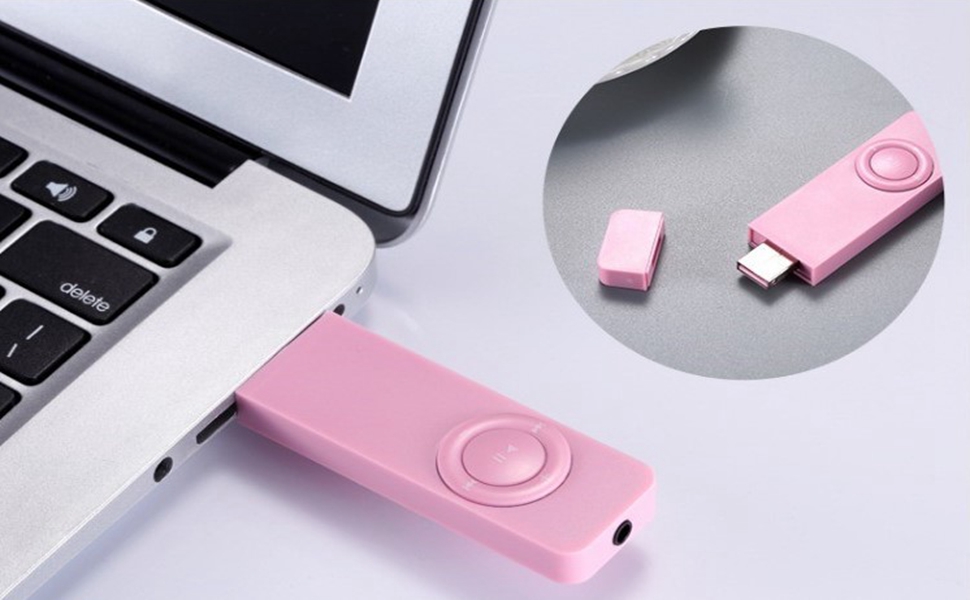
Connect the MP3 player directly to your computer's USB port to transfer files.
5. Operating Instructions
5.1 Basic Controls
The MP3 player features intuitive button controls on its front face:
| Button | Function (Tap) | Function (Hold) |
|---|---|---|
| Play/Pause (►⏸) | Play or pause current track | Advance to next folder |
| Next Track (►►) | Skip to next song | Fast forward within current track |
| Previous Track (◄◄) | Go to previous song | Scan backward within current track |
| Volume Up (+) | Increase volume | Toggle shuffle mode |
| Volume Down (-) | Decrease volume | Toggle single song repeat mode |
5.2 LED Indicators
The device uses LED lights to indicate its current mode:
- Blue blinking: Normal playback mode (play next song).
- Red and Blue blinking: Single song repeat mode.
- Red blinking: Shuffle all files mode.
The small LED indicator provides visual feedback on the player's current mode.
5.3 Listening to Audiobooks/Novels
The MP3 player is designed to remember your last listened position when playing audiobooks or novels, ensuring a seamless experience.
- When you stop playback, the device will automatically save your progress.
- Upon resuming playback, it will continue from where you left off.
6. Maintenance
6.1 Cleaning
- Use a soft, dry cloth to wipe the exterior of the MP3 player.
- Do not use liquid cleaners or abrasive materials, as they may damage the device.
6.2 Storage
- Store the MP3 player in a cool, dry place away from direct sunlight and extreme temperatures.
- Avoid exposing the device to moisture or dust.
6.3 Battery Care
- To prolong battery life, avoid fully discharging the battery frequently.
- Charge the device regularly, even if not in use for extended periods.
7. Troubleshooting
If you encounter issues with your ASHATA MP3 Player, please refer to the following common solutions:
| Problem | Possible Cause / Solution |
|---|---|
| Device does not turn on | Battery may be depleted. Connect to a USB power source and charge for at least 30 minutes. |
| No sound from earphones | Ensure earphones are fully plugged in. Check volume level. Test with different earphones if available. |
| Songs skip or do not play | Ensure audio files are in a supported format (e.g., MP3). Files may be corrupted; try re-transferring them. Verify the memory card is properly inserted. |
| Cannot transfer files to device | Ensure the device is properly connected to the computer's USB port. Try a different USB port. Ensure the device is recognized as a removable disk. |
| Poor sound quality | Ensure audio files are of good quality. The included earphones may not provide optimal sound; consider using higher quality earphones. |
8. Specifications
| Feature | Detail |
|---|---|
| Brand | ASHATA |
| Model | Portable Digital Lossless Music MP3 Player |
| Color | White |
| Memory Storage Capacity | 64 GB (via memory card, not included) |
| Connectivity Technology | Aux (for earphones), USB (for data transfer/charging) |
| Compatible Devices | Headphones, Earphones |
| Media Type | Audio |
| Supported Standards | MP3 |
| Item Weight | 1.06 ounces |
| Package Dimensions | 5 x 3.07 x 0.83 inches |
| Display Technology | No display |
9. Warranty and Support
For warranty information and customer support, please refer to the documentation provided at the time of purchase or contact ASHATA customer service through the retailer where the product was acquired. Keep your purchase receipt as proof of purchase.
For additional resources and product information, you may visit the official ASHATA brand store online: ASHATA Store
Ask a question about this manual
Ask about setup, troubleshooting, compatibility, parts, safety, or missing instructions. Manuals+ will review the question and use this page’s manual context to help answer it.