
ROCKPALS 22-RP120W
Contents
ROCKPALS 120W Portable Foldable Solar Panel Charger (Model: 22-RP120W) Instruction Manual
Introduction
This manual provides comprehensive instructions for the safe and efficient operation of your ROCKPALS 120W Portable Foldable Solar Panel Charger. Designed for outdoor use, this solar panel offers a reliable power source for compatible portable power stations and USB devices, ensuring you stay powered while off-grid. Please read this manual thoroughly before use and retain it for future reference.
What's in the Box
- 1x ROCKPALS 120W Portable Solar Panel
- 1x 4-in-1 DC Output Cable (Anderson to 5.5*2.1mm, 7.9*0.9mm, XT60, and Anderson connectors)
- Instruction Manual
Product Features
- High Conversion Efficiency: Monocrystalline silicon solar cells convert up to 23.5% of solar energy.
- Wide Compatibility: Includes a 4-in-1 cable for compatibility with ROCKPALS, Jackery, BLUETTI, ECOFLOW, and most other portable power stations.
- Smart and Fast Charging: Equipped with 1x USB-C port and 2x QC 3.0 USB ports for direct charging of phones, tablets, and other USB devices.
- Portable and Durable Design: Foldable into a compact size (19.6x18.1x2.2 inches) with an integrated rubber handle for easy transport. Constructed with PET-laminated case for durability.
- IP65 Water-Resistant: Protects against water splashing, suitable for various outdoor activities.
- Adjustable Kickstand: Allows for optimal angling towards the sun to maximize solar energy collection.
- Parallel Support: Capable of connecting two 120W solar panels in parallel for doubled output and faster charging (parallel cable available separately upon request from ROCKPALS service).

Image: The ROCKPALS 120W solar panel highlighting its 23% conversion rate and 120W maximum output, set against a scenic outdoor backdrop with a tent.
Setup Instructions
- Unfolding the Solar Panel:
Carefully unfold the ROCKPALS 120W solar panel. It features a foldable design for compact storage and easy deployment.
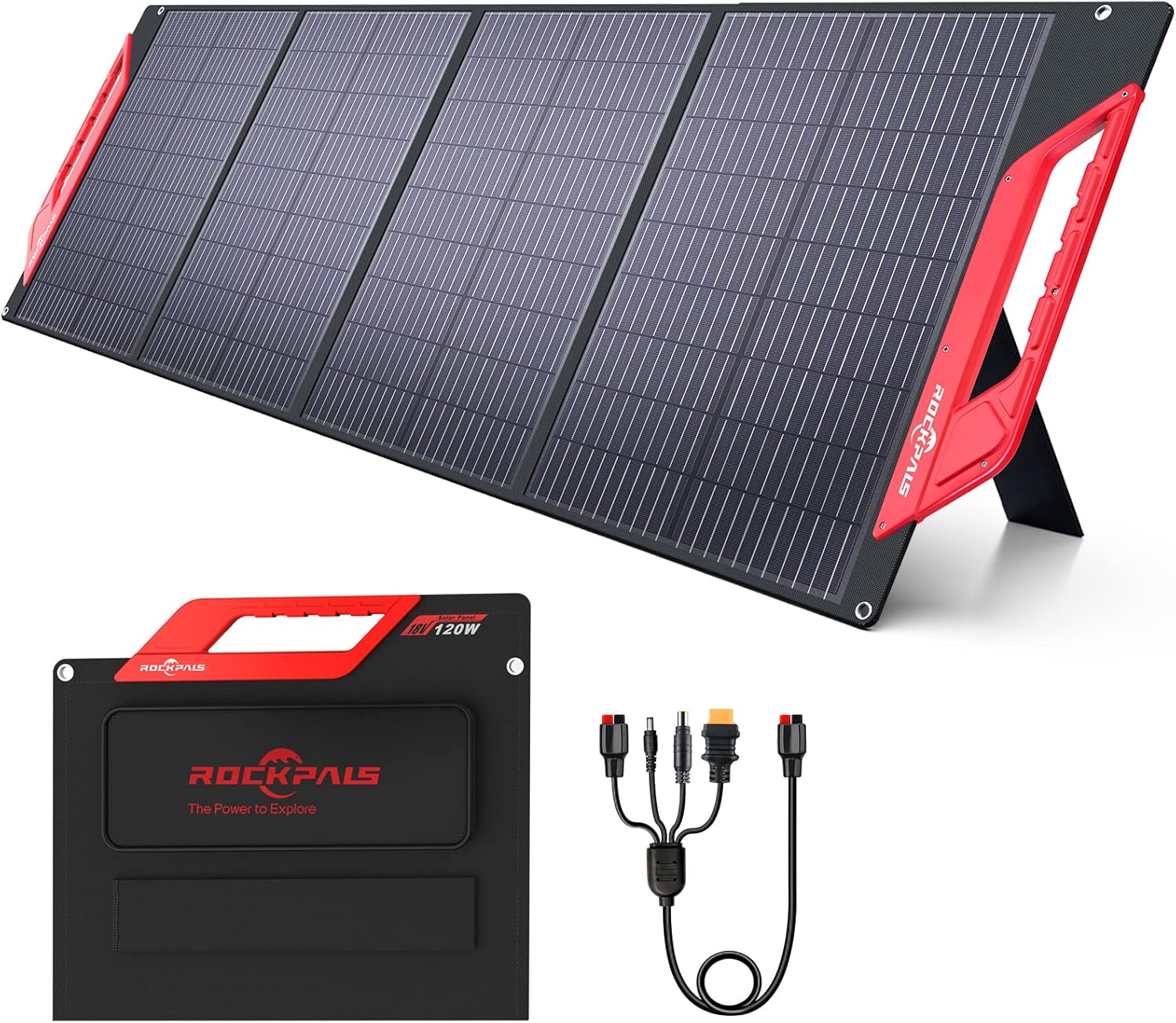
Image: The ROCKPALS 120W portable solar panel fully unfolded, showcasing its four panels and integrated kickstand.
- Positioning with Kickstand:
Utilize the adjustable kickstand on the back of the solar panel to position it directly towards the sun. Adjust the angle to maximize sunlight exposure for optimal charging efficiency. The kickstand helps achieve the best angle to absorb maximum solar power.

Image: A close-up view of the adjustable kickstand on the ROCKPALS solar panel, demonstrating its flexibility for optimal positioning.
- Connecting to a Portable Power Station:
Open the zippered pocket on the solar panel to access the integrated 4-in-1 DC output cable. Select the appropriate connector (Anderson, 5.5*2.1mm, 7.9*0.9mm, or XT60) for your portable power station and plug it in. Ensure a secure connection.

Image: The ROCKPALS 120W solar panel displaying its wide compatibility with various power station connectors, including 5.5*2.1mm, Anderson, XT60, and 7.9*0.9mm.
- Direct USB Charging:
For direct charging of USB devices, locate the USB-C and QC 3.0 USB ports within the zippered pocket. Connect your device's charging cable directly to these ports. The solar panel features intelligent charging to protect your devices.

Image: A close-up of the ROCKPALS 120W solar panel's control panel, featuring DC 18V, Type-C 18W, and two USB-C QC3.0 18W ports for direct charging of various outdoor devices.
Operating Instructions
- Optimal Sunlight Exposure: For best results, ensure the solar panel is positioned in direct sunlight with no obstructions. The adjustable kickstand helps achieve the optimal angle.
- Environmental Factors: The actual output wattage is affected by factors such as sunlight intensity, panel angle, and weather conditions. Cloudy weather or lack of direct sunlight will reduce output.
- Parallel Connection: The ROCKPALS 120W Solar Panel supports parallel connection to double the output and reduce charging time. If you have two 120W panels and require a parallel cable, please contact ROCKPALS customer service.

Image: Two ROCKPALS 120W solar panels deployed in parallel, connected to a portable power station, demonstrating how to achieve doubled power output for faster charging.
Official Product Video: ROCKPALS 120W Portable Solar Panel Charger for Power Station
Video: An official ROCKPALS video demonstrating the features and usage of the 120W Portable Solar Panel Charger, including setup and connection to a power station.
Maintenance
- Cleaning: Wipe the solar panels with a soft, damp cloth to remove dust or dirt. Avoid using harsh chemicals or abrasive materials that could scratch the surface.
- Storage: When not in use, fold the solar panel into its compact size and store it in a dry, cool place away from direct sunlight.
- Water Resistance: The panel is IP65 water-resistant, protecting it from water splashing. However, do not place it under heavy rain or submerge it in water for extended periods. Ensure the zippered pocket covering the power ports is closed to protect connections from moisture.

Image: The ROCKPALS 120W solar panel shown in a light rain, emphasizing its IP65 water-resistant rating suitable for various outdoor conditions.
Troubleshooting
- Low Output: If the solar panel is not providing expected output, check for direct sunlight exposure. Ensure no shadows are cast on the panels and adjust the angle using the kickstand for optimal sun alignment. Cloudy weather significantly reduces efficiency.
- Charging Issues: Verify all cables are securely connected to both the solar panel and the charging device/power station. Ensure the power station is compatible with the selected connector.
- Device Not Charging Directly: Confirm your USB device is compatible with the QC 3.0 or USB-C ports. Try a different port or cable to rule out faulty connections.
Specifications
| Brand | ROCKPALS |
| Model Number | 22-RP120W |
| Material | Monocrystalline Silicon |
| Maximum Power | 120 Watts |
| Maximum Voltage | 24 Volts |
| Efficiency | Up to 23.5% |
| Unfolded Dimensions (L x W x H) | 71.5" x 18.1" x 2.2" |
| Folded Dimensions (L x W x H) | 19.6" x 18.1" x 2.2" |
| Item Weight | 12.77 pounds |
| Water Resistance Rating | IP65 |
| Output Ports | 1x USB Type-C, 2x QC 3.0 USB, 1x DC (via 4-in-1 cable) |
Warranty and Support
ROCKPALS offers a 24-month warranty for this product. Additionally, lifetime technical support and 7*24H professional customer service are available to assist you with any inquiries or issues. Please refer to the contact information provided in your product packaging for support.
Ask a question about this manual
Ask about setup, troubleshooting, compatibility, parts, safety, or missing instructions. Manuals+ will review the question and use this page’s manual context to help answer it.