
1. Introduction
Thank you for choosing the Ohniyou 52-inch Ceiling Fan. This modern and classic ceiling fan is designed for versatile use, suitable for both indoor and outdoor environments such as bedrooms, kitchens, nurseries, conference rooms, patios, restaurants, and gyms. It features an energy-saving DC motor, quiet operation, and convenient remote control functionality. Please read this manual thoroughly before installation and operation to ensure safe and efficient use of your new ceiling fan.

Image 1.1: Ohniyou 52-inch Ceiling Fan with Remote Control
2. Product Features
- Indoor & Outdoor Use: Designed to fit perfectly in various spaces, including farms, factories, warehouses, dining rooms, living rooms, greenhouses, bedrooms, restaurants, gyms, and study rooms.
- Energy-Saving DC Motor: Equipped with a 6-speed DC motor that is more energy-efficient than traditional AC motors.
- Integrated LED Light: Features an 1800 lumens light kit with 48 low energy consumption LED beads, offering durability and brightness.
- Reversible Quiet DC Motor: The 3-blade modern ceiling fan delivers powerful airflow with whisper-quiet performance (noise level ≤40dB). The reversible motor allows for downdraft mode in summer and updraft mode in winter to optimize air circulation.
- Remote Control Functionality: The included remote control provides access to 3 light modes (3000K Warm White, 4000K Neutral White, 6500K Cold White), 6 wind speeds, and timing options (1/2/4 hours) for sleep shutdown. Both fan and illumination can be controlled separately.
- Adjustable Height: Comes with 4-inch and 8-inch down rods, allowing for height adjustment to suit rooms with varying ceiling heights.

Image 2.1: Key components of the 52-inch Modern Ceiling Fan, including downrods, DC motor, acrylic frosted lamp cover, and ABS blades.

Image 2.2: The ceiling fan's integrated LED light offers three color temperature options: Warm White (3000K), Natural Light (4000K), and Cool White (6500K).

Image 2.3: Illustration of the fan's reversible function, showing downward airflow for cooling in summer and upward airflow for circulating warm air in winter.
3. Setup and Installation
Installation of the Ohniyou 52-inch Ceiling Fan requires basic electrical knowledge. It is recommended to consult a qualified electrician if you are unsure about any steps. Ensure power is turned off at the circuit breaker before beginning installation.
General Installation Tips:
- Carefully unpack all components and verify against the parts list provided in your product packaging.
- For easier assembly, consider attaching the fan blades to the motor assembly *before* mounting the fan base to the ceiling. This can simplify the process, especially in tight spaces.
- Ensure all electrical connections are secure and follow local electrical codes.
- Use the appropriate down rod (4-inch or 8-inch) based on your ceiling height and desired fan clearance.
Detailed installation diagrams are typically included in the product packaging. If you encounter difficulties, searching for product-specific installation videos online may provide helpful visual guidance.
4. Operating Instructions
The Ohniyou 52-inch Ceiling Fan is operated using the included remote control. Ensure batteries are correctly inserted into the remote.
Remote Control Functions:
- ALL OFF: Turns off both the fan and the light.
- LIGHT ON/OFF: Toggles the light on or off.
- F (Forward): Sets the fan to downdraft mode (summer operation).
- R (Reverse): Sets the fan to updraft mode (winter operation).
- Fan Speed (1-6): Adjusts the fan speed from 1 (lowest) to 6 (highest).
- FAN OFF: Turns off the fan only.
- Timer (1H/2H/4H): Sets the fan to automatically turn off after 1, 2, or 4 hours.
The light color temperature can be cycled through Warm White, Neutral White, and Cold White by repeatedly pressing the LIGHT ON/OFF button.
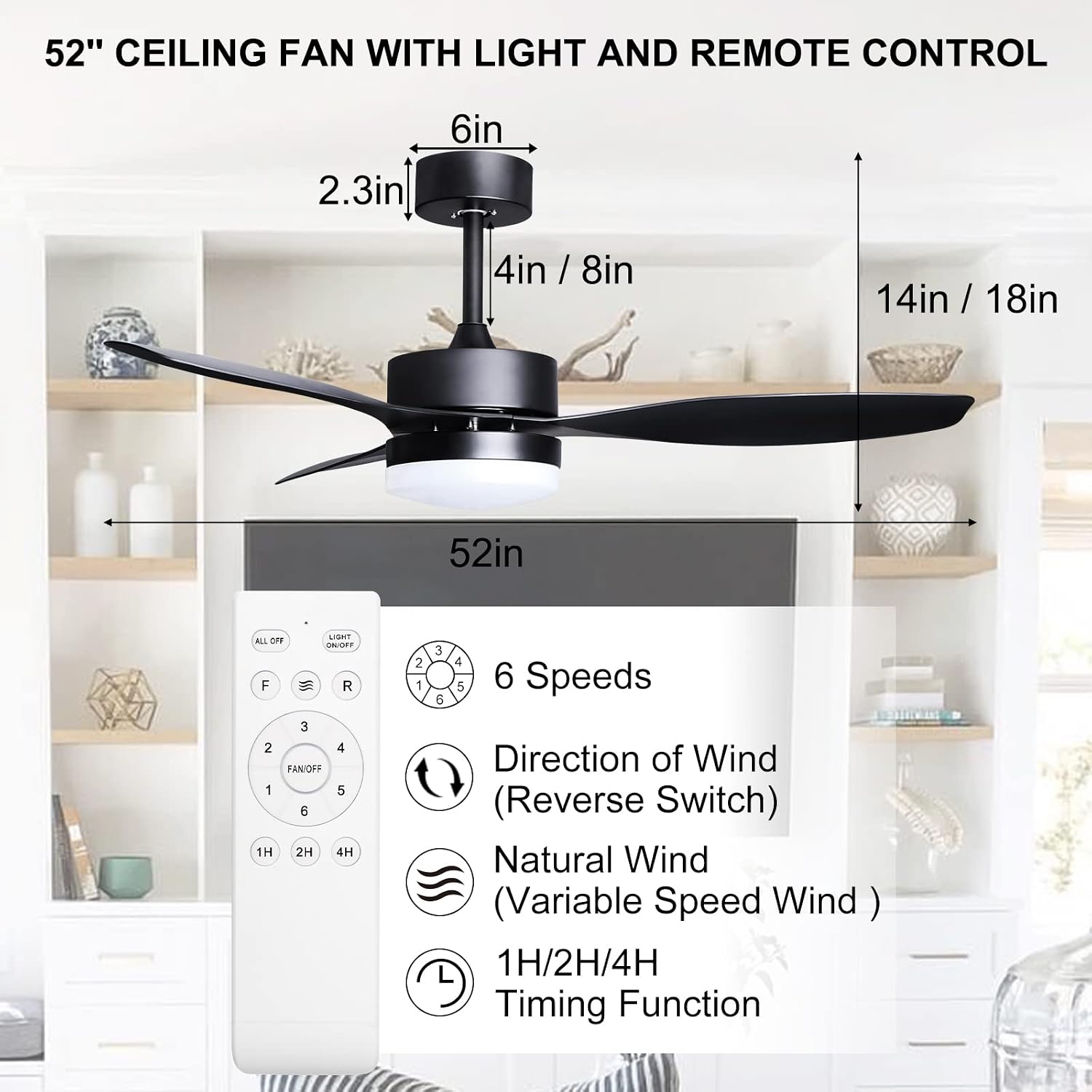
Image 4.1: Overview of the remote control functions and key dimensions of the 52-inch ceiling fan.

Image 4.2: Visual summary of the fan's features including remote control, 6 speeds, 3-color light, reversible blades, timing function, and silent motor.
5. Maintenance
Regular maintenance helps ensure the longevity and optimal performance of your ceiling fan.
- Cleaning: Dust the fan blades and motor housing regularly with a soft, damp cloth. Avoid using harsh chemicals or abrasive cleaners, as they may damage the finish.
- Blade Balance: If the fan wobbles, check that all blade screws are tightened. A balancing kit (not included) can be used if wobbling persists.
- Electrical Connections: Periodically check all electrical connections to ensure they are secure.
- Light Cover: Ensure the light cover is securely attached and free from cracks or damage.
Always turn off the power to the fan at the circuit breaker before performing any cleaning or maintenance.
6. Troubleshooting
If you experience issues with your Ohniyou ceiling fan, refer to the following common troubleshooting steps:
| Problem | Possible Cause | Solution |
|---|---|---|
| Fan does not operate / Remote not working | No power; Remote batteries low/dead; Remote not paired; Receiver module issue. | Check circuit breaker; Replace remote batteries; Re-pair remote (refer to product manual for specific steps); Contact customer support if module is faulty. |
| Light flickering or not turning on/off | Loose wiring; Faulty LED driver/light kit; Remote issue. | Check wiring connections (ensure power is off); Contact customer support for replacement parts if light kit is faulty. |
| Fan randomly changes speed | Interference; Remote issue; Internal module issue. | Ensure no other devices are causing interference; Try new remote batteries; Contact customer support for further assistance. |
| Fan wobbles excessively | Loose blade screws; Unbalanced blades; Improper mounting. | Tighten all blade screws; Use a blade balancing kit; Ensure mounting bracket is securely installed. |
If the problem persists after attempting these solutions, please contact Ohniyou customer support.
7. Specifications
| Feature | Detail |
|---|---|
| Brand | Ohniyou |
| Model Name | Ceiling Fans |
| Item Model Number | GLXCF-013D & HMCF-010 |
| Color | Black |
| Size | 52 inches |
| Product Dimensions | 51.97"D x 51.97"W x 17.72"H |
| Item Weight | 12.65 pounds |
| Power Source | AC |
| Voltage | 230 Volts (AC) |
| Wattage | 180 watts |
| Number of Blades | 3 |
| Speed Settings | 6 RPM |
| Noise Level | 35 dB |
| Light Type | LED |
| Control Method | Remote |
| Indoor/Outdoor Usage | Indoor, Outdoor |
| Assembly Required | Yes |
8. Warranty and Support
The Ohniyou 52-inch Ceiling Fan comes with a 1-year warranty from the date of purchase.
For any product inquiries, technical support, or warranty claims, please contact Ohniyou customer service. Our support team is dedicated to providing excellent service and assistance with any issues you may encounter.
Please have your model number (GLXCF-013D & HMCF-010) and purchase information ready when contacting support to expedite the process.


