
BCXY CS-CM761BL
Contents
BCXY Replacement Battery User Manual
Model: CS-CM761BL
1. Introduction
This manual provides essential instructions for the safe and effective use of your BCXY replacement battery, model CS-CM761BL. This battery is designed to be compatible with various Olympia CM series devices. Please read this manual thoroughly before installation and use to ensure optimal performance and safety.
2. Important Safety Information
Failure to follow these safety instructions may result in fire, electric shock, injury, or damage to the battery or device. Keep this manual for future reference.
- Do Not Disassemble: Do not attempt to disassemble, open, or service the battery pack. This can lead to internal damage and potential hazards.
- Correct Replacement: Replace only with the battery pack designated for your specific product. Using an incompatible battery may cause damage or safety risks.
- Physical Integrity: Do not crush, puncture, or subject the battery to short external contacts. Avoid dropping or exposing the battery to severe impacts.
- Temperature Control: Do not store the battery above 60°C (140°F). High temperatures can degrade battery performance and pose a fire risk.
- Initial Charge: A new battery pack must be fully charged before its first use to ensure proper calibration and performance.
- Fire and Burns: To reduce the risk of fire or burns, read the instructions in your device's operating guide before using this battery.
- Water Exposure: Do not expose the battery to water or moisture.
- Disposal: Dispose of used batteries according to local regulations. Do not dispose of batteries in fire.
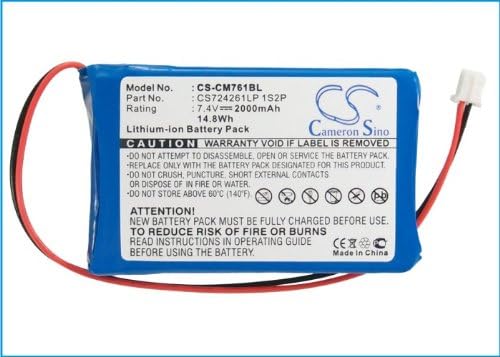
Image: Top view of the BCXY replacement battery, showing the product label with safety warnings and specifications.
3. Product Overview and Specifications
The BCXY CS-CM761BL is a high-quality Lithium Polymer replacement battery designed to meet the power requirements of compatible Olympia CM series devices. It features built-in protection mechanisms for safe and reliable operation.

Image: The BCXY replacement battery, showing its compact blue casing and connector wires.
Technical Specifications:
| Feature | Specification |
|---|---|
| Model Number | CS-CM761BL |
| Battery Type | Lithium Polymer |
| Voltage | 7.4V |
| Capacity | 2000mAh |
| Watt-Hours (Wh) | 14.8Wh |
| Dimensions (L x W x H) | 61.43 x 40.85 x 14.38 mm (2.42 x 1.61 x 0.57 inches) |
| Weight | 127.0g (4.5 ounces) |
| Certifications | ISO9001, RoHS, CE, UN38.3, MSDS |

Image: Angled view of the BCXY replacement battery, highlighting the label with model number and specifications.
4. Compatible Models
This BCXY replacement battery (Part Number: CS724261LP 1S2P) is compatible with the following Olympia models:
- Olympia CM 941
- Olympia CM-940F
- Olympia CM 942
- Olympia CM 941F
- Olympia CM942F
- Olympia CM-910
- Olympia CM940F
- Olympia CM-941
- Olympia CM 761
- Olympia CM-912
- Olympia CM-762
- Olympia CM941F
- Olympia CM761
- Olympia CM-761
- Olympia CM 75
- Olympia CM 762
- Olympia CM-942F
- Olympia CM-940
- Olympia CM 942F
- Olympia CM-911
- Olympia CM942
Please verify your device's model number and original battery part number to ensure compatibility before installation.
5. Installation Guide
Battery replacement procedures can vary significantly between devices. Always refer to your specific device's instruction manual for detailed battery replacement steps. The following are general guidelines:
- Power Off Device: Ensure your device is completely powered off and disconnected from any power source before beginning.
- Locate Battery Compartment: Identify and open the battery compartment of your device. This may require a small screwdriver or other tools.
- Remove Old Battery: Carefully disconnect the old battery's connector from the device's circuit board. Remove the old battery.
- Install New Battery: Connect the new BCXY replacement battery's connector to the device's circuit board, ensuring proper orientation. Gently place the new battery into the compartment.
- Secure Compartment: Close and secure the battery compartment.
- Initial Charge: Proceed to Section 6 for initial charging instructions.
Caution: If you are unsure about the installation process, it is recommended to seek assistance from a qualified technician to avoid damage to your device or battery.

Image: A close-up view of the battery's white connector with red and black wires, illustrating the connection point.
6. First Use and Charging
For optimal performance and battery longevity, follow these guidelines for initial use and charging:
- Initial Full Charge: After installing the new battery, connect your device to its original charger and allow it to charge completely without interruption. This initial full charge helps calibrate the battery's fuel gauge.
- Use Original Charger: Always use the charger specifically designed for your device. Using incompatible chargers can damage the battery or device.
- Avoid Deep Discharge: While Lithium Polymer batteries do not suffer from "memory effect," it is generally best to avoid regularly discharging the battery completely to 0%.
7. Care and Maintenance
Proper care and maintenance can extend the life of your BCXY replacement battery:
- Temperature: Store and operate the battery within recommended temperature ranges (typically 0°C to 40°C or 32°F to 104°F). Avoid extreme heat or cold.
- Long-Term Storage: If storing the battery for an extended period, charge it to approximately 50-60% capacity and store it in a cool, dry place. Recharge it every 3-6 months to prevent deep discharge.
- Cleaning: Keep the battery and its contacts clean and dry. Use a soft, dry cloth to wipe away any dust or debris.
- Avoid Physical Damage: Protect the battery from drops, impacts, and crushing.
8. Troubleshooting
If you encounter issues with your BCXY replacement battery, consider the following common troubleshooting steps:
- Battery Not Charging:
- Ensure the charger is properly connected to both the device and a working power outlet.
- Verify that the charger itself is functional (try with another device if possible).
- Check the battery connector for any debris or damage.
- Confirm the battery is correctly installed in the device.
- Device Not Powering On:
- Ensure the battery is fully charged.
- Re-install the battery to ensure a secure connection.
- Verify that the battery is compatible with your device model.
- Short Battery Life:
- Ensure the battery has undergone an initial full charge cycle.
- Check for excessive background applications or device settings that might be draining power rapidly.
- Review the care and maintenance guidelines to ensure proper usage and storage.
If problems persist after attempting these steps, please contact customer support.
9. Warranty and Support
Your BCXY replacement battery is manufactured under strict quality control standards and holds certifications such as ISO9001, RoHS, CE, UN38.3, and MSDS, ensuring safety and quality.
For warranty information or technical support, please refer to the documentation provided with your purchase or contact your retailer. When contacting support, please have your battery model number (CS-CM761BL) and purchase details ready.
Ask a question about this manual
Ask about setup, troubleshooting, compatibility, parts, safety, or missing instructions. Manuals+ will review the question and use this page’s manual context to help answer it.