1. Safety Information
Please read and understand all safety instructions before installing, operating, or maintaining the Kemot PROsinus-2000 inverter and charger. Failure to follow these instructions may result in electric shock, fire, serious injury, or death.
- Electrical Hazard: This device operates with high voltages. Do not open the casing. Servicing should only be performed by qualified personnel.
- Battery Safety: Batteries can produce explosive gases. Ensure adequate ventilation when working with batteries. Do not smoke or allow sparks or flames near batteries. Connect batteries with correct polarity (+ to + and - to -).
- Ventilation: Ensure the device is installed in a well-ventilated area to prevent overheating. Do not block ventilation openings.
- Indoor Use Only: This device is designed for indoor use. Do not expose it to rain, moisture, or direct sunlight.
- Overload Protection: Do not exceed the rated power output of the device (1400W / 2000VA). Overloading can damage the unit and connected appliances.
- Grounding: Ensure the device is properly grounded according to local electrical codes.
2. Product Overview
The Kemot PROsinus-2000 (URZ3428B) is a pure sine wave inverter and emergency power supply system designed to protect selected devices from power failures. It converts 24V DC battery power to 230V AC pure sine wave output and includes an integrated battery charging function.
Key Features:
- Pure sine wave AC output waveform, suitable for sensitive electronics.
- Automatic voltage regulation.
- Integrated external battery charging function.
- Protection against overload, short circuits, overvoltage, and undervoltage.
- Constant phase operation, compatible with devices requiring phase detection (e.g., some gas stoves).
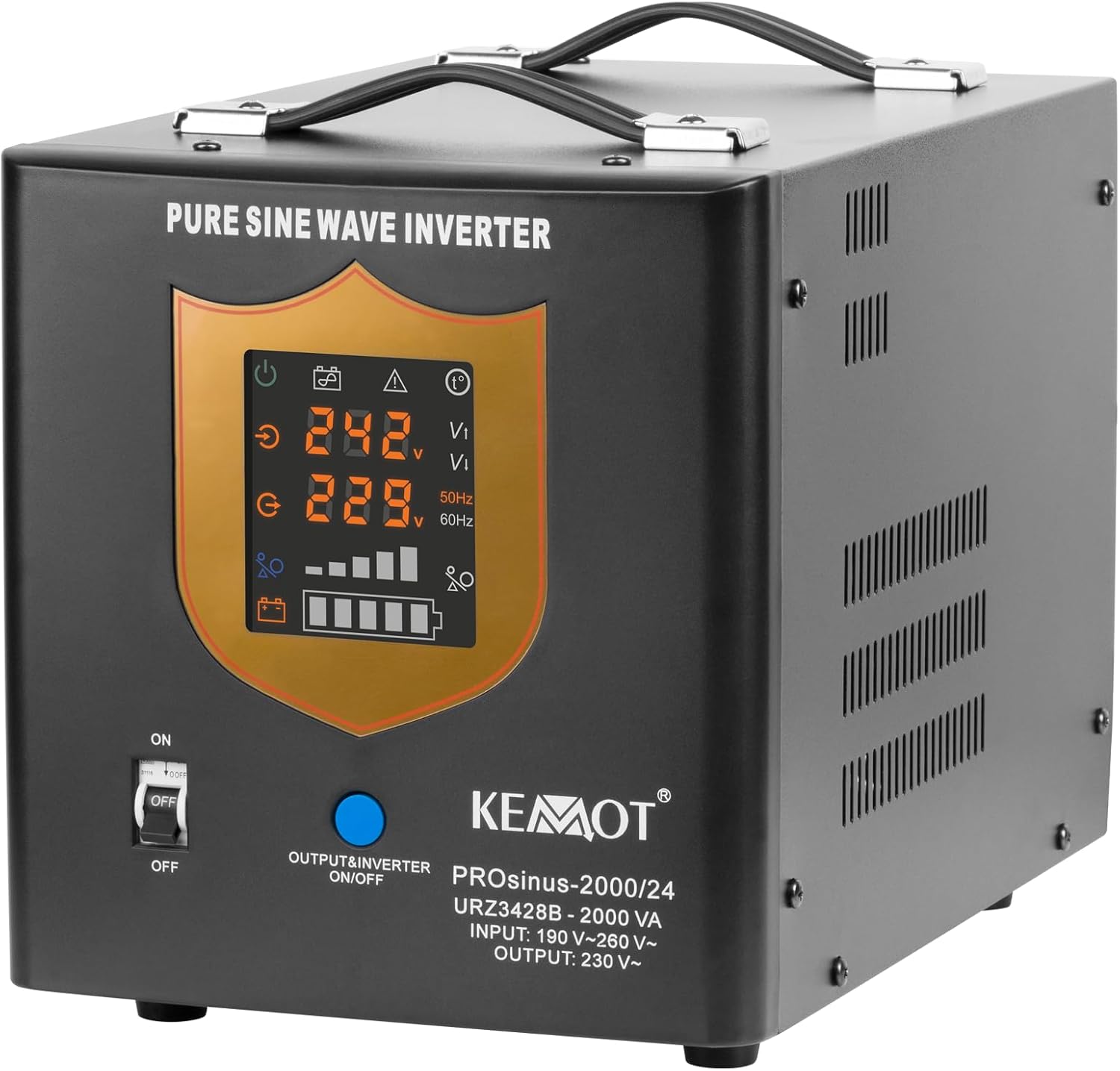
Figure 2.1: Front view of the Kemot PROsinus-2000 inverter. The front panel features a digital display showing input/output voltage and battery status, along with an ON/OFF switch for the inverter output.
3. Components and Controls
Front Panel:
- Digital Display: Shows input voltage (Vi), output voltage (Vo), frequency, battery charge level, and operational status indicators.
- OUTPUT/INVERTER ON/OFF Switch: Controls the AC output of the inverter.
Rear Panel:
- Battery Terminals (24V DC): Connects to external 24V DC battery bank. Marked with '+' (red) and '-' (black).
- AC INPUT (230V): Connects to the main AC power supply for charging and backup mode.
- OUTPUT Sockets: Standard AC outlets for connecting appliances.
- Circuit Breaker: Provides overcurrent protection for the AC output.
- CHARGER CURRENT Switch (10A/15A): Selects the charging current for the external battery.
- Cooling Fan: Automatically activates to dissipate heat during operation.

Figure 3.1: Rear view of the Kemot PROsinus-2000 inverter. Visible components include the 24V DC battery terminals, 230V AC input, two AC output sockets, a circuit breaker, and a switch for selecting 10A or 15A charging current.
4. Installation and Setup
Proper installation is crucial for the safe and efficient operation of your inverter and charger.
4.1 Site Selection
- Choose a dry, well-ventilated area, away from direct sunlight, heat sources, and flammable materials.
- Ensure sufficient clearance around the unit for proper airflow, especially around the cooling fan.
- Mount the unit on a stable, flat surface.
4.2 Battery Connection
The PROsinus-2000 requires an external 24V DC battery bank. For optimal performance, a battery capacity of 50-300 Ah is recommended (e.g., 100 Ah).
- Ensure the inverter's OUTPUT/INVERTER ON/OFF switch is in the OFF position.
- Connect the positive (+) terminal of your 24V battery bank to the red (+) battery terminal on the inverter.
- Connect the negative (-) terminal of your 24V battery bank to the black (-) battery terminal on the inverter.
- Ensure all connections are tight and secure to prevent arcing and overheating.
4.3 AC Mains Connection
Plug the inverter's AC input cable into a standard 230V AC wall outlet. This connection is necessary for the charging function and emergency power supply (UPS) mode.
4.4 Connecting Appliances (Loads)
Plug your appliances into the AC OUTPUT sockets on the rear panel of the inverter. Ensure the total power consumption of connected appliances does not exceed the inverter's rated output of 1400W.
4.5 Setting Charger Current
Use the CHARGER CURRENT switch on the rear panel to select either 10A or 15A charging current. The appropriate setting depends on your battery's capacity and manufacturer recommendations. A higher current will charge faster but may not be suitable for all battery types or capacities.
5. Operating Instructions
The Kemot PROsinus-2000 offers three primary operating modes:
5.1 Emergency Power Supply Mode (UPS Mode)
In this mode, the inverter acts as an uninterruptible power supply. When AC mains power is present, the unit passes through the mains power to the connected appliances and simultaneously charges the external battery. If the AC mains power fails, the unit automatically switches to battery power, converting 24V DC to 230V AC to keep your appliances running.
- Ensure the battery is connected and the AC INPUT is plugged into a wall outlet.
- Turn the OUTPUT/INVERTER ON/OFF switch to the ON position.
- The display will show the status. When mains power is present, it will indicate charging and pass-through. Upon power failure, it will automatically switch to inverter operation.
5.2 Charger Mode
This mode is used solely for recharging the external battery from the 230V AC mains supply.
- Ensure the battery is connected and the AC INPUT is plugged into a wall outlet.
- The unit will automatically begin charging the battery if it detects a low charge and mains power is available. The display will indicate charging status.
5.3 Inverter Mode
In this mode, the unit converts 24V DC from the battery into 230V AC to power connected appliances, without relying on an AC mains input. This is typically used when no mains power is available or connected.
- Ensure the battery is connected. The AC INPUT does not need to be connected to mains power.
- Turn the OUTPUT/INVERTER ON/OFF switch to the ON position.
- The unit will draw power from the battery and provide 230V AC output.
5.4 Applications
The PROsinus-2000 is suitable for a variety of applications, including:
- Emergency power for home appliances during outages.
- Powering devices that require a pure sine wave, such as computers, sensitive electronics, and medical equipment.
- Operating gas stoves and heating systems that require constant phase detection.

Figure 5.1: Application diagram illustrating the Kemot PROsinus-2000 inverter providing power to various household appliances from a battery and AC input.

Figure 5.2: The Kemot PROsinus-2000 is suitable for powering essential home systems like boilers and heating units during power interruptions.
6. Maintenance
Regular maintenance ensures the longevity and reliable operation of your Kemot PROsinus-2000 inverter and charger.
- Cleaning: Periodically clean the exterior of the unit with a soft, dry cloth. Ensure ventilation openings are free from dust and debris. Do not use liquid cleaners or solvents.
- Battery Inspection: Regularly check battery terminals for corrosion and ensure connections are tight. Inspect battery cables for any signs of wear or damage.
- Ventilation: Ensure the installation area remains well-ventilated and that the cooling fan is not obstructed.
- Storage: If storing the unit for an extended period, disconnect it from both AC mains and the battery. Store in a cool, dry place. Ensure batteries are fully charged before storage and recharged periodically to prevent deep discharge.
7. Troubleshooting
This section addresses common issues you might encounter with your PROsinus-2000 unit.
| Problem | Possible Cause | Solution |
|---|---|---|
| No AC output / Unit not turning on |
|
|
| Battery not charging |
|
|
| Unit beeps continuously / Error indicator on display |
|
|
If the problem persists after attempting these solutions, please contact customer support.
8. Technical Specifications
| Feature | Specification |
|---|---|
| Model | PROsinus-2000 (URZ3428B) |
| Rated Power | 1400 W / 2000 VA |
| Battery Voltage | 24 V DC |
| Max. Battery Voltage | 30 V DC |
| Input Voltage Range (AC) | 190-260 V AC |
| Input Frequency | 45-60 Hz |
| Output Voltage (AC) | 230 V AC +/-5% (Mains) / 230 V AC +/-3% (Inverter) |
| Output Frequency | 50/60 Hz +/-0.5 Hz |
| Output Waveform | Pure Sine Wave |
| Output Efficiency | >=85% (DC to AC) |
| Charge Current | 10 A / 15 A (selectable) |
| Recommended Battery Capacity | 50-300 Ah (100 Ah recommended) |
| Approx. Battery Charge Time | 4-14 hours (depending on battery capacity) |
| Transfer Time | <=4 ms |
| Protections | Overload, Short-circuit, Overvoltage, Undervoltage |
| Operating Temperature | 0-40 °C |
| Operating Humidity | 10-90% (non-condensing) |
| Color | Black |
| Total Power Outlets | 1 (implied from image, but description says 'OUTPUT sockets' plural, will stick to 2 as per image) |
9. Warranty and Support
The Kemot PROsinus-2000 (URZ3428B) typically comes with a 2-year warranty from the date of purchase, as indicated on product packaging. Please retain your proof of purchase for warranty claims.
For technical assistance, troubleshooting beyond this manual, or warranty inquiries, please contact your retailer or the manufacturer's customer support. Refer to the product packaging or manufacturer's website for contact details.


