
1. Introduction
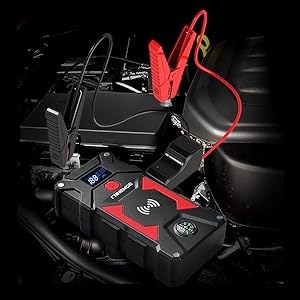
Thank you for choosing the FNNEMGE 6000A 26800mAh Jump Starter. This device is a powerful and versatile tool designed to jump-start 12V vehicles, serve as a portable power bank, and provide emergency lighting. Please read this manual thoroughly before use to ensure safe and optimal operation.
2. Safety Information
Always observe the following safety precautions to prevent injury or damage to the device and vehicle:
- Ensure the jump starter is charged above 50% before attempting to jump-start a vehicle.
- Do not connect the positive and negative clamps together.
- Do not immerse the device in water.
- Do not expose the device to extreme temperatures.
- Keep out of reach of children.
- The intelligent clamps provide protection against overcharge, short circuits, reverse polarity, overvoltage, and sparks. Pay attention to indicator lights and audible beeps from the clamps.
- If the battery is completely flat, the system may not function.

Image: Upgraded Safety Jump Cable illustrating reverse protection, short circuit protection, high temperature protection, overcurrent protection, low temperature protection, and low voltage protection.
3. Package Contents
Verify that all items are present in your package:
- 1 x FNNEMGE Portable Jump Starter
- 1 x Set of Smart Jumper Cables
- 1 x USB-C Charging Cable
- 1 x Storage Bag
- 1 x EC-5 Adapter
- 1 x User Manual

Image: All items included in the FNNEMGE Jump Starter package: jump starter unit, smart jumper cables, USB-C cable, storage bag, EC-5 adapter, and user manual.
4. Product Features and Components
Familiarize yourself with the different parts of your jump starter:

Image: Detailed diagram showing the jump starter's components: Wireless charging pad, ON/OFF button, Charging indicator screen, Jump Starting Port, EC5 DC 12V Output Port, Output 1 (QC 3.0), Flashlight, Output 2 (QC 2.0), Type C input, and Compass.
- Wireless Charging Pad: For compatible devices.
- ON/OFF Button: Powers the device on or off.
- Charging Indicator Screen: Displays battery level and charging status.
- Jump Starting Port: Connects to the smart jumper cables.
- EC5 DC 12V Output Port: For powering 12V automotive accessories.
- Output 1 (QC 3.0) & Output 2 (QC 2.0): USB ports for fast charging electronic devices.
- Flashlight: Integrated LED light with multiple modes.
- Type C Input: For charging the jump starter itself.
- Compass: Integrated for navigation.
5. Charging the Jump Starter
Before first use, fully charge the jump starter. For optimal performance, it is recommended to charge the unit once a month if not used for extended periods.
- Connect the USB-C charging cable to the Type C input port on the jump starter.
- Connect the other end of the USB-C cable to a suitable USB power adapter (not included) or a powered USB port.
- The charging indicator screen will display the charging progress. The unit is fully charged when the screen indicates 100%.
6. Operating Instructions: Jump Starting a Vehicle
This jump starter is designed for 12V vehicles, including all gasoline engines and diesel engines up to 10.0L.
- Prepare the Vehicle: Turn off the vehicle's ignition and all accessories (lights, radio, etc.). Engage the parking brake.
- Connect Smart Jumper Cables:
- Insert the blue plug of the smart jumper cables into the Jump Starting Port on the jump starter. Ensure a firm connection.
- Connect the red (+) clamp to the vehicle's positive (+) battery terminal.
- Connect the black (-) clamp to the vehicle's negative (-) battery terminal or a solid, unpainted metal part of the engine block, away from the battery.
- Check Indicator: The smart jumper cable's indicator light should turn solid green, indicating a correct connection and readiness to jump-start. If it flashes or beeps, refer to the troubleshooting section.
- Start the Vehicle: Return to the vehicle and start the engine.
- Disconnect Cables: Once the vehicle starts, immediately remove the smart jumper cables from the vehicle battery, first the black (-) clamp, then the red (+) clamp. Then disconnect the blue plug from the jump starter.

Images: Left: Inserting the smart jumper cable plug into the jump starter. Right: Smart jumper cables correctly connected to a car battery.

Image: Illustrates pressing the start button in a vehicle after connecting the jump starter.
7. Using as a Portable Power Bank
The FNNEMGE Jump Starter features a 26800mAh battery, allowing it to charge various electronic devices.
7.1 USB Charging
Connect your devices to the USB Output 1 (QC 3.0) or Output 2 (QC 2.0) ports using their respective charging cables. The jump starter will automatically begin charging.
7.2 Wireless Charging
Place your Qi-compatible smartphone or device on the wireless charging pad located on top of the jump starter. Ensure the device is centered for optimal charging.


Images: Left: A smartphone being charged wirelessly on the jump starter. Right: The jump starter connected via USB to charge a smartphone and a tablet.
8. Using the LED Light
The integrated LED light offers three modes for various situations:
- Flashlight Mode: For general illumination.
- Strobe Mode: For signaling or attracting attention.
- SOS Mode: For emergency signaling.
Press the flashlight button (usually a dedicated button or a long press of the power button, refer to specific product markings) to cycle through the modes.
Image: Illustration of the three LED lamp modes: SOS, standard lighting, and strobe, useful for emergencies or camping.
9. Using the EC-5 DC 12V Output
The EC-5 DC 12V output port allows you to power 12-volt automotive devices such as car vacuum cleaners, car refrigerators, and air compressors.
- Connect the EC-5 adapter to the EC5 DC 12V Output Port on the jump starter.
- Plug your 12V automotive device into the EC-5 adapter.
- Ensure the jump starter is powered on.
Image: The jump starter's EC-5 DC 12V output port being used to power a tire inflator, a car refrigerator, and a car vacuum cleaner.
10. Maintenance
To ensure the longevity and optimal performance of your FNNEMGE Jump Starter:
- Regular Charging: If the device is not used for a long period, it is recommended to charge it once a month to maintain its battery health.
- Storage: Store the jump starter in a cool, dry place, away from direct sunlight and extreme temperatures.
- Cleaning: Use a soft, dry cloth to clean the device. Do not use harsh chemicals or abrasive materials.
11. Troubleshooting
If you encounter issues with your jump starter, refer to the following common problems and solutions:
| Problem | Possible Cause | Solution |
|---|---|---|
| Vehicle does not start. | Jump starter battery too low (below 50%). Incorrect clamp connection. Vehicle battery completely flat. |
Charge the jump starter to over 50%. Ensure clamps are connected correctly (red to +, black to -). Check smart cable indicator for solid green. In cases of a completely flat battery, the jump starter may not be able to initiate a start. Consult a professional. |
| Smart jumper cable indicator flashes/beeps. | Reverse polarity, short circuit, or other safety issue detected. | Immediately disconnect clamps. Re-check connections for correct polarity and ensure clamps are not touching each other or other metal parts. |
| Jump starter not charging. | Faulty USB-C cable or power adapter. Charging port obstruction. |
Try a different USB-C cable and power adapter. Ensure the Type C input port is clean and free of debris. |
| Wireless charging not working. | Device not Qi-compatible. Device not properly aligned. Obstruction between device and charging pad. |
Ensure your device supports Qi wireless charging. Re-position the device on the charging pad. Remove any thick cases or metal objects. |
12. Specifications
| Feature | Detail |
|---|---|
| Brand | FNNEMGE |
| Model Number | FG602 |
| Peak Current | 6000A |
| Battery Capacity | 26800mAh (Lithium-polymer) |
| Vehicle Service Type | Car, Truck, Motorcycle, Van |
| Engine Compatibility | All Gasoline, up to 10.0L Diesel |
| Voltage | 12 Volts |
| USB Output 1 | QC 3.0 |
| USB Output 2 | QC 2.0 |
| DC Output | EC-5 12V |
| Dimensions (L x W x H) | 18 x 9.3 x 4.4 cm |
| Item Weight | 1.09 Kilograms |
| UPC | 768857722468 |
13. Warranty and Support
FNNEMGE provides a 2-year technical support and customer service for this product. If you have any questions or require assistance during use, please contact us via the email address provided in the user manual included in your package.
Please retain your purchase receipt for warranty purposes.


