1. Safety Information
Please read this manual carefully before using the appliance. Keep it for future reference. This appliance is intended for household use only.
- Ensure the appliance is properly earthed.
- Do not allow children to play with the appliance. The parental control feature helps prevent unintended operation.
- Do not open the detergent dispenser or door during operation.
- In case of malfunction, disconnect the appliance from the power supply before attempting any inspection or repair.
- Only use detergents suitable for automatic washing machines.
2. Product Overview
The MEDION MD 37386 is a front-loading washing machine designed for efficient and convenient laundry care. It features a 7 kg capacity, 1200 rpm spin speed, and 15 wash programs.
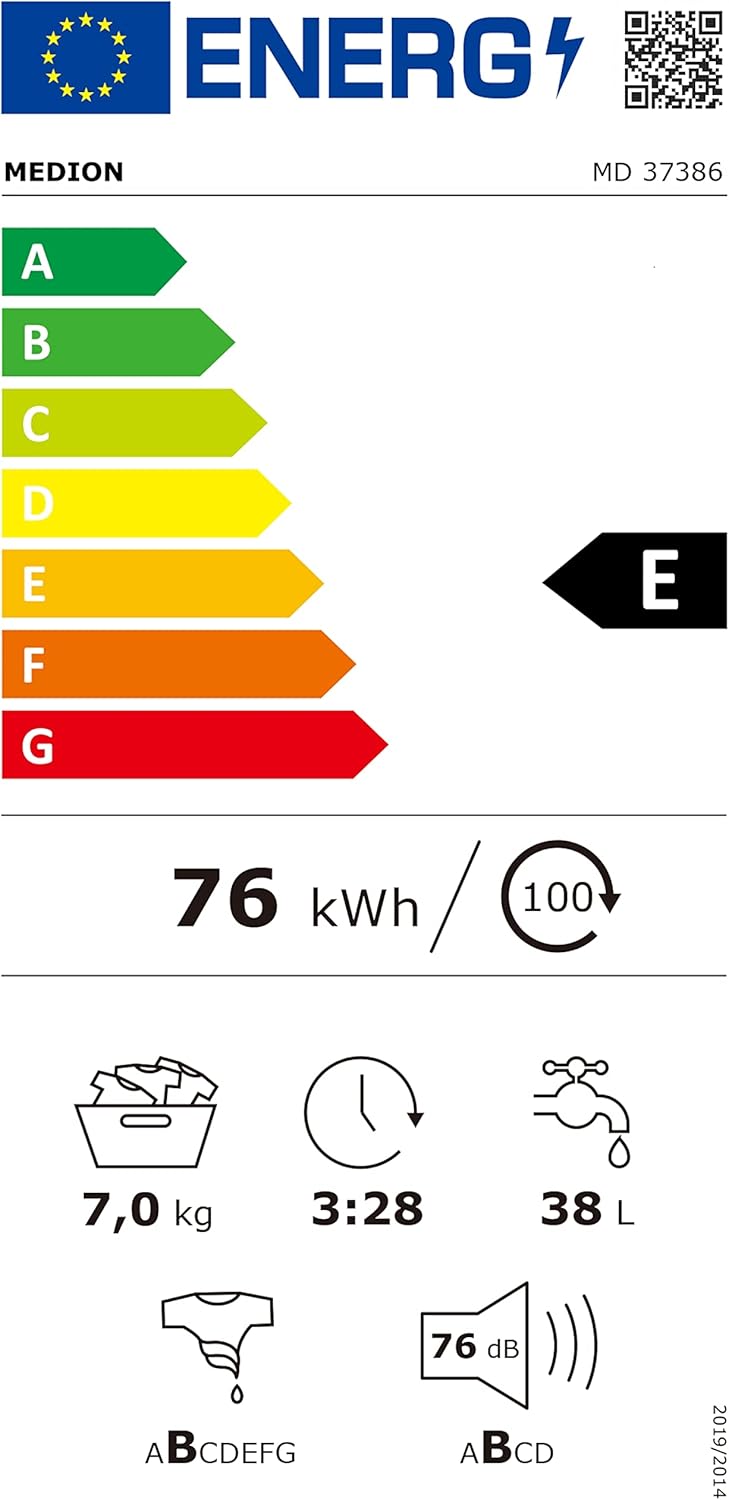
Figure 2.1: Front view of the MEDION MD 37386 Washing Machine.

Figure 2.2: The washing machine with its door open, showing the drum interior.
3. Setup and Installation
3.1 Unpacking
Carefully remove all packaging materials. It is crucial to remove the four transport safety covers located at the rear of the machine before operation. Failure to do so can cause significant damage to the appliance.
3.2 Positioning
Place the washing machine on a firm, level surface. Adjust the leveling feet to ensure the appliance is stable and does not wobble. This prevents excessive vibration and noise during operation.
3.3 Water Connection
- Connect the provided inlet hose to a cold water tap with a 3/4" thread. Ensure the connection is tight to prevent leaks.
- Attach the drain hose to a suitable drain pipe or place it over the edge of a sink, ensuring it is securely fixed to prevent displacement during draining.
3.4 Electrical Connection
Plug the power cord into a grounded electrical outlet. Ensure the voltage and frequency match the specifications listed on the appliance's rating plate.
4. Operating Instructions
4.1 Control Panel Overview
The washing machine features an intuitive control panel with a program selection dial and an LED display for cycle information.

Figure 4.1: The program selection dial and LED display.
4.2 Loading Laundry
Open the door and load laundry into the drum. Do not overload the machine; the maximum capacity is 7 kg. Ensure no items are caught in the door seal before closing the door firmly.

Figure 4.2: Example of laundry load, illustrating the 7 kg capacity.
4.3 Adding Detergent
Pull out the detergent dispenser drawer. Add the appropriate amount of detergent and fabric softener to the designated compartments. A dosing aid for liquid detergents is included for convenience.
4.4 Program Selection
Turn the program selection dial to choose one of the 15 available wash programs. The LED display will show the estimated cycle time and other relevant information. Available programs include:
- Baumwolle (Cotton) 90°C, 60°C, 40°C: For heavily soiled cotton items.
- Eco 20°C: Energy-efficient program for lightly soiled items.
- Pflegeleicht (Easy Care): For synthetic and mixed fabrics.
- Wolle (Wool): Gentle wash for woolens.
- Schleudern (Spin): Separate spin cycle.
- Spülen (Rinse): Separate rinse cycle.
- Hand-/Feinwäsche (Hand/Delicate Wash): For delicate items requiring gentle care.
- Sport: For sportswear.
- Mix: For mixed loads of different fabric types.
- Hemden (Shirts): Specific program for shirts.
- Kurz 60' (Quick 60 min): For lightly soiled items needing a faster wash.
- Extrakurz 15' (Extra Short 15 min): Very quick wash for small, lightly soiled loads.
4.5 Special Functions
- Delay Start: Allows you to set a delayed end time for the wash cycle, so your laundry finishes when it's convenient for you.
- Parental Control: Locks the control panel to prevent accidental changes to settings by children. Refer to the appliance's specific instructions for activation and deactivation.
4.6 Starting the Wash Cycle
After selecting the program and any desired options, press the Start/Pause button to begin the wash cycle. The door will lock, and the machine will start filling with water.

Figure 4.3: The washing machine drum in motion during a spin cycle.
5. Maintenance
5.1 Cleaning the Exterior
Wipe the exterior surfaces of the washing machine with a soft, damp cloth. Do not use abrasive cleaners or solvents.
5.2 Cleaning the Detergent Dispenser
Regularly remove and clean the detergent dispenser drawer to prevent residue buildup. Rinse it under running water and dry thoroughly before reinserting.
5.3 Cleaning the Drum
Periodically run a maintenance wash cycle (e.g., a hot wash with no laundry and a descaling agent) to clean the drum and internal components.
5.4 Cleaning the Drain Filter
Locate the drain filter (usually at the bottom front of the machine). Open the cover, place a shallow container underneath to catch residual water, and carefully unscrew the filter. Clean any lint or debris and rinse under water. Reinsert and secure the filter.
6. Troubleshooting
Before contacting customer service, please check the following common issues:
- Machine does not start: Ensure the power cord is plugged in, the door is closed properly, and the Start/Pause button has been pressed. Check if the parental control is active.
- No water filling: Check if the water tap is open and the inlet hose is not kinked or blocked.
- Water not draining: Inspect the drain hose for kinks or blockages. Clean the drain filter as described in Section 5.4.
- Excessive vibration/noise: Ensure the machine is level and the transport safety covers have been removed. Check that the load is balanced inside the drum.
- Door cannot be opened: The door remains locked during operation and for a short period after the cycle ends. Wait for the door lock indicator to turn off.
7. Specifications
| Feature | Specification |
|---|---|
| Model | MD 37386 |
| Capacity | 7 kg |
| Max. Spin Speed | 1200 rpm |
| Number of Programs | 15 |
| Energy Efficiency Class | E |
| Noise Level (Spin) | 77 dB |
| Dimensions (H x W x D) | 85 x 59.5 x 46 cm |
| Weight | 54 kg |
| Special Features | Parental Control, Delay Start |

Figure 7.1: Energy Label for MEDION MD 37386. For more details, visit the EPREL database.

Figure 7.2: Product Data Sheet for MEDION MD 37386. Further information is available on the EPREL database.
8. Warranty and Support
This MEDION MD 37386 washing machine comes with a 36-month manufacturer's warranty. Please refer to the included warranty card for full terms and conditions.
For technical support, spare parts, or warranty claims, please contact MEDION customer service. You can find more information on the official MEDION website: www.medion.de.


