
Alinco DJ-CRX-7
PNI Alinco DJ-CRX-7 VHF/UHF Portable Radio User Manual
Model: DJ-CRX-7
Introduction
This manual provides detailed instructions for the safe and efficient operation of your PNI Alinco DJ-CRX-7 VHF/UHF Portable Radio. Please read this manual thoroughly before using the device to ensure proper functionality and to prevent damage.
What's in the Box
Upon unpacking, please verify that all the following items are included:
- PNI Alinco DJ-CRX-7 Portable Radio Unit
- Antenna
- Li-Ion 1800 mAh 7.4V Battery
- Desktop Charger
- Wall Charger Adapter
- Wrist Strap
- User Manual
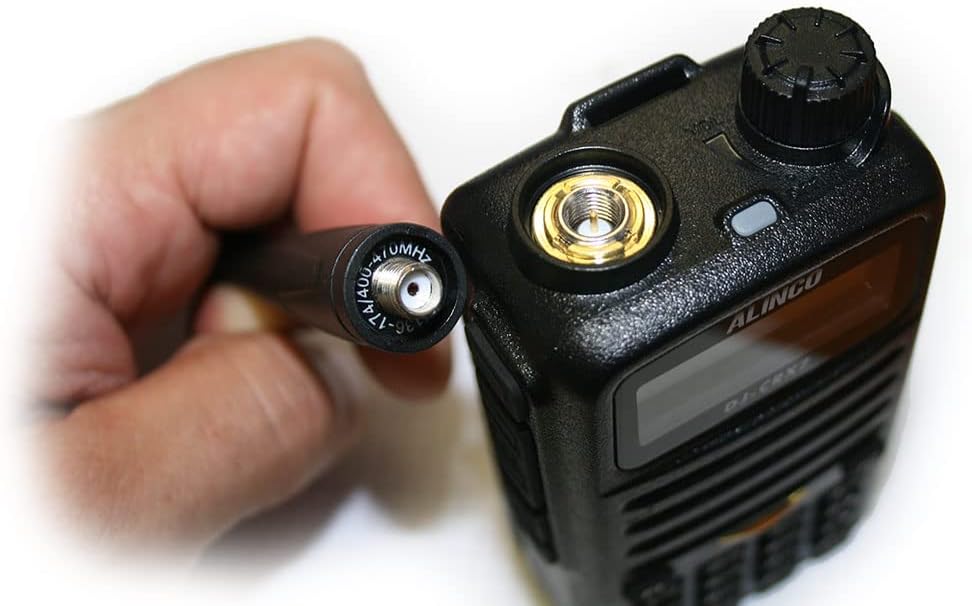
Image: All components included with the PNI Alinco DJ-CRX-7 portable radio.
Setup
1. Installing the Battery
- Ensure the radio is powered off.
- Align the Li-Ion battery pack with the battery compartment on the back of the radio.
- Slide the battery into place until it clicks securely.
2. Attaching the Antenna
- Locate the SMA connector on the top of the radio.
- Screw the antenna clockwise onto the SMA connector until it is finger-tight. Do not overtighten.

Image: Proper connection of the antenna to the radio's SMA connector.
3. Charging the Battery
- Connect the wall charger adapter to the desktop charger.
- Plug the wall charger into a standard electrical outlet.
- Place the radio (with battery installed) into the desktop charger. The charging indicator light will illuminate.
- Charge the battery fully before first use. A full charge typically takes several hours.
Operating Instructions
1. Basic Controls

Image: Front view of the PNI Alinco DJ-CRX-7 radio, showing the display and keypad.
- Power On/Off: Rotate the top knob clockwise to power on and counter-clockwise to power off.
- Volume Control: Adjust the same top knob to increase or decrease the volume.
- Channel Selection: Use the up/down arrow keys on the keypad or the rotary encoder (if present) to select channels. The radio supports 200 channels.
- Frequency Bands: The radio operates on VHF (136-174 MHz) and UHF (400-470 MHz) bands.
- Adjustable Power: The transmission power can be set to High, Medium, or Low (VHF: 5W/2W/1W; UHF: 4W/2W/1W). Refer to the menu for power adjustment.
2. Key Features
- FM Radio: The device includes an FM radio function. Consult the manual for specific activation steps.
- Channel Scan: Activate channel scan to automatically search for active frequencies.
- Key Lock: Use the key lock feature to prevent accidental button presses.
- Emergency Call: The radio is equipped with an emergency call function. Refer to the manual for programming and activation.
- Voice (VOX): Voice-activated transmission allows hands-free operation.
- Time-out Timer (TOT): Prevents a channel from being occupied for too long by limiting transmission time.
- DTMF (Dual-Tone Multi-Frequency): For signaling and control functions.
- Scrambler: Encrypts voice transmissions for privacy.
- Compander: Improves audio quality by compressing and expanding the dynamic range of the voice signal.
- Squelch: Eliminates background noise when no signal is received. Adjust the squelch level for optimal performance.
- Talk Around: Allows direct communication between two radios on a repeater output frequency, bypassing the repeater.
- BCL (Busy Channel Lockout): Prevents transmission on an already occupied channel.
- CTCSS/DCS (Continuous Tone-Coded Squelch System / Digital Coded Squelch): Sub-audible tones used to filter out unwanted communications and allow only specific groups to hear each other.
Maintenance
1. Cleaning
- Wipe the radio's surface with a soft, damp cloth. Do not use harsh chemicals or abrasive cleaners.
- Ensure the radio is dry before use or charging.
2. Battery Care
- Avoid fully discharging the battery frequently to prolong its lifespan.
- Store the battery in a cool, dry place when not in use for extended periods.
- Do not expose the battery to extreme temperatures or direct sunlight.
Troubleshooting
Common Issues and Solutions
- Radio not powering on: Check if the battery is properly installed and charged. Ensure the power/volume knob is turned clockwise.
- No sound: Adjust the volume knob. Check the squelch level. Ensure the antenna is securely attached.
- Cannot transmit: Verify you are on an allowed frequency. Check if BCL (Busy Channel Lockout) is active. Ensure the battery has sufficient charge.
- Poor reception/transmission: Check antenna connection. Ensure you are within range. Adjust squelch level.
If you encounter persistent issues not covered here, please contact customer support.
Specifications
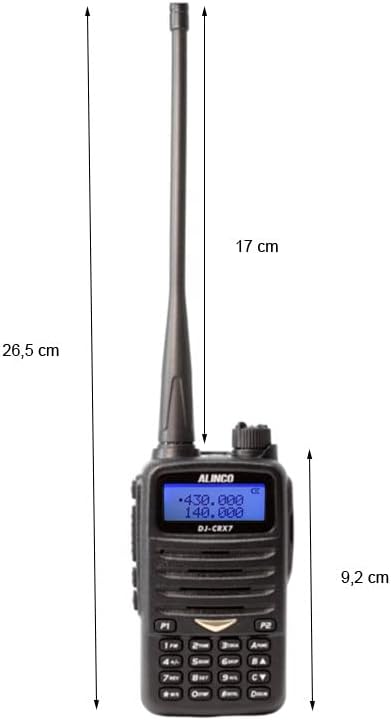
Image: Dimensions of the PNI Alinco DJ-CRX-7 portable radio.
| Feature | Detail |
|---|---|
| Model Number | DJ-CRX-7 |
| Frequency Bands | VHF (136-174 MHz), UHF (400-470 MHz) |
| Channels | 200 |
| Transmission Power | VHF: 5W/2W/1W, UHF: 4W/2W/1W |
| Battery | Li-Ion 1800 mAh, 7.4V |
| Operating Temperature | -26°C to +80°C |
| Dimensions (P x L x H) | 5.7 x 26.3 x 3.4 cm (2.24 x 10.35 x 1.34 inches) |
| Weight (with battery) | 213 Grams (0.47 lbs) |
| Water Resistance | IP67 rated (Dust tight and protected against temporary immersion up to 1m for 30 minutes). Note: While IP67 rated, the device is not designed for prolonged submersion. |
| Max Range | 10 Miles (approximate, depends on terrain and conditions) |
| Compatible Devices | Other VHF/UHF radios (144-146 MHz / 430-440 MHz), standard headsets with 3.5/2.5 mm dual jack, external antennas with SMA connector. |
Warranty Information
The PNI Alinco DJ-CRX-7 portable radio comes with a 2-year warranty from the date of purchase. This warranty covers manufacturing defects under normal use. It does not cover damage caused by misuse, accidents, unauthorized modifications, or natural disasters.
Please retain your proof of purchase for warranty claims.
Support
For technical assistance, troubleshooting beyond this manual, or warranty inquiries, please contact your retailer or the manufacturer's customer service department.
Always refer to the official Alinco website for the latest support information and software updates.
Related documentsDJ-CRX-7


Ask a question about this manual
Ask about setup, troubleshooting, compatibility, parts, safety, or missing instructions. Manuals+ will review the question and use this page’s manual context to help answer it.