
Introduction
This manual provides instructions for the HATUSOKU Digital Thermometer, Model HSK-2207-27. This device is designed for accurate temperature monitoring in various environments, including aquariums, refrigerators, and freezers, utilizing an external waterproof sensor. Its large LCD display ensures clear readability from a distance.
Package Contents
- HATUSOKU Digital Thermometer Main Unit
- External Temperature Sensor with 59-inch (150cm) Cord
- 1 AAA Battery
- Suction Cup
- Instruction Manual (this document)

Image: Included accessories: AAA battery and suction cup, shown alongside the thermometer unit and its sensor.
Product Overview
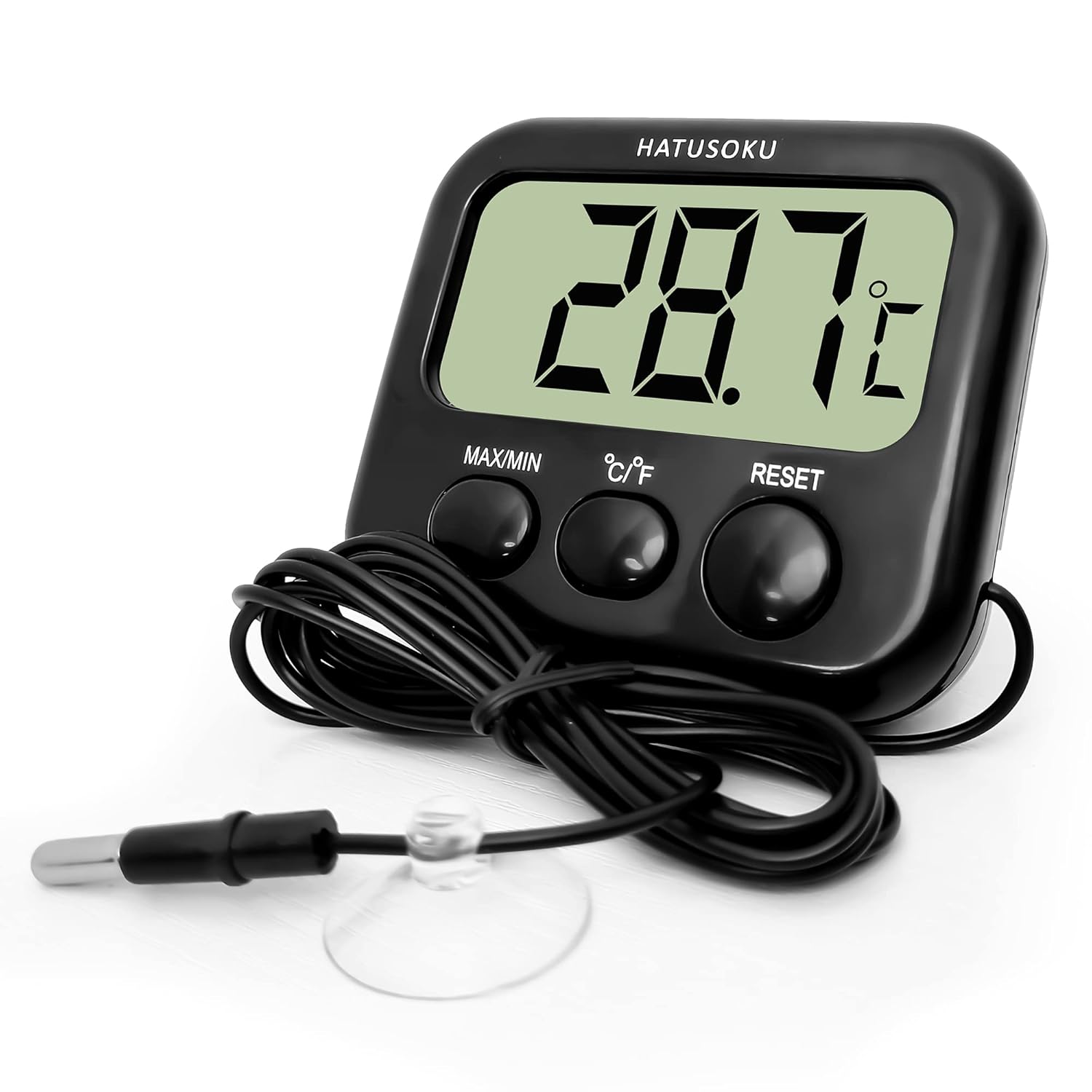
Image: Front view of the HATUSOKU Digital Thermometer, displaying the main unit with its large LCD screen, control buttons, and the attached external sensor with a suction cup.

Image: Detailed front view of the thermometer, highlighting the 'MAX/MIN' record button, '°C/°F' unit selection button, 'RESET' button, the probe part, and the suction cup.

Image: Rear view of the thermometer, illustrating the integrated magnet for attachment to metallic surfaces and the foldable kickstand for desktop placement.

Image: Diagram showing the physical dimensions of the thermometer: Width (7.8cm), Height (7.0cm), Thickness (2.8cm), and Sensor Cord Length (150cm).
Setup
- Battery Installation: Open the battery compartment on the back of the main unit. Insert one AAA battery, ensuring correct polarity (+/-). Close the compartment securely.
- Placement of Main Unit:
- Magnetic Attachment: The main unit has a magnet on its back, allowing it to be attached to metallic surfaces such as refrigerator doors.
- Kickstand: Utilize the foldable kickstand on the back for freestanding placement on a flat surface.
- Sensor Placement: Position the external sensor in the area where temperature measurement is desired. The sensor is waterproof and can be submerged in water (e.g., aquarium) or placed inside a refrigerator/freezer. Use the provided suction cup to secure the sensor cable or probe if needed.

Image: The thermometer main unit placed outside an aquarium, with its waterproof sensor submerged to monitor water temperature. The main unit is not waterproof.

Image: The thermometer main unit magnetically attached to the exterior of a refrigerator, with its sensor placed inside to monitor internal temperature.
Operating Instructions
- Power On: The device automatically powers on once the battery is installed. The current temperature will be displayed on the LCD screen.
- Temperature Unit Selection: Press the '°C/°F' button to switch between Celsius and Fahrenheit temperature units.
- Maximum/Minimum Temperature Record: Press the 'MAX/MIN' button to view the maximum recorded temperature since the last reset. Press it again to view the minimum recorded temperature. Press a third time to return to the current temperature display.
- Reset Function: To clear the recorded maximum and minimum temperatures, press and hold the 'RESET' button for a few seconds while viewing the MAX or MIN values. The recorded values will reset to the current temperature.
Maintenance
- Cleaning: Wipe the main unit and sensor with a soft, damp cloth. Do not use abrasive cleaners or immerse the main unit in water. The sensor probe is waterproof and can be cleaned with water.
- Battery Replacement: When the display becomes dim or the device stops functioning, replace the AAA battery. Ensure proper disposal of used batteries according to local regulations.
- Storage: Store the thermometer in a dry place away from direct sunlight and extreme temperatures when not in use for extended periods.
Troubleshooting
- No Display or Dim Display:
- Check if the AAA battery is installed correctly with the correct polarity.
- Replace the AAA battery with a new one.
- Inaccurate Temperature Readings:
- Ensure the sensor probe is properly positioned and not obstructed.
- Allow sufficient time (at least 15-30 minutes) for the sensor to stabilize in a new environment.
- Verify the sensor cable is securely connected to the main unit.
- Buttons Not Responding:
- Replace the battery.
- Perform a soft reset by removing and reinserting the battery.
Specifications
| Feature | Detail |
|---|---|
| Model Number | HSK-2207-27 |
| Body Size | 7.87 x 7.11 x 2.79 cm (3.0in x 2.8in x 1.1in) |
| Weight | 70 g (2.2 oz) |
| Sensor Cord Length | 150 cm (59 in) |
| Measurement Temperature Range | -40°C to 70°C (-40°F to 158°F) |
| Measurement Accuracy | ±1°C |
| Power Source | 1 x AAA Battery (included) |
| Special Features | Large Display, Max/Min Value Display, Magnetic Back, Kickstand, Suction Cup, Waterproof External Sensor |
| Display Type | Digital LCD |
| Material | Plastic |
| Product Care Instructions | Freezer Safe (sensor), Wipe Clean (main unit) |
Safety Information
- The main unit of the thermometer is not waterproof. Avoid exposing it to water or high humidity.
- The external sensor probe is waterproof but should not be used in seawater.
- Keep batteries out of reach of children. If swallowed, seek immediate medical attention.
- Do not attempt to disassemble or modify the device.
- Dispose of the device and batteries according to local environmental regulations.
Warranty and Support
HATUSOKU products are designed for reliability and performance. For warranty information or technical support, please refer to the documentation included with your purchase or contact the retailer where the product was acquired. Please retain your proof of purchase for warranty claims.