
1. Safety Information
Please read and understand all safety information and operating instructions before using this multimeter. Failure to follow these instructions may result in electric shock, fire, or serious injury.
- Always ensure the multimeter is in good working condition and that the test leads are not damaged before use.
- Do not apply voltage or current that exceeds the maximum rated values for the multimeter. This device is rated for DC/AC 600V CAT III overvoltage standard.
- Exercise extreme caution when working with voltages above 30V AC RMS, 42V peak, or 60V DC. These voltages pose a shock hazard.
- Always disconnect power to the circuit and discharge all high-voltage capacitors before performing resistance, continuity, or diode tests.
- Use the correct function and range for each measurement.
- Keep fingers behind the finger guards on the test probes during measurements.
- Do not operate the multimeter in explosive gas, vapor, or dusty environments.
- Replace the battery when the low battery indicator appears to ensure accurate readings.
2. Product Overview
The Proster Digital Multimeter Model PST is a versatile, rechargeable True RMS meter designed for accurate measurement of various electrical parameters. It features a large VA color reverse LCD display and smart touch screen controls for ease of use. This device is suitable for laboratories, factories, and home use.

Figure 2.1: Multimeter Components. This image displays the front and back of the Proster Digital Multimeter. Key components labeled include the flashlight, power display, max 9999 counts, removable silicone case, AC/DC current/voltage display, data hold button, NCV/Live button, capacitance button, and test lead input ports.
Key Features:
- 10000 Counts Rechargeable Digital Multimeter: Offers automatic and manual measurement modes with a color LCD display. Includes a charging cable for convenience.
- Smart Touch Screen Control: Large VA color reverse LCD display for clear data and easy operation.
- Accurate and Safe: Equipped with a high-performance chip for accuracy and built-in overload protection fuse. Meets DC/AC 600V CAT III overvoltage standard with double insulation.
- NCV Non-contact Voltage Detection: Detects AC voltage greater than 90ACV by placing the NCV sensor near the cable. The meter alarms and displays induction intensity.
- Multi-function: Measures AC/DC Current, AC/DC Voltage, Resistance, Capacitance, Temperature, Frequency, Continuity, Diode Test, Fire Wire Detection, and includes a Flashlight Function.
3. What's in the Box
Upon opening the package, verify that all items are present and undamaged:
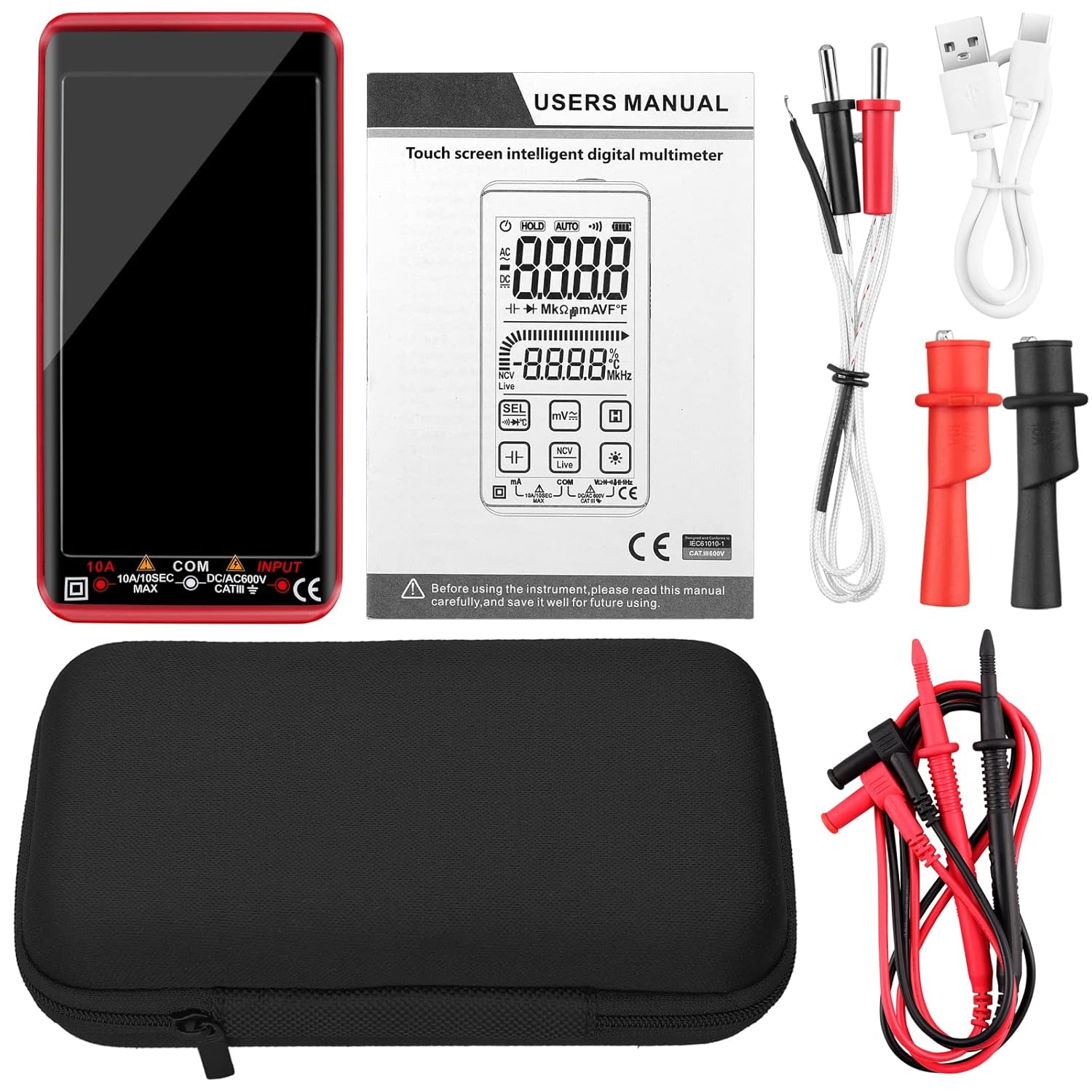
Figure 3.1: Package Contents. This image shows the Proster Digital Multimeter, user manual, test leads, temperature probe, USB-C charging cable, and a protective carrying case.
- Proster Digital Multimeter (Model PST)
- Test Leads (Red and Black)
- Temperature Probe (Thermocouple)
- USB Type-C Charging Cable
- Protective Carrying Case
- User Manual
4. Setup
4.1 Charging the Multimeter
The multimeter is equipped with a built-in rechargeable lithium battery. Before first use, or when the low battery indicator appears, charge the device using the provided USB Type-C cable.
- Locate the USB Type-C charging port on the side of the multimeter (under the removable silicone case if applicable).
- Connect the USB Type-C cable to the multimeter and the other end to a standard USB power adapter (not included) or a computer USB port.
- The battery indicator on the display will show charging status. Charge until the indicator shows a full charge.

Figure 4.1: USB-C Charging. The image shows the multimeter connected to a USB power source via its Type-C port for charging.
4.2 Connecting Test Leads
Always ensure test leads are securely connected before taking measurements.
- Insert the red test lead into the "INPUT" terminal (positive).
- Insert the black test lead into the "COM" terminal (common/negative).
- For current measurements (10A MAX), insert the red test lead into the "10A" terminal.
5. Operating Instructions
5.1 Power On/Off
- Power On: Press the power button (usually located on the top right) for approximately 1 second.
- Power Off: Long press the power button for approximately 2 seconds.
- The multimeter features an auto-off function to conserve battery power if inactive for a period.
5.2 Automatic Measurement Mode (AUTO)
Upon powering on, the multimeter typically defaults to AUTO mode, which automatically identifies and measures AC/DC voltage, resistance, and continuity without manual range selection.
5.3 Function Selection (Touch Screen)
The Proster Digital Multimeter utilizes a touch screen for selecting various measurement functions. The display shows icons for different modes.

Figure 5.1: Smart Touch Screen Control. This image illustrates a finger interacting with the touch screen of the multimeter to select functions.
Tap the corresponding icon on the touch screen to switch between measurement modes such as Voltage, Current, Resistance, Capacitance, Temperature, Frequency, Diode, Continuity, NCV, and Live Wire detection.
5.4 Specific Measurement Functions
- Voltage (AC/DC): Select the voltage mode. Connect the test leads in parallel to the circuit or component to measure voltage.
- Current (AC/DC): Select the current mode. Ensure the red test lead is in the 10A terminal for high current. Connect the multimeter in series with the circuit.
- Resistance: Select resistance mode. Ensure the circuit is de-energized. Connect test leads across the component to measure resistance.
- Capacitance: Select capacitance mode. Ensure the capacitor is discharged before connecting test leads.
- Temperature: Connect the temperature probe to the multimeter. Select temperature mode. Place the probe tip on or near the object to measure its temperature.
- Continuity: Select continuity mode. Connect test leads across the circuit or component. A buzzer will sound if continuity exists.
- Diode Test: Select diode mode. Connect test leads across the diode. The display will show the forward voltage drop.
- NCV (Non-Contact Voltage) Detection: Select NCV mode. Place the NCV sensor (top part of the multimeter) near the wire or outlet. The meter will alarm and display induction intensity if AC voltage is detected.

Figure 5.2: NCV Detection in Use. The image shows the multimeter detecting AC voltage near an electrical outlet, with the display showing the induction intensity.

Figure 5.3: Multiple Measurement Examples. This composite image demonstrates the multimeter measuring resistance on a circuit board, checking a fuse for continuity, measuring capacitance of a component, and measuring liquid temperature with the probe.
5.5 Data Hold (HOLD)
Press the "HOLD" button on the touch screen to freeze the current measurement reading on the display. Press it again to release the hold function.
5.6 Flashlight Function
Press the flashlight icon on the touch screen to turn on the built-in LED flashlight for illumination in dimly lit areas. Press again to turn it off.
6. Maintenance
6.1 Cleaning
Wipe the multimeter casing with a damp cloth and mild detergent. Do not use abrasives or solvents. Ensure the device is powered off and disconnected from any circuits before cleaning.
6.2 Battery Care
To prolong battery life, avoid fully discharging the battery frequently. Recharge the multimeter regularly, especially if it will be stored for an extended period.
6.3 Fuse Inspection
The multimeter has an internal fuse for overload protection. If the current measurement function stops working, the fuse may need inspection and replacement. Refer to a qualified technician for fuse replacement to ensure safety and proper function.
7. Troubleshooting
- No Display/Power: Ensure the multimeter is charged. Press the power button for 1 second to turn on.
- Inaccurate Readings: Check battery level and replace if low. Ensure test leads are properly connected and not damaged. Verify the correct function and range are selected.
- No Current Measurement: Check if the red test lead is in the 10A terminal for current measurements. The internal fuse might be blown; consult a technician for replacement.
- NCV Not Detecting: Ensure NCV mode is selected. The sensor needs to be close to the AC voltage source.
- Touch Screen Unresponsive: Power off and restart the device. Ensure the screen is clean and dry.
8. Specifications
| Feature | Specification |
|---|---|
| Brand | Proster |
| Model Number | PST |
| Display | Color LCD, 10000 Counts |
| Power Source | Rechargeable Lithium Battery (3.7V 600mAh) |
| Charging Port | USB Type-C |
| Safety Rating | CAT III 600V |
| AC/DC Voltage Range | Up to 600V |
| AC/DC Current Range | Up to 10A |
| Resistance Range | Standard ranges (auto-ranging) |
| Capacitance Range | Standard ranges (auto-ranging) |
| Temperature Range | Standard ranges (with probe) |
| NCV Detection | Yes, >90ACV |
| Item Weight | 12 ounces |
| Package Dimensions | 7.24 x 3.94 x 2.2 inches |
9. Warranty and Support
9.1 Warranty Information
This Proster Digital Multimeter Model PST comes with an 18-month warranty from the date of purchase. This warranty covers manufacturing defects and malfunctions under normal use. It does not cover damage caused by misuse, accidents, unauthorized modifications, or improper operation.
9.2 Customer Support
For technical assistance, warranty claims, or any questions regarding the operation of your Proster Digital Multimeter, please contact Proster customer support through the retailer's platform or the official Proster website. Please have your product model number (PST) and purchase details ready when contacting support.


