
1. Introduction
This manual provides essential instructions for the safe and effective use of your Dwi Dowellin D10 Battery. Please read this manual thoroughly before using the battery to ensure proper operation and longevity. This battery is specifically designed for use with Dwi Dowellin D10 drones.
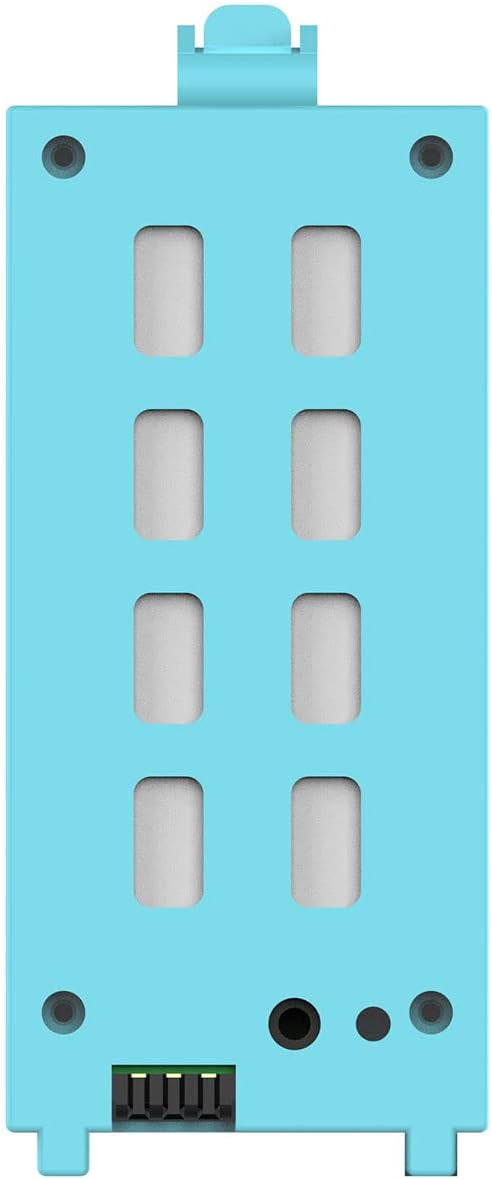
Image 1.1: Dwi Dowellin D10 Battery. This image displays the light blue rectangular battery, highlighting its connection points and overall design.
2. Compatibility
The Dwi Dowellin D10 Battery (Part Number: 753040) is exclusively compatible with Dwi Dowellin D10 drone models. Using this battery with other devices or drones may result in damage to the battery, the device, or personal injury. Always verify compatibility before use.
3. Safety Information
Lithium-ion batteries require careful handling. Adhere to the following safety guidelines:
- Do not disassemble, puncture, or modify the battery.
- Avoid exposing the battery to extreme temperatures (hot or cold), direct sunlight, or fire.
- Do not immerse the battery in water or other liquids.
- Keep the battery away from children and pets.
- If the battery shows signs of damage, swelling, or leakage, discontinue use immediately and dispose of it properly.
- Use only chargers specifically designed for Lithium-ion batteries and compatible with the Dwi Dowellin D10 drone system.
- Do not short-circuit the battery terminals.
4. Setup: Charging the Battery
Before first use, fully charge the battery. Refer to your Dwi Dowellin D10 drone's manual for specific charging instructions, as the battery is typically charged while installed in the drone or with a dedicated charger provided with the drone.
- Ensure the battery is securely connected to the drone or the compatible charger.
- Connect the charger to a power source.
- Monitor the charging indicator (usually on the drone or charger) until it indicates a full charge.
- Disconnect the charger once charging is complete to prevent overcharging.
Note: Charging times may vary. Always follow the charging guidelines provided with your Dwi Dowellin D10 drone.
5. Operating: Battery Installation and Removal
To install or remove the D10 Battery from your Dwi Dowellin D10 drone, follow these steps:
- Installation:
- Locate the battery compartment on your Dwi Dowellin D10 drone.
- Align the battery with the compartment, ensuring the connectors match.
- Gently slide the battery into the compartment until it clicks securely into place. Do not force the battery.
- Removal:
- Ensure the drone is powered off before attempting to remove the battery.
- Locate the battery release mechanism (if any) on the drone.
- Press the release button or tab, and carefully slide the battery out of the compartment.
Always handle the battery by its body, avoiding stress on the connectors.
6. Maintenance and Storage
Proper maintenance and storage extend the life of your battery.
- Cleaning: Use a dry, soft cloth to clean the battery terminals if necessary. Do not use liquids or abrasive cleaners.
- Storage:
- Store the battery in a cool, dry place, away from direct sunlight and extreme temperatures.
- For long-term storage, it is recommended to store Lithium-ion batteries at approximately 50-60% charge, not fully charged or fully depleted.
- Store the battery in a fireproof bag or container if possible.
- Disposal: Do not dispose of the battery in household waste. Recycle Lithium-ion batteries at designated collection points according to local regulations.
7. Troubleshooting
If you encounter issues with your Dwi Dowellin D10 Battery, consider the following:
| Problem | Possible Cause | Solution |
|---|---|---|
| Battery not charging |
|
|
| Short flight time |
|
|
| Battery swelling or overheating |
| Immediately discontinue use and safely dispose of the battery. Do not attempt to charge or use a swollen or overheating battery. |
For further assistance, please contact Dwi Dowellin customer support.
8. Specifications
| Brand | Dwi Dowellin |
| Model Name | D10 Battery |
| Item Model Number | 753040 |
| Battery Cell Composition | Lithium Ion |
| Number of Batteries | 1 (included) |
| Item Weight | 1.13 ounces |
| Package Dimensions | 2.91 x 1.73 x 0.75 inches |
| Recommended Uses | Drone (Dwi Dowellin D10) |
9. Warranty and Support
For warranty information, technical support, or any inquiries regarding your Dwi Dowellin D10 Battery, please refer to the documentation included with your Dwi Dowellin D10 drone or visit the official Dwi Dowellin website. You may also contact Dwi Dowellin customer service directly for assistance.
Manufacturer: Dwi Dowellin