
ErGear EGESD5V-4
ErGear Electric Standing Desk User Manual
Model: EGESD5V-4
Introduction
Thank you for choosing the ErGear Electric Standing Desk. This manual provides essential information for the proper assembly, operation, and maintenance of your new desk. Designed for optimal ergonomics and productivity, this desk allows you to seamlessly switch between sitting and standing positions, promoting a healthier work environment. Please read this manual thoroughly before use to ensure safe and efficient operation.

Image: ErGear Electric Standing Desk with Keyboard Tray in a home office setting.
Video: Official ErGear Brand Video, showcasing the versatility and benefits of ErGear products in various work environments.
Important Safety Warnings
Please adhere to the following safety guidelines to prevent injury or damage to the product:
- Ensure the desk is properly assembled and stable before use.
- Do not exceed the maximum weight limit of 176 lbs (80 kg).
- Keep hands and fingers away from moving parts during operation.
- Unplug the desk when not in use or during cleaning.
- Do not attempt to modify or repair the product without consulting the manufacturer.
- Keep the desk away from water sources and liquids.
- For children's use, always supervise and ensure proper usage.
- Consult the manufacturer's instructions for any additional safety warnings or precautions.
Product Features
Outstanding Stability
The ErGear Electric Standing Desk features a sturdy solid steel frame with aerospace-grade lifting column connectors, ensuring stability and security even at full height. It has been tested 100,000 times to maintain its robust foundation for your work.

Image: A man standing comfortably at the ErGear desk, highlighting its ultimate stability.
Smooth Height Adjustment & Memory Presets
Adjust the desk height freely from 28.35 inches to 46.46 inches. The control panel allows you to save up to three favorite height settings for quick and smooth transitions between sitting and standing positions.

Image: Illustration of the wide height adjustment range, showing both sitting and standing configurations.
Video: Demonstrates the smooth motion and wide height adjustment capabilities, including custom height settings.
Spacious Keyboard Tray & Ergonomic Design
The integrated keyboard tray offers ample space for a full-size keyboard and mouse, with a maximum load capacity of 22 lbs (10 kg). Its design promotes an ergonomic typing or gaming position, helping to clear your main desk surface and keep your workspace organized.

Image: Close-up view of the spacious keyboard tray, highlighting its dimensions and capacity.

Image: A user demonstrating the ergonomic benefits of the keyboard tray, allowing for a comfortable posture.
Uprated Motor & Quiet Operation
The desk is equipped with a powerful motor capable of lifting up to 176 lbs (80 kg). It ensures reliable long-term operation, having been tested 50,000 times. The motor operates quietly, allowing you to adjust the desk height without disturbing your focus or others in the vicinity.

Image: A cat sleeping peacefully on the desk, illustrating the quiet operation of the motor.
Desk Dimensions
The desk surface measures 48 inches wide by 24 inches deep. The height is adjustable from 28.35 inches to 46.46 inches. The keyboard tray measures 26.7 inches wide by 9.8 inches deep.
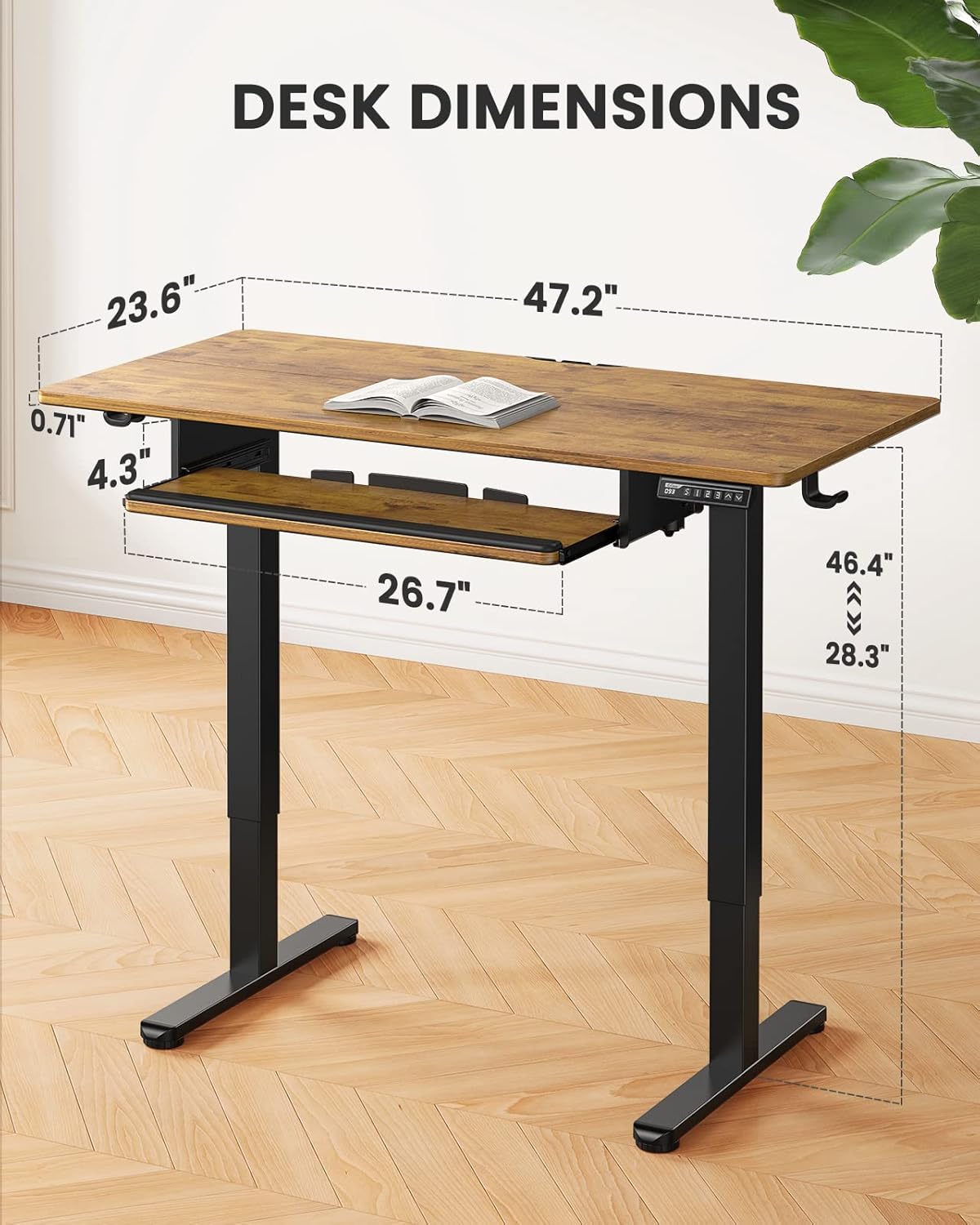
Image: Detailed diagram showing the dimensions of the ErGear Electric Standing Desk.
Setup and Assembly
Assembly of the ErGear Electric Standing Desk is designed to be straightforward. All necessary tools are included. For detailed step-by-step instructions, please refer to the official Installation Manual PDF and the video guide below.
Download the full Installation Manual (PDF): ErGear Electric Standing Desk Installation Manual
Assembly Overview:
- Assemble and Connect the Desk Legs: Attach the crossbar to the two leg columns using the provided screws. Ensure all connections are secure.
- Attach Side Plates and Transmission Rod: Secure the side plates to the leg columns. Insert the transmission rod, ensuring it is fully engaged to synchronize leg movement. If legs are uneven, adjust the rod by turning it in the left leg.
- Assemble and Attach the Desktop: Connect the two desktop pieces using the provided dowels and metal plates. Carefully align the desktop with the assembled frame and secure it with screws. Attach cable management hooks and other accessories to the underside of the desktop.
- Connect the Cables: Plug in all necessary power and control cables to the motor and control panel. Ensure all connections are firm.
- Attach Parts to the Keyboard Tray: Assemble the keyboard tray components, including the sliding rails and wrist rest, and attach it to the designated area under the desktop.
Video: Detailed Installation Guide for the ErGear Standing Desk with Keyboard Tray, providing visual steps for assembly.
Operating Instructions
Your ErGear Electric Standing Desk is equipped with an intuitive control panel for easy height adjustment and memory settings.
Control Panel Functions:
- Up/Down Arrows (▲ / ▼): Press and hold to raise or lower the desk to your desired height. Release the button to stop movement.
- Memory Presets (1, 2, 3): To save a height setting: Adjust the desk to the desired height, then press the 'M' button followed by the number (1, 2, or 3) you wish to assign. The display will confirm the setting. To recall a saved height: Simply press the corresponding number button (1, 2, or 3), and the desk will automatically move to that preset height.
- Display Screen: Shows the current height of the desk in inches.
For optimal ergonomic positioning, adjust the desk so your elbows form a 90-degree angle when typing, whether sitting or standing.
Maintenance
To ensure the longevity and optimal performance of your ErGear Electric Standing Desk, follow these simple maintenance guidelines:
- Cleaning: Wipe the desk surfaces with a damp cloth. Avoid using harsh chemicals or abrasive cleaners that could damage the finish.
- Regular Checks: Periodically inspect all screws and connections to ensure they remain tight. Re-tighten if necessary.
- Cable Management: Keep cables organized and free from tangles to prevent damage during height adjustments.
- Weight Limit: Do not overload the desk beyond its maximum weight capacity of 176 lbs (80 kg) to prevent strain on the motor and frame.
Troubleshooting
If you encounter any issues with your ErGear Electric Standing Desk, please refer to the following common troubleshooting tips. For more complex problems, consult the full installation manual or contact customer support.
- Desk Not Moving: Check if the power cord is securely plugged into both the desk and a working power outlet. Ensure no cables are tangled or obstructing the motor.
- Uneven Height: If the desk legs are not at the same height, refer to Step 2 of the assembly instructions regarding the transmission rod adjustment.
- Error Codes: If the display shows an error code, unplug the desk for 10-15 seconds, then plug it back in to reset the system. If the error persists, consult the detailed troubleshooting section in the PDF manual.
- Unusual Noises: While the motor is designed for quiet operation, minor sounds during movement are normal. If you hear loud grinding or unusual noises, stop operation immediately and check for any obstructions or loose parts.
Specifications
| Feature | Detail |
|---|---|
| Brand | ErGear |
| Model Number | EGESD5V-4 |
| Product Dimensions | 48"W x 24"D x 28.5"H (Adjustable Height) |
| Height Adjustment Range | 28.35" to 46.46" |
| Maximum Weight Capacity | 176 Pounds (80 kg) |
| Keyboard Tray Max Load | 22 Pounds (10 kg) |
| Material | Alloy Steel (Base), Wood (Top) |
| Color | Vintage Brown |
| Motor Type | Electric |
| Memory Presets | 3 |
| Assembly Required | Yes (Tools Included) |
| Product Weight | 50 Pounds |
Warranty and Support
ErGear products come with a Limited Warranty. For specific details regarding your warranty coverage, please refer to the warranty information provided with your purchase or visit the official ErGear website.
If you require technical assistance, have questions about assembly, or need to report a defect, please contact ErGear customer support through their official channels. Contact information can typically be found on the ErGear website or within your product packaging.
Related documentsEGESD5V-4


Ask a question about this manual
Ask about setup, troubleshooting, compatibility, parts, safety, or missing instructions. Manuals+ will review the question and use this page’s manual context to help answer it.