
Nacon S55145063
Nacon S55145063 Unisex Adult Backpack User Manual
Model: S55145063
1. Introduction
Thank you for choosing the Nacon S55145063 Unisex Adult Backpack. This manual provides essential information for the proper use, care, and maintenance of your new backpack. Please read this manual thoroughly before using the product to ensure optimal performance and longevity.
2. Safety Information
- Do not overload the backpack beyond its intended capacity to prevent damage to the bag and potential injury.
- Keep the backpack away from open flames or extreme heat sources.
- Ensure all zippers and buckles are securely fastened when carrying items to prevent loss.
- Avoid exposing the backpack to sharp objects that could puncture or tear the fabric.
3. Product Overview
The Nacon S55145063 backpack is designed for versatile use, featuring multiple compartments and a durable construction. It includes a main storage area, front pockets, and adjustable shoulder straps for comfort.

Figure 3.1: Front view of the Nacon S55145063 backpack, showcasing its sleek design and the Nacon logo at the bottom.

Figure 3.2: Side view of the backpack with the main compartment unzipped, illustrating the wide opening for easy access to contents.
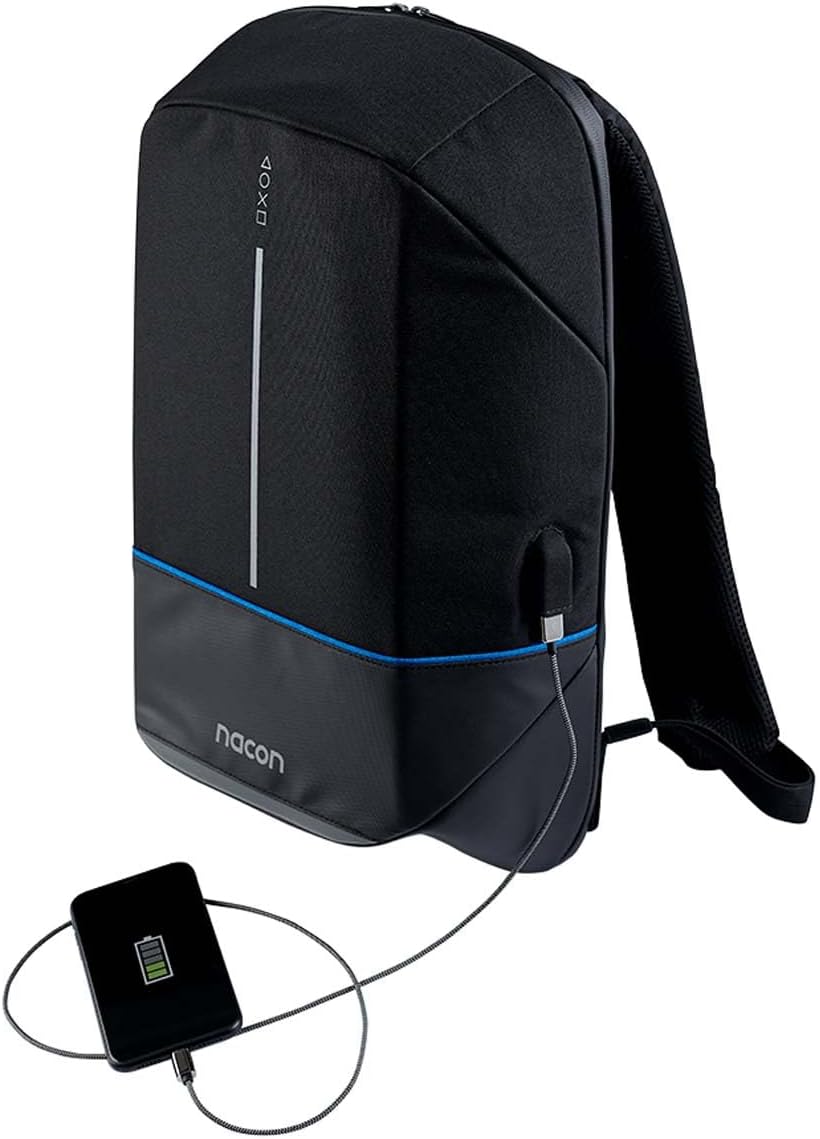
Figure 3.3: The backpack's integrated external USB charging port, demonstrating its utility for charging devices on the go (power bank not included).
4. Setup
The Nacon S55145063 backpack requires minimal setup before use.
- Unpacking: Remove the backpack from its packaging. Inspect for any signs of damage during transit.
- Adjusting Straps: Place the backpack on your back. Use the adjustable buckles on the shoulder straps to achieve a comfortable and secure fit. The backpack should sit snugly against your back, with the weight evenly distributed.
- USB Charging Port (if applicable): If your model includes an external USB charging port, locate the internal USB cable. Connect your portable power bank (not included) to this internal cable. You can then connect your device to the external USB port for charging.
5. Operating
Using your Nacon S55145063 backpack is straightforward.
- Loading Items: Open the main compartment zipper. Place your items inside, distributing weight evenly to maintain balance and comfort. Utilize internal pockets for smaller items.
- Securing Contents: Once loaded, ensure all zippers are fully closed to secure your belongings.
- Carrying: Use both shoulder straps for optimal weight distribution and comfort. The top handle can be used for short-distance carrying or hanging.
6. Maintenance
Proper care will extend the life of your backpack.
- Cleaning: The manufacturer's instructions specify machine washing. For minor dirt, wipe the surface with a damp cloth and mild soap. For deeper cleaning, follow the care label instructions. Ensure the backpack is completely dry before storing to prevent mildew.
- Storage: Store the backpack in a cool, dry place away from direct sunlight when not in use.
- Zipper Care: Periodically check zippers for smooth operation. If a zipper becomes stiff, apply a small amount of zipper lubricant or wax.
7. Troubleshooting
Common issues and their solutions.
| Problem | Possible Cause | Solution |
|---|---|---|
| Zipper stuck or difficult to move | Fabric caught in zipper; lack of lubrication | Gently pull fabric away; apply zipper lubricant or wax. |
| Stains on fabric | Dirt or spills | Spot clean with mild soap and water, or machine wash according to care instructions. |
| Shoulder straps feel uncomfortable | Improper adjustment; overloaded backpack | Adjust straps for a snug fit; reduce load if too heavy. |
8. Specifications
| Feature | Detail |
|---|---|
| Model Number | S55145063 |
| Brand | Nacon |
| Color | Multicolor |
| Dimensions (L x W x H) | 15.4 x 49.29 x 32.2 cm (approximately 6.06 x 19.41 x 12.68 inches) |
| Weight | 1.06 kilograms (approximately 2.34 lbs) |
| Care Instructions | Machine Wash |
9. Warranty and Support
Nacon products are manufactured to high-quality standards. For information regarding warranty coverage, please refer to the warranty card included with your purchase or visit the official Nacon website. For technical support or inquiries, please contact Nacon customer service through their official channels.
Online Support: Visit the official Nacon website for FAQs, support resources, and contact information.
Manufacturer: Nacon
Ask a question about this manual
Ask about setup, troubleshooting, compatibility, parts, safety, or missing instructions. Manuals+ will review the question and use this page’s manual context to help answer it.