1. Introduction
The Sound Town STPA-160D is a Class-D plate amplifier designed for integration into PA and DJ speaker cabinets and loudspeakers. This amplifier delivers 150W RMS power at 8-ohm and features a 3-band EQ, True Wireless Stereo (TWS) Bluetooth connectivity, and various input/output options. This manual provides essential information for the safe and efficient operation of your STPA-160D amplifier.
2. Safety Instructions
- Power Source: Connect the unit only to an AC power outlet of the specified voltage. Ensure the power cord is not damaged or pinched.
- Ventilation: Do not block ventilation openings. Ensure adequate airflow around the unit to prevent overheating.
- Moisture: Do not expose the unit to rain, moisture, or excessive humidity. Avoid placing liquid-filled objects on the amplifier.
- Servicing: Do not attempt to service this unit yourself. Refer all servicing to qualified service personnel.
- Placement: Install the amplifier securely within a speaker cabinet. Avoid placing it on unstable surfaces.
- Cleaning: Disconnect power before cleaning. Use a dry cloth for cleaning. Do not use liquid cleaners or aerosols.
3. Product Features
- Class-D plate power amplifier design.
- 150W RMS power output at 8-ohm.
- XLR/1/4" combo input with mic/line switch for versatile connectivity.
- 1/8" AUX input for external audio devices.
- XLR thru output for connecting to additional speakers or mixers.
- True Wireless Stereo (TWS) Bluetooth for wireless audio streaming.
- Integrated 3-band EQ (Treble, MID, Bass) for sound control.
- Overload and overheat protection circuits.
4. Controls and Connections
Familiarize yourself with the control panel and connection points of the STPA-160D amplifier.
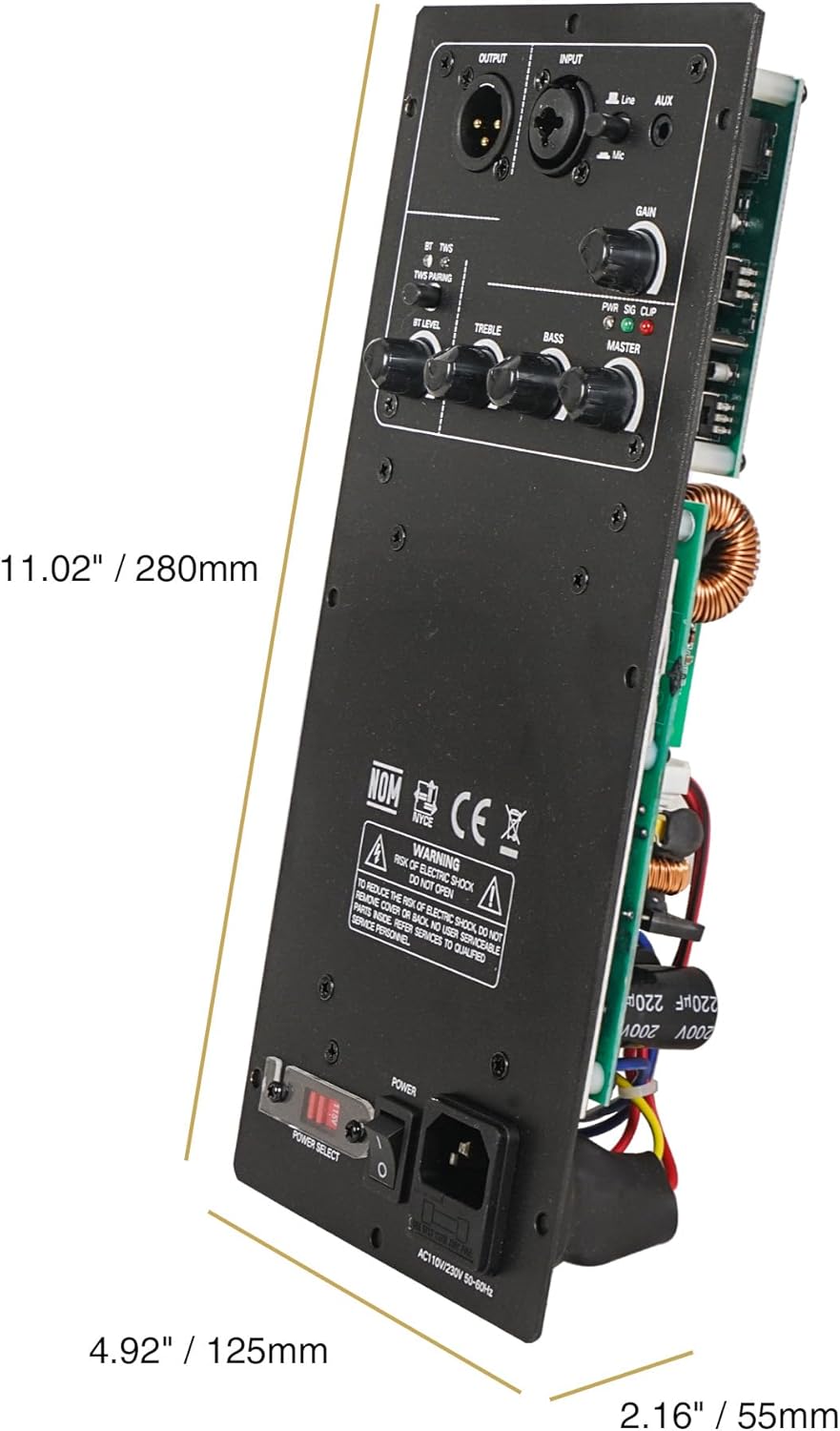
This image illustrates the amplifier's control panel, including input/output jacks (XLR/1/4 combo, AUX), gain, master volume, and 3-band EQ controls (Treble, Mid, Bass). Dimensions are also indicated, showing the unit's physical size for integration into speaker cabinets.
- INPUT (XLR/1/4" Combo): Connect audio sources such as microphones or line-level devices.
- MIC/LINE Switch: Selects input sensitivity for microphone or line-level signals.
- AUX (1/8"): Connect portable audio players or other devices with a 3.5mm output.
- OUTPUT (XLR): Provides a balanced output signal for connecting to another powered speaker or a mixer.
- GAIN: Adjusts the input sensitivity for the connected audio source.
- MASTER: Controls the overall output volume of the amplifier.
- TREBLE, MID, BASS: 3-band equalizer controls to adjust the frequency response.
- POWER Switch: Turns the amplifier on or off.
- POWER SELECT: Voltage selector (AC115V/230V 50-60Hz). Ensure this is set correctly for your region before connecting power.
- TWS Button: Initiates True Wireless Stereo pairing for Bluetooth.
- BT/PAIR LED: Indicates Bluetooth status (pairing, connected).
- PWR/SIG/CLIP LED: Power indicator, signal presence, and clip warning.
5. Setup
Proper installation and connection are crucial for optimal performance.

This image displays the internal circuitry of the STPA-160D amplifier, showing the main circuit board, power supply components, and wiring. This view is typically accessed during installation or service.
- Cabinet Integration: Carefully mount the STPA-160D plate amplifier into the designated opening of your passive speaker cabinet. Ensure a secure fit and proper sealing to maintain cabinet acoustics.
- Speaker Connection: Connect the internal speaker wires from the amplifier to the speaker driver(s) within the cabinet. Observe correct polarity (+ to + and - to -).
- Power Voltage Selection: Before connecting the power cord, verify that the POWER SELECT switch on the amplifier is set to the correct voltage for your region (115V or 230V). Incorrect voltage selection can damage the unit.
- Power Connection: Connect the supplied AC power cord to the amplifier's power inlet and then to a grounded electrical outlet.
- Audio Input: Connect your audio source (mixer, microphone, instrument, media player) to the appropriate input jack (XLR/1/4" Combo or AUX).
- Output Connection (Optional): If linking to another powered speaker or a mixer, connect an XLR cable from the amplifier's XLR OUTPUT to the input of the next device.
6. Operating Instructions
- Power On: Ensure all connections are secure and volume controls are set to minimum. Flip the POWER switch to the 'ON' position. The PWR LED should illuminate.
- Input Selection: If using the XLR/1/4" combo input, set the MIC/LINE switch according to your source (MIC for microphones, LINE for line-level devices like mixers).
- Volume Adjustment: Slowly increase the GAIN control for your input source and then the MASTER volume control to achieve the desired listening level. Monitor the CLIP LED; if it flashes frequently, reduce the GAIN or MASTER volume to prevent distortion.
- Equalization: Use the TREBLE, MID, and BASS controls to fine-tune the sound to your preference or room acoustics. Adjust these controls incrementally.
- Power Off: Before disconnecting power or making changes to connections, turn the MASTER volume down completely, then flip the POWER switch to 'OFF'.
7. Bluetooth Pairing (TWS)
The STPA-160D supports Bluetooth for wireless audio streaming and True Wireless Stereo (TWS) for pairing two STPA-160D units for a stereo sound experience.
Standard Bluetooth Pairing:
- Ensure the amplifier is powered on.
- On your mobile device, enable Bluetooth and search for available devices.
- Select "Sound Town STPA-160D" from the list. The BT/PAIR LED on the amplifier will indicate a successful connection.
- You can now stream audio wirelessly to the amplifier.
True Wireless Stereo (TWS) Pairing:
To use two STPA-160D units in TWS mode for stereo sound:
- Power on both STPA-160D amplifiers.
- On one amplifier (this will be the primary unit), press and hold the TWS button until the BT/PAIR LED flashes rapidly.
- Repeat this step on the second amplifier (this will be the secondary unit).
- The two units will automatically search and pair with each other. Once paired, the BT/PAIR LED on both units will show a steady light or a slower flash pattern.
- Now, connect your mobile device to the primary STPA-160D unit via standard Bluetooth pairing as described above.
- Audio streamed to the primary unit will now play in stereo across both amplifiers.
8. Maintenance
- Cleaning: Regularly wipe the exterior of the amplifier with a soft, dry cloth. Do not use abrasive cleaners, solvents, or waxes.
- Ventilation: Ensure that the ventilation openings are free from dust and debris. Use a soft brush or compressed air to clear any blockages.
- Connections: Periodically check all cable connections for tightness and signs of wear. Replace damaged cables immediately.
- Storage: If storing the amplifier for an extended period, disconnect it from power and store it in a cool, dry place, away from direct sunlight and extreme temperatures.
9. Troubleshooting
| Problem | Possible Cause | Solution |
|---|---|---|
| No power | Power cord disconnected; Power switch off; Incorrect voltage selection; Blown fuse. | Check power cord connection; Turn power switch on; Verify POWER SELECT switch setting; Consult qualified service personnel for fuse replacement. |
| No sound output | Input cable disconnected; Volume controls too low; Incorrect input selected; Speaker wires disconnected. | Check input cable connections; Increase GAIN and MASTER volume; Ensure MIC/LINE switch is correct; Verify internal speaker wire connections. |
| Distorted sound | Input signal too high (clipping); EQ settings incorrect; Damaged speaker. | Reduce GAIN or MASTER volume until CLIP LED stops flashing; Adjust EQ settings; Test with another speaker if possible. |
| Bluetooth not connecting | Bluetooth not enabled on device; Amplifier not in pairing mode; Device too far. | Ensure Bluetooth is on your device; Press TWS button to enter pairing mode; Move device closer to amplifier. |
| TWS pairing failure | Incorrect TWS pairing procedure; Units too far apart. | Ensure both units are in TWS pairing mode simultaneously; Keep units within close proximity during pairing. |
10. Specifications
| Feature | Specification |
|---|---|
| Model | STPA-160D |
| Amplifier Type | Class-D Plate Amplifier |
| RMS Power Output | 150W @ 8-ohm |
| Inputs | 1 x XLR/1/4" Combo (Mic/Line switchable), 1 x 1/8" AUX |
| Outputs | 1 x XLR Thru |
| Bluetooth | Yes, with True Wireless Stereo (TWS) |
| Equalizer | 3-band (Treble, MID, Bass) |
| Protection | Overload, Overheat |
| Power Supply | AC115V/230V 50-60Hz (Switchable) |
| Item Weight | 2.2 pounds (1 kg) |
| Package Dimensions | 11.61 x 6.26 x 6.06 inches (29.5 x 15.9 x 15.4 cm) |
| Certification | CE |
11. Warranty and Support
Sound Town products are designed for reliability and performance. For warranty information, please refer to the warranty card included with your purchase or visit the official Sound Town website. For technical support, troubleshooting assistance, or service inquiries, please contact Sound Town customer support through their official channels. Keep your purchase receipt as proof of purchase for warranty claims.