
Introduction
This manual provides essential instructions for the safe and efficient operation of your Kisonli MIX-KK Portable Wireless Bluetooth Speaker. Please read this manual thoroughly before using the device and retain it for future reference.
Product Overview
The Kisonli MIX-KK is a portable wireless Bluetooth speaker designed for audio playback from various compatible devices. It features a compact design, integrated controls, and multiple connectivity options.
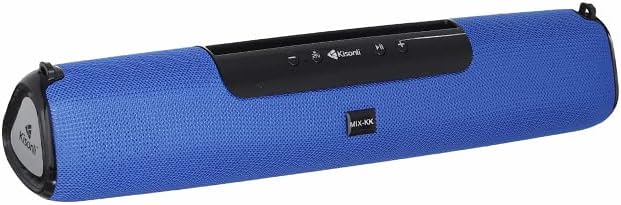
Figure 1: Angled view of the Kisonli MIX-KK speaker, showcasing its blue fabric finish and control panel.

Figure 2: Front view of the speaker, highlighting the central control panel with buttons for power, play/pause, and volume/track control.

Figure 3: Side view of the Kisonli MIX-KK speaker, showing the Kisonli branding on the end cap.

Figure 4: The speaker with a smartphone placed in the integrated stand, demonstrating its utility for media consumption.

Figure 5: Rear view of the speaker's control panel area, revealing various input ports including USB, Micro USB (for charging), TF card slot, and AUX input.
Setup
1. Charging the Speaker
Before initial use, fully charge the speaker. Connect the provided Micro USB charging cable to the speaker's charging port (refer to Figure 5) and the other end to a USB power adapter (not included) or a computer's USB port. The charging indicator light will illuminate during charging and turn off or change color when fully charged.
2. Powering On/Off
To power on the speaker, press and hold the power button (usually indicated by a power symbol on the control panel, refer to Figure 2) for a few seconds until you hear an audible prompt or see an indicator light. To power off, repeat the process.
Operating Instructions
1. Bluetooth Connection
- Enable Bluetooth: Power on the speaker. It will automatically enter Bluetooth pairing mode, indicated by a flashing LED light and an audible prompt.
- Activate Device Bluetooth: On your smartphone, tablet, or laptop, enable Bluetooth in its settings.
- Select Speaker: Search for available Bluetooth devices. Select "MIX-KK" (or similar name) from the list.
- Confirm Connection: Once paired, the speaker will provide an audible confirmation, and the LED indicator will stop flashing.
The speaker will attempt to reconnect to the last paired device automatically when powered on.
2. Basic Controls
- Play/Pause: Press the Play/Pause button (refer to Figure 2) once to play or pause audio.
- Volume Up: Press the '+' button to increase volume. Hold the '+' button to skip to the next track.
- Volume Down: Press the '-' button to decrease volume. Hold the '-' button to go to the previous track.
3. Using the Integrated Phone Stand
The speaker features an integrated slot on its top surface (refer to Figure 4) designed to hold a smartphone or small tablet, providing a convenient viewing angle during audio playback.
4. TF Card / USB Playback
Insert a TF (MicroSD) card or a USB flash drive into the respective port (refer to Figure 5). The speaker will automatically detect the storage device and begin playing audio files. Use the track control buttons to navigate.
5. AUX Input
Connect an audio device using a 3.5mm AUX cable (not included) to the AUX port (refer to Figure 5). The speaker will switch to AUX mode, allowing audio playback from the connected device.
6. FM Radio
To activate FM radio mode, press the 'M' (Mode) button on the control panel until you hear static. Press the Play/Pause button once to auto-scan and save available stations. Use the '+' and '-' buttons to switch between saved stations.
Maintenance
1. Cleaning
Wipe the speaker with a soft, dry cloth. Do not use abrasive cleaners, alcohol, or solvents. Ensure no liquid enters the ports.
2. Battery Care
To prolong battery life, avoid fully discharging the speaker frequently. Charge the speaker regularly, even if not in use for extended periods. Store in a cool, dry place.
3. Water Resistance
The Kisonli MIX-KK speaker is designed to be waterproof. However, avoid submerging it in water for extended periods or exposing it to high-pressure water jets. Ensure all port covers (if present) are securely closed before exposure to water.
4. Storage
When not in use, store the speaker in a dry environment away from direct sunlight and extreme temperatures.
Troubleshooting
- Cannot Power On: Ensure the speaker is fully charged. Connect it to a power source and try again.
- Cannot Connect via Bluetooth:
- Ensure the speaker is in pairing mode (flashing LED).
- Turn off and on Bluetooth on your device.
- Move the speaker closer to your device.
- Remove "MIX-KK" from your device's Bluetooth list and attempt to pair again.
- No Sound or Low Sound:
- Increase the volume on both the speaker and your connected device.
- Ensure the speaker is correctly paired via Bluetooth or the AUX cable is fully inserted.
- If using TF card/USB, ensure audio files are in a compatible format.
- Sound Lags or Disconnects:
- Ensure there are no obstructions between the speaker and the Bluetooth device.
- Move away from other wireless devices that might cause interference.
- Try disconnecting and reconnecting the Bluetooth connection.
- Poor FM Radio Reception:
- Move the speaker to an open area, away from buildings or electronic interference.
- The charging cable can sometimes act as an antenna; try connecting it to improve reception.
Specifications
| Brand Name | Kisonli |
| Model | MIX-KK |
| Connectivity Technology | Bluetooth |
| Audio Output Mode | Stereo |
| Mounting Type | Tabletop |
| Special Features | Bluetooth, Portable, Wireless |
| Compatible Devices | Laptop, Smartphone, Tablet |
| Surround Sound Channel Configuration | 2 |
| Is Waterproof | True |
| Wireless Communication Technology | Bluetooth |
| Power Source | Battery Powered |
Warranty and Support
For warranty information and customer support, please refer to the documentation provided at the time of purchase or contact your retailer. Kisonli may also provide support through their official website.