
1. Product Overview
The Kisonli LED-913 is a compact and versatile wireless Bluetooth soundbar speaker designed to enhance your audio experience. It features a user-friendly interface, clear and dynamic sound output, and integrated LED lighting. This soundbar also includes a built-in radio function, allowing you to tune into your favorite stations. It is suitable for use with televisions, tablets, laptops, and smartphones.

Image 1.1: Front view of the Kisonli LED-913 Wireless Bluetooth Soundbar Speaker, showcasing its sleek design and speaker grille.
2. Setup Instructions
2.1 Unpacking
- Carefully remove the soundbar and all accessories from the packaging.
- Verify that all components are present: Kisonli LED-913 Soundbar, charging cable, and user manual.
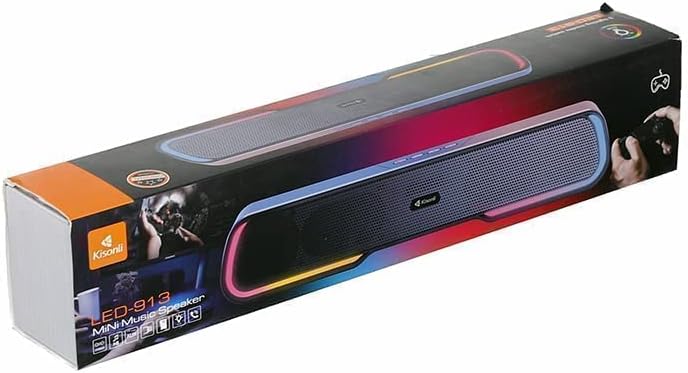
Image 2.1: The Kisonli LED-913 Soundbar Speaker shown in its retail packaging.
2.2 Charging the Soundbar
Before initial use, fully charge the soundbar. Connect the provided charging cable to the soundbar's charging port and the other end to a compatible USB power adapter (not included) or a computer's USB port.
2.3 Power On/Off
- To power on: Press and hold the power button located on the soundbar's control panel until the LED indicator lights up.
- To power off: Press and hold the power button again until the LED indicator turns off.
2.4 Bluetooth Pairing
- Ensure the soundbar is powered on and in Bluetooth mode. The LED indicator will typically flash, indicating it is ready for pairing.
- On your device (smartphone, tablet, laptop), enable Bluetooth and search for available devices.
- Select "LED-913" from the list of devices.
- Once paired, the soundbar will emit a confirmation tone, and the LED indicator will stop flashing and remain solid.
2.5 Wired Connection (AUX)
For devices without Bluetooth, use an AUX cable (not included) to connect the soundbar. Insert one end of the AUX cable into the soundbar's AUX port and the other end into your device's audio output port. Switch the soundbar to AUX mode using the mode button.

Image 2.2: Rear/side view of the Kisonli LED-913 Soundbar Speaker, highlighting the various input ports.
3. Operating Instructions
3.1 Basic Controls
- Power Button: Press and hold to turn on/off. Short press to change modes (Bluetooth, AUX, FM Radio).
- Volume Up/Next Track: Short press for volume up. Long press for next track (in Bluetooth/USB mode).
- Volume Down/Previous Track: Short press for volume down. Long press for previous track (in Bluetooth/USB mode).
- Play/Pause Button: Short press to play or pause audio.
3.2 FM Radio Function
- Switch the soundbar to FM Radio mode using the mode button.
- Press and hold the Play/Pause button to automatically scan and save available radio stations.
- Use the Volume Up/Down buttons (short press) to navigate through saved stations.
3.3 LED Light Control
The soundbar features integrated LED lights. Refer to the control panel for a dedicated button or a combination of buttons to cycle through light modes or turn them off.
4. Maintenance
- Cleaning: Use a soft, dry cloth to clean the surface of the soundbar. Do not use liquid cleaners or abrasive materials.
- Storage: Store the soundbar in a cool, dry place away from direct sunlight and extreme temperatures when not in use for extended periods.
- Water Resistance: While the product is water-resistant, avoid submerging it in water or exposing it to heavy rain. Ensure all ports are dry before charging or connecting cables.
5. Troubleshooting
| Problem | Possible Solution |
|---|---|
| Soundbar does not power on. | Ensure the soundbar is fully charged. Connect it to a power source and try again. |
| Cannot pair via Bluetooth. | Ensure the soundbar is in Bluetooth pairing mode (flashing LED). Turn off and on Bluetooth on your device. Move closer to the soundbar. |
| No sound output. | Check volume levels on both the soundbar and your connected device. Ensure the correct input mode (Bluetooth/AUX) is selected. |
| Poor radio reception. | Try repositioning the soundbar to improve signal reception. Perform an auto-scan for stations again. |
6. Product Specifications
| Feature | Detail |
|---|---|
| Brand | Kisonli |
| Model Name | LED-913 (also 6221237238750) |
| Speaker Type | Soundbar |
| Connectivity Technology | Bluetooth, Wireless (Amplifier), Corded Electric (Power) |
| Wireless Communication Technology | Bluetooth |
| Audio Output Mode | Surround |
| Surround Sound Channel Configuration | 1 |
| Special Features | LED Light, Radio |
| Recommended Uses | For Televisions, Tablets, Laptops, Smartphones |
| Color | Black |
| Water Resistance | Yes, Waterproof |
| Frequency Response | 20 kHz |
| Mounting Type | Tabletop |
| Material | Thermoplastic Polyurethane |
| Controller Type | Button |
| Product Dimensions (D x W x H) | 5.5 cm x 37 cm x 7.1 cm |
| Item Weight | 500 grams |

Image 6.1: Diagram showing the dimensions of the Kisonli LED-913 Soundbar Speaker.
7. Warranty & Support
7.1 Warranty Information
This product is provided without an explicit warranty. Please refer to your retailer's return policy for any issues within the allowable return period.
7.2 Customer Support
For further assistance or inquiries, please contact the retailer or the point of purchase. Keep your purchase receipt for reference.