
1. Introduction
This manual provides instructions for the installation, operation, and maintenance of your Ecolight LED Battery-Operated Bar Light. This versatile 9-inch LED light offers both 4000K bright white and RGB color-changing options, controlled by tapping the light or using the included infrared (IR) remote control. It is designed for various indoor applications such as under cabinets, in laundry rooms, living rooms, utility areas, or closets.
What's Included:
- Ecolight LED Bar Light
- Infrared (IR) Remote Control
- 6 AA Batteries
- Command Strips by 3M for damage-free mounting
- Mounting Screws

Figure 1: Ecolight LED Bar Light with remote and mounting accessories.
2. Safety Information
- Read all instructions before installation and use.
- This product is intended for indoor use only. Do not expose to water or high humidity.
- Do not mix old and new batteries. Do not mix alkaline, standard (carbon-zinc), or rechargeable (nickel-cadmium) batteries.
- Remove batteries if the light will not be used for an extended period.
- Keep batteries out of reach of children.
- Do not stare directly into the LED light source.
3. Setup
3.1 Battery Installation
- Remove the back battery compartment cover by sliding it off.
- Insert the 6 AA batteries, ensuring correct polarity (+/-) as indicated inside the compartment.
- Replace the battery compartment cover.

Figure 2: Installing AA batteries into the light bar.
3.2 Mounting Options
The Ecolight LED Bar Light can be mounted using either the included Command Strips for damage-free installation or screws for a permanent fixture.
Using Command Strips (Damage-Free Mounting):
- Clean the desired mounting surface with rubbing alcohol and let it dry completely.
- Separate the Command Strips. Remove the red liner from one side of each strip and press it firmly onto the back of the light bar.
- Remove the black liners from the exposed side of the Command Strips.
- Position the light bar on the cleaned surface and press firmly for 30 seconds.
- To remove, gently slide the light bar off the mounted base. Then, slowly stretch each strip downwards against the surface until it releases.
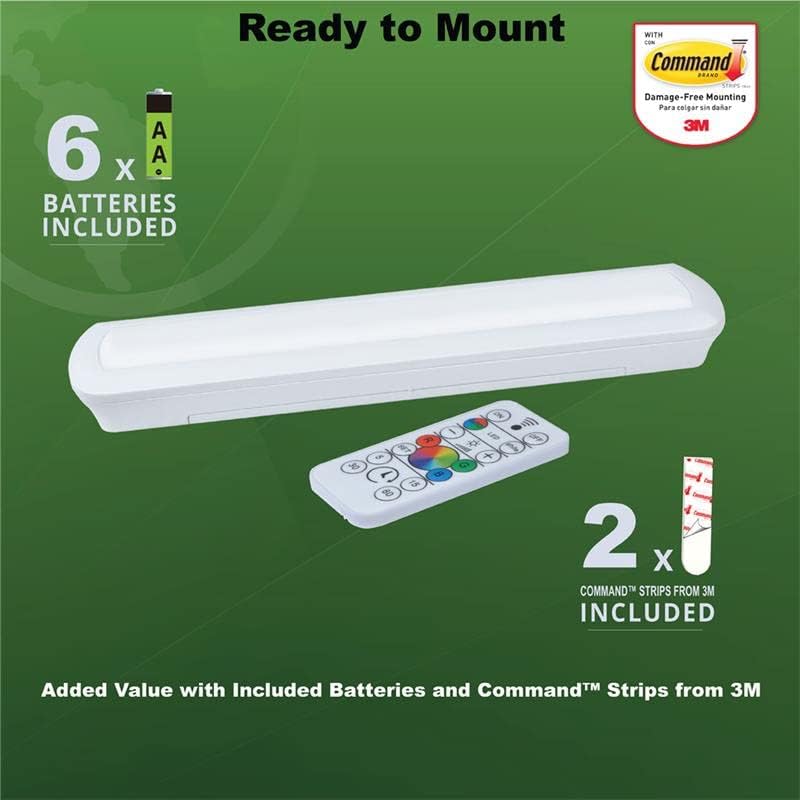
Figure 3: Attaching Command Strips to the light bar for mounting.
Using Screws (Permanent Mounting):
- Mark the desired screw locations on your mounting surface using the keyhole slots on the back of the light bar as a guide.
- Drill pilot holes if necessary.
- Insert the included screws into the pilot holes, leaving a small gap between the screw head and the surface.
- Align the keyhole slots on the back of the light bar with the screw heads and slide the light into place until secure.
3.3 Installation Video
Video 1: Detailed instructions for installing and removing the Ecolight LED Bar Light using Command Strips.
4. Operating Instructions
4.1 Tap Control
The light bar features a tap-on/off activation directly on its lens:
- Tap once: Activates bright white light (4000K).
- Tap twice: Initiates continuous RGB color cycling.
- Tap three times: Sets the light to the currently displayed RGB color.
- Tap four times: Turns off the light.

Figure 4: Tap activation on the light bar lens.
4.2 Remote Control Functions
The included IR remote control provides comprehensive control over the light bar's features:
- ON/OFF: Turns the light on or off.
- LED: Activates continuous RGB color cycling.
- White: Activates 4000K bright white light.
- +/- (Brightness): Adjusts the brightness level (dimmable).
- R, G, B Buttons: Selects specific Red, Green, or Blue colors.
- Color Wheel: Allows selection of various colors within the RGB spectrum.
- SET: Confirms a selected color from the color wheel.
- Timer (5, 15, 30, 60 minutes): Sets an auto-off timer for the specified duration.
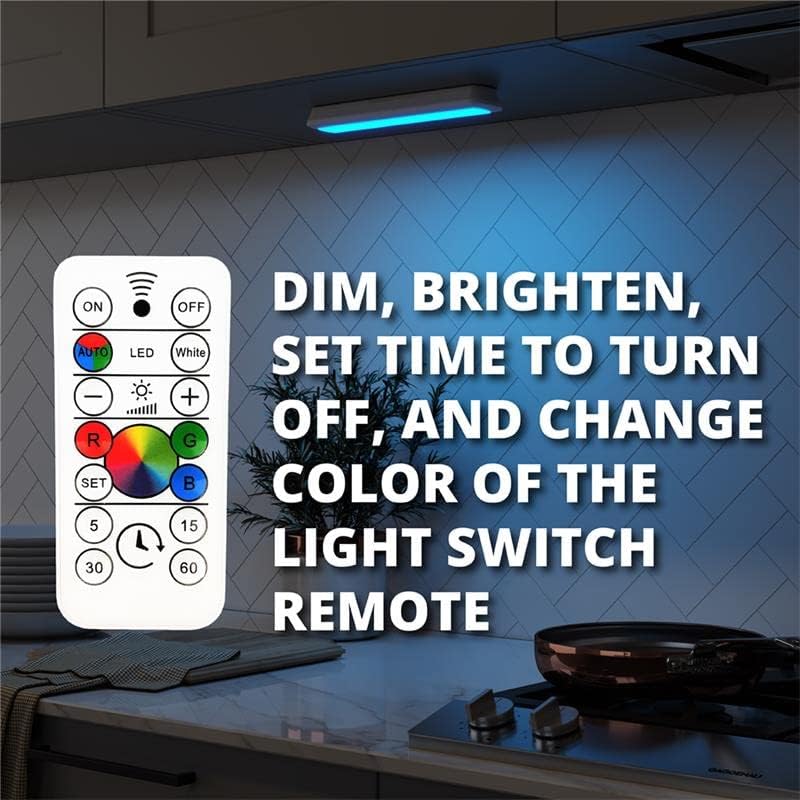
Figure 5: Remote control for the LED Bar Light.

Figure 6: Examples of RGB color output from the light bar.
5. Maintenance
5.1 Battery Replacement
When the light output diminishes or the light stops functioning, it's time to replace the batteries. The easy battery change compartment allows you to slide the light out without removing the mounting strips (if used).
- If mounted with Command Strips, gently slide the light bar off its mounted base.
- Remove the back battery compartment cover.
- Replace all 6 AA batteries with new ones, observing correct polarity.
- Replace the battery compartment cover and reattach the light bar to its base (if applicable).
5.2 Cleaning
To clean the light bar, wipe it with a soft, dry cloth. Do not use abrasive cleaners or solvents, as these may damage the finish or electronic components.
6. Troubleshooting
| Problem | Possible Cause | Solution |
|---|---|---|
| Light does not turn on. | Dead or incorrectly installed batteries. | Replace batteries, ensuring correct polarity. |
| Remote control not working. | Remote battery is dead or remote is too far from the light. | Ensure remote is within range (approx. 10-15 ft). Replace remote battery if necessary. |
| Light output is dim. | Low battery power or dimming function activated. | Replace batteries. Use the '+' button on the remote to increase brightness. |
| Light does not change colors. | Incorrect mode selected. | Ensure 'LED' or a specific color button is pressed on the remote, or tap the light multiple times for color cycling. |
7. Specifications
- Model Number: BO1307-RGB-09LF1-E
- Light Source Type: LED
- Brightness: 80 Lumens
- Color Temperature: 4000K (White), RGB Color Changing
- Power Source: 6 AA Batteries (included)
- Battery Life: Approximately 100 hours
- Product Dimensions: 9"W x 2.5"H x 1"D
- Item Weight: 3.68 ounces
- Material: Plastic
- Control Method: Tap, Infrared Remote
- Special Features: Dimmable, Auto-Off Timer (5, 15, 30, 60 min)
- Indoor/Outdoor Usage: Indoor Only
- Average Life: 30,000 Hours

Figure 7: Product Dimensions.
8. Warranty and Support
This Ecolight LED Battery-Operated Bar Light comes with a 6-year limited warranty. For warranty claims, technical support, or further assistance, please contact Good Earth Lighting customer service. Refer to the product packaging or the official Good Earth Lighting website for contact details.


