
1. Product Overview
The Shark HE401 Air Purifier 4 is designed to improve indoor air quality by capturing pollutants, allergens, and odors. It features a True HEPA Multi-Filter and Advanced Odor Protection, utilizing 4-Fan Technology for efficient air circulation.

Image: The Shark HE401 Air Purifier 4 unit shown alongside its remote control. The purifier is white with a black base and a digital display showing '100'.
2. What's in the Box
Upon unboxing your Shark HE401 Air Purifier 4, verify that all components are present:
- Shark HE401 Air Purifier Unit
- Remote Control
- True HEPA Multi-Filter (pre-installed or separate)

Image: A visual representation of the Shark HE401 Air Purifier 4, its remote control, and the True HEPA Multi-Filter, indicating the typical contents of the product packaging.
3. Setup Instructions
3.1 Unpacking and Placement
- Carefully remove all components from the packaging.
- Choose a suitable location for your air purifier. Ensure it is placed on a flat, stable surface, away from walls or furniture that might obstruct airflow. Maintain at least 6 inches of clearance around all sides.
- Plug the power cord into a standard electrical outlet.
3.2 Filter Installation (if not pre-installed)
The True HEPA Multi-Filter is crucial for the purifier's performance. If your filter is not already installed, follow these steps:
- Locate the filter compartment on the air purifier unit.
- Open the filter compartment cover.
- Remove the new filter from its protective packaging.
- Insert the filter into the compartment, ensuring it is seated correctly.
- Close the filter compartment cover securely.
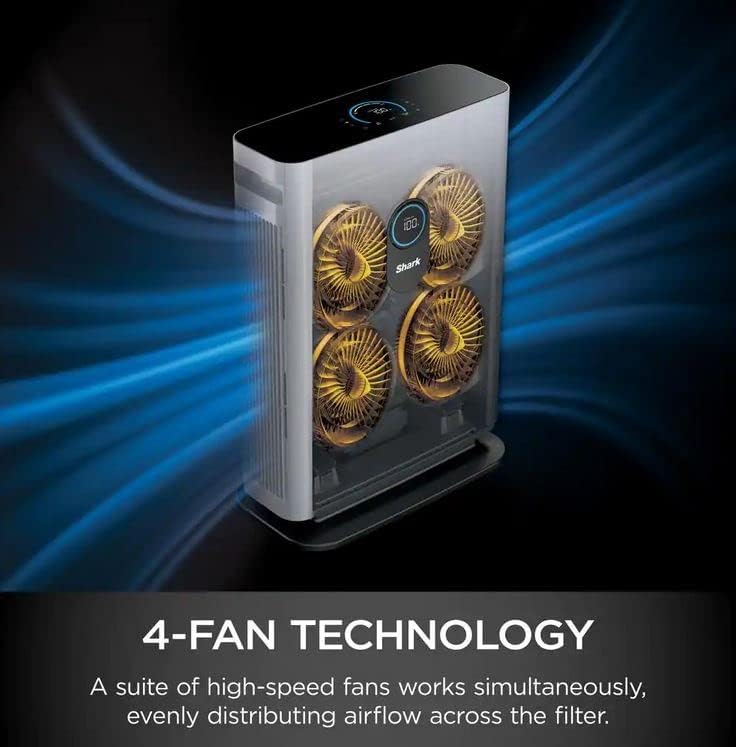
Image: A hand demonstrating how to open the filter compartment on the side of the Shark HE401 Air Purifier 4 to access or change the filter.
4. Operating Instructions
Familiarize yourself with the control panel and remote for optimal use.

Image: An annotated diagram highlighting the various features of the Shark HE401 Air Purifier 4, including the top control panel, adjustable fan speed, timer, brightness control, air info display, remote control, filter, and front display LED screen.
4.1 Power On/Off
Press the power button on the top control panel or the remote control to turn the unit on or off.
4.2 Fan Speed Adjustment
The air purifier offers multiple fan speed settings:
- Low, Medium, High, Maximum: Manually select your desired fan speed.
- Auto Mode: The purifier will automatically adjust the fan speed based on the detected air quality to maintain optimal purification.
4.3 Timer Function
Use the timer function to set the duration for which the unit will operate before automatically shutting off. Refer to the control panel or remote for specific timer options.
4.4 Brightness Control
Adjust the brightness of the LED display and the top control panel lights. Options typically include full brightness, partially dim, and fully dim, allowing for an uninterrupted sleep environment.
4.5 Air Information Display
The front display LED screen and top control panel provide real-time air quality information. You can toggle between different trackers such as "% of Room Clean," "Time to Clean," PM2.5, or PM10 levels.
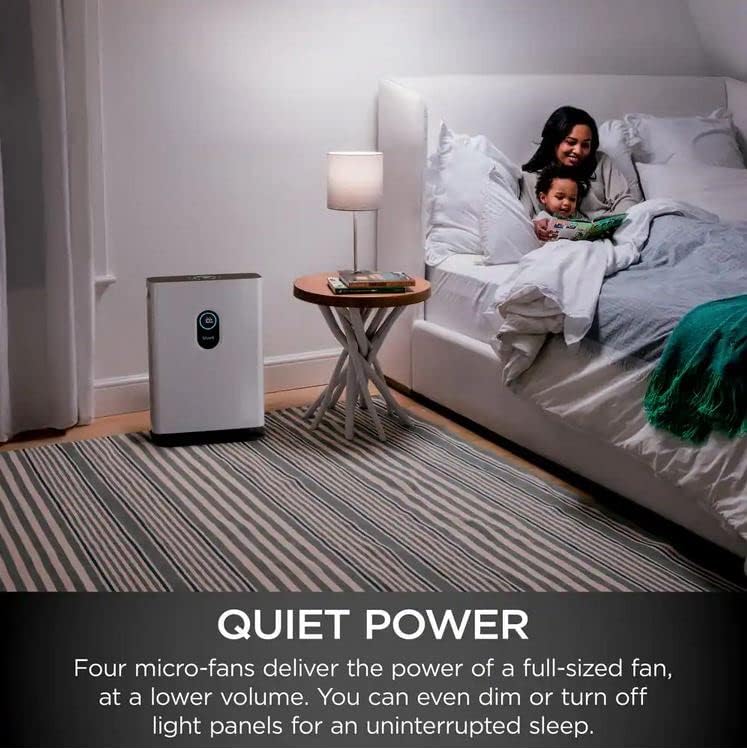
Image: The Shark HE401 Air Purifier 4 operating in a living room setting, with its display indicating '100% Clean Air', demonstrating its real-time air quality feedback.

Image: The Shark HE401 Air Purifier 4 placed in a bedroom next to a bed, illustrating its quiet operation and dimmable lights for nighttime use.
5. Maintenance
5.1 Filter Replacement
The True HEPA Multi-Filter has a lifespan of up to 12 months, depending on usage and air quality. The unit will indicate when it's time to change the filter, typically by a pulsing "Filter Life" light.

Image: A cross-section diagram of the True HEPA Multi-Filter, showing its three layers: one for trapping dirt, dander, and particles; another for guarding against odors; and the third for capturing 99.97% of pollutants and allergens down to 0.3 microns.
To replace the filter:
- Turn off and unplug the air purifier.
- Open the filter compartment cover.
- Carefully remove the old filter and dispose of it according to local regulations.
- Insert a new Shark True HEPA Multi-Filter (model specific) into the compartment.
- Close the filter compartment cover securely.
- Plug in the unit and reset the filter life indicator if necessary (refer to the control panel instructions).
5.2 Cleaning the Unit
- Always unplug the unit before cleaning.
- Wipe the exterior of the air purifier with a soft, dry cloth.
- Do not use abrasive cleaners, solvents, or harsh chemicals.
- Periodically clean the air intake and exhaust vents with a soft brush or vacuum cleaner attachment to prevent dust buildup.
6. Troubleshooting
If you encounter issues with your Shark HE401 Air Purifier 4, refer to the following common troubleshooting steps:
- Unit not powering on: Ensure the power cord is securely plugged into both the unit and a working electrical outlet. Check if the outlet has power.
- Reduced airflow or purification: Check if the filter needs replacement. A clogged filter can significantly reduce performance. Ensure air intake and exhaust vents are not obstructed.
- Unusual noises: Verify that the unit is placed on a flat, stable surface. Check for any foreign objects that might have entered the fan area (unplug first).
- Air quality readings seem inaccurate: The sensor is highly responsive to smoke but may show less sensitivity to certain VOCs or PM spikes from activities like cooking. Ensure the sensor area is clean and unobstructed.
- Remote control not working: Check and replace the batteries in the remote control. Ensure there are no obstructions between the remote and the unit.
If problems persist after attempting these steps, please contact customer support.
7. Specifications
| Brand | Shark |
| Model Number | HE401 |
| Controller Type | Button Control |
| Filter Type | True HEPA Multi-Filter with Advanced Odor Protection |
| Fan Technology | 4-Fan Technology |
| Color | Gray |
| Approximate Dimensions (Package) | 27.32 x 20.19 x 11.57 inches |
| Approximate Weight (Package) | 23.23 Pounds |
| ASIN | B0B7879PRY |

Image: An internal view of the Shark HE401 Air Purifier 4, illustrating its 4-Fan Technology with four high-speed fans working simultaneously to distribute airflow across the filter.
8. Warranty and Support
As this product is a renewed item, warranty terms may differ from new products. Please refer to the specific warranty information provided at the time of purchase or contact the seller directly for details regarding your product's warranty coverage.
For technical support, troubleshooting assistance, or to inquire about replacement parts, please contact Shark customer service or the authorized reseller from whom you purchased the unit. Keep your purchase receipt and model number (HE401) readily available when contacting support.