
1. Introduction
This manual provides essential instructions for the safe and efficient operation, installation, and maintenance of your Kratos 28W-210 Commercial Strip Warmer. Please read this manual thoroughly before installation and use to ensure proper function and to prevent injury or damage.
The Kratos 28W-210 is a 24-inch commercial strip warmer designed to keep prepared food hot and fresh prior to service. It features a durable stainless steel construction, a fully insulated control box, and an aluminum deflector to efficiently direct heat towards food.
2. Safety Instructions
WARNING: Failure to follow these safety instructions may result in fire, electric shock, serious injury, or property damage.
- Always ensure the unit is properly grounded.
- Do not operate the unit with a damaged cord or plug. If the cord is damaged, it must be replaced by the manufacturer, its service agent, or similarly qualified persons to avoid a hazard.
- Unplug the unit from the power outlet before cleaning, servicing, or moving.
- This appliance is hot when in use. To avoid burns, do not let bare skin touch hot surfaces.
- Ensure adequate clearance around the unit for proper ventilation and heat dissipation.
- This appliance is intended for commercial use only.
- Do not immerse the unit in water or other liquids.
- Keep children and unauthorized personnel away from the appliance during operation.
- The unit is NSF and UL certified, indicating compliance with public health and safety standards.
3. Product Overview
The Kratos 28W-210 Commercial Strip Warmer is constructed from durable stainless steel and designed for efficient food warming. Key components include:
- Heating Element: Provides consistent heat to keep food warm.
- Aluminum Deflector: Directs heat towards the food station for energy-efficient warming.
- Control Box: Fully insulated for long-lasting performance.
- On/Off Toggle Control: Simple switch for operation.
- Heat Indicator Light: Illuminates when the unit is active.
- Power Cord with NEMA 5-15P Plug: For standard 120V electrical outlets.
- Mounting Brackets and Hanging Chains: Included for versatile installation options.

Image 3.1: The Kratos 28W-210 Commercial Strip Warmer, showing its stainless steel body and included hanging chains.

Image 3.2: A close-up view of the control panel, featuring the Kratos logo, an orange heat indicator light, and a black on/off toggle switch.

Image 3.3: An interior view of the strip warmer, highlighting the heating element and the reflective aluminum deflector designed to focus heat.
4. Setup and Installation
The Kratos 28W-210 is designed for quick and easy installation. Follow these steps:
- Unpacking: Carefully remove the strip warmer and all components from the packaging. Inspect for any shipping damage.
- Mounting Location: Choose a suitable location above your food holding area. Ensure the mounting surface can support the weight of the unit and that there is sufficient clearance from combustible materials.
- Installation: Use the provided mounting brackets and hanging chains to securely suspend the strip warmer. Ensure the unit is level and stable.
- Electrical Connection: The unit comes with a power cord and a standard NEMA 5-15P plug. Connect the plug to a compatible 120V, 500W electrical outlet. Ensure the outlet is properly grounded.
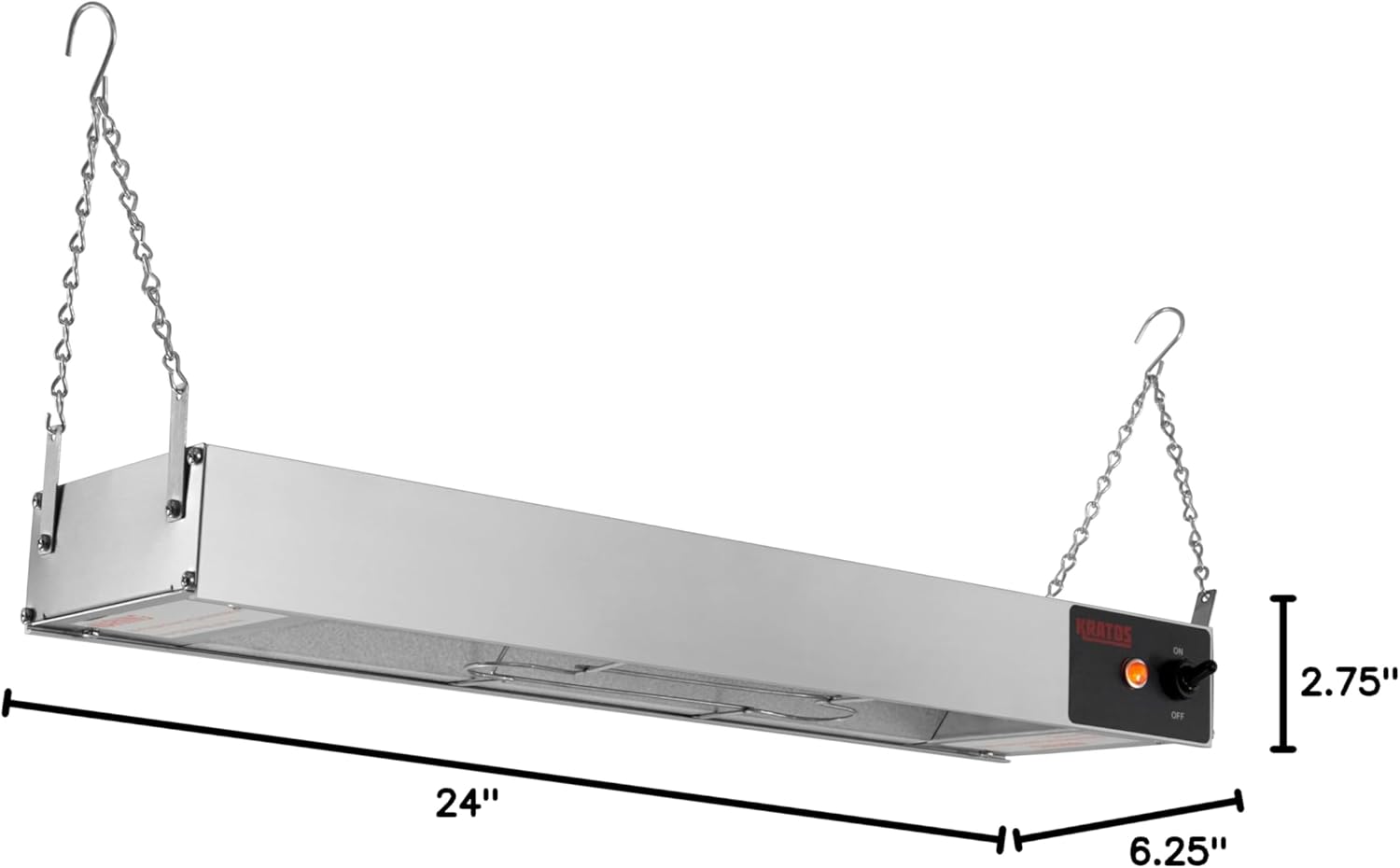
Image 4.1: The Kratos 28W-210 strip warmer with its dimensions indicated: 24 inches long, 6.25 inches deep, and 2.75 inches high.

Image 4.2: A top-down view of the strip warmer's end, clearly showing the attached power cord with a NEMA 5-15P plug.
5. Operation
Operating the Kratos 28W-210 is straightforward:
- Power On: Once installed and plugged in, locate the on/off toggle switch on the control panel. Flip the switch to the 'ON' position.
- Heat Indicator: The orange heat indicator light will illuminate, signifying that the unit is active and generating heat.
- Food Placement: Place prepared food directly beneath the strip warmer. The aluminum deflector will direct heat downwards, maintaining serving temperatures without over-drying the food.
- Power Off: To turn off the unit, flip the toggle switch to the 'OFF' position. The heat indicator light will extinguish.
6. Maintenance and Cleaning
Regular maintenance and cleaning will ensure the longevity and optimal performance of your strip warmer.
- Before Cleaning: Always unplug the unit from the power source and allow it to cool completely before cleaning.
- Exterior Cleaning: Wipe the exterior stainless steel surfaces with a damp cloth and a mild, non-abrasive cleaner. Dry thoroughly with a soft cloth.
- Interior Cleaning: Carefully clean the interior surfaces, including the aluminum deflector, to remove any food residue. Avoid spraying water directly onto the heating element or electrical components.
- Inspection: Periodically inspect the power cord for any signs of damage. Check mounting hardware for security.
- Do not use harsh chemicals, abrasive pads, or steel wool, as these can damage the stainless steel finish.
7. Troubleshooting
If you encounter issues with your Kratos 28W-210, refer to the following table for common problems and solutions:
| Problem | Possible Cause | Solution |
|---|---|---|
| Unit does not heat up. | No power supply. | Ensure the unit is plugged into a functional 120V outlet. Check circuit breaker. |
| On/Off switch is in 'OFF' position. | Flip the toggle switch to 'ON'. | |
| Heat indicator light is off. | Unit is not receiving power or is off. | Verify power connection and switch position. If still off, contact service. |
| Unit is heating inconsistently. | Damaged heating element or internal wiring. | Unplug the unit immediately. Contact qualified service personnel for inspection and repair. |
For issues not listed above or if troubleshooting steps do not resolve the problem, please contact Kratos customer support or a qualified service technician.
8. Specifications
| Specification | Detail |
|---|---|
| Model Number | 28W-210 |
| Brand | Kratos |
| Voltage | 120 Volts |
| Wattage | 500 Watts |
| Product Dimensions (L x W x H) | 24" x 6.25" x 2.75" |
| Material | Stainless Steel |
| Power Source | Corded Electric (NEMA 5-15P Plug) |
| Certifications | NSF, UL |
| UPC | 840232903584 |
9. Warranty and Support
For warranty information, please refer to the documentation provided at the time of purchase or contact Kratos customer service directly. Warranty terms may vary based on region and retailer.
For technical support, replacement parts, or service inquiries, please contact Kratos customer support. Ensure you have your model number (28W-210) and purchase details available when contacting support.