Product Overview
The Ecomxia WM300 is a versatile 2-piece wireless lavalier microphone system designed for seamless audio recording with iPhone, iPad, and Android devices. Featuring a portable charging case, advanced noise reduction capabilities, and a 70ft transmission range, it is ideal for vlogging, interviews, live streaming, and various content creation needs.
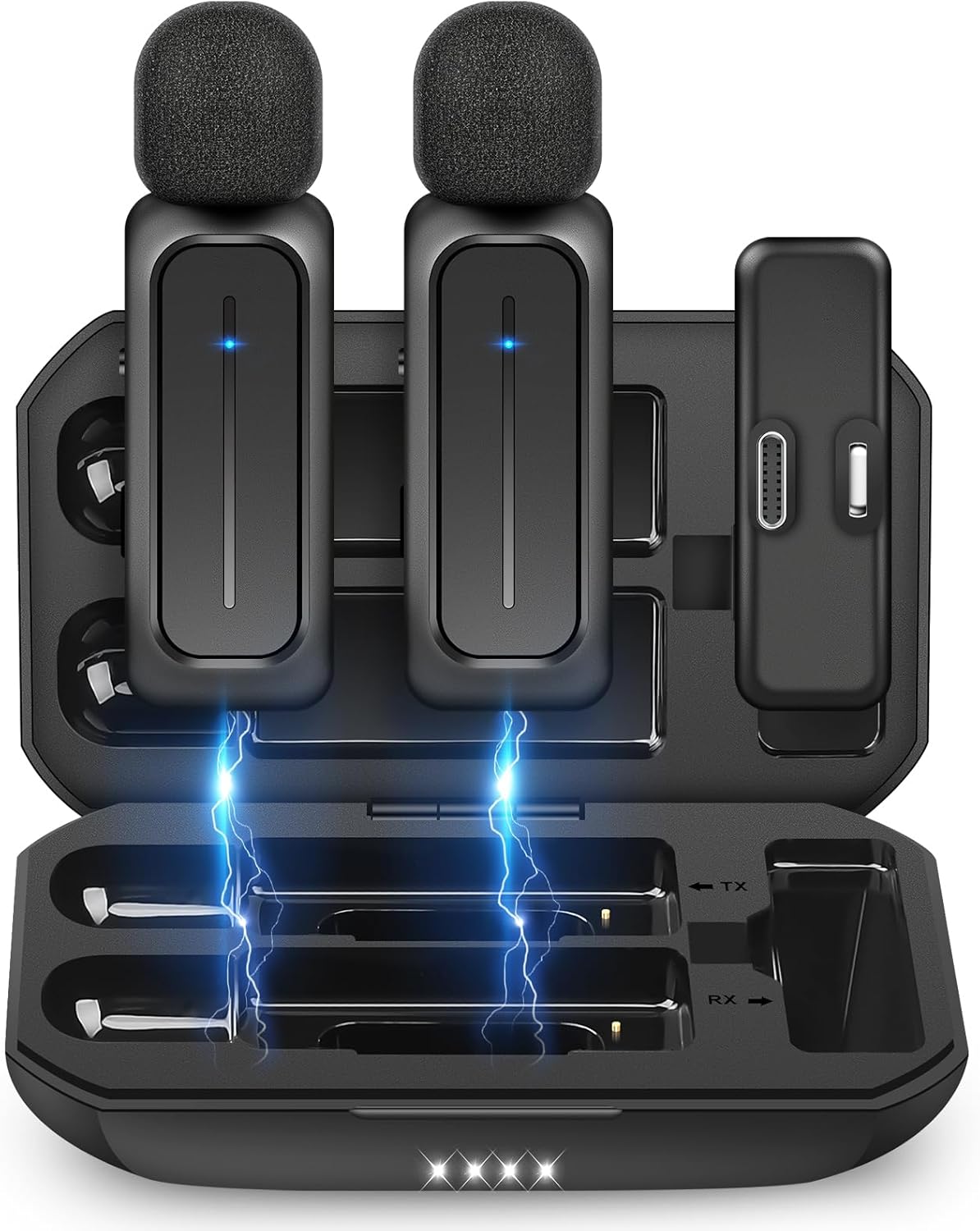
Image: The Ecomxia WM300 wireless lavalier microphone system, showing two microphones and a receiver neatly stored within their charging case.
What's Included
- One Receiver
- Two Transmitters (Microphones)
- Charging Case

Image: A view of the open charging case, showcasing the two wireless microphones and the receiver unit inside, illustrating the complete package contents.
Key Features
- 3 Noise Reduction Modes: Built-in intelligent active noise reduction chip for clear recording in noisy environments. Includes Auto AI Noise Cancelling, Manual Noise Reduction, and Reverberation mode.
- Extended Battery Life: Built-in 700mAh rechargeable battery provides up to 8 hours of operation on a single 2-hour charge. The charging case features 4 indicator lights (25%, 50%, 75%, 100%) to show remaining power.
- Plug and Play: Simple setup by plugging the receiver into your device and clipping the microphone.
- 70ft Stable Range: Optimized antenna design ensures stable transmission up to 70 feet indoors or outdoors.
- Omni-directional Pickup: Upgraded high-sensitive condenser microphone captures clear, original sound from all directions.
- Portable Design: Compact and stylish charging case for easy storage and transport.
- Multi-functional Control: Manually stop/resume recording by switching the microphone's toggle. Power off the mic by holding the 'M' button to conserve battery.
- Wide Compatibility: Features a 2-in-1 Lighting & USB-C double connector, compatible with iPhone, iPad, and Android devices.

Image: Illustration of the three noise reduction modes (Auto AI, Manual, Reverberation) and the charging progress indicators on the charging case.

Image: A close-up of the microphone highlighting its high-sensitive condenser, suitable for both indoor and outdoor recording environments.

Image: Demonstrates the multi-functional switch for pausing/resuming recording and the compact size of the microphone for easy portability in a bag.

Image: Shows the dual Lighting and USB-C connector, illustrating its compatibility with both Apple and Android devices.
Setup Guide
- Charge the System: Before first use, ensure both microphones and the receiver are fully charged using the provided charging case. The charging case itself can be charged via a 5V adapter. Indicator lights on the case can confirm battery levels.
- Connect the Receiver: Plug the receiver's Lighting or USB-C connector into your iPhone, iPad, or Android device's charging port. No additional apps or Bluetooth pairing are required.
- Clip the Microphone: Clip the lavalier microphone onto your shirt or collar, ensuring it is positioned to capture your voice clearly.
- Start Recording: Once connected, the system is ready. Open your preferred video or audio recording application on your device and begin recording.

Image: Illustrates the charging process of the system using a 5V adapter, showing the receiver connected to a phone for charging.

Image: Step-by-step guide showing how to plug the receiver into a phone and clip the microphone onto clothing for immediate use.
Operating Instructions
Using Noise Reduction Modes
The WM300 features three noise reduction modes to optimize audio quality in various environments:
- Auto AI Noise Cancelling: Automatically reduces background noise. This is the default mode.
- Manual Noise Reduction: Provides a stronger noise filtering effect.
- Reverberation Mode: Adds an echo effect, suitable for specific audio styles like singing.
Refer to the microphone's indicator lights or a dedicated button (if present, not explicitly detailed in provided data) for switching between these modes. The product description mentions "a manually noise reduction and reverberation mode for selection," implying a control on the device.

Image: Visual representation of the microphone's ability to reduce noise, showing "Before" and "After" sound wave patterns with noise reduction applied.
Pausing/Resuming Recording & Power Management
- To manually stop recording, switch the microphone's toggle switch (Up).
- To resume recording, switch the microphone's toggle switch (Down).
- To power off the microphone and save battery, hold the 'M' button on the microphone.
Specifications
| Feature | Detail |
|---|---|
| Model Name | WM300 |
| Brand | Ecomxia |
| Connectivity Technology | Wireless Lavalier Microphones |
| Connector Type | Lighting, USB-C |
| Compatible Devices | iPhone, iPad, Android (Smartphone, Tablet) |
| Microphone Form Factor | Lavalier |
| Polar Pattern | Omnidirectional |
| Audio Sensitivity | 30 dB |
| Signal-to-Noise Ratio | 80 dB |
| Wireless Range | Up to 70ft |
| Battery Life (Transmitter) | Up to 8 hours |
| Charging Case Battery | 700mAh |
| Charging Time | Approx. 2 hours (charging case) |
| Item Weight | 0.15 Ounces |
| Product Dimensions (L x W x H) | 2.24 x 1.18 x 4.3 inches |
| Material | Plastic |
Maintenance
- Cleaning: Use a soft, dry cloth to wipe down the microphones, receiver, and charging case. Avoid using harsh chemicals or abrasive materials.
- Storage: Store the system in its charging case when not in use to protect it from dust and damage. Keep it in a cool, dry place away from direct sunlight and extreme temperatures.
- Battery Care: For optimal battery longevity, avoid fully discharging the device frequently. Charge it regularly, even if not in constant use.
Troubleshooting
No Sound or Low Volume
- Check Connection: Ensure the receiver is fully and correctly plugged into your device's port.
- Check Battery: Verify that both the microphone(s) and the receiver are sufficiently charged. The charging case indicator lights can confirm battery levels.
- Device Volume: Increase the volume on your recording device (phone/tablet).
- Microphone Position: Ensure the microphone is clipped securely and facing the sound source.
- App Settings: Confirm that your recording application is set to use the external microphone input.
Poor Sound Quality / Excessive Noise
- Noise Reduction Mode: Experiment with the different noise reduction modes (Auto AI, Manual) to find the best setting for your environment.
- Distance: Ensure the microphone is within the optimal range (not too far from the receiver, ideally within 70ft).
- Interference: Move away from strong electromagnetic interference sources (e.g., Wi-Fi routers, other wireless devices).
- Obstructions: Minimize physical obstructions between the microphone and receiver.
Microphone Not Pairing
- Re-insert Receiver: Unplug and re-plug the receiver into your device.
- Restart Devices: Restart both your recording device and the microphone system.
- Charge: Ensure all components are charged.
Warranty & Support
For warranty information, technical support, or any inquiries regarding your Ecomxia WM300 Wireless Lavalier Microphone, please refer to the product packaging or contact Ecomxia customer service directly through the retailer where you purchased the product. Keep your purchase receipt as proof of purchase for warranty claims.
You may also visit the official Ecomxia store on Amazon for further assistance: Ecomxia Store


