
RovyVon E7
Contents
RovyVon E7 Hybrid Battery EDC Flashlight Instruction Manual
Model: E7
Product Overview
The RovyVon E7 Hybrid Battery EDC Flashlight is a compact and versatile illumination tool designed for everyday carry. It features a maximum output of 700 lumens, dual LED options (6500K cool white), and a unique hybrid power system supporting both a built-in Li-po battery and a replaceable AAA battery. Its design includes a glow-in-the-dark fluorescent shell and a convenient lock mode to prevent accidental activation.

Image: The RovyVon E7 flashlight, showcasing its transparent body and dual buttons.
What's in the Box
- RovyVon E7 Flashlight (with built-in battery)
- Reversible Pocket Clip (1x)
- Key Rings (2x)
- USB-C Port Cover (1x)
- RovyVon Card (Warranty/Information)

Image: The RovyVon E7 flashlight, its packaging, and included accessories such as key rings and pocket clip.
Setup and Charging
Initial Use and Unlocking
Before first use, the flashlight must be unlocked. Rapidly click Button 1 four times when the flashlight is off to enter or exit Lock Mode. This prevents accidental activation.
Charging the Built-in Battery
The RovyVon E7 features a built-in 330mAh Li-po battery rechargeable via a USB-C port. Locate the USB-C port on the side of the flashlight. Gently lift the USB-C cover and connect a USB-C cable (not included) to a power source. A charging indicator light will show the charging status.

Image: The RovyVon E7 flashlight connected to a USB-C charging cable, showing the charging indicator light.
Installing AAA Battery (Optional)
For extended runtime or as a backup, the E7 can also be powered by a replaceable AAA battery (not included). To install, carefully open the battery compartment. Insert one AAA battery with the correct polarity. The flashlight will automatically switch to the AAA battery when the built-in Li-po battery is depleted or can be manually switched by long-pressing from off.

Image: A cutaway view of the RovyVon E7 flashlight illustrating the positions of the replaceable AAA battery and the internal USB-C rechargeable Li-po battery.
Operating Instructions
The RovyVon E7 features two distinct buttons for controlling its various light modes.

Image: Diagram showing the two control buttons on the RovyVon E7 flashlight: Button 1 for the front light and Button 2 for the side light.
Button 1: Front Light Control (Main LED)
- Single Click (from off): Activates Moonlight mode (0.5 lumens).
- Double Click (from off): Activates the last used brightness mode (Low, Medium, High). Subsequent single clicks cycle through Low (10lm), Medium (100lm), and High (700lm).
- Triple Click (from off): Activates Strobe mode.
- Quadruple Click (from off): Toggles Lock Mode on/off.
- Long Press (from any mode): Turns the front light off.
Button 2: Side Light Control (Auxiliary LEDs)
- Single Click (from off): Activates White Flood LED. Subsequent single clicks cycle between Low (0.3lm) and High (30lm) brightness.
- Double Click (from off): Activates Red Flood LED. Subsequent single clicks cycle between Low (5lm) and High (10lm) brightness.
- Triple Click (from off): Activates Red Flash mode.
- Quadruple Click (from off): Activates Red Beacon mode.
- Long Press (from any mode): Turns the side light off.
Glow-in-the-Dark Shell
The E7's fluorescent shell will glow blue after exposure to sunlight or 365nm UV light, making it easy to locate in dark environments.

Image: The RovyVon E7 flashlight glowing blue in a dark environment, demonstrating its fluorescent shell feature.
Maintenance
- Cleaning: Wipe the flashlight with a soft, damp cloth. Do not use harsh chemicals or abrasive materials.
- Battery Care: For optimal performance and longevity of the built-in Li-po battery, avoid fully discharging it frequently. Recharge when the battery indicator is low. If using an AAA battery, remove it if the flashlight will not be used for an extended period to prevent leakage.
- USB-C Port: Ensure the USB-C port cover is properly sealed when not charging to maintain water resistance.
- Storage: Store the flashlight in a cool, dry place away from direct sunlight and extreme temperatures.
Troubleshooting
| Problem | Possible Cause | Solution |
|---|---|---|
| Flashlight does not turn on. |
|
|
| Light output is dim. |
|
|
| USB-C charging not working. |
|
|
Specifications
| Feature | Detail |
|---|---|
| Model | E7 |
| Dimensions (L x W x H) | 2.6" x 1.08" x 0.53" (66mm x 27.4mm x 13.5mm) |
| Weight | 1.13 ounces (32 grams) |
| Light Source | LED (6500K Cool White for main, White/Red for auxiliary) |
| Max Output (Main LED) | 700 Lumens |
| Power Source | Built-in 330mAh Li-po Battery / Replaceable AAA Battery |
| Charging Port | USB-C (5V) |
| Material | Polycarbonate |
| Water Resistance | IPX6 (Water Resistant) |
| Impact Resistance | 1.5 meters |
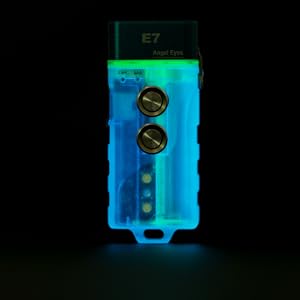
Image: A detailed table outlining the performance parameters of the RovyVon E7, including output, runtime, intensity, and beam distance for both primary and auxiliary LEDs.
Warranty and Support
RovyVon products are designed for durability and performance. For specific warranty details and support inquiries, please refer to the RovyVon card included in your product packaging or visit the official RovyVon website. You can also find additional support and product information on the RovyVon Store on Amazon.
Manufacturer: Runfree Equipment Technology (Hong Kong) CO LTD
Date First Available: July 20, 2022
Documents and downloads
Ask a question about this manual
Ask about setup, troubleshooting, compatibility, parts, safety, or missing instructions. Manuals+ will review the question and use this page’s manual context to help answer it.