
Introduction
This manual provides comprehensive instructions for the NKF RHOS581SM Infrared (IR) remote control. This remote is a replacement unit designed for seamless compatibility with various RCA LED UHD Smart TV Virtuoso models. It operates via infrared technology and requires no programming or pairing, functioning immediately upon battery installation.
Setup
1. Battery Installation
The NKF RHOS581SM remote control requires two AAA alkaline batteries (not included). Follow these steps to install them:
- Locate the battery compartment cover on the back of the remote control.
- Press down on the tab and slide the cover downwards to remove it.
- Insert two new AAA alkaline batteries, ensuring the positive (+) and negative (-) terminals align correctly with the markings inside the compartment.
- Slide the battery compartment cover back into place until it clicks securely.

Image: Back view of the remote control with the battery compartment open, illustrating correct battery placement.
2. Initial Use
Once batteries are installed, the remote control is ready for immediate use. No programming or pairing is required. Point the remote directly at your RCA LED UHD Smart TV Virtuoso and begin operation.
Operating Instructions
This section outlines the primary functions of the NKF RHOS581SM remote control. Familiarize yourself with the button layout for optimal use.
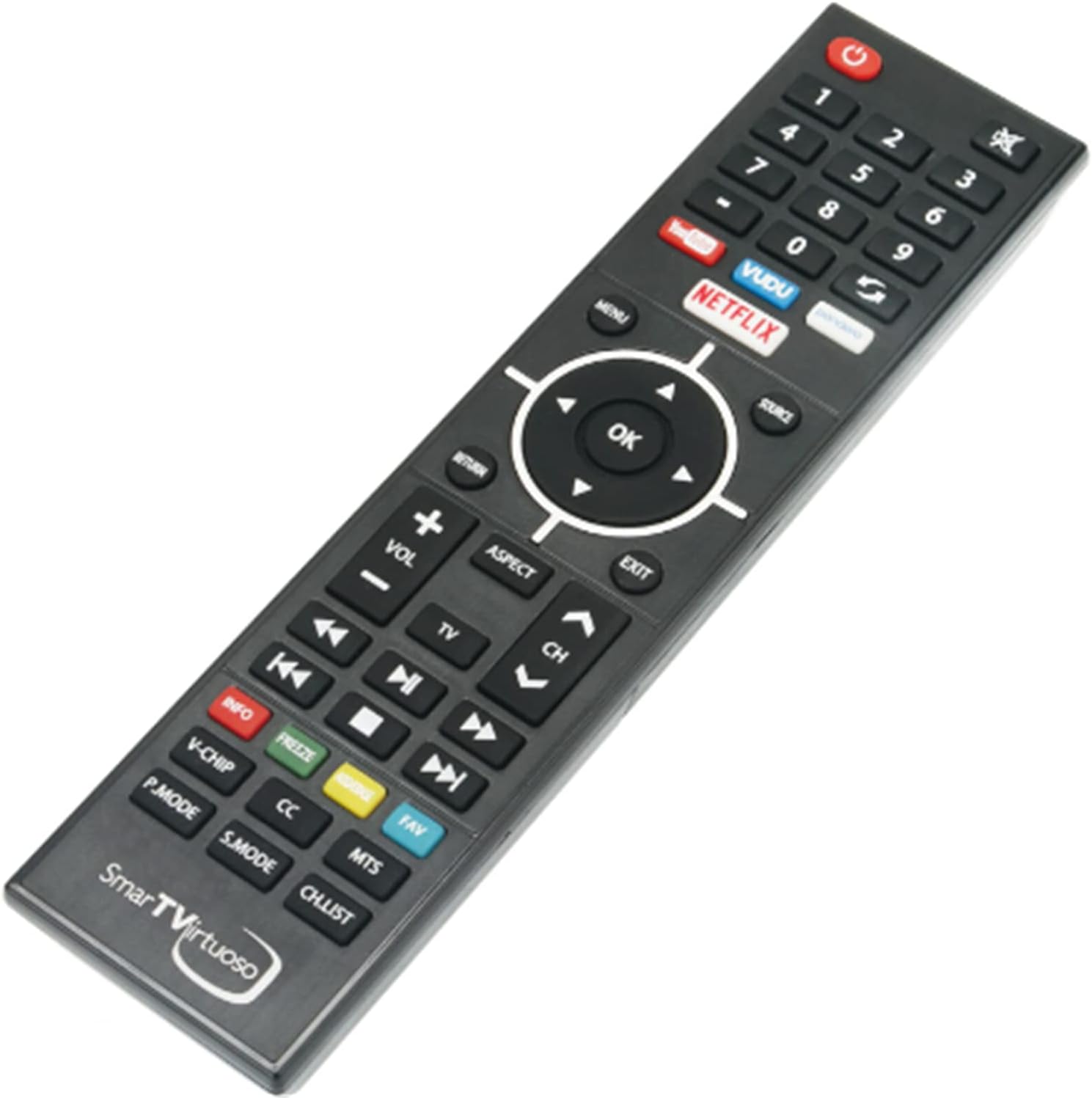
Image: Front view of the NKF RHOS581SM remote control, displaying all functional buttons.
- Power Button (●): Located at the top left. Press to turn the TV on or off.
- Number Buttons (0-9): For direct channel selection.
- Navigation Pad (Up, Down, Left, Right, OK): Used to navigate menus, select options, and confirm choices. The 'OK' button is in the center.
- Volume Up/Down (VOL +/-): Adjusts the television's sound level.
- Channel Up/Down (CH +/-): Changes the television channel.
- Mute Button (🔇): Mutes or unmutes the TV audio.
- Input/Source Button (SOURCE): Cycles through available input sources (HDMI, AV, etc.).
- Menu Button (MENU): Accesses the TV's main menu.
- Exit Button (EXIT): Closes current menus or on-screen displays.
- Return Button (RETURN): Goes back to the previous screen or menu.
- Smart TV App Buttons (YouTube, VUDU, Netflix): Direct access buttons for popular streaming applications.
- Media Control Buttons (Play/Pause, Stop, Rewind, Fast Forward): For controlling media playback.
- Color Buttons (Red, Green, Yellow, Blue): Functionality varies depending on the TV model and current application.
Maintenance
Cleaning
To clean the remote control, use a soft, dry cloth. For stubborn dirt, lightly dampen the cloth with water or a mild, non-abrasive cleaner. Avoid using harsh chemicals or abrasive materials, as these can damage the remote's surface or internal components.
Battery Replacement
Replace batteries when the remote's response becomes sluggish or stops working. Always replace both AAA batteries simultaneously with new ones. Do not mix old and new batteries, or different types of batteries.
Storage
Store the remote control in a cool, dry place away from direct sunlight and extreme temperatures. If the remote will not be used for an extended period, remove the batteries to prevent leakage and potential damage.
Troubleshooting
If you encounter issues with your NKF RHOS581SM remote control, refer to the following common problems and solutions:
| Problem | Possible Cause | Solution |
|---|---|---|
| Remote is not responding. | Dead or incorrectly installed batteries. | Replace batteries with new AAA alkaline batteries, ensuring correct polarity. |
| Remote has limited range or intermittent response. | Weak batteries; Obstruction between remote and TV; Remote not pointed directly at TV's IR sensor. | Replace batteries. Remove any objects blocking the line of sight. Ensure the remote is pointed directly at the TV's IR receiver. |
| Specific buttons are not working. | Button malfunction; TV model incompatibility for advanced functions. | Ensure the remote is compatible with your specific TV model. If basic functions also fail, the remote may be faulty. |
Specifications
Below are the technical specifications for the NKF RHOS581SM remote control:
| Feature | Detail |
|---|---|
| Brand | NKF |
| Model Name | RHOS581SM |
| Connectivity Technology | Infrared (IR) |
| Compatible Devices | RCA LED UHD Smart TV Virtuoso (Specific models may vary) |
| Battery Type | 2 x AAA batteries (Alkaline recommended) |
| Maximum Range | Approximately 10 meters (33 feet) |
| Button Quantity | 49 |
| Controller Type | Button Control |
| Item Weight | 3 Ounces (approx. 85 grams) |
| Item Dimensions (L x W x H) | 8" x 2" x 0.79" (approx. 20.3 cm x 5.1 cm x 2 cm) |
Support Information
For further assistance or if you have questions regarding the compatibility or functionality of your NKF RHOS581SM remote control, please contact the seller or NKF customer service. They can provide professional guidance and support.