1. Introduction
Thank you for purchasing the Panasonic 23 Litres Convection Microwave Oven, model NN-CT35MBFDG. This appliance is designed to provide versatile cooking options, including microwave, convection, and grill functions, with an 800-watt power output. To ensure safe and efficient operation, please read this manual thoroughly before using the oven and retain it for future reference.
2. Important Safety Instructions
When using electrical appliances, basic safety precautions should always be followed to reduce the risk of fire, electric shock, burns, or injury. This includes:
- Read all instructions before use.
- Do not operate the oven if the cord or plug is damaged, if it is not working properly, or if it has been damaged or dropped.
- Do not heat liquids or other foods in sealed containers as they are liable to explode.
- Only allow children to use the oven without supervision when adequate instructions have been given so that the child is able to use the oven in a safe way and understands the hazards of improper use.
- Use only utensils suitable for use in microwave ovens.
- When heating food in plastic or paper containers, keep an eye on the oven due to the possibility of ignition.
- If smoke is observed, switch off or unplug the appliance and keep the door closed in order to stifle any flames.
- Do not overcook food.
- Do not use corrosive chemicals or vapors in this appliance.
- This appliance is intended for household use only.
- The oven should be cleaned regularly and any food deposits removed.
- Failure to maintain the oven in a clean condition could lead to deterioration of the surface that could adversely affect the life of the appliance and possibly result in a hazardous situation.
3. Product Overview
3.1 Oven Components
The Panasonic NN-CT35MBFDG microwave oven features a spacious 23-liter interior with a stainless steel inner material for durability and easy cleaning. It includes a turntable for even cooking and a grill rack for grilling functions.

Figure 1: Front view of the Panasonic 23 Litres Convection Microwave Oven NN-CT35MBFDG. The image shows the black floral design on the left side of the door and the control panel on the right.

Figure 2: Interior view of the microwave oven, showing the glass turntable and the internal cavity. This view highlights the cooking space.
3.2 Control Panel
The control panel provides access to all cooking functions and settings. It features a digital display, function buttons, time/weight adjustment buttons, and start/stop controls.
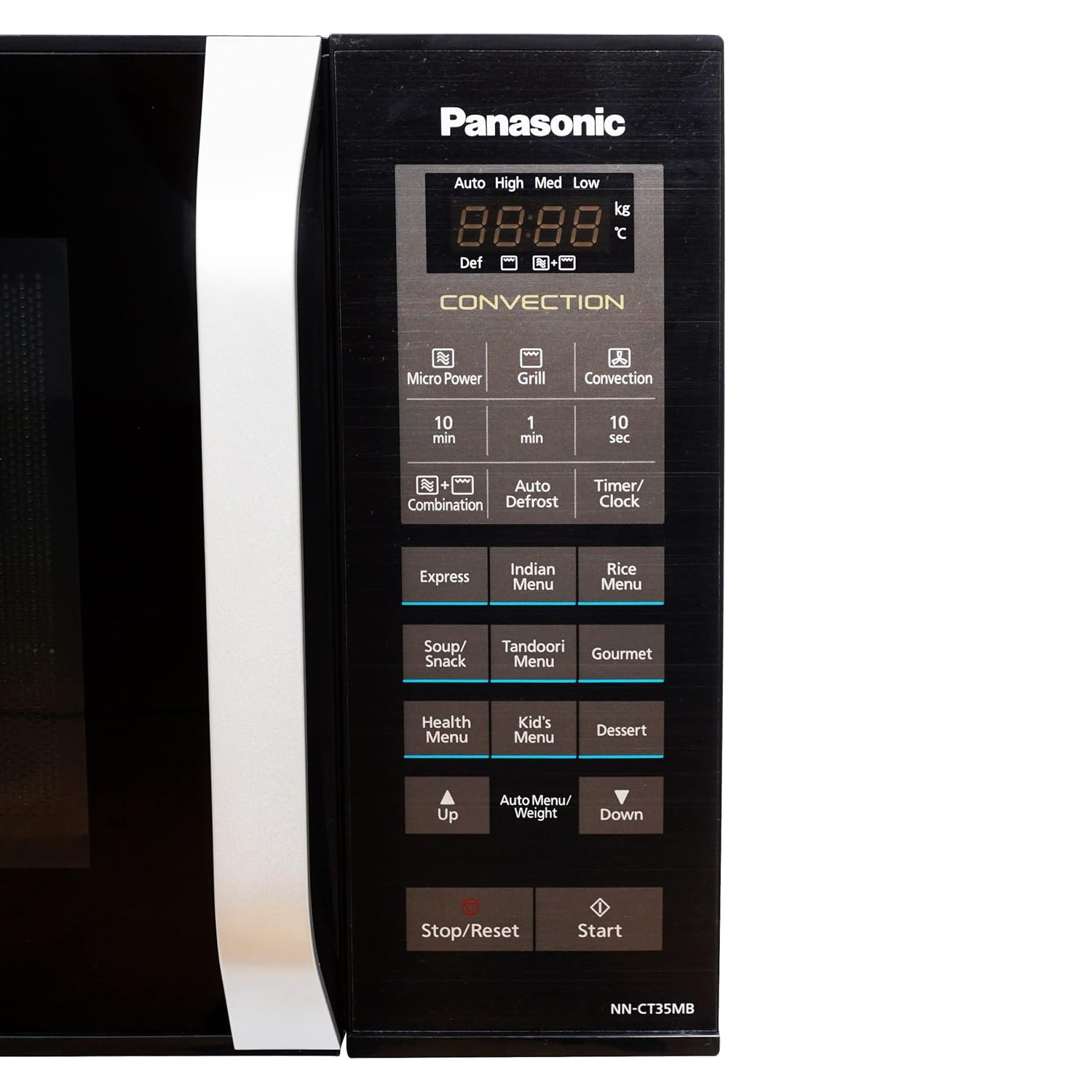
Figure 3: Close-up of the control panel. Key buttons include Micro Power, Grill, Convection, Combination, Auto Defrost, Timer/Clock, Express, Indian Menu, Rice Menu, Soup/Snack, Tandoori, Gourmet, Health Menu, Kid's Menu, Dessert, Up/Down arrows for adjustment, and Start/Stop/Reset buttons.
4. Setup
4.1 Unpacking
- Remove all packaging materials from inside and outside the oven.
- Check the oven for any damage, such as dents or a misaligned door. Do not operate the oven if it is damaged.
- Ensure all accessories, including the glass turntable and grill rack, are present.
4.2 Placement
- Place the oven on a flat, stable surface strong enough to support its weight.
- Ensure adequate ventilation by leaving at least 10 cm (4 inches) of space at the rear, 20 cm (8 inches) at the top, and 5 cm (2 inches) on both sides.
- Do not block air vents.
- Keep the oven away from heat sources, strong magnetic fields, and areas with high humidity.
4.3 Electrical Connection
- Plug the oven into a properly grounded electrical outlet.
- Ensure the voltage and frequency match the specifications on the oven's rating label.
- Do not use extension cords or adapters.
4.4 Initial Setup
- After plugging in, the display may show "0:00" or similar.
- To set the clock, press the "Timer/Clock" button, then use the Up/Down arrows or number pads (if available) to set the current time. Press "Timer/Clock" again to confirm.
5. Operating Instructions
5.1 Basic Microwave Cooking
- Place food in a microwave-safe dish on the turntable.
- Close the oven door.
- Press the "Micro Power" button repeatedly to select the desired power level (e.g., High, Med, Low).
- Use the "10 min", "1 min", "10 sec" buttons or Up/Down arrows to set the cooking time.
- Press "Start".
5.2 Convection Cooking
Convection mode uses a fan to circulate hot air, ideal for baking and roasting.

Figure 4: A whole chicken roasting inside the oven, demonstrating the convection cooking capability. The interior lights indicate operation.
- Place food on the grill rack or a heat-resistant dish.
- Press the "Convection" button.
- Use the Up/Down arrows to set the desired temperature.
- Set the cooking time using the time buttons or Up/Down arrows.
- Press "Start". The oven may preheat first.
5.3 Grill Cooking
- Place food on the grill rack.
- Press the "Grill" button.
- Set the grilling time.
- Press "Start".
5.4 Combination Cooking
Combination mode allows simultaneous microwave and convection/grill cooking for faster and more thorough results.
- Press the "Combination" button.
- Select the desired combination mode (e.g., Micro+Grill, Micro+Convection).
- Set the cooking time.
- Press "Start".
5.5 Auto Defrost
- Place the frozen food on the turntable.
- Press the "Auto Defrost" button.
- Use the Up/Down arrows to select the food type or enter the weight of the food.
- Press "Start". The oven will automatically calculate the defrosting time.
5.6 Auto Menus
The oven features several pre-programmed auto menus for convenient cooking of various dishes.

Figure 5: Icons illustrating common food items like Popcorn, Potato, Pizza, Frozen Veggie, Beverage, Dinner Plate, and Defrost, which correspond to the oven's auto menu functions.
- Press the desired auto menu button (e.g., "Express", "Indian Menu", "Rice Menu", "Soup/Snack", "Tandoori", "Gourmet", "Health Menu", "Kid's Menu", "Dessert").
- Use the Up/Down arrows to select the quantity or weight if prompted.
- Press "Start".
6. Maintenance and Cleaning
Regular cleaning helps maintain the oven's performance and extends its lifespan.
6.1 Cleaning the Interior
- Always unplug the oven before cleaning.
- Wipe the interior cavity with a damp cloth after each use to prevent food buildup.
- For stubborn stains, use a mild detergent or a microwave-safe cleaner. Avoid abrasive cleaners or scouring pads.
- Remove and wash the glass turntable and roller ring in warm, soapy water.
6.2 Cleaning the Exterior
- Wipe the exterior surfaces with a soft, damp cloth.
- Clean the control panel gently with a damp cloth, ensuring no water seeps into the panel.
- Do not use harsh chemicals or solvents.
7. Troubleshooting
If you encounter issues with your oven, refer to the following common problems and solutions:
| Problem | Possible Cause | Solution |
|---|---|---|
| Oven does not start | Power cord not plugged in; Door not closed properly; Fuse blown or circuit breaker tripped. | Ensure plug is securely in outlet; Close door firmly; Check household fuse/circuit breaker. |
| Food not cooking evenly | Food not stirred or turned; Incorrect power level/time; Turntable not rotating. | Stir or turn food during cooking; Adjust power/time; Check if turntable is correctly placed and clean. |
| Light inside oven not working | Bulb needs replacement. | Contact qualified service personnel for bulb replacement. |
| Excessive steam inside oven | High moisture content in food. | This is normal for foods with high water content. Wipe interior after use. |
If the problem persists after attempting these solutions, please contact customer support.
8. Specifications
The following are the technical specifications for the Panasonic 23 Litres Convection Microwave Oven NN-CT35MBFDG:
- Brand: Panasonic
- Model: NN-CT35MBFDG
- Capacity: 23 Litres
- Wattage (Microwave Power Output): 800 Watts
- Oven Cooking Mode: Convection
- Installation Type: Countertop
- Inner Material Type: Stainless Steel
- Door Material: Tempered Glass
- Defrost System: Defrost
- Included Components: Grill Rack
- Item Weight: 15 kg 600 g
- Item Dimensions (LxWxH): 50 x 44 x 35 Centimeters
- Country of Origin: India

Figure 6: Diagram showing the dimensions of the microwave oven: 35cm height, 44cm width, and 50cm depth.
9. Warranty and Support
9.1 Warranty Information
This Panasonic microwave oven comes with a standard manufacturer's warranty. Please refer to the warranty card included with your product for specific terms, conditions, and duration. Keep your purchase receipt as proof of purchase for warranty claims.
9.2 Customer Support
For technical assistance, service, or to inquire about replacement parts, please contact Panasonic customer support. Contact details can typically be found on the Panasonic official website or in the warranty documentation provided with your appliance.


