
GLEDOPTO GL-C-008P
GLEDOPTO ZigBee 3.0 RGBCCT LED Controller User Manual
Model: GL-C-008P
1. Product Overview
The GLEDOPTO ZigBee 3.0 RGBCCT LED Controller (Model: GL-C-008P) is designed to provide versatile control over RGB, Warm White (WW), and Cold White (CW) LED light strips. This controller supports ZigBee Light Link (ZLL) and ZigBee 3.0 gateways, enabling smart home integration with voice control and smartphone application capabilities. It also features direct control via a 2.4G RF remote, offering flexibility in managing your lighting.
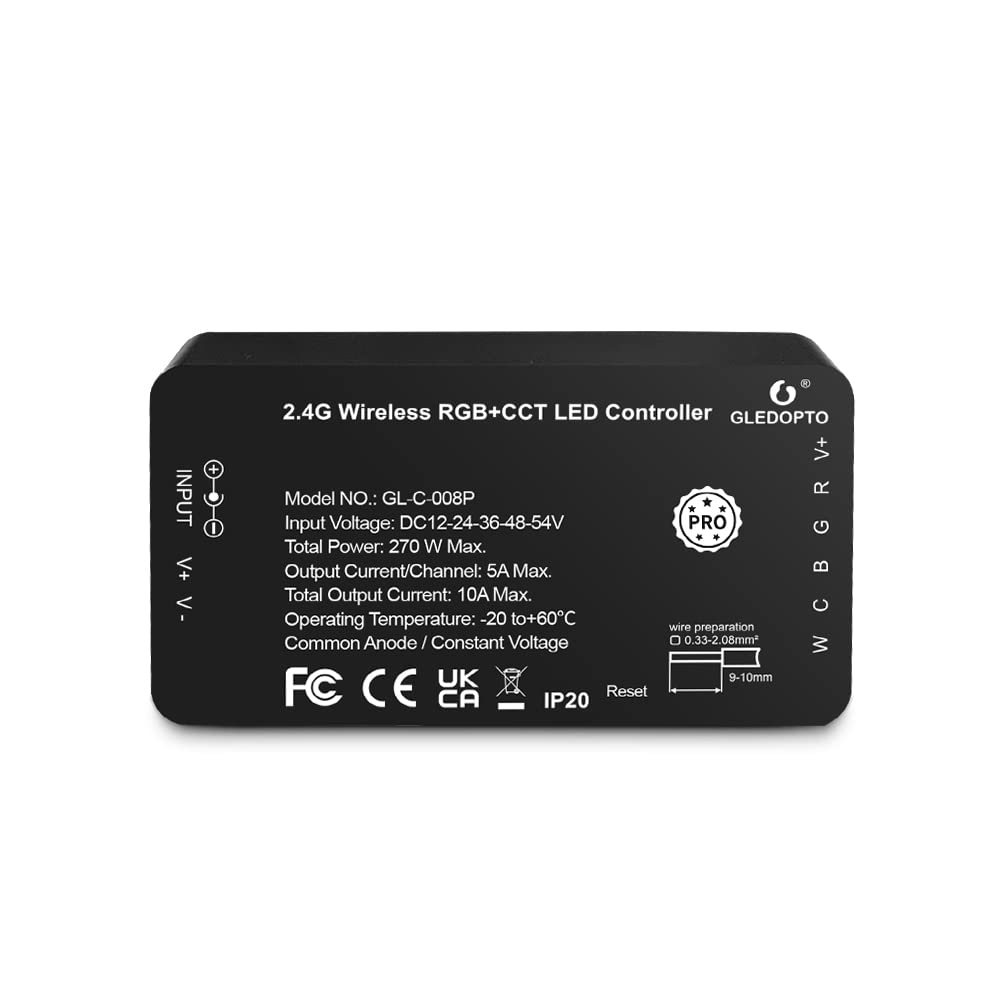
Figure 1: GLEDOPTO ZigBee 3.0 RGBCCT LED Controller (Model GL-C-008P). This image displays the top view of the controller, highlighting its input and output terminals, along with printed specifications such as model number, input voltage range, total power, and operating temperature.
2. Key Features
- ZigBee 3.0 & ZLL Compatibility: Seamlessly integrates with most ZigBee Light Link and ZigBee 3.0 gateways/hubs, including Amazon Echo Plus and Tuya.
- RF Remote Control: Supports 2.4G RF remote control for direct light management (color, temperature, brightness, mode) without requiring a ZigBee gateway. Compatible with GLEDOPTO 6-group (GL-RC-006Z) or 4-group (GL-W-003Z) wall remotes.
- Voice Control: Compatible with voice assistants like Amazon Alexa and Google Home for convenient hands-free operation.
- Extensive Color Options: Offers 16 million colors and dimmable saturation control for personalized lighting.
- Adjustable Color Temperature: Allows adjustment of white light from 2700K (warm white) to 6500K (cool white).
- Brightness Control: Dimmable from 1% to 100% to suit various needs.
- Memory Function: Retains the last color setting after power loss.
- Wide Voltage Input: Supports DC 12V-24V-36V-48V-54V, making it suitable for a variety of LED light strips.
- Reset Function: Features a dedicated reset button for easy pairing and troubleshooting.
3. Setup and Installation
Follow these steps to set up your GLEDOPTO ZigBee 3.0 RGBCCT LED Controller:
- Connect LED Strip: Connect your RGB+CCT LED light strip to the controller's output terminals. Ensure correct polarity (V+, R, G, B, W, C). The controller uses a "press type" design for wiring, which is more convenient than screw terminals.
- Power Connection: Connect a DC power supply (12V-54V, appropriate for your LED strip) to the controller's 5.5x2.1mm DC input jack.
- ZigBee Gateway Setup (if applicable): Plug in your ZigBee gateway/hub and connect it to your Wi-Fi router. Ensure it is powered on and ready for device pairing.
- Download Gateway App: Download the corresponding gateway application (e.g., Tuya Smart, Philips Hue) to your smartphone.
- Pairing the Controller:
- Open the gateway application and initiate the device search function.
- Power on the GLEDOPTO controller. If the device is not found, try power cycling the controller (turn off and on) or perform a reset.
- Once detected, add the controller to a room or group within the app.

Figure 2: Press-type wiring design. This image illustrates how to connect the LED strip wires to the controller's terminals using a press mechanism, simplifying the wiring process.

Figure 3: Voltage compatibility. This diagram shows the wide input voltage range (DC 12V-54V) supported by the controller, along with the maximum current output for each voltage, emphasizing the need to match the power supply to the LED strip's voltage.

Figure 4: Steps for usage. This infographic outlines the four main steps for setting up the controller: connecting the LED strip and power, setting up the ZigBee bridge, downloading the control app, and finally, controlling the lights through the app interface.
4. Operating Instructions
4.1. Smartphone App Control
Once paired with your ZigBee gateway, you can control the LED strip using the gateway's dedicated smartphone application:
- Color Selection: Choose from 16 million colors using the color wheel or predefined color palettes.
- Brightness Adjustment: Adjust the light intensity from 1% to 100%.
- Color Temperature: Modify the white light from warm (2700K) to cool (6500K).
- Scene Modes: Select from various pre-programmed scene modes or create custom ones.
4.2. Voice Control
Integrate your controller with voice assistants for convenient control:
- Amazon Alexa: Enable the relevant skill in the Alexa app and discover devices. You can then use commands like "Alexa, turn on the living room light," "Alexa, set to warm white," or "Alexa, increase brightness to 70%."
- Google Home: Link your gateway account in the Google Home app. Use commands such as "Hey Google, turn off the kitchen lights" or "Hey Google, change the bedroom light to blue."
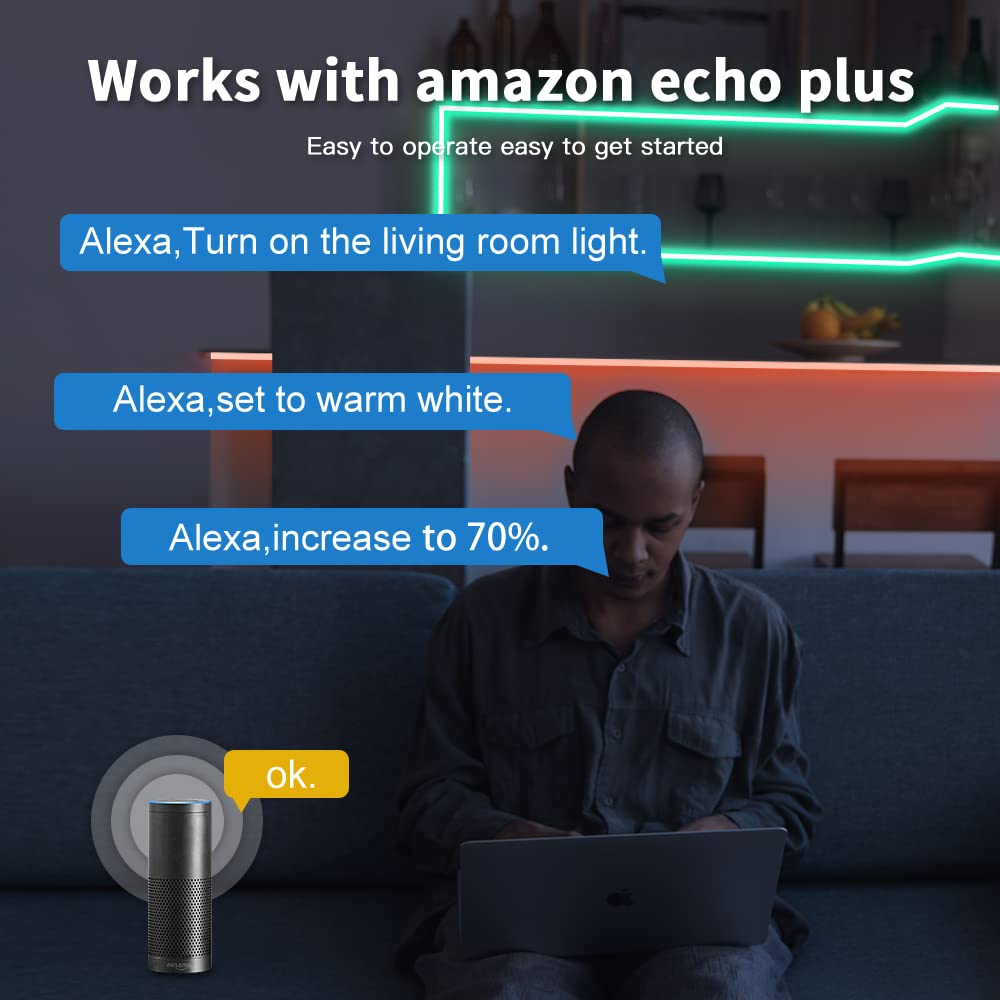
Figure 5: Voice control with Amazon Echo Plus. This image demonstrates the ease of controlling the LED lights using voice commands through an Amazon Echo device, showcasing common commands for turning lights on/off, changing color temperature, and adjusting brightness.
4.3. RF Remote Control (Optional)
If you have a compatible GLEDOPTO 2.4G RF remote (e.g., GL-RC-006Z, GL-W-003Z), you can control the lights directly without the need for a ZigBee gateway. Refer to your remote's manual for pairing instructions. The remote allows control over brightness, color, and color temperature.

Figure 6: 2.4G RF Remote Control. This image shows a user operating the LED lighting with a dedicated RF remote, highlighting the convenience of direct control over saturation and other lighting parameters.
4.4. Reset Function
The controller features a reset button for pairing or troubleshooting:
- Short Press: Press once briefly to turn the light strip on or off.
- Long Press: Press and hold for more than 2 seconds. The LED strip will blink 3 times, indicating a successful reset. This action will unpair the controller from its current ZigBee network.

Figure 7: Reset function. This image highlights the location of the reset button on the controller and provides instructions for its use: a short press for power toggle and a long press (over 2 seconds) to perform a full reset, indicated by three blinks of the LED strip.
5. Maintenance
To ensure optimal performance and longevity of your GLEDOPTO LED Controller:
- Cleaning: Gently wipe the controller with a dry, soft cloth. Do not use liquid cleaners or abrasive materials.
- Environment: Ensure the controller is installed in a dry environment, away from direct sunlight, high temperatures, and excessive humidity. The operating temperature range is -20℃ to 60℃.
- Ventilation: Ensure adequate airflow around the controller to prevent overheating, especially when operating at maximum load.
- Power Supply: Always use a stable and compatible DC power supply within the specified voltage range (12V-54V).
6. Troubleshooting
If you encounter issues with your GLEDOPTO LED Controller, refer to the following common problems and solutions:
| Problem | Possible Cause | Solution |
|---|---|---|
| LED strip does not light up. | No power, incorrect wiring, faulty LED strip, controller not paired. | Check power supply connection. Verify LED strip wiring (V+, R, G, B, W, C). Test LED strip with another power source. Ensure controller is paired with gateway/remote. |
| Cannot control via app/voice. | Controller not paired, gateway offline, Wi-Fi issue, app error. | Perform a controller reset and re-pair. Check if your ZigBee gateway is online and connected to Wi-Fi. Restart the app. Ensure voice assistant skill is enabled and linked. |
| Colors are incorrect or unresponsive. | Incorrect LED strip type selected in app, wiring issue. | Verify that the LED strip type (RGBCCT) is correctly configured in your gateway app. Recheck the wiring connections to ensure R, G, B, W, C wires are connected to the correct terminals. |
| RF remote not working. | Remote not paired, battery low, out of range. | Pair the remote with the controller according to the remote's instructions. Replace remote battery. Ensure remote is within 15-30 meters range. |
If the problem persists after trying these solutions, please contact customer support.
7. Specifications
| Parameter | Value |
|---|---|
| Model Number | GL-C-008P |
| Input Voltage | DC 12V-24V-36V-48V-54V |
| Total Output Current | 5A max |
| Total Power | 270W max |
| Dimensions (L x W x H) | 89 x 48 x 23.5 mm (3.5 x 1.89 x 0.93 inches) |
| Operating Temperature | -20℃ to 60℃ (-4°F to 140°F) |
| Input Connector | DC 5.5 x 2.1mm Jack |
| Material | Acrylonitrile Butadiene Styrene |
| Operating Mode | ON-OFF |
| Contact Type | Normally open |
| Connector Type | Plug In |
| Switch Type | Push button |
| Terminal | Through hole |
| Mounting Type | Wall mount |
8. Warranty and Support
GLEDOPTO provides a 2-year quality service for this ZigBee LED Controller. If you have any questions, require technical assistance, or experience any issues with your product, please contact GLEDOPTO customer support through the retailer where you purchased the product or refer to the official GLEDOPTO website for contact information.
9. Application Examples
The GLEDOPTO ZigBee 3.0 RGBCCT LED Controller is suitable for various indoor lighting applications, enhancing ambiance and functionality in different spaces.

Figure 8: Scene Display. This image showcases various practical applications of the LED controller in different indoor settings, including kitchen under-cabinet lighting, staircase accent lighting, bathroom mirror lighting, and living room cove lighting, demonstrating its versatility.
Related Documents - GL-C-008P
 |
Gledopto Smart Lighting Products Catalog - Zigbee, WiFi, RF LED Controllers, Bulbs, and Fixtures Explore the comprehensive range of Gledopto smart lighting solutions, including Zigbee 3.0, WiFi, and RF LED controllers, dimmers, RGB+CCT strips, downlights, bulbs, and floodlights. Enhance your home with intelligent, energy-efficient lighting. |
 |
ZigBee Light Link Gateway Controller: Connection and Pairing Guide Instruction manual detailing the connection and pairing of ZigBee Light Link controllers with smart home gateways. Covers wiring, setup, and reset procedures for various LED types. |
 |
GLEDOPTO GL-C-301P 5-in-1 Smart LED Controller Pro+ User Manual & Specifications Detailed user manual and technical specifications for the GLEDOPTO GL-C-301P 5-in-1 Smart LED Controller Pro+. Learn about product parameters, button functions, frequency settings, wiring diagrams for RGBCCT, RGBW, RGB, CCT, Dimmer modes, gateway connection, RF remote control pairing/unpairing, and safety precautions. |
 |
GLEDOPTO Indoor Product Pro User Instruction Manual - Smart Downlights Comprehensive user instruction manual for GLEDOPTO Indoor Product Pro smart downlights. Covers setup, gateway and RF remote control pairing, technical specifications, installation steps, and compatibility with various smart home systems like HUE, SmartThings, and Tuya. |
 |
GLEDOPTO RGB+CCT Smart Lighting User Manual & Specifications Comprehensive user instructions and technical specifications for GLEDOPTO RGB+CCT smart lighting products, including remote controls, flood lights, and garden lamps. Learn about features, compatibility, installation, and operation. |
 |
Gledopto Outdoor Product Pro User Manual: RGB+CCT Remote & Lighting Comprehensive user instructions for Gledopto's Outdoor Product Pro series, including RGB+CCT remote controls (GL-RC-006Z) and various outdoor floodlights and garden lamps. Covers features, setup, linking, specifications, and compatibility. |
Ask a question about this manual
Ask about setup, troubleshooting, compatibility, parts, safety, or missing instructions. Manuals+ will review the question and use this page’s manual context to help answer it.