
1. Introduction
Thank you for choosing the X-IMVNLEI X-IDRONE15 Drone. This professional-grade, foldable drone is equipped with a 4K camera, 5GHz Wi-Fi for stable image transmission, and advanced features like Optical Flow Positioning and Headless Mode. Designed for both beginners and experienced pilots, the X-IDRONE15 offers an exceptional aerial photography and flight experience.
Please read this manual thoroughly before operating the drone to ensure safe and optimal performance. Keep this manual for future reference.
Safety Guidelines
- Always operate the drone in open areas, away from people, animals, buildings, and obstacles.
- Do not fly in strong winds, rain, or other adverse weather conditions.
- Ensure batteries are fully charged and propellers are correctly installed before each flight.
- Maintain a safe distance from the drone during operation.
- Adhere to local regulations regarding drone operation, including registration requirements and flight zones.
- Supervise children when they are operating the drone.
2. Package Contents
Verify that all items listed below are included in your package:
- X-IDRONE15 Drone
- Remote Control
- 2 x 3.7V 1200mAh Batteries
- USB Charging Cable
- Spare Propellers (4 pieces)
- Screwdriver
- User Manual (this document)
- Carrying Case

Image: Contents of the X-IMVNLEI X-IDRONE15 Drone package.
3. Component Identification
Drone Components
- Propellers: Generate lift for flight.
- Motors: Drive the propellers.
- Front Camera (4K): Main camera for high-resolution photos and videos, 90° electrically adjustable.
- Bottom Camera: Secondary camera, used for Optical Flow Positioning and additional perspectives.
- Optical Flow Sensor: Provides precise indoor and outdoor positioning.
- Battery Compartment: Houses the drone battery.
- Power Button: Turns the drone on/off.
- Indicator Lights: Display drone status.
- Foldable Arms: Allow for compact storage and portability.

Image: Unfolded view of the X-IDRONE15 Drone, highlighting key components.
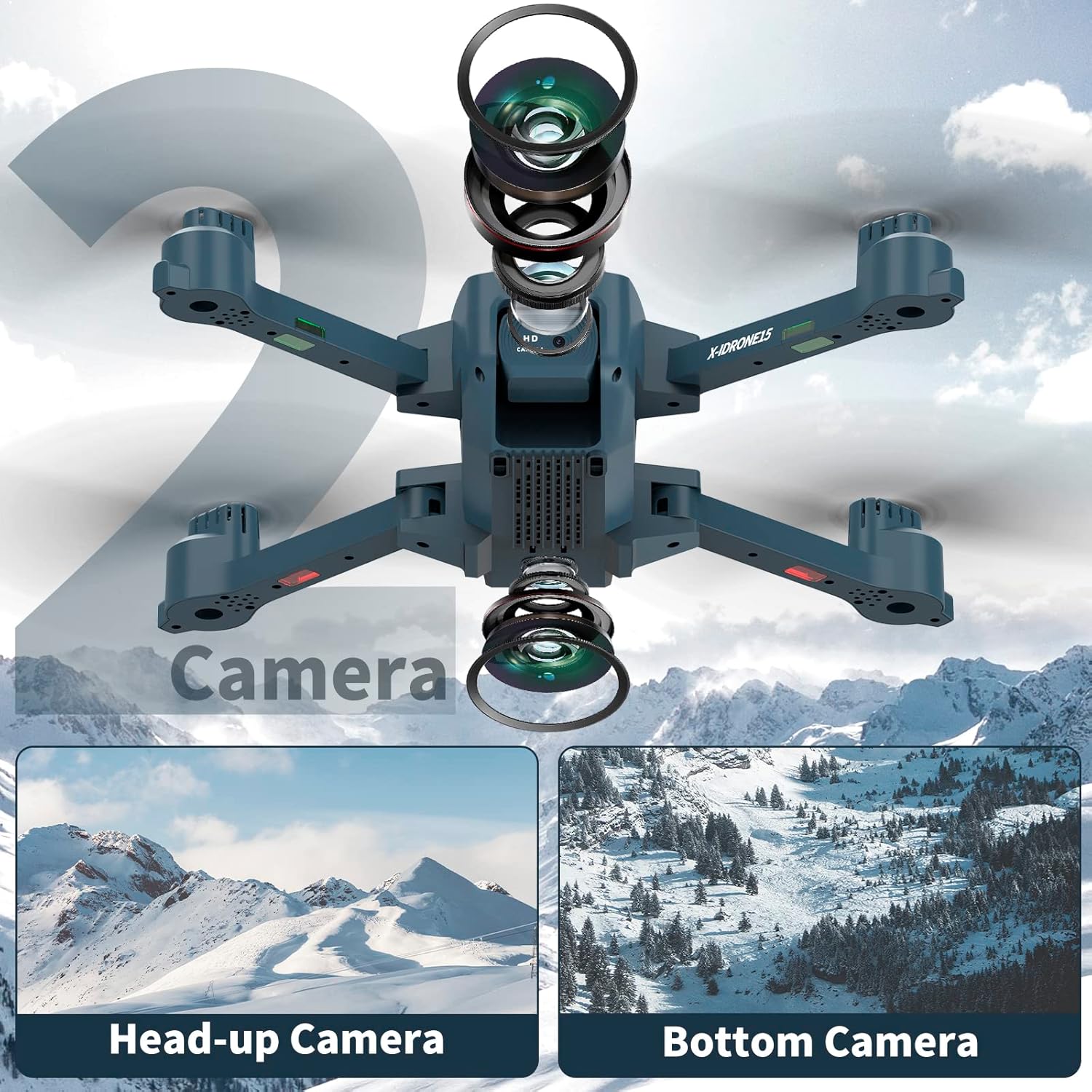
Image: The X-IDRONE15 Drone's dual camera system, featuring a main 4K camera and a bottom camera.
Remote Control Components
- Left Joystick: Controls altitude (up/down) and rotation (left/right).
- Right Joystick: Controls forward/backward and left/right movement.
- One-Key Take-off/Landing Button: Initiates automatic take-off or landing.
- Speed Switch: Adjusts flight speed (low/medium/high).
- Headless Mode Button: Activates/deactivates Headless Mode.
- Photo/Video Button: Captures photos or starts/stops video recording.
- Power Button: Turns the remote control on/off.
- Phone Holder: Secures your smartphone for FPV viewing.
Image: The X-IDRONE15 Remote Control, showing its various buttons and joysticks.
4. Setup
4.1 Charging the Batteries
- Connect the USB charging cable to the drone battery.
- Plug the other end of the USB cable into a 5V/2A USB power adapter (not included).
- The indicator light on the battery will show charging status (e.g., red for charging, green for fully charged).
- Charging typically takes 60-90 minutes per battery. Do not overcharge.

Image: The X-IDRONE15 Drone batteries, ready for charging or insertion.
4.2 Installing Propellers
The drone comes with pre-installed propellers. If replacement is needed:
- Identify the A and B propellers. Each propeller arm is marked with A or B.
- Match the A propeller to the A motor shaft and the B propeller to the B motor shaft.
- Securely attach the propellers using the provided screws and screwdriver. Ensure they are tight but not overtightened.
4.3 Installing Drone Battery
- Ensure the drone is powered off.
- Insert a fully charged battery into the battery compartment on the drone's rear.
- Push until it clicks into place.
4.4 Installing Remote Control Batteries
- Open the battery cover on the back of the remote control.
- Insert 3 x AAA batteries (not included), observing correct polarity.
- Close the battery cover.
4.5 App Download and Connection
- Scan the QR code in the quick start guide or search for the designated app (e.g., "X-IMVNLEI FPV") in your smartphone's app store.
- Install the app.
- Power on the drone and then the remote control.
- On your smartphone, go to Wi-Fi settings and connect to the drone's Wi-Fi network (e.g., "X-IDRONE15-XXXXXX").
- Open the app. The live video feed should appear, indicating a successful connection.
5. Operating Instructions
5.1 Pairing and Calibration
- Place the drone on a flat, level surface.
- Power on the drone, then power on the remote control.
- Push the left joystick up and then down. The drone's indicator lights will flash rapidly, then become solid, indicating successful pairing.
- To calibrate the gyroscope, push both joysticks down and to the right simultaneously. The lights will flash and then become solid, indicating calibration is complete.
5.2 Take-off and Landing
- One-Key Take-off: Press the One-Key Take-off/Landing button. The drone will automatically ascend to a stable altitude.
- Manual Take-off: After pairing and calibration, push both joysticks down and outwards simultaneously to unlock the motors. Then, gently push the left joystick up to ascend.
- One-Key Landing: Press the One-Key Take-off/Landing button again. The drone will automatically descend and land.
- Manual Landing: Gently pull the left joystick down to descend. Once landed, pull the left joystick down and hold for 2-3 seconds to stop the motors.

Image: Visual guide for One-Key Take-off/Landing, Headless Mode, and Altitude Hold functions.
5.3 Flight Controls
- Altitude: Push the Left Joystick up to ascend, down to descend.
- Rotation: Push the Left Joystick left to rotate counter-clockwise, right to rotate clockwise.
- Forward/Backward: Push the Right Joystick up to fly forward, down to fly backward.
- Left/Right Movement (Strafe): Push the Right Joystick left to fly left, right to fly right.
- Speed Adjustment: Press the Speed Switch button to cycle through low, medium, and high speeds.
5.4 Special Flight Modes
- Headless Mode: Press the Headless Mode button. In this mode, the drone's orientation is irrelevant; it will always move relative to the pilot's position. Press again to exit.
- Optical Flow Positioning: The drone uses its bottom camera to analyze ground patterns, providing stable hovering and precise positioning, especially in environments with clear ground textures.
- Altitude Hold: The drone maintains a consistent altitude, allowing for easier control of horizontal movement and stable aerial photography.

Image: The X-IDRONE15 Drone utilizing its intelligent Optical Flow Positioning algorithm for stable flight.
5.5 Camera Operation
- Taking Photos: Briefly press the Photo/Video button on the remote control or tap the camera icon in the app.
- Recording Video: Press and hold the Photo/Video button for 2 seconds to start recording. Press again briefly to stop. Alternatively, use the video icon in the app.
- Adjusting Camera Angle: Use the dedicated button on the remote control (if available) or the app interface to electrically adjust the 4K camera's angle up to 90°.
- Viewing Media: Photos and videos are saved to your smartphone via the app.

Image: Detail of the X-IDRONE15 Drone's 4K HD camera, featuring 90° electrical adjustment.
6. Maintenance
6.1 Propeller Care
- Regularly inspect propellers for damage (cracks, bends). Replace any damaged propellers immediately using the provided spare parts.
- Ensure propellers are clean and free of debris (dust, grass, hair) that could affect flight performance.
6.2 Battery Care
- Always use the original charging cable.
- Do not leave batteries charging unattended.
- Store batteries in a cool, dry place, away from direct sunlight and extreme temperatures.
- If not used for an extended period, charge batteries to about 50% capacity every 3 months to prolong their lifespan.
6.3 Cleaning the Drone
- Use a soft, dry cloth to wipe the drone's body.
- For stubborn dirt, slightly dampen the cloth with water. Avoid using harsh chemicals.
- Gently clean the camera lens with a microfiber cloth.
7. Troubleshooting
| Problem | Possible Cause | Solution |
|---|---|---|
| Drone does not respond to remote control. | Not paired; low battery (drone or remote); interference. | Ensure drone and remote are powered on and paired correctly. Charge batteries. Fly in an area with less interference. |
| Drone is unstable or drifts during flight. | Gyroscope not calibrated; damaged propellers; strong wind. | Recalibrate the gyroscope on a flat surface. Check and replace damaged propellers. Avoid flying in windy conditions. |
| No FPV video feed in the app. | Not connected to drone's Wi-Fi; app not open; Wi-Fi interference. | Ensure your phone is connected to the drone's 5GHz Wi-Fi. Restart the app and drone. Try a different location. |
| Short flight time. | Battery not fully charged; old battery; aggressive flying. | Ensure batteries are fully charged. Consider replacing old batteries. Fly more conservatively. |
| Drone crashes easily. | Lack of pilot experience; environmental factors. | Practice in open, safe areas. Start with low speed mode. Review flight controls. |
8. Specifications
| Feature | Detail |
|---|---|
| Brand | X-IMVNLEI |
| Model Name | X-IDRONE15 |
| Special Features | 4K camera, 5GHz Wi-Fi, Optical Flow Positioning, Foldable |
| Age Range (Description) | Adult |
| Color | Grey |
| Video Recording Resolution | 4K |
| Effective Still Resolution | 8 Megapixels |
| Connectivity Technology | Wi-Fi (5GHz) |
| Included Components | 2 batteries (3.7V 1200mAh), Remote Control, USB Cable, Spare Propellers, Screwdriver, Carrying Case |
| Skill Level | Beginner |
| Battery Capacity | 1200 Milliampere-hour (mAh) |
| Video Capture Format | MP4 |
| Remote Control Technology | Bluetooth |
| Battery Composition | Lithium |
| Optical Sensor Technology | CMOS |
| Material | Plastic |
| Item Dimensions (L x W x H) | 26L x 19W x 8H centimeters |
9. Warranty and Support
X-IMVNLEI products are designed for quality and performance. For warranty information, please refer to the specific terms provided at the point of purchase or contact your retailer. If you encounter any issues or require technical assistance, please contact X-IMVNLEI customer support through the official brand store or your purchase platform.
For further assistance, please visit the X-IMVNLEI Brand Store.

