
Veridian Healthcare 08-106B
Veridian Digital Thermometer Instruction Manual
Model: 08-106B
Introduction
This manual provides detailed instructions for the proper use and care of your Veridian Digital Thermometer, Model 08-106B. This device is designed for accurate and reliable temperature measurement for oral, rectal, or underarm use. Please read all instructions carefully before use to ensure accurate readings and safe operation.
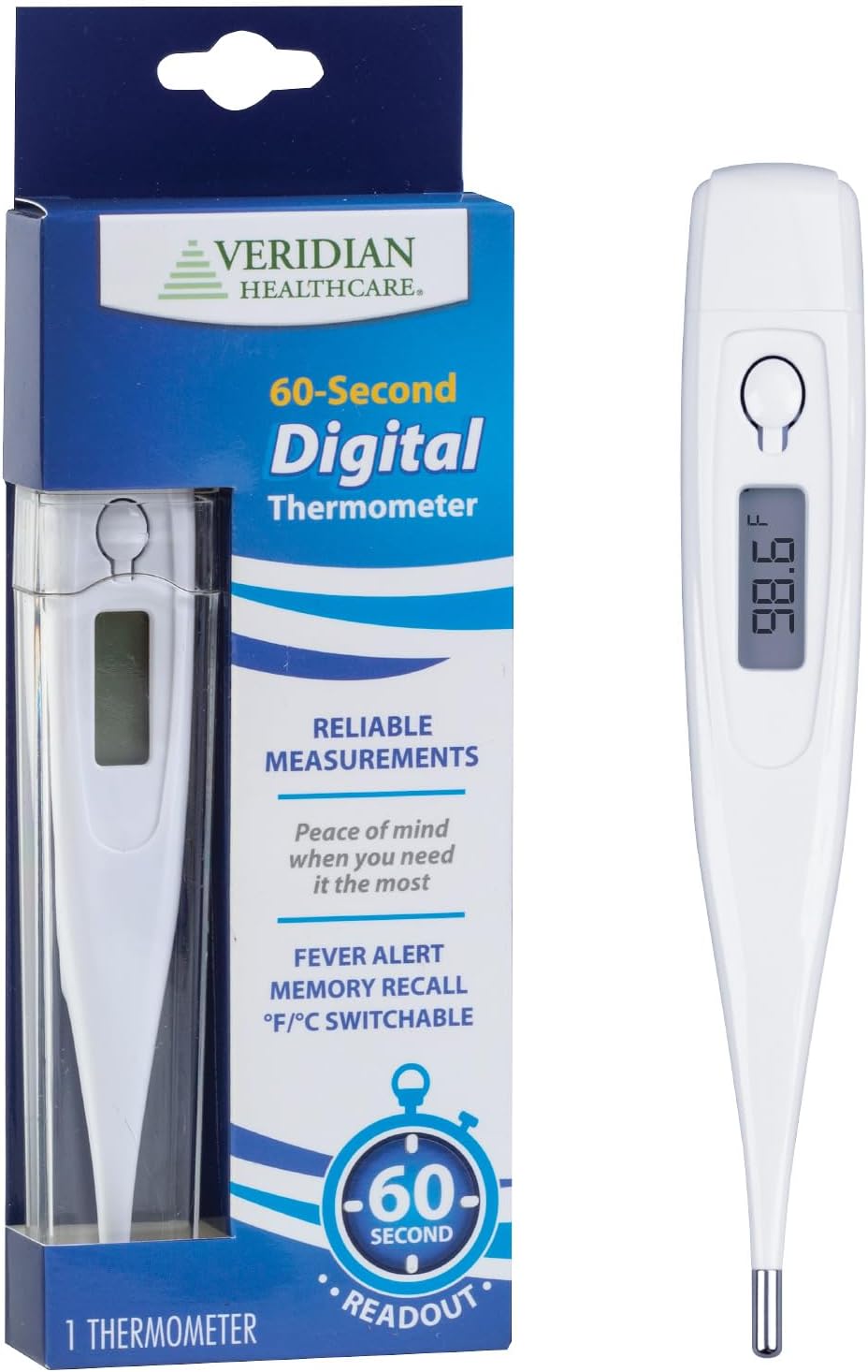
Image: The Veridian Digital Thermometer shown alongside its retail packaging. The thermometer is white with a digital display and a power button. The packaging highlights features such as '60-Second Readout' and 'Fever Alert'.
Product Features
- 60-Second Readout: Provides temperature readings in approximately 60 seconds.
- Fever Alert: An audible alarm sounds if the temperature reading is 100.0°F (37.7°C) or higher.
- Memory Recall: Stores the last temperature reading for easy comparison.
- Clinical Rigid Tip: Designed for oral, rectal, or underarm application.
- Water-Resistant: Allows for hygienic and easy cleaning.
- Fahrenheit/Celsius Switchable: Easily switch between temperature units.
- Automatic Shut-off: Conserves battery life.
- Replaceable Battery: Uses one LR41 battery (included).

Image: A graphic titled 'WHOLE FAMILY CARE' displaying icons for 'Simple to Use', 'Accurate Readout', 'Sturdy Rigid Tip', 'Memory Recall', 'Water Proof', and 'Battery Included', emphasizing the thermometer's user-friendly design and features.
Package Contents
Your Veridian Digital Thermometer package includes:
- 1 Veridian Digital Thermometer (Model 08-106B)
- 1 Storage Case
- 1 LR41 Battery (pre-installed or included separately)
- English/Spanish Instructions

Image: A graphic titled 'IN THE BOX' showing the digital thermometer, its storage case, and a list indicating the inclusion of a battery and instructions.
Setup
- Initial Inspection: Remove the thermometer from its packaging and inspect it for any damage.
- Battery Check: The LR41 battery is typically pre-installed. If the display does not turn on, refer to the 'Battery Replacement' section.
- Probe Cover Application: For hygienic use, especially for oral or rectal measurements, insert the tip of the thermometer into a disposable probe cover. Peel back the paper cover where indicated to expose the probe sheath, then peel the other side of the paper cover. Dispose of the used probe cover after each measurement.
Operation
- Power On: Press the power button to turn on the thermometer. A short beep will sound, and the display will show all segments briefly, followed by the last measured temperature (memory recall). Then, 'L°F' or 'L°C' will appear, indicating it is ready for measurement.
- Select Temperature Unit (°F/°C): While the thermometer is displaying 'L°F' or 'L°C', press and hold the power button for approximately 3 seconds to switch between Fahrenheit (°F) and Celsius (°C).
- Take Measurement: Place the thermometer tip according to the desired measurement method (oral, rectal, or underarm).
- Reading Completion: The thermometer will beep when the measurement is complete (approximately 60 seconds). The final temperature will be displayed.
- Power Off: The thermometer will automatically shut off after approximately 10 minutes of inactivity to conserve battery life. You can also manually turn it off by pressing the power button.

Image: A graphic titled '60-SECOND MEASUREMENTS' showing three icons: 'Press Power Button On', 'Place Probe Tip Under Tongue', and 'Beeps When Reading Is Complete', outlining the quick measurement process.
Measurement Methods
The Veridian Digital Thermometer can be used for oral, rectal, or underarm temperature measurements.
Oral Measurement (for ages 4 and up)
- Place the thermometer tip under the tongue as close to the heat pocket as possible.
- Keep the mouth closed during the measurement.
- The reading is typically completed in about 60 seconds.
Rectal Measurement (for infants and young children)
- Lubricate the probe tip with a water-soluble jelly. Do not use petroleum jelly.
- Gently insert the tip no more than 1/2 inch into the rectum.
- The reading is typically completed in about 60 seconds.
Underarm (Axillary) Measurement
- Place the thermometer tip in the armpit, ensuring good skin contact.
- Hold the arm firmly against the body during the measurement.
- This method may take longer than oral or rectal measurements and is generally less accurate.

Image: A close-up view of the thermometer's sturdy rigid tip, with text indicating its suitability for oral, rectal, and underarm application.
Fever Alert
The thermometer is equipped with a fever alert feature. If the measured temperature is 100.0°F (37.7°C) or higher, the thermometer will emit a series of rapid beeps to indicate a fever. This alert functions in both Fahrenheit and Celsius modes.
Memory Recall
To recall the last measured temperature, simply press the power button to turn on the thermometer. The last reading will be displayed for approximately 2 seconds before the thermometer enters measurement mode ('L°F' or 'L°C').
Care and Cleaning
The Veridian Digital Thermometer is water-resistant, making it easy to clean and maintain hygiene.
- Cleaning the Thermometer: After each use, especially if not using a probe cover, wipe the thermometer tip with a soft cloth moistened with isopropyl alcohol (70% concentration) or wash with mild soap and cool water.
- Disinfection: For thorough disinfection, the tip can be immersed in isopropyl alcohol for a short period. Do not immerse the entire thermometer.
- Drying: Dry the thermometer thoroughly with a clean, soft cloth before storing.
- Storage: Store the thermometer in its protective storage case in a cool, dry place, away from direct sunlight and extreme temperatures.
Battery Replacement
The thermometer uses one LR41 (1.5V) button cell battery. When the battery symbol appears on the display, the battery needs to be replaced.
- Locate the battery compartment cover, usually at the end opposite the tip.
- Carefully remove the cover. You may need a small coin or screwdriver.
- Remove the old battery and insert a new LR41 battery with the positive (+) side facing up.
- Replace the battery compartment cover securely.
- Dispose of the old battery according to local regulations.
Specifications
| Feature | Detail |
|---|---|
| Model Number | 08-106B |
| Measurement Range | 90.0°F - 109.9°F (32.0°C - 42.9°C) |
| Accuracy | ±0.2°F (±0.1°C) between 96.0°F - 102.0°F (35.5°C - 39.0°C) |
| Display Type | Digital LCD |
| Battery Type | 1.5V LR41 Button Cell |
| Battery Life | Approximately 200 hours of continuous operation |
| Dimensions | 5 x 1 x 0.5 inches |
| Weight | 0.02 ounces |
| Operating Environment | 50°F - 104°F (10°C - 40°C), 15% - 95% RH |
| Storage Environment | -4°F - 122°F (-20°C - 50°C), 15% - 95% RH |
| Special Feature | Auto Off |
| Material | Plastic |
Troubleshooting
If you encounter issues with your Veridian Digital Thermometer, consider the following:
- No Display/Blank Screen: Check the battery. Replace the LR41 battery if necessary.
- Inaccurate Readings: Ensure the thermometer tip is correctly placed for the chosen measurement method. Avoid taking a temperature immediately after eating, drinking, or exercising. Ensure the probe cover (if used) is properly applied.
- Slow Reading: While designed for a 60-second readout, external factors or measurement method (e.g., underarm) can sometimes extend the measurement time. Ensure proper contact and wait for the beep.
For further assistance, please contact customer support.
Warranty and Customer Support
Limited Warranty
The Veridian Digital Thermometer Model 08-106B comes with a one-year limited warranty from the date of purchase. This warranty covers manufacturing defects under normal use. It does not cover damage resulting from misuse, accidents, or unauthorized alterations.
Customer Support
For questions, technical support, or warranty claims, please contact Veridian Healthcare Customer Care:
- Toll-Free Number: 866-326-1313
- Hours of Operation: Monday - Friday, 8:30 AM - 4:30 PM CST
Related documents08-106B


Ask a question about this manual
Ask about setup, troubleshooting, compatibility, parts, safety, or missing instructions. Manuals+ will review the question and use this page’s manual context to help answer it.