
1. Product Overview
The Auxbeam RA80 XL RGB 8-Gang Switch Panel is designed to provide centralized control for up to eight different auxiliary LED lights or electrical devices in various DC 12-24V vehicles. It features a large 5-inch panel with 1-inch comfort buttons, RGB multicolor options, and automatic sensing dimmable functionality. This system simplifies wiring by integrating relays and fuses into a single control box.

Image 1.1: Auxbeam RA80 XL RGB 8-Gang Switch Panel with its packaging.
2. Package Contents
Verify that all components are present in the package before beginning installation.
- 1 x RA80 XL Switch Panel
- 1 x Circuit Control Box
- 1 x Circuit Breaker
- 60pcs Labels
- Mounting Brackets
- 10ft Wire Harness
- Power Harness
- Fuse Wire & Adapter
- Installation Kit

Image 2.1: All components included in the Auxbeam RA80 XL package.
3. Setup and Installation
3.1 Mounting the Switch Panel
The switch panel can be mounted in various locations within the vehicle cabin. Use the provided mounting brackets to secure the panel. Consider accessibility and visibility for optimal use.

Image 3.1: Examples of switch panel mounting locations within a vehicle.
3.2 Wiring Connections
The system is designed to simplify wiring by consolidating connections to a single circuit control box, which houses built-in solid-state relays and fuses. This reduces clutter in the engine compartment.

Image 3.2: Simplified wiring diagram for connecting the switch panel system to vehicle accessories.
3.2.1 ACC Fuse Connection
- Connect the red ACC Fuse wire to the fuse adapter.
- Open the ACC gear and verify that the ACC fuse in the vehicle is powered.
- Remove the original vehicle ACC Fuse, insert the fuse adapter, and then reinsert the entire fuse adapter into the original ACC Fuse position.
3.2.2 Connecting Accessories
Connect the positive wires of your electrical equipment to the designated 1-8 way wiring ports on the circuit control box. Similarly, connect the negative wires. For controlling multiple lights with one button, connect the positive wires of both lights to the same '+' hole of the circuit control box, and their negative poles accordingly.

Image 3.3: Comparison illustrating reduced wiring clutter in the engine compartment after installing the Auxbeam system.
4. Operating Instructions
4.1 Lighting Modes
The RA80 XL switch panel offers three distinct lighting modes for connected accessories:
- Toggle / Constant Light: Maintains continuous illumination.
- Momentary / Ignition Power: Activates only while the button is pressed or with ignition power.
- Pulsed / Strobe Mode: Provides a flashing light pattern.
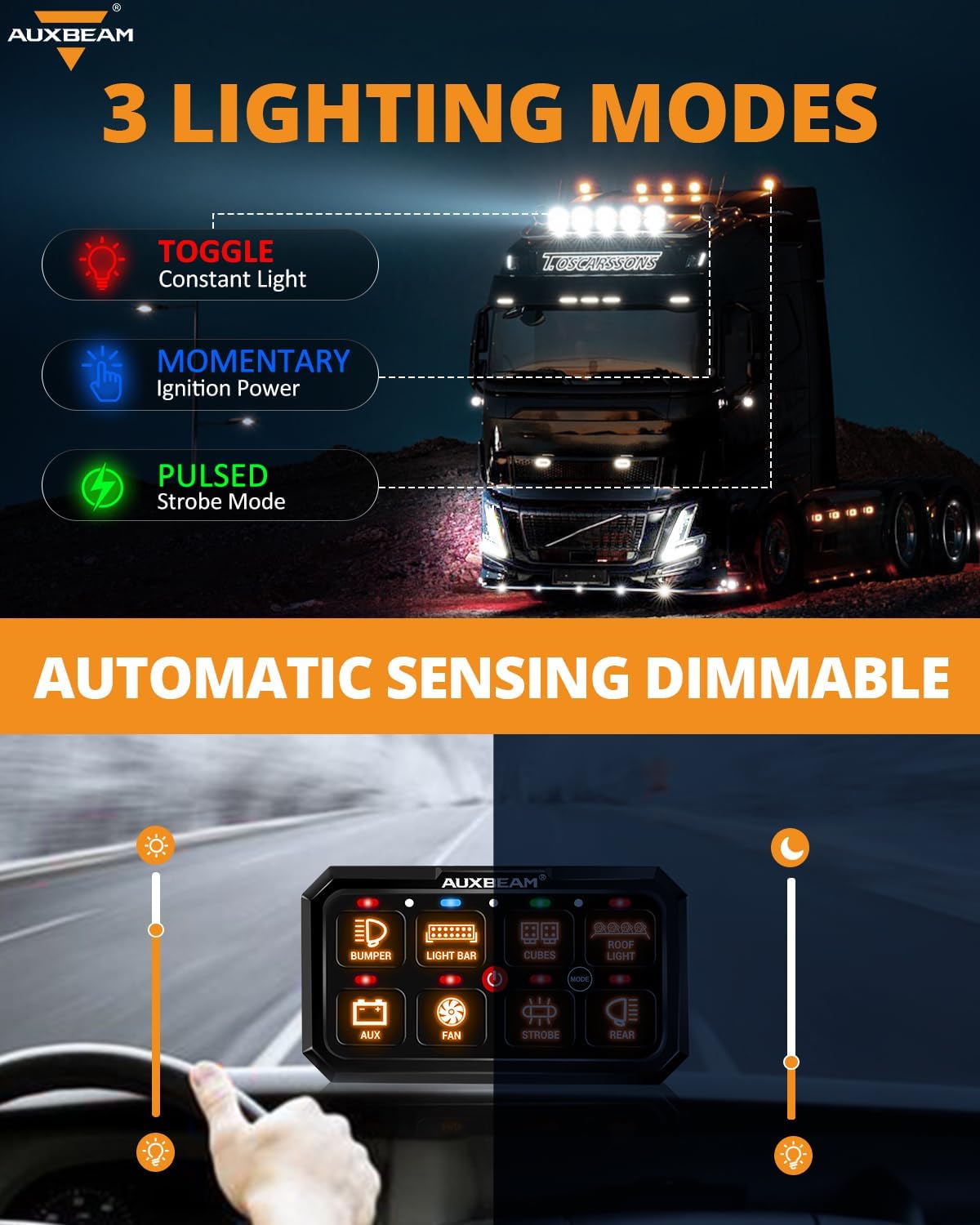
Image 4.1: Visual representation of Toggle, Momentary, and Pulsed lighting modes.
4.1.1 Toggle Mode
Ideal for maintaining constant light in dark environments. Press the button once to turn on, press again to turn off.

Image 4.2: Toggle mode providing constant light.
4.1.2 Momentary Mode
Suitable for functions like an extra car horn, where activation is needed only for a brief period.

Image 4.3: Momentary mode for temporary activation.
4.1.3 Pulsed Mode
The strobe function is useful for emergencies or signaling, providing flexible response.

Image 4.4: Pulsed mode for strobe functionality.
4.2 RGB Multicolor Function
The switch panel offers unlimited color options to match your vehicle's dash lighting, enhancing the interior aesthetic.

Image 4.5: RGB function allowing color customization to match vehicle interior.
4.3 Automatic Sensing Dimmable Function
The backlight brightness of the switch panel automatically adjusts based on the surrounding environment, providing comfortable visual brightness during both day and night driving.

Image 4.6: Automatic dimming feature for optimal visibility in varying light conditions.
4.4 ON/OFF Button and Memory Function
The central ON/OFF button primarily functions as a memory control. It allows for a single-key closure and activation of all devices that were in use. This memory function remains active even after the vehicle is turned off and restarted.
5. Troubleshooting
5.1 Accessories Not Working When Vehicle is Off
The switch system typically stops working when the vehicle is powered off because the ACC fuse is used to draw power. This design ensures that the vehicle battery is not drained. If continuous power is required, connect the red ACC wire directly to the battery. However, this is not recommended as it can consume battery power.
5.2 Devices Not Restoring After Power Interruption
After a power interruption (e.g., vehicle restart), you will need to press the ON/OFF button to restore the accessories. This is a safety feature designed to ensure the battery has sufficient power to start the vehicle.
5.3 Need for Extension Wires
If the provided wire lengths are insufficient for your installation, extension wires for the 8-gang switch panel can be obtained using ASIN: B093293RJ7.
5.4 Additional Stickers
More stickers for the RA80 XL large switch panel can be acquired using ASIN: B0C13FPNP1.
6. Specifications
| Feature | Specification |
|---|---|
| Operation Mode | ON-OFF |
| Current Rating | 60 Amps |
| Operating Voltage | DC 12-24 Volts |
| Max Power Rating (12V) | 720W |
| Max Power Rating (24V) | 1200W |
| Circuit Type | 8-way |
| Contact Type | Normally Closed |
| Connector Type | Plug In |
| Terminal Type | Screw |
| Actuator Type | Push Button |
| Control Method | Touch |
| International Protection Rating | IP65 |
| Operating Temperature | -40°F to +221°F (-40°C to +105°C) |
| Item Dimensions (L x W x H) | 12.9 x 8.9 x 4.5 inches |
| Item Weight | 5.55 pounds |
| Material | Aluminum (Contact Material) |

Image 6.1: Overview of RA80 XL features and technical specifications.
7. Warranty and Support
7.1 Warranty Information
The Auxbeam RA80 XL RGB 8-Gang Switch Panel comes with a 2-year warranty. Please retain your proof of purchase for warranty claims.
7.2 Customer Support
For any questions, technical assistance, or warranty inquiries, please contact Auxbeam customer support through their official channels or the retailer where the product was purchased.
8. Application
The Auxbeam RA80 XL RGB 8-Gang Switch Panel is suitable for a wide range of DC 12-24V vehicles, including but not limited to:
- Cars
- ATVs
- UTVs
- SUVs
- Trucks
- RVs
- Campers
- Trailers
- Boats
- Golf Carts
- Tractors
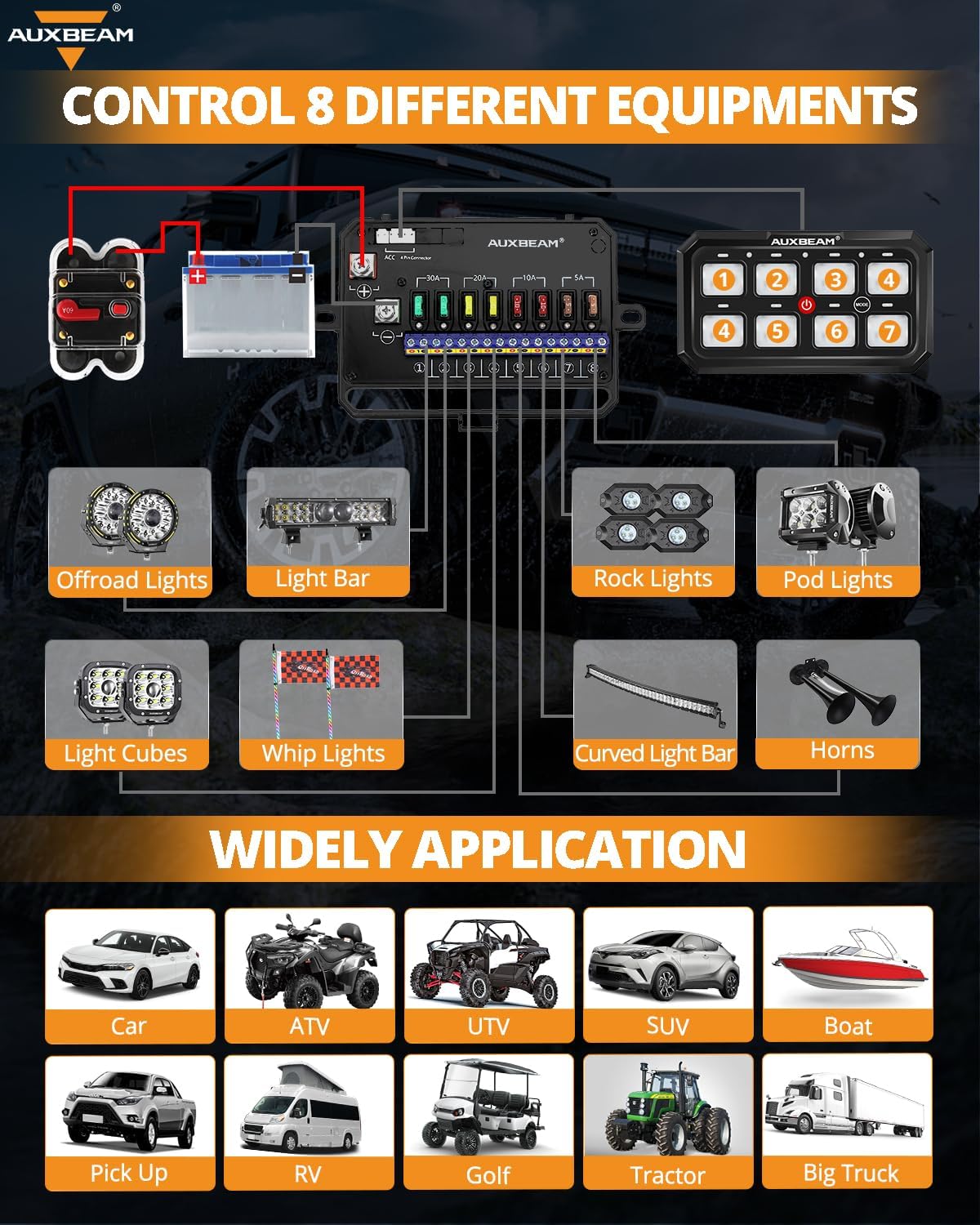
Image 8.1: Examples of vehicles compatible with the Auxbeam RA80 XL switch panel.