
1. Introduction
Thank you for choosing the NORTH EDGE APACHE-46 Digital Sports Watch. This manual provides detailed instructions on how to set up, operate, and maintain your watch. Designed for outdoor enthusiasts, the APACHE-46 features an altimeter, barometer, compass, thermometer, pedometer, and is water-resistant up to 50 meters. Please read this manual thoroughly to ensure proper use and to maximize the watch's capabilities.

Front view of the NORTH EDGE APACHE-46 digital sports watch with a green nylon strap.
2. Product Overview
Key Features:
- Integrated Altimeter, Barometer, and Compass: Accurately tracks altitude, air pressure, and direction.
- Daily Activity Monitoring: Supports step counting, distance tracking, and calorie calculation.
- Weather Trend Reference: Barometric pressure data helps anticipate weather changes for outdoor activities.
- 50m Water Resistance: Suitable for hand washing, rain, and daily water exposure.
- Durable Design: Lightweight with a comfortable nylon strap, built for outdoor use.
- Additional Functions: Chronograph, Dual Time Display, Lap-timer, World Time, Backlight, Alarm Clock, Low Power Reminder.
Components Included:
- NORTH EDGE APACHE-46 Digital Sports Watch
- Nylon Strap (pre-installed)
- CR2032 Battery (pre-installed)

Rear view of the NORTH EDGE APACHE-46 watch, showing the stainless steel back cover with model number, water resistance rating, and battery type (CR2032).
3. Setup
Initial Power On:
Your watch comes with a pre-installed CR2032 battery. If the display is blank, press any button to activate it. If it remains blank, the battery may need replacement (refer to Section 5: Maintenance).
Setting Time and Date:
- In Time Mode, press and hold the SET button (usually top-left or bottom-left) until the time display flashes.
- Use the MODE button (usually bottom-right) to cycle through hours, minutes, seconds, year, month, and day settings.
- Use the ADJUST button (usually top-right) to change the flashing value.
- Once all settings are correct, press the SET button again to exit setting mode.
Compass Calibration:
For accurate compass readings, calibration is recommended before first use and after significant changes in location or magnetic interference.
- Enter Compass Mode (usually by pressing the MODE button until 'COMP' appears).
- Follow the on-screen prompts to calibrate. This typically involves rotating the watch horizontally in a figure-eight motion or rotating it slowly 360 degrees on a flat surface.
- Ensure you are away from strong magnetic fields (e.g., large metal objects, electronics) during calibration.
4. Operating Instructions
The watch features multiple modes accessible via the MODE button. Use the ADJUST button to change values or cycle through sub-functions within a mode, and the LIGHT button (if present, usually top-right or bottom-left) for backlight activation.
4.1 Altimeter Mode:
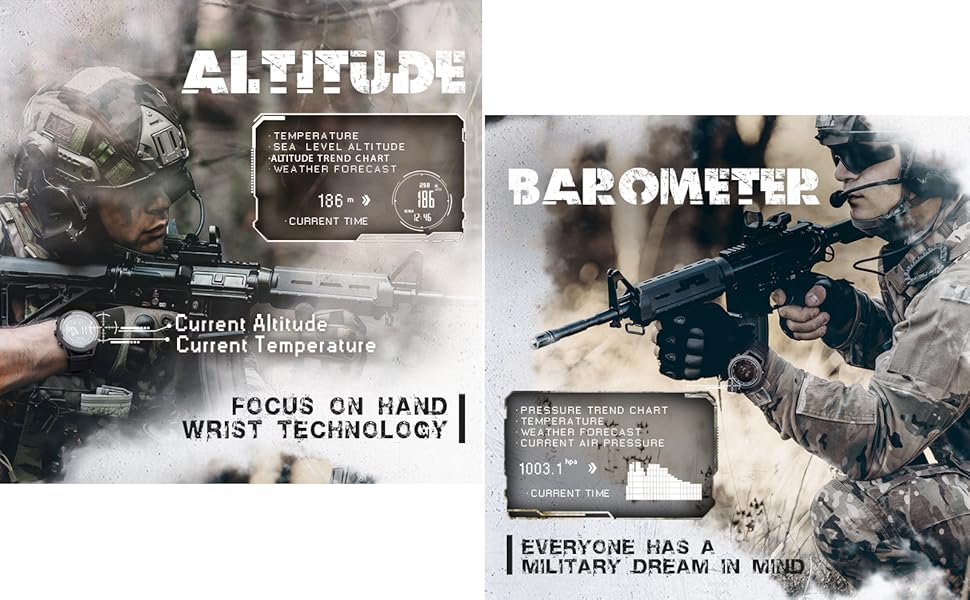
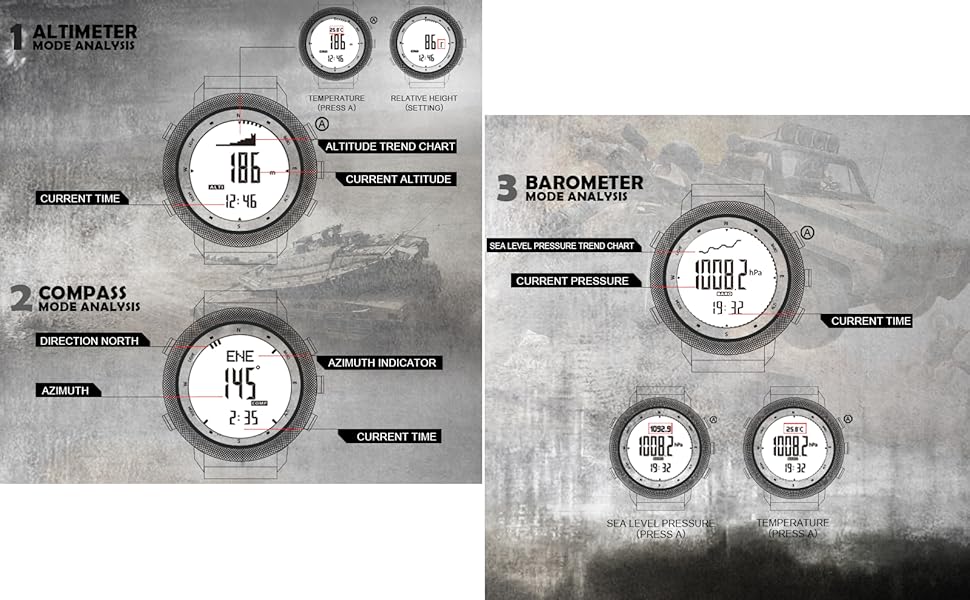
The altimeter measures current altitude based on atmospheric pressure. It can display altitude in meters or feet and often includes temperature readings.
- Press the MODE button to navigate to Altimeter Mode.
- The display will show current altitude and temperature.
- To switch between meters and feet, refer to the watch's specific settings menu (usually accessed by holding the SET button in Altimeter Mode).
Watch display showing altimeter function with current altitude (186m) and temperature (25.7°C).
4.2 Barometer Mode:
The barometer measures atmospheric pressure, which can indicate weather trends. A rising pressure often means improving weather, while falling pressure suggests worsening conditions.
- Press the MODE button to navigate to Barometer Mode.
- The display will show current atmospheric pressure (e.g., in hPa or inHg) and a pressure trend graph over the last 24 hours.
- This feature is for reference and not a professional weather forecasting device.

Watch display showing barometer function with current atmospheric pressure (1003.1 hPa) and a 24-hour pressure trend graph.
4.3 Compass Mode:
The digital compass provides directional guidance. Ensure it is calibrated for accuracy.
- Press the MODE button to navigate to Compass Mode.
- The display will show your current bearing in degrees and cardinal directions (N, NE, E, SE, S, SW, W, NW).
- If readings seem inaccurate, perform a calibration as described in Section 3.
Watch display showing digital compass function with current direction (10 degrees) and calibration support.
4.4 Pedometer Mode:
Track your daily activity with the built-in pedometer, which records steps, distance, and calories burned.
- Press the MODE button to navigate to Pedometer Mode.
- The display will show your step count, estimated distance, and calories burned.
- Some models allow setting personal data (stride length, weight) for more accurate readings. Refer to the watch's settings for this.

Watch display showing pedometer function with steps count (12580), distance (5.62 km), calories burned (523 kcal), and exercise time.
4.5 Other Functions:
- Chronograph (Stopwatch): Use the MODE button to enter Chronograph Mode. Use ADJUST to start/stop and SET to reset.
- Dual Time / World Time: Allows tracking time in a second time zone. Navigate to this mode and adjust as needed.
- Alarm: Set daily alarms. Navigate to Alarm Mode, use SET to adjust, and ADJUST to turn on/off.
- Backlight: Press the LIGHT button (if available) to illuminate the display in low-light conditions.
5. Maintenance
Cleaning:
Wipe the watch case and strap with a soft, damp cloth. Avoid using harsh chemicals or abrasive cleaners, which can damage the watch's finish or seals.
Water Resistance:
The APACHE-46 is water-resistant up to 50 meters (5 ATM / 164 feet). This means it is suitable for hand washing, rain, and brief immersion in water. Do not press buttons underwater, as this can compromise the water seal. Avoid hot water, steam, and prolonged exposure to water, especially in high-pressure environments like diving, as this can damage the watch.
Battery Replacement:
The watch uses a CR2032 lithium coin cell battery. When the display dims or functions become erratic, it's time to replace the battery.
- Using a small screwdriver, carefully remove the screws on the back cover of the watch.
- Gently pry open the back cover. Note the position of the rubber gasket.
- Remove the old CR2032 battery.
- Insert a new CR2032 battery with the positive (+) side facing up.
- Ensure the rubber gasket is properly seated in its groove to maintain water resistance.
- Replace the back cover and tighten the screws securely. Do not overtighten.
6. Troubleshooting
Display is blank or dim:
- Check battery level. Replace the CR2032 battery if necessary.
- Ensure the watch is not in a power-saving mode (if applicable).
Inaccurate Altimeter/Barometer readings:
- Altimeter readings are affected by changes in atmospheric pressure. Calibrate the altimeter regularly if precise altitude is critical.
- Ensure the sensor port (usually on the side of the watch) is clean and unobstructed.
Compass readings are incorrect:
- Perform a compass calibration (refer to Section 3).
- Move away from strong magnetic fields, large metal objects, or electronic devices that may interfere with the compass.
Watch fogging up internally:
- This can indicate a compromised water seal. Avoid further water exposure.
- Contact customer support for assistance.
7. Specifications

Infographic displaying key specifications of the NORTH EDGE APACHE-46 watch.
| Feature | Specification |
|---|---|
| Model Number | APACHE-46 |
| Display Type | Digital (EL Backlight) |
| Case Material | Metal |
| Dial Material | Glass |
| Strap Material | Nylon |
| Case Diameter | 50 mm |
| Case Thickness | 14.5 mm |
| Strap Width | 24 mm |
| Strap Length | 260 mm |
| Weight | 105 Grams |
| Water Resistance | 5 ATM (50 meters / 164 feet) |
| Battery Type | CR2032 (included) |
| Special Features | Altimeter, Barometer, Compass, Pedometer, Thermometer, Chronograph, Dual Time, Lap-timer, World Time, Alarm, Backlight |
8. Warranty and Support
Warranty Information:
The NORTH EDGE APACHE-46 watch comes with a limited warranty. Please refer to the warranty card included in your product packaging for specific terms and conditions, including coverage duration and what is covered.
Customer Support:
For any questions, technical assistance, or warranty claims, please contact NORTH EDGE customer support through the retailer where you purchased the product or visit the official NORTH EDGE website for contact information.


