
Introduction
This manual provides instructions for the proper installation and use of your Mignova Tablet Soft Silicone and Hard Back Cover, along with the included Tempered Glass Screen Protector. This product is designed to offer comprehensive protection for your compatible 10-inch tablet.
Compatibility: This product is compatible with various 10-inch tablets, including but not limited to:
- TPSPAD Android 10 10 inch Tablet
- MAGCH M210 / M101 / X10 / L21 Tablet 10 inch
- MEIZE K116 / K118 Tablet 10 inch
- ZONKO K118 / K116 Tablet 10 inch
- Xiashuanghu RS10 Tablet 10 inch
- Kaktin 10 inch Tablet
- Habisder kt107
- Kaktin d10
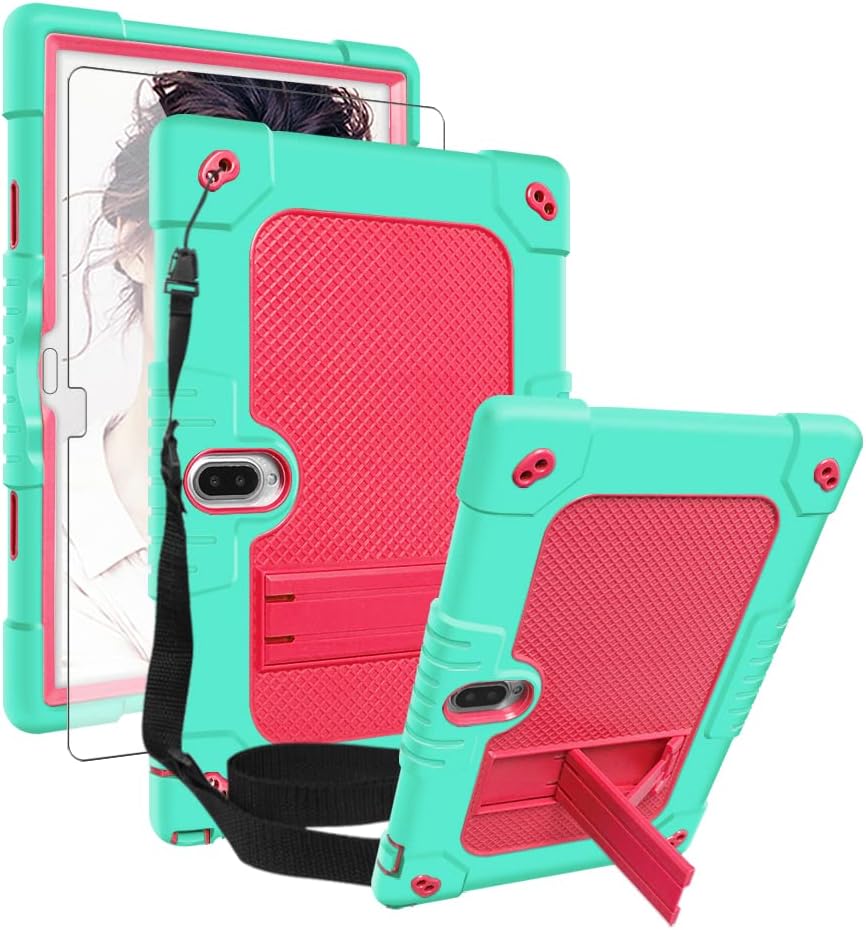
Image: The Mignova tablet case in green and pink, shown with the included tempered glass screen protector and shoulder strap.
Package Contents
Verify that all items are present in the package:
- 1 x Tablet Case (Soft Silicone & Hard Back Cover)
- 1 x Tempered Glass Screen Protector
- 1 x Adjustable and Detachable Shoulder Strap

Image: An exploded view showing the tablet case, adjustable shoulder strap, and a small tool, illustrating the components included in the package.
Setup and Installation
1. Installing the Tablet Case
- Ensure your tablet is clean and free of dust or debris.
- Carefully separate the soft silicone outer layer from the hard back cover.
- Place your tablet into the hard back cover, ensuring it fits securely.
- Re-apply the soft silicone outer layer, making sure all edges and corners are properly seated around the hard cover and tablet.
- Verify that all ports, buttons, and camera openings align correctly with the case cutouts.

Image: A close-up view of the tablet case, highlighting the raised edges around the camera (3mm higher) and screen (3mm higher) designed to prevent scratches.

Image: A detailed view of the tablet case corner, emphasizing the "Thicker Silicone Corner" for superior protection against impacts.
2. Applying the Tempered Glass Screen Protector
For optimal results, apply the screen protector in a dust-free environment.
- Thoroughly clean your tablet screen using the provided cleaning wipes (if included) or a microfiber cloth. Ensure no dust, smudges, or fingerprints remain.
- Carefully peel off the protective film from the adhesive side of the tempered glass.
- Align the screen protector with your tablet screen, paying attention to cutouts for the camera and sensors.
- Gently lower the screen protector onto the screen. It will adhere automatically.
- If any bubbles appear, gently push them towards the edges of the screen using a soft cloth or squeegee.
Note: The screen protector features 9H hardness, 99.99% HD transparency, ultra-thin 0.33mm thickness, and 2.5D rounded edges for a smooth feel. It is also hydrophobic, dust-free, waterproof, and scratch-resistant.
3. Attaching the Shoulder Strap
- Locate the four attachment points on the corners of the tablet case.
- Attach the clips of the adjustable shoulder strap to these points.
- Adjust the strap length to your preference for comfortable carrying or mounting.
Operating Instructions
Using the Built-in Kickstand
The integrated kickstand allows for hands-free viewing and typing. To deploy:
- Locate the kickstand on the back of the case.
- Gently pull the kickstand outwards until it locks into position.
- Position your tablet at the desired viewing or typing angle.
- To retract, push the kickstand back into its recess until it clicks securely.

Image: Illustrations demonstrating the "Typing Angle" and "Viewing Angle" achievable with the built-in kickstand of the tablet case.
Utilizing the Shoulder Strap
The adjustable and detachable shoulder strap offers versatile carrying and mounting options:
- Carrying: Wear the tablet over your shoulder or cross-body for portability.
- Mounting: The strap can be used to hang the tablet on a car headrest for rear-seat entertainment.

Image: A collage showing various uses of the tablet case, including a person using the kickstand for viewing, a child studying with the tablet, a person carrying it with the shoulder strap, and the tablet mounted on a car headrest.
Maintenance
Cleaning the Case
To clean the silicone and hard plastic case:
- Wipe with a damp cloth and mild soap if necessary.
- Avoid harsh chemicals or abrasive cleaners, as these may damage the material.
- Ensure the case is completely dry before re-installing the tablet.
Cleaning the Screen Protector
To clean the tempered glass screen protector:
- Use a microfiber cloth to gently wipe away fingerprints and smudges.
- For stubborn marks, lightly dampen the cloth with water or a screen cleaner specifically designed for electronics.
- Avoid excessive pressure to prevent damage.
Troubleshooting
Screen Protector Bubbles
If small bubbles appear after screen protector installation:
- Most small bubbles will disappear naturally within 24-48 hours.
- For larger bubbles, gently lift the nearest edge of the screen protector and re-apply, pushing the bubble out with a soft cloth.
- Ensure the screen is completely clean before re-application to prevent dust from causing new bubbles.
Difficulty Accessing Ports/Buttons
If you experience difficulty accessing ports or pressing buttons:
- Verify that the tablet is correctly seated within the case and that the silicone layer is properly aligned.
- Ensure no foreign objects are obstructing the cutouts.
Specifications
| Brand | Mignova |
| Model Number | 10 inch (Tablet Case) |
| Form Factor | Case |
| Shell Type | Soft (Silicone) |
| Special Features | Screen Protector, Adjustable Shoulder Belt, Built-in Kickstand |
| Screen Protector Hardness | 9H |
| Screen Protector Transparency | 99.99% HD |
| Screen Protector Thickness | 0.33mm |
| Screen Protector Edge | 2.5D Rounded |
| Color | Green+Pink (for this variant) |
Warranty and Support
Information regarding product warranty and customer support is not provided within this manual. Please refer to the product packaging or the manufacturer's official website for details on warranty coverage and how to contact customer support.