
TEMPWARE TW7500ER
Contents
TEMPWARE Electric Garage Heater User Manual
Model: TW7500ER - 7500-Watt Digital Fan-Forced Ceiling Mount Shop Heater
Introduction
Thank you for choosing the TEMPWARE Electric Garage Heater. This manual provides essential information for the safe and efficient operation of your 7500-Watt digital fan-forced ceiling mount shop heater. Please read this manual thoroughly before installation and use, and retain it for future reference.

Figure 1: TEMPWARE 7500-Watt Electric Garage Heater and Remote Control.
Important Safety Information
Always follow basic safety precautions when using electrical appliances to reduce the risk of fire, electric shock, and injury to persons.
- Electrical Connection: This heater requires a 240-Volt hardwired connection. Installation must be performed by a qualified electrician in accordance with the (US) National Electric Code and local codes. Ensure the heater is properly grounded and connected to a correctly sized current protection circuit breaker.
- Overheat Protection: The heater is equipped with a built-in sensor that automatically switches the device off if it overheats. Do not block air inlets or outlets.
- Placement: Mount the heater securely to the ceiling, ensuring adequate clearance from walls, ceilings, and flammable materials. Refer to installation instructions for specific clearances.
- Maintenance: Disconnect power before performing any maintenance or cleaning.
- Usage Environment: This heater is designed for indoor use in workshops, garages, and similar spaces. Do not use in wet or damp locations.
- No Power Cord Included: Note that this heater does not come with a power cord, as it is designed for hardwired installation.
Figure 2: The heater features a built-in thermostat and overheat protection for safe operation.
Installation Instructions
This heater is designed for ceiling mount installation. Due to its hardwired nature, professional installation by a qualified electrician is highly recommended.
Mounting the Heater
The heater features adjustable louvers and a variable mounting angle to direct air output effectively. Ensure the mounting location provides sufficient clearance and structural support.
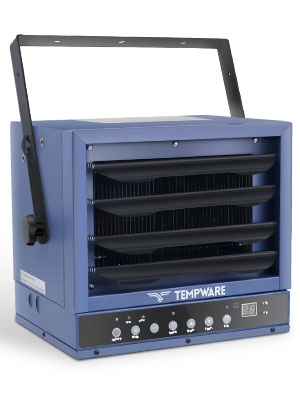
Figure 3: The heater offers variable mounting angles for optimal heat distribution.
Electrical Wiring
The heater must be hardwired to a 240-Volt power supply. Follow these steps carefully:
- Turn off Power: Before starting any wiring, ensure the main power to the circuit is turned off at the breaker.
- Access Wiring Compartment: Remove all screws from the bottom panel of the heater to access the wiring compartment.
- Run Wiring: Run the appropriate gauge wiring (e.g., 8 AWG copper wire for 7500W model) through a cut-out on the side of the heater.
- Connect Wires: Connect the L1, L2, and Ground wires to the Power Block as instructed by the internal wiring diagram.
- Secure Connections: Torque all terminal screws and power block lugs tight with the required torque (typically 40 in-lbs).
- Close Compartment: Replace the bottom panel and secure all screws.
- Restore Power: Turn on power at the main circuit breaker panel. The heater is now ready for use.
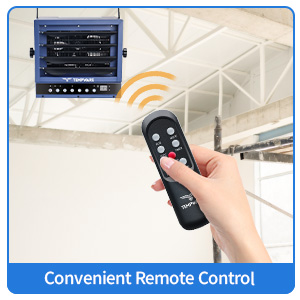
Figure 4: Detailed steps for hardwired electrical connection.

Figure 5: Internal wiring connections for the hardwired installation.
Operating Instructions
The TEMPWARE Electric Garage Heater can be controlled via its integrated control panel or the included full-function remote control.
Control Panel and Remote Functions

Figure 6: Overview of the heater's control panel and remote control functions.
- Power ON/OFF: Press the ON/OFF button to turn the heater on or off.
- Mode Selection: Press the MODE button to cycle through available heating modes (e.g., Low, High, Fan Only). The 7500-Watt model offers power ranges from 6,250 to 7,500 watts.
- Temperature Adjustment: Use the TEMP+ and TEMP- buttons to set your desired temperature (from 45°F to 95°F). The built-in thermostat will maintain the set temperature.
- ECO Mode: Activate ECO mode for energy efficiency. In this mode, the heater automatically adjusts its working mode or turns off based on the ambient temperature to save energy.
- Timer Function: Press the TIMER button to set an auto-off timer from 1 to 12 hours. This helps conserve energy by automatically shutting off the heater after a set period.
- °F/°C Conversion: Switch between Fahrenheit and Celsius temperature display using the dedicated button.
Heating Performance and Coverage
This 7500-Watt heater provides up to 25,590 BTUs, capable of heating large areas up to 1,250 square feet, making it ideal for workshops and garages.

Figure 7: The heater offers a remote coverage of up to 27 feet and heats areas up to 1,250 sq. ft.

Figure 8: Smart power adjustment ensures eco-efficient constant heat by adapting to ambient temperature.
When turning off the heater, it will run for an additional 90 seconds to cool down the heating elements. This 90-second countdown will be displayed on the unit. Do not cut power to the unit during this cool-down period unless it is an emergency, as this feature helps prolong the lifespan of the heating elements and ensures safety.
Maintenance
Regular maintenance ensures the longevity and efficient operation of your TEMPWARE Electric Garage Heater. Always disconnect the power supply before performing any maintenance.
- Cleaning: Periodically clean the exterior of the heater with a soft, damp cloth. Do not use abrasive cleaners or solvents. Ensure the heater is completely dry before restoring power.
- Air Inlets/Outlets: Keep the air inlets and outlets free from dust and debris to ensure proper airflow and prevent overheating. Use a vacuum cleaner with a brush attachment to gently remove dust.
- Inspection: Annually inspect the power connections and wiring for any signs of wear, damage, or loose connections. This should ideally be done by a qualified electrician.
- Storage: If storing the heater for an extended period, ensure it is clean and dry. Store in a cool, dry place.
Troubleshooting
If you encounter issues with your heater, refer to the following common problems and solutions:
| Problem | Possible Cause | Solution |
|---|---|---|
| Heater does not turn on. | No power supply; tripped circuit breaker; loose wiring connection. | Check the circuit breaker and reset if tripped. Verify power supply to the unit. Ensure all hardwired connections are secure (consult an electrician if unsure). |
| Heater turns off unexpectedly. | Overheat protection activated; blocked air vents; ambient temperature reached. | Ensure air inlets and outlets are clear. Allow the unit to cool down. If the room temperature has reached the set thermostat temperature, the heater will turn off automatically. |
| Remote control not working. | Dead batteries; remote out of range; obstruction between remote and heater. | Replace remote control batteries. Ensure you are within the 27 ft remote coverage range. Remove any obstructions between the remote and the heater's receiver. |
| Insufficient heating. | Incorrect mode selected; thermostat set too low; room size too large for heater capacity. | Select a higher heating mode (e.g., High). Increase the thermostat setting. Ensure the heater's capacity (7500W for up to 1250 sq. ft.) matches your space. Consider adding a ceiling fan to circulate heat in high-ceiling areas. |
Product Specifications
| Feature | Detail |
|---|---|
| Brand | TEMPWARE |
| Model Number | TW7500ER |
| Power/Wattage | 7500 watts (Adjustable: 6,250W - 7,500W) |
| Voltage | 240 Volts |
| Heating Area | Up to 1,250 square feet |
| BTU Output | 25,590 BTUs (Maximum) |
| Product Dimensions | 45.72 x 38.1 x 38.1 cm (18 x 15 x 15 inches) |
| Item Weight | 10.7 kg (23.6 lbs) |
| Color | Blue |
| Mounting Type | Ceiling Mount (Hardwired Installation) |
| Special Features | Digital Thermostat (45°F to 95°F), Overheat Protection, ECO Mode, 1-12 Hour Timer, Remote Control, Adjustable Louvers, Variable Mounting Angle. |
| Certifications | ETL Certified |

Figure 9: The 7500W heater provides powerful heating performance.

Figure 10: Heating capacity comparison for 5000W, 7500W, and 10000W models.
Warranty and Support
Specific warranty details are not provided in this manual. Please refer to the product packaging or contact TEMPWARE customer support for warranty information and assistance. Keep your purchase receipt as proof of purchase.
Official Product Videos
No official product videos from the seller were found to be embedded in this manual.
Ask a question about this manual
Ask about setup, troubleshooting, compatibility, parts, safety, or missing instructions. Manuals+ will review the question and use this page’s manual context to help answer it.