
Nokia
Nokia 2660 Flip User Manual
Model: 2660 Flip
Introduction
The Nokia 2660 Flip is a classic flip phone designed for ease of use and reliable communication. It features a large display, large buttons, and a long-lasting battery, making calls and texts straightforward. The device supports Dual-SIM functionality and 4G/LTE connectivity for enhanced network compatibility. Its robust design includes an emergency button for quick contact with loved ones.
Safety Information
Read these simple guidelines. Not following them may be dangerous or illegal.
- Switch off in restricted areas: Switch off the device when mobile phone use is not allowed or when it may cause interference or danger, for example, in aircraft, near medical equipment, fuel, chemicals, or blasting areas.
- Road safety comes first: Obey all local laws. Always keep your hands free to operate the vehicle while driving. Your first consideration while driving should be road safety.
- Interference: All wireless devices may be susceptible to interference, which could affect performance.
- Qualified service: Only qualified personnel may install or repair this product.
- Batteries, chargers, and other accessories: Use only batteries, chargers, and other accessories approved by Nokia for use with this device. Do not connect incompatible products.
- Keep your device dry: Your device is not water-resistant. Keep it dry.
- Protect your hearing: To prevent possible hearing damage, do not listen at high volume levels for long periods. Exercise caution when holding your device near your ear while the loudspeaker is in use.
Package Contents
Ensure all items are present in the product packaging:
- Nokia 2660 Flip Phone
- Removable Battery
- Micro USB Charger
- Quick Start Guide
Device Overview
Familiarize yourself with the key components of your Nokia 2660 Flip phone.

Image: The Nokia 2660 Flip phone in its open position, displaying the main screen with time and date, and the full alphanumeric keypad below.
- Main Display: The internal screen for viewing menus, messages, and calls.
- Keypad: Alphanumeric keys for dialing and text input, along with navigation and function keys.
- Navigation Key: Central key for navigating menus.
- Call/End Keys: Dedicated buttons for initiating and ending calls.
- Camera: Located on the rear of the device.
- External Display (if applicable): A small screen on the front cover for quick notifications (not explicitly mentioned in specs, but common for flip phones).
- Micro USB Port: For charging the device.
- Emergency Button: A dedicated button for quick access to emergency contacts.
Setup
1. Inserting the SIM Card(s) and Battery
The Nokia 2660 Flip supports Dual-SIM functionality, allowing you to use two SIM cards simultaneously. The battery must be inserted after the SIM cards.
- Turn off the phone and disconnect it from any charger.
- Remove the back cover by gently prying it open from the notch.
- If the battery is already in, remove it.
- Locate the SIM card slots. Insert the SIM card(s) into the respective slots with the gold contacts facing down, ensuring they click into place.
- Insert the battery, aligning the gold contacts on the battery with the contacts in the phone.
- Replace the back cover, pressing firmly until it snaps into place.
2. Charging the Device
Before first use, it is recommended to fully charge the battery.
- Connect the micro USB end of the charger cable to the micro USB port on the side of the phone.
- Plug the other end of the charger into a wall outlet.
- The battery indicator on the screen will show the charging status. A full charge takes approximately 4 hours.
- Once fully charged, disconnect the charger from the phone and the outlet.

Image: Side profile of the Nokia 2660 Flip phone, highlighting the micro USB port at the bottom for charging.
3. Powering On/Off
- To Power On: Press and hold the Power/End key until the Nokia logo appears on the screen.
- To Power Off: Press and hold the Power/End key, then select "Power off" from the options on the screen.
Operating Instructions
1. Basic Navigation
Use the navigation key and soft keys to move through menus and select options.
- Navigation Key: Press up, down, left, or right to scroll through options. Press the center key to select.
- Left Soft Key: Typically used for "Select" or "Menu" options.
- Right Soft Key: Typically used for "Back" or "Cancel" options.
2. Making and Receiving Calls
- Making a Call:
- Enter the phone number using the keypad.
- Press the Call key (green button) to dial.
- Receiving a Call:
- When the phone rings, open the flip to answer, or press the Call key (green button).
- To end a call, close the flip or press the End key (red button).
3. Sending and Receiving Messages

Image: The Nokia 2660 Flip phone displaying its main menu with various application icons, including the messaging icon.
- Sending a Message:
- Go to Menu > Messaging > Create message.
- Type your message using the keypad.
- Enter the recipient's number or select from contacts.
- Select "Send".
- Receiving a Message:
- New messages are indicated by an envelope icon on the screen.
- Go to Menu > Messaging > Inbox to read messages.
4. Contacts
Store and manage your contacts for easy dialing.
- Adding a Contact: Go to Menu > Contacts > Add new. Enter the name and number, then save.
- Finding a Contact: Go to Menu > Contacts > Names, then scroll or type the first letter of the name.
5. Camera Usage
Capture moments with the integrated camera.
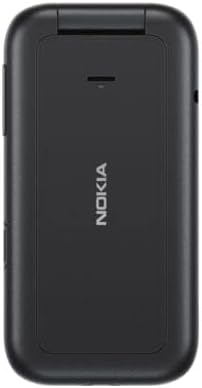
Image: The rear of the Nokia 2660 Flip phone, clearly showing the camera lens and flash module.
- Taking a Photo: Go to Menu > Camera. Frame your shot and press the center navigation key to capture.
- Viewing Photos: Go to Menu > Gallery.
6. Emergency Button
The emergency button allows you to quickly contact up to 5 pre-set contacts in an emergency.
- Setting up Emergency Contacts: Navigate to Menu > Settings > Emergency calls. Add up to 5 contacts from your phonebook.
- Using the Emergency Button: In an emergency, press and hold the dedicated emergency button (usually on the side or back of the phone). The phone will cycle through your emergency contacts until one answers.
7. Dual SIM Functionality
Manage two different phone numbers or network providers on a single device.
- When making a call or sending a message, the phone will prompt you to select which SIM card to use, or you can set a default SIM in the settings.
- Access SIM card settings via Menu > Settings > Connectivity > Dual SIM.
Maintenance
1. Cleaning Your Device
- Use a soft, clean, dry cloth to wipe the surface of the device.
- Do not use harsh chemicals, cleaning solvents, or strong detergents.
- Keep the camera lens clean for optimal photo quality.
2. Battery Care
- Avoid exposing the battery to extreme temperatures.
- Do not puncture, disassemble, or modify the battery.
- If the battery is damaged, replace it with an original Nokia approved battery.
- For optimal battery life, avoid constantly charging the phone when it's already full.
3. Storage
- Store the device in a cool, dry place away from direct sunlight.
- If storing for an extended period, ensure the battery has some charge (around 50%) to prevent deep discharge.
Troubleshooting
| Problem | Possible Cause | Solution |
|---|---|---|
| Phone does not power on. | Low battery; battery not inserted correctly; software issue. | Charge the battery for at least 30 minutes. Ensure battery is correctly seated. Try removing and reinserting the battery. |
| Cannot make or receive calls. | No network signal; SIM card not inserted correctly; SIM card not activated. | Check network signal strength. Reinsert SIM card(s). Contact your network provider to ensure SIM is active. |
| Poor call quality. | Weak signal; interference; earpiece/microphone obstruction. | Move to an area with better signal. Ensure earpiece and microphone are clear of debris. |
| Battery drains quickly. | High usage; background processes; aging battery. | Reduce screen brightness. Close unused applications. Consider replacing the battery if it's old. |
| Cannot send/receive messages. | Incorrect message center number; no network signal; insufficient credit. | Verify message center number in settings. Check network signal. Ensure sufficient credit on your SIM. |
Specifications
| Feature | Detail |
|---|---|
| Model Name | Nokia 2660 Flip |
| Dimensions (Folded) | 4.25 x 2.17 x 0.75 inches (108 x 55 x 19 mm) |
| Weight | 3.39 ounces (96 grams) |
| Operating System | S30+ |
| Display Size | 2.8 Inches |
| Display Resolution | 240 x 320 pixels |
| RAM | 48 MB (0.05 GB) |
| Memory Storage Capacity | 0.05 GB (Internal) |
| Cellular Technology | 4G/LTE |
| Wireless Connectivity | Cellular, Wi-Fi |
| SIM Support | Dual SIM |
| Battery Capacity | 1450 mAh (Lithium Polymer) |
| Talk Time | Up to 10.5 Hours |
| Standby Time | Up to 400 Hours |
| Charging Time | Approximately 4 Hours |
| Camera Features | Rear Camera |
| Audio Jack | No headphone jack |
| Human Interface Input | Buttons |
| Manufacturer | HMD Global Oy |
Warranty and Support
For warranty information and technical support, please refer to the official Nokia website or contact their customer service. The warranty period and terms may vary by region and retailer.
- Online Support: Visit the official Nokia support website for FAQs, troubleshooting guides, and software updates.
- Customer Service: Contact Nokia customer service for direct assistance with product issues or warranty claims.
Related documents


Ask a question about this manual
Ask about setup, troubleshooting, compatibility, parts, safety, or missing instructions. Manuals+ will review the question and use this page’s manual context to help answer it.