1. Introduction
The FLASH HOBBY BL32 USB Linker is a dedicated programming tool designed for configuring and updating BLHeli open source Electronic Speed Controllers (ESCs). This device facilitates convenient setup of various functions for BLHeli (BLHeli-S, BLHeli-32) ESCs via a computer. This manual provides detailed instructions for its proper use.
2. Product Overview
The BL32 USB Linker is a compact and essential tool for enthusiasts and professionals working with BLHeli ESCs. It offers a straightforward interface for parameter adjustment and firmware management.
Key Features:
- Designed for BLHeli open source ESCs (BLHeli-S, BLHeli-32).
- Supports ESCs with SIL, ATMEL, and STM chips.
- Enables convenient setup of various ESC functions on a computer.
- Provides access to BLHeliSuite software and drivers for download.
- Compact and portable design.
Product Components:


3. Setup
Before using the BL32 USB Linker, ensure you have the necessary software and drivers installed on your computer. The linker is compatible with BLHeliSuite for Windows, macOS, and Linux.
3.1 Software and Driver Installation
- Download BLHeliSuite: Visit the official FLASH HOBBY website or the BLHeliSuite project page to download the latest version of the BLHeliSuite software for your operating system.
- Install Drivers: The BL32 USB Linker typically uses a CH340 USB-to-Serial chip. If your operating system does not automatically install the necessary drivers, you may need to download and install them manually. Links are usually provided on the BLHeliSuite download page or the product's support section.
- Decompress Software: Extract the downloaded BLHeliSuite archive to a convenient location on your computer.
3.2 Connecting the USB Linker
- Power On ESC: Ensure your Electronic Speed Controller (ESC) is powered on, typically by connecting it to a battery.
- Connect ESC to Linker: Connect the 3-pin cable from your ESC to the corresponding pins on the BL32 USB Linker. Pay attention to the 'S' (signal) and 'GND' (ground) labels to ensure correct orientation.
- Connect Linker to Computer: Plug the USB-A end of the BL32 USB Linker into an available USB port on your computer. A red LED on the linker may illuminate to indicate power.


4. Operating the BL32 USB Linker
4.1 Using with BLHeliSuite (PC)
The BL32 USB Linker is primarily designed for use with the BLHeliSuite software on a personal computer. This allows for detailed configuration and firmware management of compatible ESCs.
- Open BLHeliSuite: Launch the "Multi ESC Config Tool" (BLHeliSuite) program on your computer.
- Select Port and Connect: In the software, check "Direct Connect" and select the correct COM port corresponding to your USB Linker. Click "Connect".
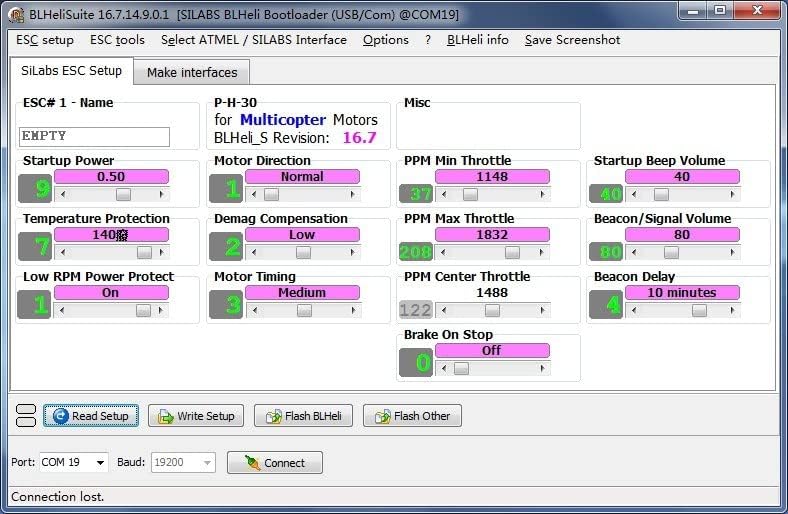
- Read Parameters: Click on "M1" or the equivalent button to read the current parameters from your connected ESC. The software will display the ESC's configuration.
- Modify Parameters: Adjust the desired parameters (e.g., motor timing, startup power, voltage cutoff) according to your requirements.
- Save Settings: After making changes, click "Save Settings" to write the new configuration to the ESC. You can re-read parameters to confirm the changes.

For a visual guide on connecting and configuring parameters, refer to the video below:
Video 1: How to configure parameters for AM32/BLHeli_32 with ESC-LINK. This video demonstrates the physical connection of an ESC-Link device to an ESC and a computer, followed by the software steps to configure parameters and perform firmware updates for AM32/BLHeli_32 ESCs.
5. Maintenance
Regular maintenance ensures the longevity and optimal performance of your BL32 USB Linker and connected ESCs.
5.1 Firmware Updates
Periodically check for firmware updates for your ESCs. Firmware updates often include performance improvements, bug fixes, and new features.
- For ESCs via BLHeliSuite: In the BLHeliSuite software, navigate to the "Flash" tab. Click "Load Firmware" to select the appropriate firmware file, then "Flash Firmware" to update your ESC.
5.2 General Care
- Keep the linker clean and free from dust and debris.
- Store in a dry environment to prevent moisture damage.
- Avoid excessive force when connecting or disconnecting cables.
6. Troubleshooting
If you encounter issues with your BL32 USB Linker, refer to the following common troubleshooting steps:
- Linker Not Recognized by PC:
- Ensure the CH340 driver is correctly installed. Check Device Manager (Windows) for unrecognized devices or COM port issues.
- Try a different USB port on your computer.
- Verify the data cable is functional.
- No Communication with ESC:
- Confirm the ESC is powered on.
- Check that the 3-pin cable from the ESC is correctly connected to the linker, paying attention to signal and ground pins.
- Ensure the correct COM port is selected in BLHeliSuite.
- Verify the ESC is a BLHeli (BLHeli-S, BLHeli-32) compatible model.
- Software Download Issues:
- Always download software and drivers from official sources to avoid compatibility or security problems.
- If encountering issues with foreign file hosting sites, search for alternative official download mirrors or contact FLASH HOBBY support for direct links.
7. Specifications
- Item Name: USB linker programmer
- Brand: FLASH HOBBY
- Model Number: USB
- Hardware Interface: USB
- Compatible Devices: Personal Computer, Laptop
- Operating System Compatibility: Windows, macOS, Linux
- Product Dimensions: 1.57 x 0.98 x 0.7 inches
- Item Weight: 0.598 ounces (0.02 Kilograms)
8. Warranty and Support
For warranty information, technical support, or further assistance, please contact FLASH HOBBY customer service or visit their official website. Keep your purchase receipt as proof of purchase.


