
1. Product Overview
The elemage ZS-GQ3 is a 2K outdoor security camera designed for reliable surveillance. It features 2K (2560 x 1440) HD resolution, PIR motion detection, two-way audio communication, and advanced night vision capabilities up to 15 meters. With an IP65 waterproof rating, it is suitable for various outdoor conditions. The camera operates on a built-in battery and connects via 2.4 GHz WiFi (5 GHz WiFi is not supported).
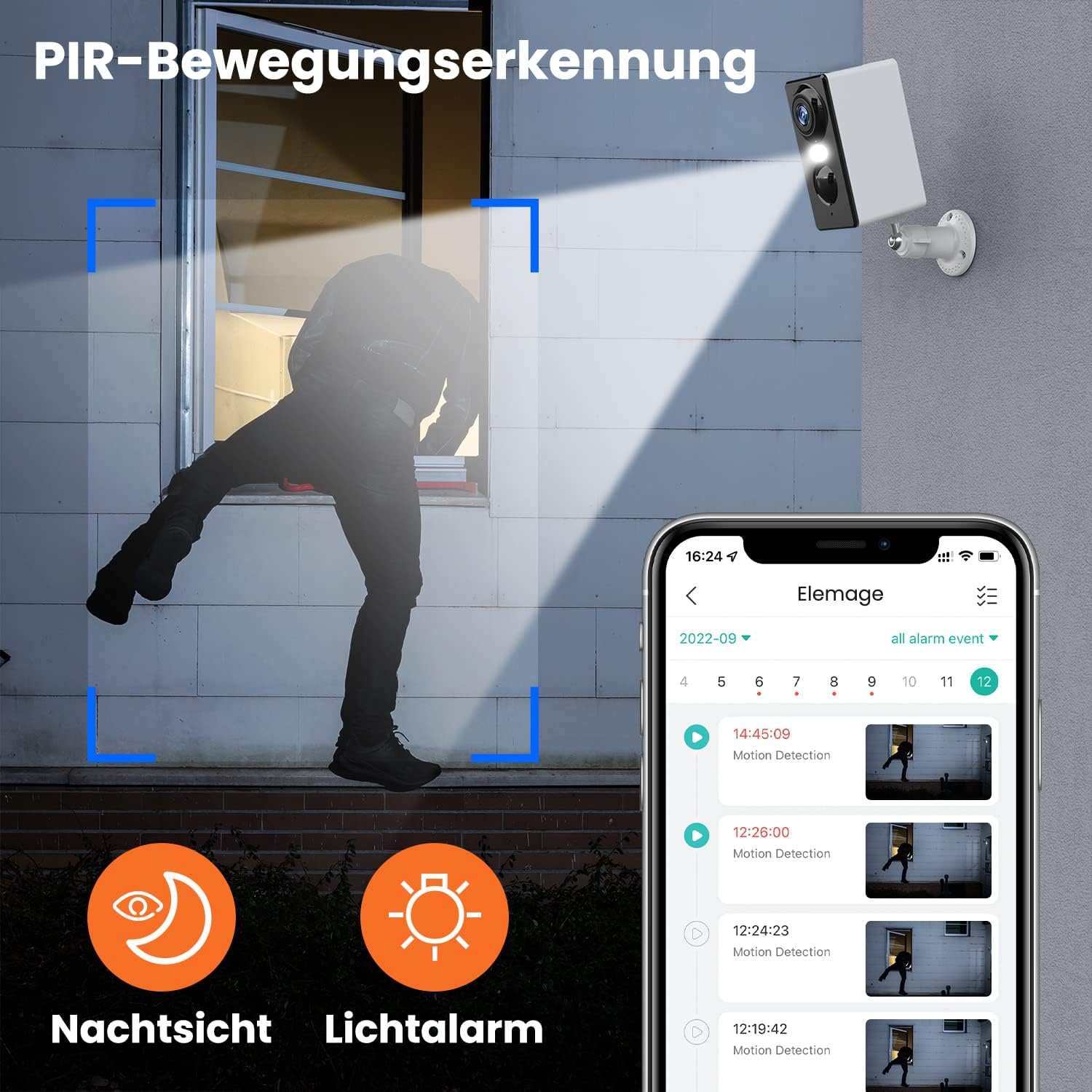
Image 1.1: The elemage ZS-GQ3 camera features PIR motion detection, night vision, and a light alarm for enhanced security.
2. Package Contents
Please verify that all items listed below are included in your package:
- elemage 2K Outdoor Security Camera (ZS-GQ3)
- Wall Mount Bracket
- USB Charging Cable
- Mounting Screws and Wall Plugs
- User Manual

Image 2.1: The complete package contents of the elemage ZS-GQ3 security camera.
3. Setup Guide
3.1 Initial Charging
Before first use, fully charge the camera's built-in battery using the provided USB cable and a standard 5V USB power adapter (not included). A full charge ensures optimal performance and battery life.
3.2 App Installation
Download and install the 'elemage Cam' application on your smartphone. The app is available for both iPhone and Android devices. Search for 'elemage Cam' in your device's app store.
3.3 Camera Pairing and WiFi Connection
- Open the 'elemage Cam' app and create an account or log in.
- Follow the in-app instructions to add a new device.
- Ensure your smartphone is connected to a 2.4 GHz WiFi network. The camera does not support 5 GHz WiFi.
- During the pairing process, you will be prompted to connect the camera to your home WiFi network. Enter your WiFi credentials carefully.
- Once connected, the camera's status indicator will confirm successful pairing.
3.4 Mounting the Camera
The camera is designed for wall mounting. Choose a location that provides the desired viewing angle and is within range of your 2.4 GHz WiFi network. Use the included wall mount bracket, screws, and wall plugs for secure installation.
- Mark the drilling points using the mount bracket as a template.
- Drill holes and insert the wall plugs.
- Secure the mount bracket to the wall with the screws.
- Attach the camera to the mount bracket and adjust the angle as needed.

Image 3.1: The camera is IP65 waterproof, allowing for outdoor installation in various weather conditions.
4. Operating Instructions
4.1 Live View
Access the 'elemage Cam' app on your smartphone to view the live feed from your camera anytime, anywhere. The live view provides real-time monitoring of your property.
4.2 PIR Motion Detection
The camera is equipped with PIR (Passive Infrared) motion detection. When motion is detected, the camera will automatically begin recording and send push notifications to your smartphone. You can review recorded events within the app.

Image 4.1: Intelligent AI sensor provides user-defined motion detection and sends notifications to your phone.
4.3 Two-Way Audio
Utilize the built-in microphone and speaker for two-way communication. Through the 'elemage Cam' app, you can speak to visitors or deter intruders directly from your smartphone.

Image 4.2: Engage in real-time conversation with two-way audio functionality.
4.4 Night Vision
The camera offers advanced night vision, providing clear surveillance even in low-light conditions. It supports both black-and-white and colored night vision, with an effective range of up to 15 meters.

Image 4.3: Experience clear color night vision with a long-distance view.
4.5 Storage Options
The camera supports local storage via a MicroSD card (2GB to 128GB, not included) and cloud storage options (subscription may be required). Recorded footage can be accessed and reviewed through the 'elemage Cam' app.
4.6 Multi-Device Viewing
You can share access to your camera's live feed with multiple users. After sharing, several phones can view the security camera simultaneously through the 'elemage Cam' app.

Image 4.4: View the camera feed from multiple phones, anytime and anywhere.
5. Maintenance
5.1 Battery Management
The 'elemage Cam' app will send a reminder when the camera's battery level drops below 20%. Recharge the camera promptly to ensure continuous operation. Battery life varies based on usage, motion detection frequency, and environmental factors.
5.2 Cleaning
Although the camera is IP65 waterproof, regularly clean the lens and camera body with a soft, damp cloth to remove dust, dirt, or water spots that may obstruct the view. Do not use harsh chemicals or abrasive materials.
5.3 Firmware Updates
Periodically check the 'elemage Cam' app for available firmware updates. Keeping your camera's firmware up-to-date ensures optimal performance, security, and access to new features.
6. Troubleshooting
- Camera not connecting to WiFi: Ensure your WiFi network is 2.4 GHz. Verify the WiFi password is correct. Move the camera closer to the router to improve signal strength.
- No motion detection notifications: Check the motion detection settings in the 'elemage Cam' app. Ensure notifications are enabled for the app on your smartphone. Verify the camera's battery level.
- Poor image quality: Clean the camera lens. Ensure there are no obstructions in the camera's field of view. Check your internet connection speed.
- Short battery life: Reduce the sensitivity of motion detection or the duration of recorded events. Ensure the camera is not in an area with excessive motion.
- Two-way audio issues: Ensure your phone's microphone and speaker are enabled for the 'elemage Cam' app. Check the camera's audio settings in the app.
For more detailed troubleshooting or specific issues, refer to the help section within the 'elemage Cam' application or contact customer support.
7. Specifications
| Feature | Specification |
|---|---|
| Model Number | ZS-GQ3 |
| Video Recording Resolution | 2K (2560 x 1440) |
| Effective Video Resolution | 1080 Pixels (Note: Product title states 2K, this might be a base resolution) |
| Viewing Angle | 120 Radians (approx. 68.75 degrees) |
| Frame Rate | 15 fps |
| Wireless Communication Technology | Wi-Fi (2.4 GHz only) |
| Power Source | Battery Powered, Solar Powered (optional accessory) |
| Battery Type | Lithium-ion (1 CR2032 battery included for internal clock/memory, main battery is built-in rechargeable) |
| IP Rating | IP65 Waterproof |
| Storage | MicroSD card (2-128GB, not included), Cloud Storage |
| Mounting Type | Wall Mount |
| Color | White |
| Weight | 136 Grams |
| Certifications | CE, FCC, MSDS, RoHS, UN38.3 |
8. Warranty and Support
For warranty information, please refer to the documentation provided at the time of purchase or contact elemage customer support directly. If you encounter any issues or have questions regarding your elemage ZS-GQ3 camera, please reach out to the manufacturer's support team for assistance. Contact details are typically available on the product packaging or the official elemage website.
