1. Introduction
The KETOTEK KT4000 is a digital plug thermostat designed for precise temperature control in various environments. It features dual relay outputs for both heating and cooling devices, making it suitable for applications such as aquariums, fish tanks, greenhouses, incubators, and reptile habitats. This manual provides detailed instructions for the safe and effective use of your KT4000 thermostat.

Image 1.1: KETOTEK KT4000 Digital Plug Thermostat with Probe 220V. The image shows the main thermostat unit with its digital display, the temperature probe, and the dual-socket power strip.
2. Product Features
- Plug-and-Play Design: Easy to set up and use with dual relay outputs for simultaneous heating and cooling control.
- High-Precision Temperature Control: Supports both heating and cooling modes with an automatic switch-over, covering a wide range from -50℃ to 99℃.
- Intuitive User Interface: Simple 3-button operation for setting desired temperatures and parameters.
- Cooling Delay Function: Prevents compressor overload, extending the lifespan of cooling devices.
- Clear Display: Easy-to-read digital display, which can be mounted prominently using included adhesive tapes.
- Safety and Reliability: Constructed with fire-resistant and durable materials, featuring an integrated buzzer alarm for abnormal conditions.
- Waterproof Sensor: Equipped with a 2-meter NTC waterproof temperature sensor for accurate real-time environmental temperature monitoring.
- Memory Function: Retains all settings in case of power outages.
- Temperature Calibration: Allows adjustment to ensure the displayed temperature matches the actual temperature.
- Reset Function: Enables quick restoration of factory settings.
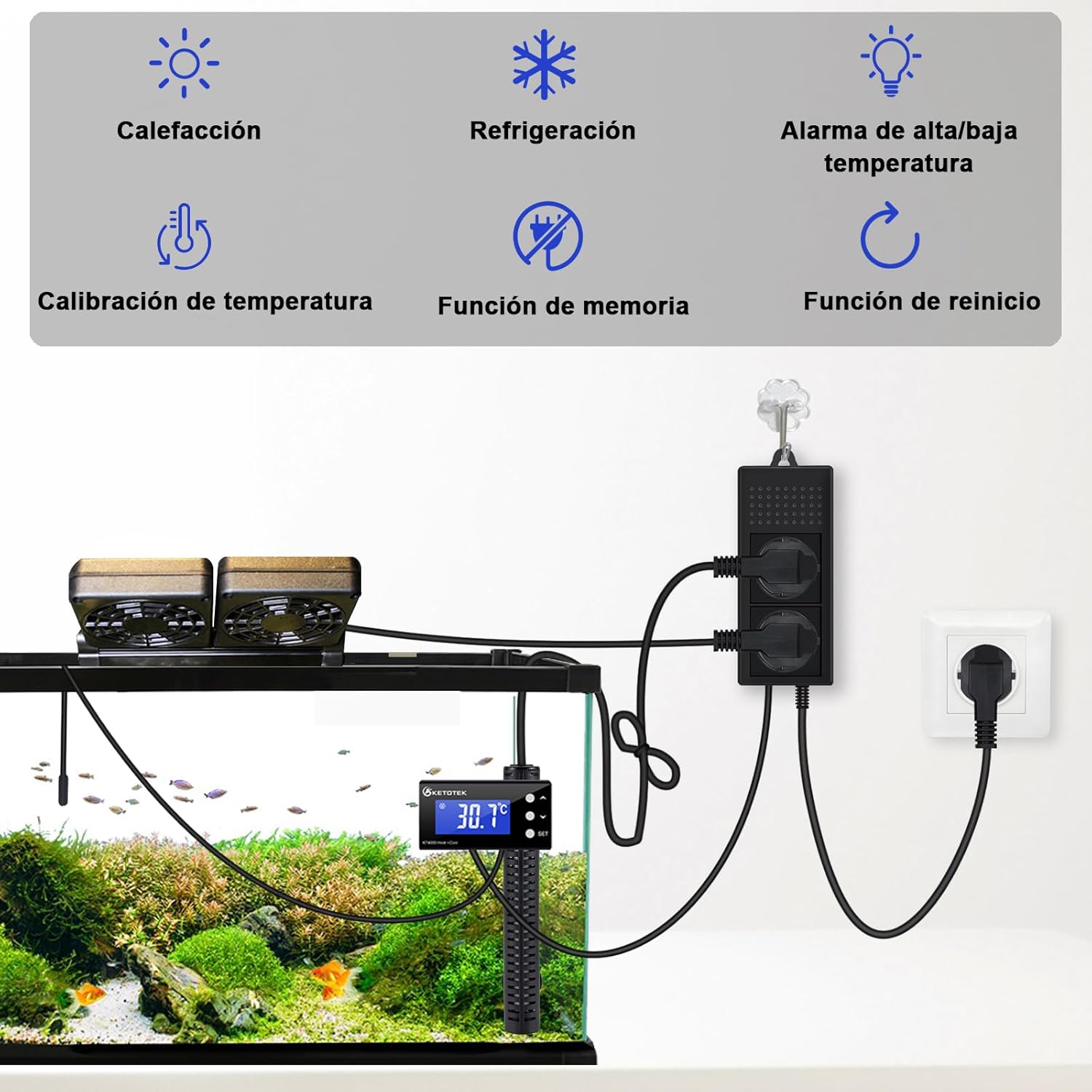
Image 2.1: The KT4000 thermostat controlling an aquarium environment. It illustrates the heating, cooling, and alarm functions, along with temperature calibration, memory, and reset features.
3. Package Contents
Please check the package contents upon receipt to ensure all items are present and undamaged:
- 1 x KETOTEK KT4000 Digital Plug Thermostat Unit
- 1 x 2-meter NTC Waterproof Temperature Sensor
- 1 x Suction Cup (for sensor placement)
- 2 x Double-sided Adhesive Tapes (for display mounting)
- 1 x User Manual (this document)

Image 3.1: The contents of the KETOTEK KT4000 package, including the thermostat, sensor, and mounting accessories.
4. Setup Instructions
Follow these steps to set up your KETOTEK KT4000 thermostat:
- Unpack: Carefully remove all components from the packaging.
- Connect Sensor: Plug the 2-meter NTC waterproof temperature sensor into the designated port on the thermostat unit.
- Place Sensor: Position the temperature sensor in the environment where temperature control is needed. For aquariums, use the provided suction cup to secure the sensor underwater. Ensure the sensor is fully submerged and away from direct heat sources or strong currents for accurate readings.
- Mount Display (Optional): Use the double-sided adhesive tapes to mount the thermostat's display unit in a prominent, easily viewable location.
- Connect Devices: Plug your heating device into one of the thermostat's power outlets and your cooling device into the other. The outlets are clearly marked for heating and cooling.
- Power On: Plug the thermostat's main power cord into a standard 220V/230V electrical outlet. The display will light up, showing the current temperature.

Image 4.1: Details of the KT4000's reliable design, showing the hanging tab, 2-meter waterproof probe, suction cup for probe, and double-sided tapes for display mounting.
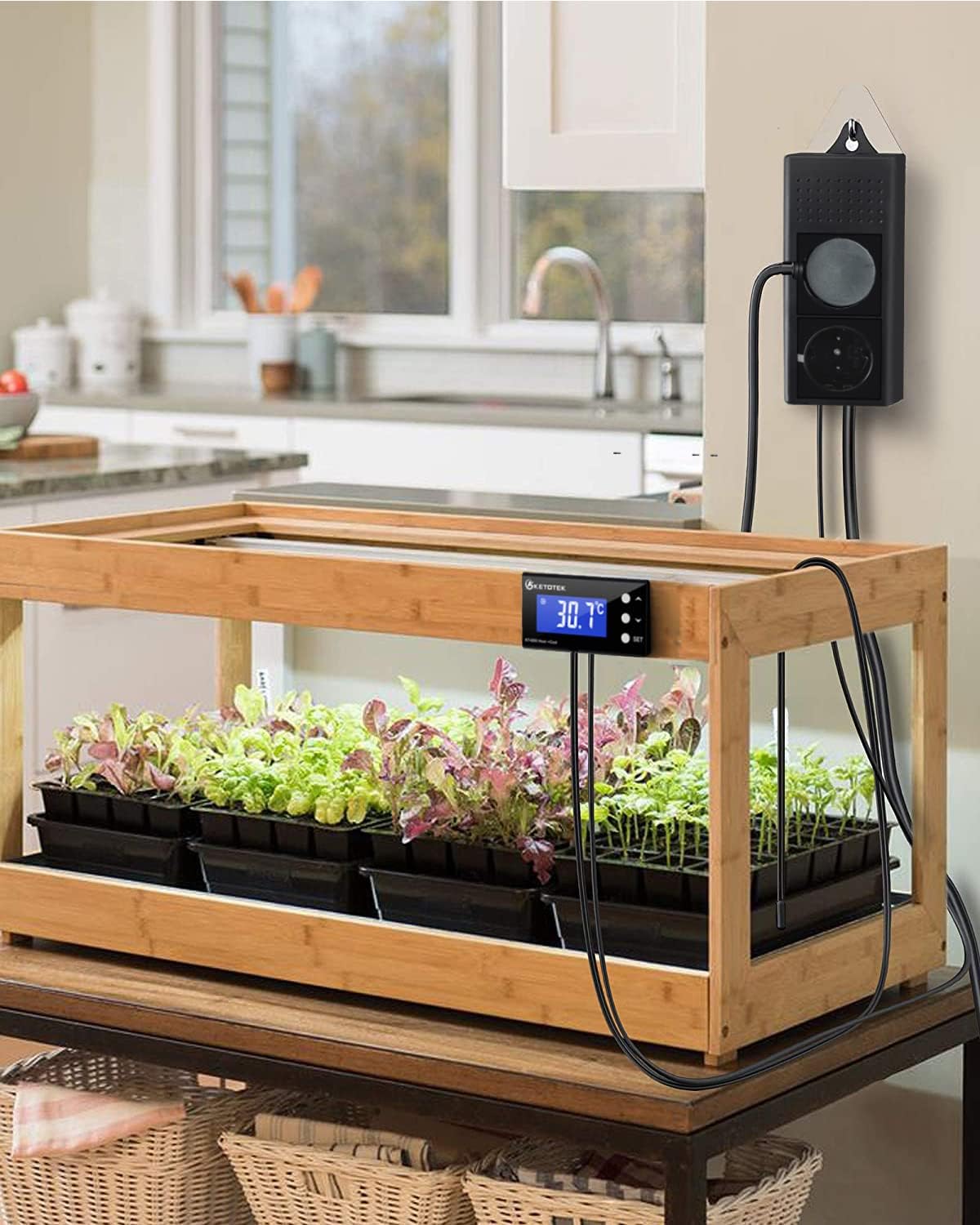
Image 4.2: The KT4000 thermostat controlling a greenhouse environment, demonstrating its versatility in different applications.
5. Operation and Programming
The KT4000 thermostat is operated using three buttons: UP, DOWN, and SET.
5.1. Parameter Settings
To enter the parameter setting mode, press and hold the SET button for 3 seconds. Use the UP and DOWN buttons to navigate through the parameters and adjust their values. Press SET again to confirm a value and move to the next parameter, or long-press SET to save and exit.
| Code | Function | Adjustable Range | Default Value |
|---|---|---|---|
| LS | Target Temperature | -50℃ ~ 99℃ | 20℃ |
| Hd | Heating Differential Value | 0.5℃ ~ 20℃ | 2℃ |
| Ld | Cooling Differential Value | 0.5℃ ~ 20℃ | 2℃ |
| AH | High Temperature Alarm Value | -50℃ ~ 99℃ | 99℃ |
| AL | Low Temperature Alarm Value | -50℃ ~ 99℃ | -50℃ |
| CA | Temperature Calibration | -10℃ ~ 10℃ | 0 |
| PL | Cooling Delay Start | 0 ~ 10 minutes | 1 minute |
| BL | Backlight Control | ON/OFF/10 | 10 minutes |

Image 5.1: Visual representation of the KT4000's parameter codes, functions, adjustable ranges, and default values.
5.2. Example: Setting Temperature Range (e.g., 28℃ to 33℃)
To maintain the temperature between 28℃ and 33℃, follow these steps:
- Step 1: Set Target Temperature (LS)
Press and hold SET for 3 seconds. The display will show "LS". Press UP or DOWN to adjust the value to 30. Press SET to confirm. - Step 2: Set Heating Differential (Hd)
The display will show "Hd". Press UP or DOWN to adjust the value to 2. This means heating will activate when the temperature drops 2°C below the target (30-2=28°C) and stop when it reaches the target (30°C). Press SET to confirm. - Step 3: Set Cooling Differential (Ld)
The display will show "Ld". Press UP or DOWN to adjust the value to 3. This means cooling will activate when the temperature rises 3°C above the target (30+3=33°C) and stop when it reaches the target (30°C). Long-press SET to save all settings and exit.
With these settings:
- If temperature < 28℃, heating starts.
- If temperature ≥ 30℃, heating stops.
- If temperature ≥ 33℃, cooling starts.
- If temperature < 30℃, cooling stops.
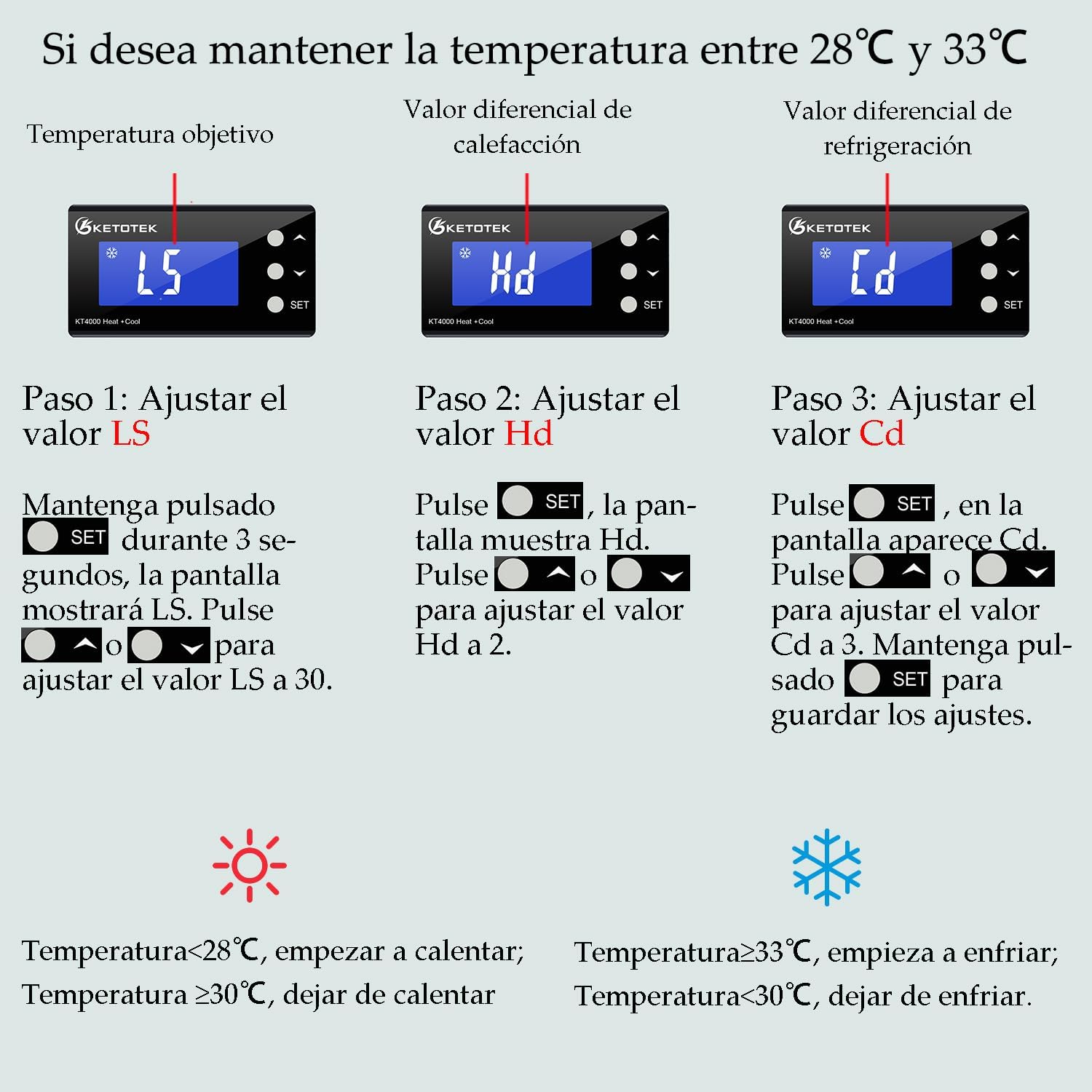
Image 5.2: A step-by-step guide on how to set the target temperature (LS), heating differential (Hd), and cooling differential (Ld) to maintain a specific temperature range.
6. Maintenance
To ensure optimal performance and longevity of your KETOTEK KT4000 thermostat, follow these maintenance guidelines:
- Cleaning: Wipe the thermostat unit and display with a soft, dry cloth. Do not use abrasive cleaners or immerse the main unit in water.
- Sensor Care: Regularly check the temperature sensor for any buildup or damage. Clean it gently if necessary. Ensure the sensor cable is not kinked or damaged.
- Connections: Periodically inspect all electrical connections to ensure they are secure and free from corrosion.
- Storage: If storing the unit for an extended period, disconnect it from power, clean it, and store it in a dry, cool place.
7. Troubleshooting
If you encounter issues with your KT4000 thermostat, refer to the following common problems and solutions:
- Display Not Lighting Up:
• Check if the thermostat is properly plugged into a live power outlet.
• Ensure there is power to the outlet. - Temperature Reading Inaccurate:
• Verify the sensor is correctly placed and fully submerged (if in liquid) or in the desired environment.
• Check for any damage to the sensor cable.
• Use the temperature calibration function (CA parameter) to adjust the reading if necessary. - Heating/Cooling Device Not Activating:
• Ensure the heating/cooling device is properly plugged into the correct outlet on the thermostat.
• Check the set target temperature (LS) and differential values (Hd, Ld).
• For cooling, check the cooling delay (PL) setting. The device may be waiting for the delay period to end. - Alarm Sounds Continuously:
• Check the high (AH) and low (AL) temperature alarm settings.
• The current temperature may be outside the set alarm limits. Adjust the environment or the alarm limits. - Settings Not Saving:
• Ensure you long-press the SET button after adjusting parameters to save the changes.
8. Specifications
| Specification | Detail |
|---|---|
| Model Number | KT4000 |
| Dimensions | 7.5 x 8.6 x 3.5 cm (Thermostat unit) |
| Weight | 616 g |
| Power Source | Wired Electric |
| Voltage | 220V, 230V |
| Output Power | Max. 10A 220Vac per outlet |
| Material | Plastic |
| Display Type | LCD |
| Temperature Range | -50℃ to 99℃ |
| Sensor Type | NTC Waterproof Sensor (2 meters) |
| Mounting Type | Ceiling Mount (for power strip), Adhesive/Suction Cup (for display/sensor) |
| Color | Black |
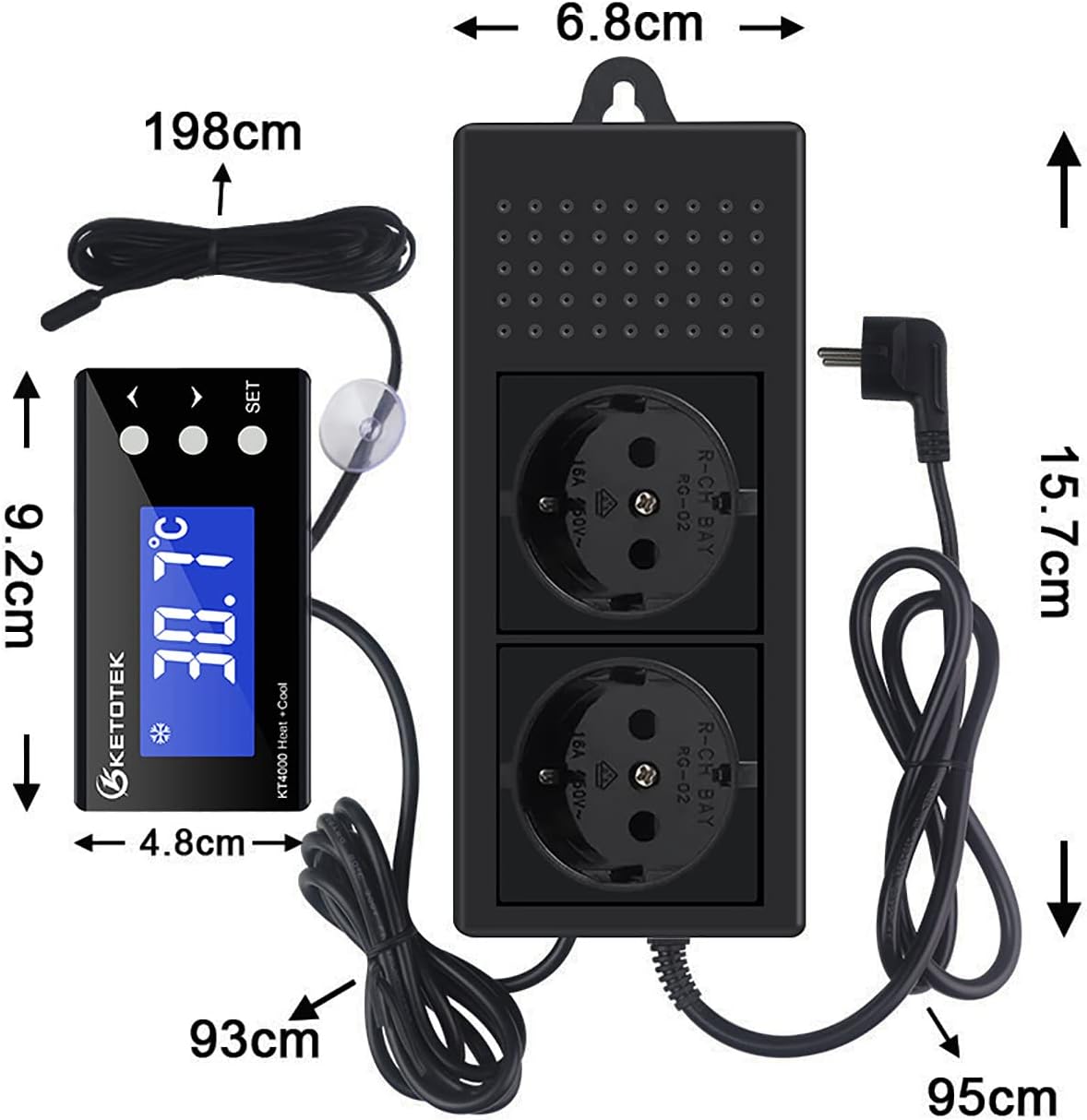
Image 8.1: Detailed dimensions of the KETOTEK KT4000 thermostat unit and its components.
9. Safety Information
Please read and adhere to the following safety precautions to prevent injury or damage to the device:
- Ensure the power supply voltage matches the device's requirements (220V/230V).
- Do not expose the main thermostat unit or power strip to water or high humidity. Only the sensor probe is waterproof.
- Do not exceed the maximum load capacity of 10A per outlet.
- Keep the device out of reach of children and pets.
- Do not disassemble or attempt to repair the device yourself. Contact qualified personnel for service.
- Ensure proper ventilation around the device to prevent overheating.
- Unplug the device from the power outlet before cleaning or performing any maintenance.
10. Warranty and Support
For warranty information, technical support, or service inquiries, please contact KETOTEK customer service through your purchase platform or the official KETOTEK website. Please have your model number (KT4000) and purchase details ready when contacting support.


